
SuperHQ
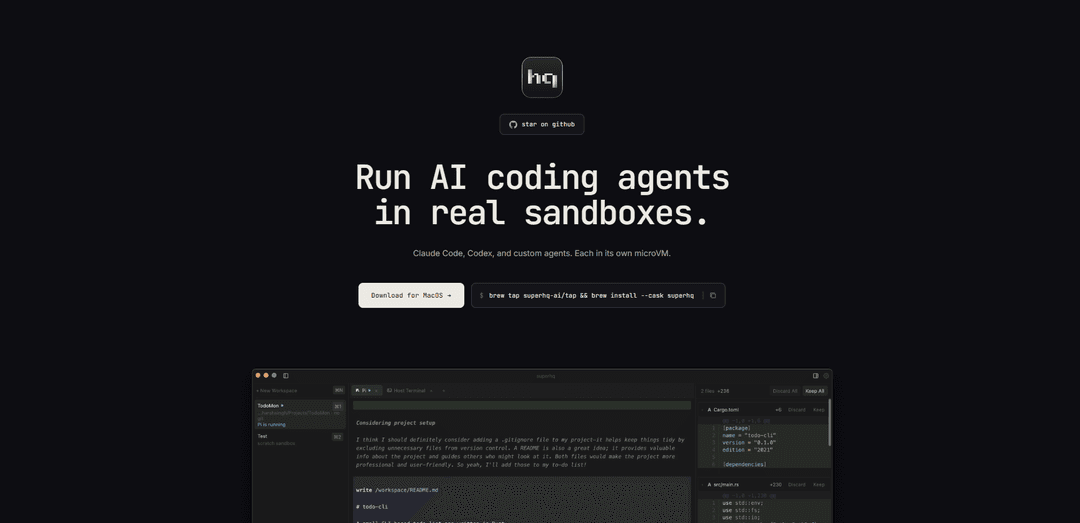
SuperHQ is a macOS desktop application that runs AI coding agents like Claude Code and Codex inside isolated microVMs with secure sandboxing, unified diff review, and checkpoint capabilities.
https://superhq.ai/?ref=producthunt
Product Information
Updated:Apr 15, 2026
What is SuperHQ
SuperHQ is an open-source development tool created by SuperHQ Lab that orchestrates AI coding agents in secure, isolated environments on macOS. Built around a microVM architecture, SuperHQ allows developers to run Claude Code, Codex, and custom AI agents each in their own Debian-based sandbox with full Linux userland capabilities. The platform features a secure authentication gateway that keeps API keys outside the sandbox, ensuring that AI agents can perform coding tasks without compromising security. SuperHQ is part of a broader ecosystem of AI development tools from SuperHQ Lab, including Shuru (the underlying microVM sandbox technology), SuperContext (a context-sharing engine for AI workflows), and Superpowers (a Chrome extension for AI interactions).
Key Features of SuperHQ
SuperHQ is a desktop application for macOS that orchestrates AI coding agents like Claude Code, Codex, and custom agents inside isolated Debian-based microVMs. It provides a secure sandbox environment where agents can execute code, install packages, and make changes to projects without affecting the host system. The platform features a unified diff review panel for approving changes, opt-in port forwarding, checkpoint/rewind capabilities for VM state management, and project mounting at /workspace with overlay filesystem protection. SuperHQ keeps API keys secure through an auth gateway while giving developers full control over AI interactions in a real Linux userland environment.
Isolated MicroVM Sandboxes: Each AI agent runs in its own Debian-based microVM with full apt, npm, pip support, allowing agents to install packages and execute code without risking the host system
Unified Diff Review Panel: Review every change made by AI agents through a comprehensive diff interface before applying modifications to local files, with the ability to selectively keep or discard changes
Checkpoint and Rewind: Save complete VM state snapshots at any point, resume workspaces in seconds, and fork checkpoints to create fresh branches for experimentation
Secure Project Mounting: Projects mount into sandboxes at /workspace with an overlay filesystem that keeps all changes isolated until explicitly approved in the review panel
Opt-in Port Forwarding: Selectively expose ports from sandbox to host for dev servers, databases, and APIs only when explicitly authorized, maintaining security by default
Multi-Agent Workspace Management: Manage multiple AI agents simultaneously with keyboard shortcuts for switching between workspaces and tabs, allowing parallel development workflows
Use Cases of SuperHQ
Safe AI-Assisted Development: Developers can let AI coding agents experiment with code changes, install dependencies, and run tests in isolated environments without risking their main development setup
Code Refactoring and Experimentation: Teams can use checkpointing to test multiple refactoring approaches with AI agents, comparing results and rewinding to previous states without losing work
Secure API Key Management: Organizations can enable developers to use AI coding assistants while keeping sensitive API keys out of the sandbox through SuperHQ's secure auth gateway
Multi-Language Project Development: Developers working across Python, Node.js, and other ecosystems can leverage AI agents that install and manage language-specific tools within isolated VMs
Code Review Automation: Development teams can have AI agents propose changes across codebases while maintaining human oversight through the unified diff review system before merging
Educational Coding Environments: Educators and students can use isolated sandboxes to learn coding with AI assistance, where mistakes and experiments won't affect the host system
Pros
Complete isolation prevents AI agents from damaging host systems or accessing sensitive data without permission
Comprehensive change review system gives developers full control before applying any modifications
Checkpoint and rewind capabilities enable risk-free experimentation and easy rollback
Open-source with multiple complementary tools (Shuru SDK, SuperContext, Neko) for extended functionality
Cons
Currently only available for macOS, limiting accessibility for Windows and Linux users
Running multiple microVMs simultaneously may require significant system resources (CPU, memory, disk)
Requires understanding of VM concepts and sandbox workflows which may have a learning curve for some developers
As a relatively new platform, it may have limited community resources and third-party integrations compared to established tools
How to Use SuperHQ
1. Install SuperHQ: Download and install SuperHQ for macOS using Homebrew by running: brew tap superhq-ai/tap && brew install --cask superhq
2. Launch the application: Open SuperHQ on your Mac. The app will set up a Debian VM sandbox environment with apt, npm, pip, and other development tools pre-installed.
3. Create a new workspace: Press Cmd+N to create a new workspace. Each workspace runs in its own isolated microVM sandbox where you can safely run AI coding agents.
4. Mount your project: Your local project directory will automatically mount into the sandbox at /workspace. All changes made by agents are stored in an overlay layer and don't immediately affect your local files.
5. Start an AI agent: Create a new agent tab by pressing Cmd+T. Choose from Claude Code, Codex, Pi, or custom agents. Authenticate with an API key or use your ChatGPT subscription.
6. Let the agent work: Give instructions to your AI agent. The agent can install packages, run commands, modify code, and execute tasks within the safe sandbox environment without affecting your host system.
7. Review changes: Press Cmd+B to toggle the review panel. View a unified diff of every change the agent made to your files before they touch your local system.
8. Approve or discard changes: In the review panel, selectively keep what works and discard the rest. Only approved changes will be applied to your actual local files.
9. Manage port forwarding (optional): Press Cmd+Shift+P to access the ports panel. Enable opt-in port forwarding to expose dev servers, databases, or APIs from the sandbox to your host machine.
10. Checkpoint your work: Save the current VM state by creating a checkpoint. This allows you to stop the workspace and resume later in seconds, or fork a checkpoint to create a fresh branch.
11. Switch between workspaces: Use Cmd+1-9 to switch between different workspaces, Ctrl+Cmd+] for next workspace, or Ctrl+Cmd+[ for previous workspace. Hold Cmd to see workspace shortcut badges.
12. Manage tabs within workspaces: Use Cmd+T to create new agent tabs, Cmd+W to close tabs, and Ctrl+1-9 to switch between tabs. Hold Ctrl to see tab badges.
SuperHQ FAQs
SuperHQ is a desktop application that orchestrates AI coding agents like Claude Code, Codex, and custom agents inside isolated microVMs (virtual machines). It provides a secure environment where agents can work on your code with a full Linux userland, while keeping your API keys out of the sandbox.
SuperHQ Video
Popular Articles

Atoms: A Multi-Agent AI Platform That Transforms Ideas into Launch-Ready Products
Oct 13, 2026

Nano Banana SBTI: What It Is, How It Works, and How to Use It in 2026
Apr 15, 2026

Atoms Review — The AI Product Builder Redefining Digital Creation in 2026
Apr 10, 2026

Kilo Claw: How to Deploy and Use a True "Do‑It‑For‑You" AI Agent(2026 Update)
Apr 3, 2026
Latest AI Tools Similar to SuperHQ

Gait
Gait is a collaboration tool that integrates AI-assisted code generation with version control, enabling teams to track, understand, and share AI-generated code context efficiently.

invoices.dev
invoices.dev is an automated invoicing platform that generates invoices directly from developers' Git commits, with integration capabilities for GitHub, Slack, Linear, and Google services.

EasyRFP
EasyRFP is an AI-powered edge computing toolkit that streamlines RFP (Request for Proposal) responses and enables real-time field phenotyping through deep learning technology.

Cart.ai
Cart.ai is an AI-powered service platform that provides comprehensive business automation solutions including coding, customer relations management, video editing, e-commerce setup, and custom AI development with 24/7 support.
Popular AI Tools Like SuperHQ

GitHub Copilot Chat
GitHub Copilot Chat is an AI-powered coding assistant that provides natural language interactions, real-time code suggestions, and contextual support directly within supported IDEs and GitHub.com.

CopilotForXcode
CopilotForXcode is an Xcode Source Editor Extension that integrates GitHub Copilot, Codeium, and ChatGPT to provide AI-powered code suggestions, chat assistance, and prompt-to-code functionality within Xcode.

BrowserAI
BrowserAI is an open-source library that enables running local Large Language Models (LLMs) directly in web browsers with WebGPU acceleration, offering privacy-focused AI capabilities without requiring server infrastructure.

OpenAI Codex CLI
OpenAI Codex CLI is a lightweight, open-source coding agent that runs in your terminal, enabling developers to translate natural language into code execution while providing ChatGPT-level reasoning with the ability to run code, manipulate files, and iterate under version control.