
Onpilot
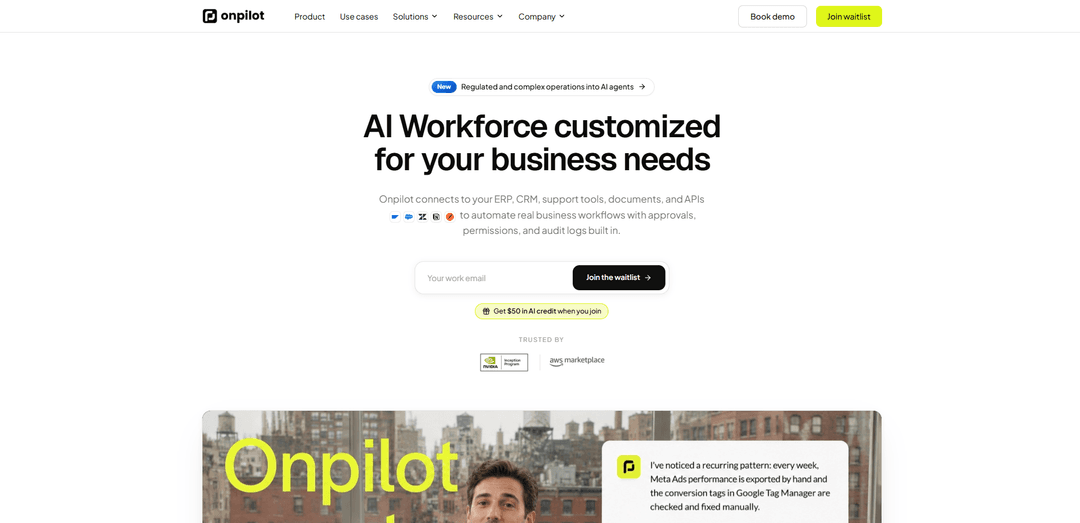
Onpilot is an enterprise AI workforce platform that connects to your business systems to run agentic workflows with human approvals, security controls, and full audit logs—deployable in your product, portals, or chat tools.
https://www.onpilot.ai/?ref=producthunt
Product Information
Updated:Jun 15, 2026
What is Onpilot
Onpilot is an AI-powered copilot and agent platform built for modern businesses and SaaS teams that want AI to do real operational work inside the tools they already use. It connects to systems like ERPs, CRMs, support desks, databases, documents, and custom APIs to help teams automate workflows, answer questions grounded in company data, and execute tasks safely. Designed for production use, Onpilot emphasizes enterprise needs like permissions, tenant separation, and governance, and can be deployed as a web widget, inside dashboards and portals, or via channels like Slack and Microsoft Teams.
Key Features of Onpilot
Onpilot is an enterprise AI workforce platform for building and deploying agentic copilots that connect to your existing business systems (ERP, CRM, support tools, databases, documents, and custom APIs) to execute real workflows with built-in security and governance. It supports approvals (human-in-the-loop), granular permissions, audit logs, and multi-tenant isolation, and can be deployed inside SaaS products, internal dashboards, customer portals, and common communication channels like Slack and Microsoft Teams—enabling teams to automate operational work safely and at scale.
Agentic workflows that take action: Turns business processes into AI agents that can search, reason, execute steps in connected systems, and escalate when needed (e.g., create Jira work orders, notify Teams/Slack, post reports).
Deep integrations across enterprise stack: Connects to ERPs, CRMs, support desks, databases, knowledge bases, email/workspace tools, documents, and custom APIs/webhooks/OpenAPI tools to automate end-to-end workflows.
Security & governance controls: Includes OAuth-based connections, encrypted data handling, granular access control, and audit logs that record every query, approval, and action for accountability.
Human-in-the-loop approvals: Adds approval steps before sensitive actions (e.g., interactive Slack approvals) so teams stay in control while still benefiting from automation.
Multi-tenant ready for SaaS and enterprises: Supports tenant separation, customer-specific configurations, per-tenant access control, and enterprise identity needs like SSO and SCIM.
Deploy anywhere (embedded and omnichannel): Launches agents in websites/web widgets, SaaS products, internal tools, and channels like Slack and Microsoft Teams, with options for multi-tenant, VPC, or on-prem deployments.
Use Cases of Onpilot
Manufacturing operations triage and maintenance: Automate incident triage and maintenance workflows by creating/assigning work orders (e.g., in Jira), routing tasks, and notifying shift supervisors via Teams/Slack with optional approval gates.
HR + IT helpdesk for frontline teams: Answer routine employee questions (PTO, policies, shift swaps) and execute provisioning tasks (e.g., grant Figma/Notion access, send notifications) to reduce ticket volume.
Customer support automation and escalation: Connect to Zendesk/Intercom/Freshdesk and knowledge sources to draft responses, resolve common issues, and escalate complex cases with full auditability.
Sales & CRM operations assistant: Work inside Salesforce/HubSpot to retrieve account context, update records, generate summaries, and coordinate follow-ups through email and chat tools.
Finance and reporting workflows: Pull data from systems like Stripe/QuickBooks and databases (e.g., Snowflake/PostgreSQL) to generate reports, reconcile information, and route approvals for finance actions.
Compliance and controlled operations: Support regulated or sensitive processes by enforcing permissions, requiring approvals before critical actions, and maintaining audit logs for every agent decision and execution.
Pros
Strong enterprise readiness: permissions, audit logs, approvals, and data isolation are core features.
Broad connectivity: integrates with many common business tools plus custom APIs/webhooks for real workflow execution.
Flexible deployment: can be embedded in products/portals and deployed in multi-tenant, VPC, or on-prem environments.
Cons
Setup effort: mapping complex workflows and configuring permissions/approvals may require meaningful implementation work.
Early-access/beta signals in some materials may imply product maturity and feature availability can vary by deployment.
How to Use Onpilot
1) Join Onpilot (waitlist or demo): Go to https://www.onpilot.ai/ and choose either “Join waitlist” (to get access/credits) or “Book a demo” (to see the platform live and plan your first agent).
2) Define the workflow you want to automate: Pick a concrete business process (e.g., HR/IT helpdesk Q&A, creating Jira work orders, routing sales leads, support triage, compliance checks). Write down: inputs (questions/events), required data sources, and the actions the agent should take.
3) Connect your systems (data + tools): In Onpilot, connect the tools your workflow depends on (e.g., ERP/CRM/support desk/Slack/Teams/email/databases/docs/custom APIs). Onpilot uses secure OAuth connections where applicable and keeps access scoped per team.
4) Configure agent permissions and access control: Set what the agent can read and do: which apps it can use, which records/fields it can access, and which users/roles can interact with it. Keep sensitive systems/actions restricted to least-privilege.
5) Add Human-in-the-Loop approvals for sensitive actions: For actions like scheduling downtime, dispatching work orders, changing access, or sending external messages, add an approval step. Example: have the agent send an interactive Slack/Teams approval request and only proceed after an authorized user approves.
6) Enable governance (audit logs + monitoring): Turn on monitoring and audit logging so every query, tool call, approval, and action is recorded with context. Use this to review behavior, troubleshoot errors, and satisfy compliance expectations.
7) Deploy the agent where your team works: Launch the agent in the channel that matches your workflow: inside your SaaS product, internal dashboard, customer portal, web widget, or chat surfaces like Slack/Teams (and other supported channels as available).
8) Run a real end-to-end test: Test with a realistic prompt or event. Example (from the site): “Provision Figma and Notion access for Jane in marketing, and notify the team in Slack.” Verify the agent can retrieve the right info, request approvals if needed, and execute the actions in connected tools.
9) Iterate: tighten scope, improve outcomes: Adjust configuration based on test results: refine what the agent is allowed to do, add/modify approval gates, improve data connections (docs/knowledge bases), and clarify escalation rules for edge cases.
10) Operate in production (control + scale): Use the admin controls to monitor usage, errors, and activity across workspaces/tenants. Scale by creating additional agents for new workflows, keeping tenant separation and per-team configurations as needed.
Onpilot FAQs
Onpilot is an AI agent platform (“AI workforce”) that connects to your business systems (ERP, CRM, support tools, documents, databases, and APIs) to automate real workflows with governance features like approvals, permissions, and audit logs.
Onpilot Video
Popular Articles

Atoms: A Multi-Agent AI Platform That Transforms Ideas into Launch-Ready Products
May 22, 2026

Nano Banana SBTI: What It Is, How It Works, and How to Use It in 2026
Apr 15, 2026

Atoms Review — The AI Product Builder Redefining Digital Creation in 2026
Apr 10, 2026

Kilo Claw: How to Deploy and Use a True "Do‑It‑For‑You" AI Agent(2026 Update)
Apr 3, 2026
Latest AI Tools Similar to Onpilot

Inbox AI
Inbox AI is a privacy-focused MacOS productivity app that combines voice-driven AI automation with email management capabilities, allowing users to create custom workflows and commands while offering both cloud-based and on-device AI options.

Cart.ai
Cart.ai is an AI-powered service platform that provides comprehensive business automation solutions including coding, customer relations management, video editing, e-commerce setup, and custom AI development with 24/7 support.

Hiyllo Work
Hiyllo Work is an all-in-one team workspace platform that combines chat, project management, calendar, email, file storage and video meetings in a single integrated environment.

MailSense
MailSense is an AI-powered email assistant that filters, summarizes, and generates replies to emails through a Telegram bot interface to help users manage their inbox more efficiently.
Popular AI Tools Like Onpilot

Magentic-UI
Magentic-UI is an open-source, human-centered web agent prototype by Microsoft Research that enables collaborative planning and execution of complex web-based tasks through transparent interaction between humans and AI agents.

Microsoft Copilot Cowork
Microsoft Copilot Cowork is an AI-powered assistant that turns user intent into actionable plans and autonomously executes multi-step tasks across Microsoft 365 apps while keeping users in control through checkpoints and approvals.

Upsonic
Upsonic is a reliability-focused AI agent framework with dockerized server-client architecture that enables trusted agent workflows through advanced features like verification layers, triangular architecture, and Model Context Protocol (MCP) integration.

CampEd Hire
CampEd Hire is a powerful Chrome extension that streamlines recruitment by automatically collecting and organizing job applicant data from LinkedIn job posts, with features like automated data collection, CSV export, and batch resume downloads.