
stagewise
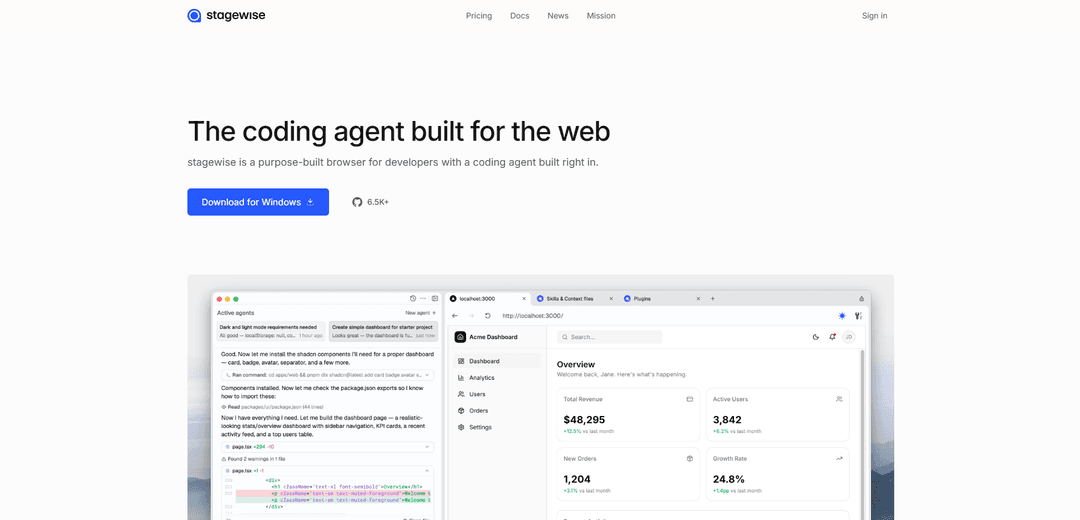
stagewise is a purpose-built browser for developers with an integrated AI coding agent that has full console and debugger access, enabling visual vibe coding directly in your local codebase across all frameworks.
https://stagewise.io/?ref=producthunt
Product Information
Updated:May 8, 2026
What is stagewise
stagewise is the first frontend coding agent specifically designed for existing production-grade web applications. It's a developer-focused browser that integrates AI-powered coding capabilities directly into the browsing experience, allowing developers to interact with their web apps visually and make code changes in real-time. Unlike traditional development workflows where developers must manually describe UI issues or copy element information into prompts, stagewise provides real-time, browser-powered context that connects your frontend UI directly to AI code agents. The tool is framework-independent and compatible with all kinds of development setups, requiring only that it be run from your app's root directory where the package.json file is located.
Key Features of stagewise
Stagewise is a purpose-built browser and frontend coding agent designed for web developers working with production-grade applications. It integrates AI coding capabilities directly into the browser, allowing developers to make UI changes through natural language prompts while providing rich contextual data including DOM elements, screenshots, and application metadata. The tool lives inside your browser, makes changes directly to your local codebase, and is compatible with all major frontend frameworks (React, Vue, Angular). It features a framework-independent toolbar that connects to popular AI coding assistants like Cursor, Windsurf, GitHub Copilot, and others, enabling visual debugging and prompt-based UI editing without manual context switching.
Browser-Integrated Coding Agent: A purpose-built browser with an AI coding agent built directly in, featuring full console and debugger access on all tabs, enabling developers to edit web applications through natural language prompts without leaving the browser environment.
Rich Contextual AI Integration: Automatically captures and transmits DOM elements, screenshots, and application metadata to integrated AI assistants, eliminating the need for developers to manually paste element information and folder paths into prompts.
Framework-Agnostic Toolbar: Open-source, framework-independent toolbar that works with all major frontend frameworks and integrates seamlessly with popular AI coding assistants including Cursor, Windsurf, GitHub Copilot, Cline, Roo Code, and Trae.
Temporary or Permanent Code Changes: Allows developers to make quick experimental changes to any page for testing, or connect to a local codebase for permanent edits that are reflected directly in the project files.
Reverse Engineering Tools: Powerful tools to understand and extract components, style systems, and color palettes from any website, enabling developers to analyze and reuse design patterns from existing applications.
IDE Integration: Optional integration with favorite IDEs to view relevant and modified files, with a VSCode extension available for seamless workflow integration between browser and code editor.
Use Cases of stagewise
Visual Bug Fixing and UI Debugging: Frontend developers can click on any live DOM element in their browser, send it directly to their AI coding agent, and have bugs fixed or UI adjustments made without manually describing the issue or navigating through code files.
Rapid Feature Iteration: Product teams can quickly prototype and implement new UI features based on existing production codebases by describing desired changes in natural language, enabling faster iteration cycles and reducing development time.
Component Library Development: Developers working with design systems like shadcn/ui can edit components directly in the browser, switching between different component types or adjusting styling properties through simple prompts while maintaining consistency with the existing codebase.
Responsive Layout Implementation: Web developers can use visual debugging to identify and fix responsive design issues across different screen sizes, with AI agents making the necessary code changes to implement proper responsive layouts.
Design System Analysis: Teams can use reverse engineering tools to analyze competitors' websites or design inspiration sources, extracting color palettes, component structures, and style systems to inform their own design decisions.
Production Codebase Maintenance: Development teams maintaining large-scale production applications can streamline their workflow by making targeted UI changes without context switching, with the agent understanding the existing codebase structure and making appropriate modifications.
Pros
Eliminates manual context switching by providing AI agents with automatic, rich contextual data about UI elements and application structure
Framework-agnostic and compatible with all major frontend frameworks and popular AI coding assistants, making it flexible for diverse development environments
Open-source architecture with zero impact on production bundle size, ensuring transparency and no performance penalties
Enables both temporary experimentation and permanent codebase changes, supporting different development workflows from prototyping to production
Cons
Must be run from the app's root directory (where package.json is located) to work properly, limiting flexibility in project structure
Relatively new tool (founded in 2024) with a small team, which may impact long-term support and feature development speed
Requires developers to adopt a new browser and workflow, which may present a learning curve and integration challenges with existing development processes
Limited to frontend/UI development tasks, not suitable for backend or full-stack development needs
How to Use stagewise
1: Sign up for a stagewise account at stagewise.io
2: Start your web application in development mode
3: Open a terminal and navigate to your app's root directory
4: Run stagewise using the command 'npx stagewise@latest' or simply 'stagewise' if installed
5: Install the stagewise VS Code extension from your code editor's marketplace (optional but recommended for enhanced functionality)
6: Install the appropriate npm package for your framework (React, Next.js, Vue, Nuxt.js, Angular, etc.) - this can be done automatically via the AI-guided setup or manually
7: Once stagewise loads, a toolbar will appear in your browser on your localhost development app
8: Click on any HTML/DOM element in your running application that you want to modify
9: Enter natural language prompts describing the changes you want (e.g., 'increase the height here', 'change this to an accordion', 'make this button blue')
10: The AI agent will implement the changes directly in your source code
11: Review the changes in your IDE (stagewise can open relevant files automatically)
12: For using stagewise with other AI agents like Cursor or Windsurf, start stagewise in bridge mode using 'stagewise -b' command
13: Configure your API keys using the Bring Your Own Key (BYOK) option for unlimited access to AI providers
stagewise FAQs
stagewise is a purpose-built browser for developers with a coding agent built right in. It delivers a browsing experience that prioritizes the needs of web developers, allowing them to make code changes directly from the browser.
stagewise Video
Popular Articles

Vosko AI: Localize and Dub Videos for Global Audiences
Oct 15, 2026

Atoms: A Multi-Agent AI Platform That Transforms Ideas into Launch-Ready Products
Oct 13, 2026

Nano Banana SBTI: What It Is, How It Works, and How to Use It in 2026
Apr 15, 2026

Atoms Review — The AI Product Builder Redefining Digital Creation in 2026
Apr 10, 2026
Latest AI Tools Similar to stagewise

Gait
Gait is a collaboration tool that integrates AI-assisted code generation with version control, enabling teams to track, understand, and share AI-generated code context efficiently.

invoices.dev
invoices.dev is an automated invoicing platform that generates invoices directly from developers' Git commits, with integration capabilities for GitHub, Slack, Linear, and Google services.

EasyRFP
EasyRFP is an AI-powered edge computing toolkit that streamlines RFP (Request for Proposal) responses and enables real-time field phenotyping through deep learning technology.

Cart.ai
Cart.ai is an AI-powered service platform that provides comprehensive business automation solutions including coding, customer relations management, video editing, e-commerce setup, and custom AI development with 24/7 support.
Popular AI Tools Like stagewise

GitHub Copilot Chat
GitHub Copilot Chat is an AI-powered coding assistant that provides natural language interactions, real-time code suggestions, and contextual support directly within supported IDEs and GitHub.com.

CopilotForXcode
CopilotForXcode is an Xcode Source Editor Extension that integrates GitHub Copilot, Codeium, and ChatGPT to provide AI-powered code suggestions, chat assistance, and prompt-to-code functionality within Xcode.

BrowserAI
BrowserAI is an open-source library that enables running local Large Language Models (LLMs) directly in web browsers with WebGPU acceleration, offering privacy-focused AI capabilities without requiring server infrastructure.

OpenAI Codex CLI
OpenAI Codex CLI is a lightweight, open-source coding agent that runs in your terminal, enabling developers to translate natural language into code execution while providing ChatGPT-level reasoning with the ability to run code, manipulate files, and iterate under version control.