
Cloudskill
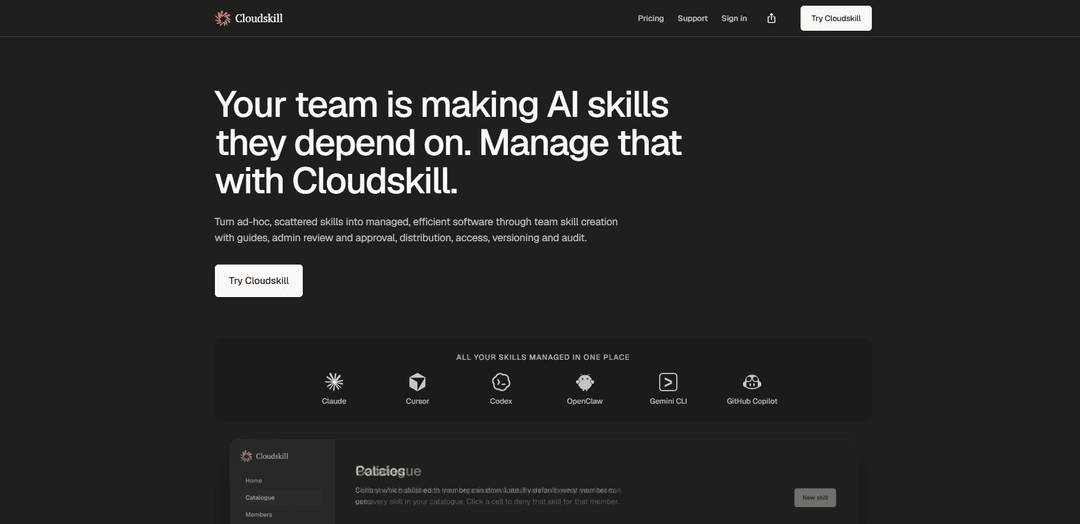
Cloudskill is an AI agent skills management platform that centralizes a team skill catalogue with guided creation, admin/stakeholder review and approval, controlled distribution, versioning/rollback, and audit logs to keep skills consistent, secure, and compliant.
https://www.cloudskill.com/?ref=producthunt
Product Information
Updated:Jun 15, 2026
What is Cloudskill
Cloudskill helps organizations manage the “skills” (structured instructions and operational know-how) that AI agents and copilots depend on, treating them like software assets rather than scattered documents. It provides a centrally hosted catalogue where teams can create, store, and reuse skills with clear descriptions and ownership, while administrators maintain governance through reviews, approvals, and access control. Built for emerging AI Ops and AI enablement needs, Cloudskill focuses on preventing conflicting or malformed skills from degrading agent performance and reducing the security risks that can come from unvetted skill sharing.
Key Features of Cloudskill
Cloudskill is a centralized skills-management system for organisations building and using AI agent “skills” (e.g., for tools like Claude, Cursor, Gemini CLI, and GitHub Copilot). It turns ad-hoc, scattered skills into managed assets with guided creation, admin/stakeholder review and approval, controlled distribution and access, versioning with rollback, and a searchable audit log—helping teams reduce conflicts/malformed skills that degrade agent performance and mitigate security/compliance risks.
Centrally hosted skill catalogue: A single, findable repository for team-created AI agent skills, preserving descriptions and history so knowledge remains even when employees change roles or leave.
Guided skill authoring for quality and consistency: Structured creation flows encourage clean, well-described skills that are less likely to conflict or degrade agent performance.
Review, approval, and governance workflow: Team members can submit skills while admins/stakeholders review and approve, balancing frontline expertise with operational control.
Version control with rollback: Every edit creates a new version and allows one-click reverts, enabling safe iteration and quick recovery from regressions.
Policy-based distribution and access control: Assign and revoke which skills different members can use, helping standardize tool behavior across teams and reduce risky or unapproved usage.
Audit log and exportable change history: Searchable records of who created/edited/assigned/revoked skills support compliance, incident review, and onboarding handovers.
Use Cases of Cloudskill
Enterprise AI enablement and standardization: Platform teams curate approved skills (e.g., code review, incident triage, documentation) and distribute them consistently across engineering orgs.
Security and compliance governance for AI assistants: Security/IT teams enforce review, access policies, and audit trails to reduce the risk of conflicting or insecure skills and to satisfy audit requests.
Software engineering productivity (SDLC workflows): Engineering teams manage skills for code review, refactoring, release notes, and repo-specific conventions, with versioning to match evolving codebases.
IT operations and incident response playbooks: Ops teams publish and maintain skills for troubleshooting, runbooks, and postmortems, ensuring responders use the latest approved procedures.
Regulated industries knowledge retention: Finance/healthcare/public sector teams maintain controlled, auditable skills aligned to internal policies, preserving institutional know-how with traceability.
Pros
Strong governance: review/approval, access controls, and audit logs support operational and compliance needs.
Risk reduction: versioning and rollback help prevent or quickly fix skill conflicts and regressions that can degrade agent performance.
Knowledge durability: centralized catalogue retains team expertise beyond individual contributors.
Cons
Added process overhead: review and approval workflows can slow down rapid experimentation for small teams.
Some key capabilities are not yet available: SSO/identity integration and prompt templates are listed as “coming soon.”
How to Use Cloudskill
1. Start a trial and sign in: Go to https://www.cloudskill.com/ and start the 14-day free trial. Create your account and sign in to reach the Cloudskill dashboard.
2. Create (or confirm) your organisation/workspace: From the dashboard, set up the workspace where your team’s skills will live. This becomes the central system of record for your skill catalogue, versions, assignments, and audit history.
3. Open the central skill catalogue: Navigate to the skill catalogue area (the centrally hosted catalogue). This is where skills are stored so they’re findable and reusable, and where each skill keeps its description and version history.
4. Add a new skill (author submission): Use the “new skill” creation workflow to submit a skill. Cloudskill is designed so the people doing the work author the skill (e.g., an engineer writes a code-review skill), while curation/control stays with admins and stakeholders.
5. Write the skill clearly to avoid conflicts and performance degradation: When creating the skill, add clean, well-described content. Cloudskill’s guided creation is intended to help prevent conflicting or malformed skills that can degrade agent performance.
6. Submit the skill for review and approval: Submit the skill so it enters the admin + stakeholder review process. This ensures you’re not blindly trusting skills that could pose security risks and keeps governance with the catalogue owners.
7. Admin/stakeholder review and approve: As an admin (or designated reviewer), review the submitted skill and approve it for inclusion in the catalogue. This is the control point for quality, safety, and organisational consistency.
8. Distribute skills to team members (assignment): Assign approved skills to the right people on your team. Cloudskill supports distribution and access control so you decide what each person should be using.
9. Control access using the policies matrix: Use the policies/access matrix to manage who can access which skills. This helps enforce least-privilege usage and keeps skill usage aligned with role and responsibility.
10. Download/use skills with supported tools: From the catalogue, use the provided download/access options to apply skills in the tools your team uses (listed on the site): Claude, Cursor, Codex, OpenClaw, Gemini CLI, and GitHub Copilot.
11. Update skills with version control: When a skill needs improvement, edit it. Each edit creates a new version so changes are tracked over time and the catalogue reflects how your organisation actually works.
12. Roll back to a previous version if needed: If an update introduces issues, use version control with rollback to revert to an earlier version with a click.
13. Monitor changes with the audit log: Use the admin action audit log to see who created, edited, assigned, or revoked skills. This provides visibility for onboarding handovers and compliance/audit requests.
14. Export records when audit or compliance requests them: When needed, export the recorded and searchable change history (who did what and when) to support audit/compliance processes.
15. Plan for upcoming integrations (optional): If relevant to your rollout, note that SSO & identity integration is listed as “Coming soon” (Okta, Azure AD, Google Workspace via SAML/OIDC, plus SCIM provisioning). Prompt templates alongside skills are also listed as “Coming soon.”
Cloudskill FAQs
Cloudskill is an AI agent skills management platform for organizations. It helps teams turn ad-hoc, scattered “skills” into managed software through guided creation, admin review/approval, distribution, access control, versioning, and audit.
Cloudskill Video
Popular Articles

Atoms: A Multi-Agent AI Platform That Transforms Ideas into Launch-Ready Products
May 22, 2026

Nano Banana SBTI: What It Is, How It Works, and How to Use It in 2026
Apr 15, 2026

Atoms Review — The AI Product Builder Redefining Digital Creation in 2026
Apr 10, 2026

Kilo Claw: How to Deploy and Use a True "Do‑It‑For‑You" AI Agent(2026 Update)
Apr 3, 2026
Latest AI Tools Similar to Cloudskill

invoices.dev
invoices.dev is an automated invoicing platform that generates invoices directly from developers' Git commits, with integration capabilities for GitHub, Slack, Linear, and Google services.

Monyble
Monyble is a no-code AI platform that enables users to launch AI tools and projects within 60 seconds without requiring technical expertise.

Devozy.ai
Devozy.ai is an AI-powered developer self-service platform that combines Agile project management, DevSecOps, multi-cloud infrastructure management, and IT service management into a unified solution for accelerating software delivery.
Mediatr
MediatR is a popular open-source .NET library that implements the Mediator pattern to provide simple and flexible request/response handling, command processing, and event notifications while promoting loose coupling between application components.
Popular AI Tools Like Cloudskill
Launch
Launch is an AI-powered platform that enables users to build full-stack applications instantly while providing comprehensive tools for product launches, entrepreneurship programs, and customer acquisition.

GitHub Copilot Chat
GitHub Copilot Chat is an AI-powered coding assistant that provides natural language interactions, real-time code suggestions, and contextual support directly within supported IDEs and GitHub.com.

Rememberall
Rememberall is a secure, open-source long-term memory solution that enables AI applications and GPT models to maintain persistent memory across conversations through semantic search and vector storage capabilities.

Upsonic
Upsonic is a reliability-focused AI agent framework with dockerized server-client architecture that enables trusted agent workflows through advanced features like verification layers, triangular architecture, and Model Context Protocol (MCP) integration.