ShioriCode
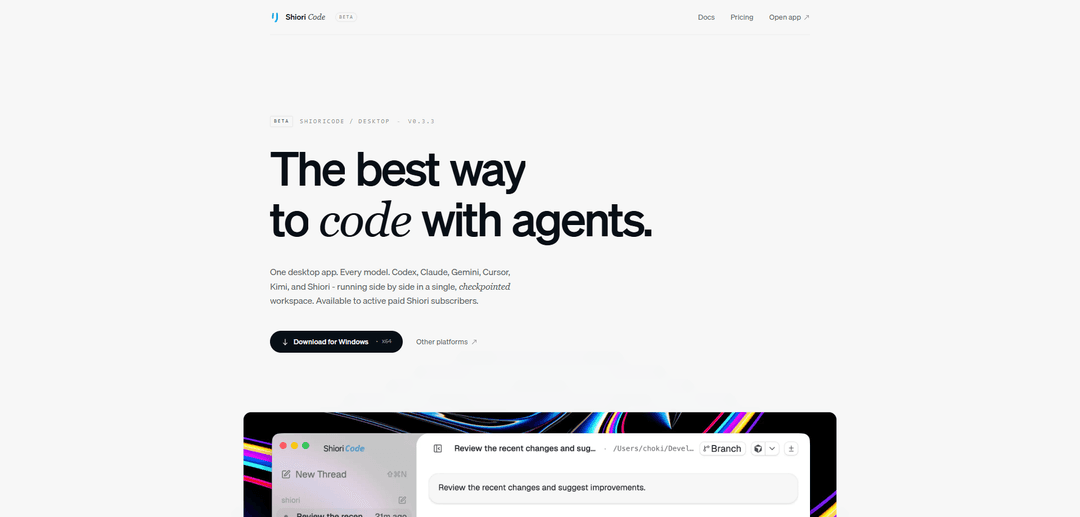
ShioriCode is a desktop AI agent workspace that runs your existing coding-agent CLIs (Codex, Claude Code, Gemini, Cursor, Kimi, and Shiori) side by side in a single project-aware, checkpointed environment with a live activity timeline and per-turn diff review.
https://shiori.ai/code?ref=producthunt
Product Information
Updated:Jun 8, 2026
What is ShioriCode
ShioriCode is a desktop interface designed for real-world coding work that doesn’t fit in one prompt. Instead of treating AI coding agents as one-off runs in a terminal, it organizes them into long-running, project-aware threads tied to your repo/workspace (and often a branch), so you can follow progress over time and keep context anchored to the project. It supports multiple popular agent CLIs—such as Codex, Claude Code, Gemini, Cursor, Kimi—plus a hosted Shiori provider, and is available to active paid Shiori subscribers on macOS, Windows, and Linux.
Key Features of ShioriCode
ShioriCode is a desktop AI agent workspace that lets you run multiple coding-agent CLIs (e.g., Codex, Claude, Gemini, Cursor, Kimi, and a hosted Shiori provider) side by side inside a single, project-aware, checkpointed workflow. It’s designed for long-running, real-repo coding sessions: you describe a task, the agent reads the repository and starts work, and you can watch a streamed timeline of edits/commands/steps, review per-turn diffs, rewind to checkpoints, and then ship changes. ShioriCode is available to active paid Shiori subscribers and runs on macOS, Windows, and Linux.
Multi-provider agent workspace: Use multiple agent CLIs in one desktop app (Codex, Claude, Gemini, Cursor, Kimi, plus a hosted Shiori provider), enabling side-by-side model/provider workflows without leaving the tool.
Project-aware, long-running threads: Keeps each agent run as a persistent, project-context thread suited for work that doesn’t fit into a single prompt and can continue over time.
Live activity timeline: Streams agent activity into a readable timeline so you can observe progress as it edits files, runs shell commands, and proceeds step-by-step.
Per-turn diff review: Surfaces generated diffs for each turn, letting you inspect what changed before accepting or continuing—without switching to external diff tools.
Checkpointing and rewind: Provides checkpointed sessions so you can approve changes incrementally and rewind to earlier states if an agent goes off track.
Cross-platform desktop app: Available for macOS (Apple Silicon and Intel), Windows x64, and Linux (AppImage) for consistent agent workflows across environments.
Use Cases of ShioriCode
Software feature development in real repos: Product engineers can delegate multi-step implementation tasks (new endpoints, UI flows, integrations) to agents, then review diffs and merge after checkpointed approvals.
Refactoring and modernization projects: Teams can run long-running refactors (module splits, API migrations, dependency upgrades) while tracking every edit/command in the timeline and reverting via checkpoints when needed.
Bug fixing and incident follow-ups: During debugging, agents can reproduce issues, propose fixes, and iteratively adjust code; developers can audit changes per turn and rewind if a fix introduces regressions.
Code review and change auditing for regulated environments: Organizations that need stronger oversight can use the diff-centric workflow and streamed activity to make agent-driven changes more inspectable and reviewable.
Multi-model evaluation for coding tasks: Developer experience and platform teams can compare providers/models on the same codebase by running agents side by side and judging output quality via consistent diff review.
Pros
Unifies multiple agent CLIs/providers into one desktop workflow, reducing context switching.
Strong visibility and control via streamed timelines, per-turn diffs, and checkpoint rewind.
Built for real-project, long-running work rather than single-prompt interactions.
Cross-platform availability (macOS/Windows/Linux).
Cons
Requires an active paid Shiori subscription (not available to free users).
Depends on external agent CLIs/providers for core capabilities; experience may vary by provider setup and model behavior.
May add workflow overhead for simple tasks compared to lightweight editor autocomplete or a single CLI run.
How to Use ShioriCode
1) Get access (subscription requirement): Ensure you are an active paid Shiori subscriber, since ShioriCode is available to active paid subscribers.
2) Download ShioriCode for your OS: Open https://shiori.ai/code and download the installer for your platform: macOS (Apple Silicon or Intel DMG), Windows (x64 installer), or Linux (AppImage).
3) Install and launch the desktop app: Run the downloaded installer (or open the DMG/AppImage) and launch ShioriCode.
4) Connect your preferred agent provider/CLI: In ShioriCode, pick whichever coding-agent CLI you already have authenticated (e.g., Codex, Claude Code, Gemini, Kimi, Cursor) or use the hosted Shiori provider.
5) Open a project workspace: Create or open a project in ShioriCode so the agent can work in a real repo/workspace context.
6) Start a project-aware thread (session): Create a new thread for the task. ShioriCode keeps each agent run as a project-aware thread tied to a branch and workspace.
7) Describe what to build or fix: Enter your request (“Describe”): say what you want to build or fix. The agent reads your repo, plans, and begins work.
8) Watch the agent work in real time: Use the timeline view (“Watch”) to follow streamed activity, including file edits, shell commands, and reasoning steps.
9) Review per-turn diffs inside the app: Inspect the generated diffs as they appear. ShioriCode surfaces diffs without leaving the app so you can understand what changed each turn.
10) Approve changes or rewind to a checkpoint: If you like the changes, approve them. If not, rewind to any checkpoint to undo/roll back to an earlier state in the session.
11) Continue iterating (optionally switch models/providers): Keep the session going for long-running work that doesn’t fit in one prompt, and run models/providers side by side as needed within the desktop workspace.
12) Ship: merge the work when ready: Once you’re satisfied after reviewing diffs and checkpoints, finalize the work by merging the changes.
ShioriCode FAQs
ShioriCode is a desktop AI agent workspace that lets you run coding-agent CLIs (Codex, Claude Code, Gemini, Cursor, Kimi, and a hosted Shiori provider) side by side in a single, checkpointed workspace, with project-aware threads and a readable activity timeline.
Popular Articles

Atoms: A Multi-Agent AI Platform That Transforms Ideas into Launch-Ready Products
May 22, 2026

Nano Banana SBTI: What It Is, How It Works, and How to Use It in 2026
Apr 15, 2026

Atoms Review — The AI Product Builder Redefining Digital Creation in 2026
Apr 10, 2026

Kilo Claw: How to Deploy and Use a True "Do‑It‑For‑You" AI Agent(2026 Update)
Apr 3, 2026
Latest AI Tools Similar to ShioriCode

Gait
Gait is a collaboration tool that integrates AI-assisted code generation with version control, enabling teams to track, understand, and share AI-generated code context efficiently.

invoices.dev
invoices.dev is an automated invoicing platform that generates invoices directly from developers' Git commits, with integration capabilities for GitHub, Slack, Linear, and Google services.

EasyRFP
EasyRFP is an AI-powered edge computing toolkit that streamlines RFP (Request for Proposal) responses and enables real-time field phenotyping through deep learning technology.

Cart.ai
Cart.ai is an AI-powered service platform that provides comprehensive business automation solutions including coding, customer relations management, video editing, e-commerce setup, and custom AI development with 24/7 support.
Popular AI Tools Like ShioriCode

GitHub Copilot Chat
GitHub Copilot Chat is an AI-powered coding assistant that provides natural language interactions, real-time code suggestions, and contextual support directly within supported IDEs and GitHub.com.

CopilotForXcode
CopilotForXcode is an Xcode Source Editor Extension that integrates GitHub Copilot, Codeium, and ChatGPT to provide AI-powered code suggestions, chat assistance, and prompt-to-code functionality within Xcode.

BrowserAI
BrowserAI is an open-source library that enables running local Large Language Models (LLMs) directly in web browsers with WebGPU acceleration, offering privacy-focused AI capabilities without requiring server infrastructure.

OpenAI Codex CLI
OpenAI Codex CLI is a lightweight, open-source coding agent that runs in your terminal, enabling developers to translate natural language into code execution while providing ChatGPT-level reasoning with the ability to run code, manipulate files, and iterate under version control.