
Rudel
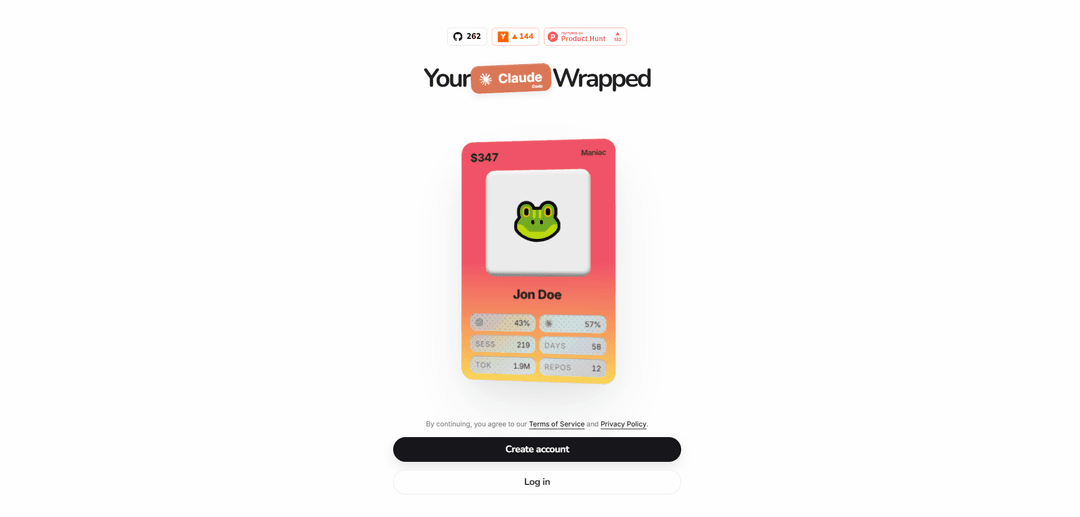
Rudel is an analytics layer for Claude Code and Codex that automatically ingests session transcripts to power dashboards and “Wrapped”-style insights on usage, performance, and cost.
https://app.rudel.ai/wrapped?ref=producthunt
Product Information
Updated:May 19, 2026
What is Rudel
Rudel is a tool for ingesting, storing, and analyzing AI coding-agent session data—especially Claude Code and Codex—to help teams understand how coding agents are actually being used. It provides a dashboard of metrics such as token usage, session duration, model mix, activity patterns, and outcomes (e.g., success/commit rates), and can generate shareable “Claude Code Wrapped” summaries. Rudel is typically used via a CLI plus a web dashboard (e.g., app.rudel.ai), and it’s positioned as a practical analytics layer rather than a benchmark or evaluation suite.
Key Features of Rudel
Rudel is an analytics tool for Claude Code and OpenAI Codex that ingests full coding-agent session transcripts and related metadata to produce a dashboard of insights such as token usage, session duration, activity patterns, model mix, and outcomes (e.g., success/commit rates). It can be enabled to auto-upload sessions when a coding-agent run exits, and it emphasizes that transcripts may include sensitive material (code, prompts, tool/file/command outputs, URLs, and secrets), so it should only be used in environments where uploading that data is acceptable.
Session transcript ingestion: Captures and uploads full Claude Code/Codex session transcripts plus metadata for analysis; includes prompts, tool output, file contents, command output, URLs, and potentially secrets.
Usage and cost analytics dashboard: Provides rollups like input/output/total tokens, spend, sessions, active days, average/longest session length, and other usage metrics.
Productivity and outcome metrics: Tracks indicators such as commit rate and success rate to help teams understand how often sessions translate into code changes and successful outcomes.
Model and workflow breakdowns: Surfaces patterns like Claude vs. Codex usage share, commands used, skills used (e.g., refactor), sub-agent usage, and repos touched.
CLI-based setup and automation: Installs and runs via CLI (e.g., login, enable) with the ability to auto-upload sessions when Claude Code/Codex exits.
Privacy-conscious enablement guidance: Explicitly warns users to enable only on projects/environments they’re comfortable uploading due to sensitive transcript contents.
Use Cases of Rudel
Engineering team governance and reporting: Track spend, token consumption, and session outcomes across repos to inform budgeting, policy, and ROI discussions for coding-agent adoption.
Developer productivity and workflow optimization: Identify high-friction patterns (long sessions, low commit rate) and optimize prompts, tooling, and practices based on commands/skills/sub-agent usage.
Model evaluation and A/B comparisons: Compare Claude vs. Codex usage patterns and outcomes (success/commit rates, duration, tokens) to choose the best model for specific tasks.
Internal enablement and training: Use aggregated insights (common skills, workflows, activity patterns) to coach developers on effective agent usage and standard operating procedures.
Ops/FinOps for AI tooling: Monitor cost drivers (tokens, long sessions, repo breadth) and set guardrails for AI usage in cost-sensitive environments.
Pros
Clear, quantifiable visibility into coding-agent usage (tokens, time, spend) and outcomes (commit/success rates).
CLI-based enablement with auto-upload makes it easy to instrument workflows with minimal ongoing effort.
Rich breakdowns (models, skills, commands, repos, sub-agents) support actionable optimization and comparisons.
Cons
High sensitivity risk: full transcripts/metadata may include source code, secrets, and other confidential data.
Requires comfort with uploading session data to a service; may be unsuitable for regulated or locked-down environments without strict controls.
How to Use Rudel
1) Install the Rudel CLI: Install Rudel globally with npm so you can authenticate and enable session uploads: `npm install -g rudel`.
2) Log in (authenticate): Run `rudel login` and complete the browser-based authentication flow.
3) Enable automatic session uploads for Claude Code / Codex: Run `rudel enable`. This registers a Claude Code hook that runs when a session ends (on exit) and uploads the session transcript to Rudel.
4) Use your coding agent normally: Run Claude Code or Codex sessions as usual. When you exit a session, Rudel’s hook will auto-upload the transcript and related metadata.
5) View analytics in the Rudel dashboard: Open the hosted dashboard at `app.rudel.ai` to see insights such as token usage, session duration, activity patterns, model usage, and more (e.g., a “Claude Code Wrapped” summary).
6) Review data-sensitivity guidance before enabling in new environments: Rudel uploads full coding-agent session data, which may include sensitive material (source code, prompts, tool output, file contents, command output, URLs, and secrets). Only enable Rudel in projects/environments where you’re comfortable uploading that data.
7) Understand hosted-service privacy positioning (if using app.rudel.ai): If you use the hosted service at `app.rudel.ai`, Rudel states they do not have access to personal data contained in uploaded transcripts and cannot read that data.
Rudel FAQs
Rudel is a product that ingests, stores, and analyzes Claude Code and Codex session transcripts, and can generate a “Claude Code Wrapped” usage summary.
Rudel Video
Popular Articles

Atoms: A Multi-Agent AI Platform That Transforms Ideas into Launch-Ready Products
May 22, 2026

Nano Banana SBTI: What It Is, How It Works, and How to Use It in 2026
Apr 15, 2026

Atoms Review — The AI Product Builder Redefining Digital Creation in 2026
Apr 10, 2026

Kilo Claw: How to Deploy and Use a True "Do‑It‑For‑You" AI Agent(2026 Update)
Apr 3, 2026
Latest AI Tools Similar to Rudel

Gait
Gait is a collaboration tool that integrates AI-assisted code generation with version control, enabling teams to track, understand, and share AI-generated code context efficiently.

invoices.dev
invoices.dev is an automated invoicing platform that generates invoices directly from developers' Git commits, with integration capabilities for GitHub, Slack, Linear, and Google services.

EasyRFP
EasyRFP is an AI-powered edge computing toolkit that streamlines RFP (Request for Proposal) responses and enables real-time field phenotyping through deep learning technology.

Cart.ai
Cart.ai is an AI-powered service platform that provides comprehensive business automation solutions including coding, customer relations management, video editing, e-commerce setup, and custom AI development with 24/7 support.
Popular AI Tools Like Rudel

GitHub Copilot Chat
GitHub Copilot Chat is an AI-powered coding assistant that provides natural language interactions, real-time code suggestions, and contextual support directly within supported IDEs and GitHub.com.

CopilotForXcode
CopilotForXcode is an Xcode Source Editor Extension that integrates GitHub Copilot, Codeium, and ChatGPT to provide AI-powered code suggestions, chat assistance, and prompt-to-code functionality within Xcode.

BrowserAI
BrowserAI is an open-source library that enables running local Large Language Models (LLMs) directly in web browsers with WebGPU acceleration, offering privacy-focused AI capabilities without requiring server infrastructure.

OpenAI Codex CLI
OpenAI Codex CLI is a lightweight, open-source coding agent that runs in your terminal, enabling developers to translate natural language into code execution while providing ChatGPT-level reasoning with the ability to run code, manipulate files, and iterate under version control.