
Agentspan
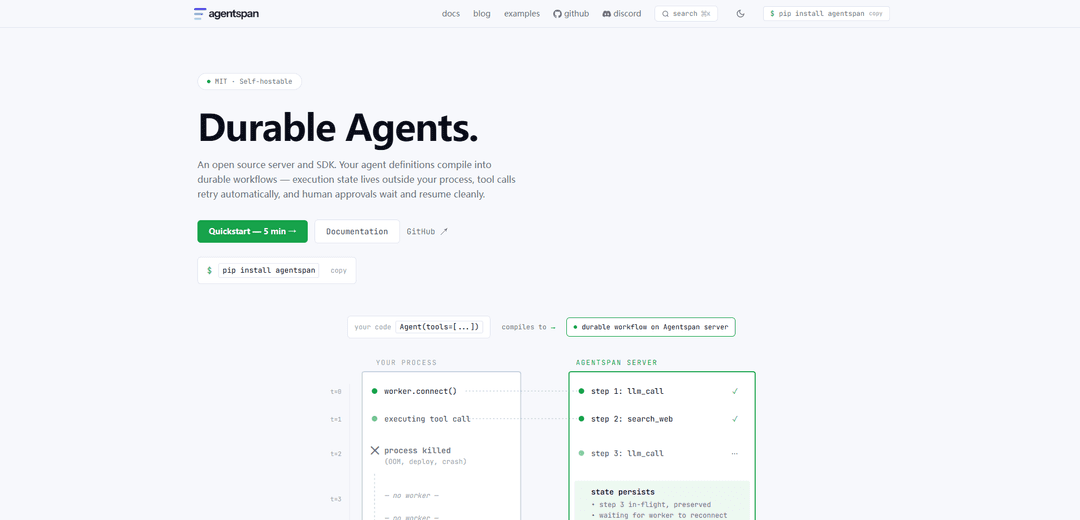
Agentspan is an MIT-licensed, self-hostable open-source server and SDK that compiles agent code into durable, crash-safe workflows with automatic retries, human-in-the-loop approvals, and full observability.
https://agentspan.ai/?ref=producthunt
Product Information
Updated:Jun 8, 2026
What is Agentspan
Agentspan is a durable execution runtime for AI agents, delivered as an open-source server plus SDK (Python and TypeScript) that helps you build, run, and observe agents in a production-ready way. Instead of keeping execution state inside your app process (where crashes, restarts, and timeouts lose progress), Agentspan runs agents as durable workflows whose state lives on the Agentspan server. It supports common agent patterns like tool use, structured outputs, memory, streaming events, and multi-agent coordination, and can be used directly or as a drop-in execution layer for existing frameworks such as OpenAI Agents SDK, Google ADK, and LangGraph.
Key Features of Agentspan
Agentspan is an open-source, self-hostable server and SDK that turns agent code into durable, observable workflows whose execution state lives outside your process. It’s designed for production: agents can crash and resume from the exact step, pause indefinitely for human approval, retry tool calls automatically, and run multi-agent coordination patterns—while providing full event streaming and execution history through a local server/UI. It supports multiple model providers via a simple model string, adds guardrails and structured outputs, and includes deterministic testing utilities for CI.
Durable execution (crash + resume by default): Workflows persist on the Agentspan server so agents survive process crashes and can be reattached from any machine, resuming from the last completed step without custom checkpointing.
Human-in-the-loop approvals: Mark tools as approval-required so runs pause cleanly (for minutes or days) and resume after approval/rejection via code or external channels (e.g., Slack/web portal).
Multi-agent pipelines and coordination strategies: Compose agents with expressions like `researcher >> writer >> editor` and use multiple coordination patterns (sequential, parallel, handoff/router, swarm, etc.) with per-step logging and durability.
Observability + streaming events: Provides full execution history and real-time event streams for tool calls/results, LLM requests, handoffs, timing, errors, and completion—supporting live UIs and debugging.
Structured output + guardrails: Enforce typed outputs (e.g., Pydantic models) and safety/validation guardrails (regex, custom checks, or LLM checks) with configurable auto-retry, fix-up, escalation, or pause-for-human behavior.
Framework integrations and model-provider flexibility: Works with existing agent frameworks (e.g., OpenAI Agents SDK, Google ADK, LangGraph) via minimal changes, and supports many model providers by switching a single provider/model string.
Use Cases of Agentspan
Customer support automation with approvals: Run agents that draft replies, enrich cases, and trigger actions like refunds or account changes while requiring human approval for sensitive steps and maintaining an auditable execution trail.
Finance/operations workflows (retriable tool automation): Automate reconciliations, invoice processing, or back-office tasks where tool calls may fail transiently—Agentspan’s durable steps and retries reduce manual restarts and lost work.
Research and content pipelines: Create multi-agent chains (research → write → edit) that can run long jobs reliably, stream progress to a UI, and resume after interruptions without rerunning completed steps.
IT/DevOps runbooks and incident response: Orchestrate diagnostic and remediation steps with human gates for high-risk actions, plus full observability for post-incident review and replay.
Enterprise data analysis assistants: Deploy long-running analysis agents that preserve state across sessions, enforce structured report outputs, and provide traceability for compliance and stakeholder review.
Pros
Durability is built-in (crash-safe, resumable workflows) rather than requiring custom checkpointing.
Strong production tooling: observability, streaming events, retries, and human-in-the-loop pauses.
Open-source (MIT) and self-hostable; supports multiple model providers and integrates with popular agent frameworks.
Cons
Requires running an Agentspan server/runtime (additional infrastructure compared to simple in-process scripts).
Some advanced capabilities (durability, orchestration) may add conceptual overhead for small or purely interactive agents.
How to Use Agentspan
1) Install Agentspan: In your Python environment, install the SDK: `pip install agentspan`.
2) Start (or verify) the Agentspan server + UI: Install the Agentspan CLI (e.g., `npm install -g @agentspan-ai/agentspan`, or build from source) and run the local server so you can inspect runs in the visual dashboard (commonly at `http://localhost:6767`). Use `agentspan doctor` to verify setup.
3) Define tools (functions) for the agent to call: Create Python functions and decorate them with `@tool`. Use type hints and docstrings so Agentspan can auto-generate schemas for tool calling.
Example:
```python
from agentspan.agents import tool
@tool
def get_weather(city: str) -> dict:
"""Get current weather for a city."""
return {"city": city, "temp": 72, "condition": "Sunny"}
```
4) Create an Agent with a model and tools: Instantiate `Agent(...)` with a name, model string, tools list, and instructions. Models use `provider/model-name` format.
Example:
```python
from agentspan.agents import Agent
agent = Agent(
name="assistant",
model="openai/gpt-4o",
tools=[get_weather],
instructions="You are a helpful assistant.",
)
```
5) Run the agent (durable execution): Use `run(agent, prompt)` to execute. The run is logged and durable (execution state lives on the Agentspan server).
Example:
```python
from agentspan.agents import run
result = run(agent, "What's the weather in NYC?")
```
6) Stream events for real-time observability: Use `stream(...)` to receive tool calls, tool results, handoffs, guardrail events, and completion as they happen.
Example:
```python
from agentspan.agents import stream, EventType
for event in stream(agent, "Research AI agents"):
if event.type == EventType.TOOL_CALL:
print(f"→ {event.tool_name}({event.args})")
elif event.type == EventType.TOOL_RESULT:
print(f"← {event.result}")
elif event.type == EventType.HANDOFF:
print(f"handoff → {event.target}")
elif event.type == EventType.DONE:
print(event.output)
break
```
7) Make runs crash-safe with start() + reconnect: Use `start(...)` to begin a long-running workflow and get a handle you can reconnect to later (even from another machine). If your process dies mid-run, the workflow continues on the server.
Example:
```python
from agentspan.agents import start, AgentHandle, AgentRuntime
handle = start(agent, "analyze 10k records")
# later (or from another machine)
handle = AgentHandle(workflow_id="wf-f8a2c1", runtime=AgentRuntime())
```
8) Add human-in-the-loop approvals for sensitive tools: Mark tools as requiring approval. The agent will pause (with no timeout) until approved/rejected, then resume from the exact waiting point.
Example:
```python
from agentspan.agents import tool, start
@tool(approval_required=True)
def process_refund(order_id, amount):
"""Refund — needs human approval."""
...
handle = start(agent, "refund #8821")
handle.approve() # or handle.reject("over limit")
```
9) Build multi-agent pipelines with >>: Compose multiple agents into a durable pipeline where each step feeds the next; every step is logged and resumable.
Example:
```python
from agentspan.agents import Agent, run
researcher = Agent("researcher", ...)
writer = Agent("writer", ...)
editor = Agent("editor", ...)
result = run(researcher >> writer >> editor, "state of AI agents in 2026")
```
10) Switch LLM providers by changing one string: Use `provider/model-name` strings to swap providers without changing orchestration code (and you can mix models in one pipeline).
Examples:
- `anthropic/claude-sonnet-4-6`
- `openai/gpt-4o`
- `google/gemini-2.0-flash`
- `groq/llama-3.3-70b-versatile`
11) Add guardrails to validate outputs and auto-retry: Attach guardrails (e.g., regex checks) to validate responses. On failure, Agentspan can retry, ask the model to fix, raise an error, or pause for a human.
Example:
```python
from agentspan.agents import Agent, RegexGuardrail
guardrail = RegexGuardrail(
patterns=[r"\b\d{3}-\d{2}-\d{4}\b"],
name="no_ssn",
on_fail="retry",
max_retries=3,
)
agent = Agent(
name="support_bot",
model="openai/gpt-4o",
guardrails=[guardrail],
)
```
12) Enforce structured outputs with Pydantic: Provide an `output_type` (Pydantic model). Agentspan enforces schema correctness and retries if the model returns malformed output.
Example:
```python
from pydantic import BaseModel
from agentspan.agents import Agent, run
class Report(BaseModel):
summary: str
key_findings: list[str]
sources: list[str]
agent = Agent(name="analyst", model="openai/gpt-4o", output_type=Report)
result = run(agent, "Analyze Q3 earnings")
```
13) Add memory for stateful conversations: Use `ConversationMemory` to keep session history (and optionally semantic memory for cross-session recall).
Example:
```python
from agentspan.agents import Agent, run, ConversationMemory
memory = ConversationMemory()
agent = Agent(name="assistant", model="openai/gpt-4o", memory=memory)
run(agent, "My name is Alice, I'm a backend engineer.")
result = run(agent, "What do you know about me?")
```
14) Write deterministic CI tests with mock_run: Test agent logic without an LLM or server by mocking the exact tool-call sequence and asserting behavior.
Example:
```python
from agentspan.agents.testing import mock_run, MockEvent, expect
result = mock_run(
agent,
"Weather in Chicago?",
events=[
MockEvent.tool_call("get_weather", {"city": "Chicago"}),
MockEvent.tool_result("get_weather", {"temp_f": 55}),
MockEvent.done("Chicago is 55°F and cloudy."),
],
)
expect(result).completed().used_tool("get_weather")
```
15) Wrap existing frameworks (OpenAI Agents SDK / Google ADK / LangGraph) with one line: If you already have an agent/graph in another framework, keep it unchanged and run it through Agentspan for durable execution and observability by replacing the framework runner call with `agentspan.agents.run(...)`.
Examples:
```python
from agentspan.agents import run
result = run(agent, "prompt") # OpenAI Agents SDK agent
result = run(root_agent, "prompt") # Google ADK root agent
result = run(app, "prompt") # LangGraph app/graph
```
Agentspan FAQs
Agentspan is an open-source (MIT), self-hostable server plus SDK/CLI that compiles AI agent definitions into durable workflows. Execution state lives outside your process so agents can survive crashes, retry tool calls, and support long-running and human-approved automation.
Agentspan Video
Popular Articles

Vosko AI: Localize and Dub Videos for Global Audiences
Oct 15, 2026

Atoms: A Multi-Agent AI Platform That Transforms Ideas into Launch-Ready Products
Oct 13, 2026

Nano Banana SBTI: What It Is, How It Works, and How to Use It in 2026
Apr 15, 2026

Atoms Review — The AI Product Builder Redefining Digital Creation in 2026
Apr 10, 2026
Latest AI Tools Similar to Agentspan

Gait
Gait is a collaboration tool that integrates AI-assisted code generation with version control, enabling teams to track, understand, and share AI-generated code context efficiently.

invoices.dev
invoices.dev is an automated invoicing platform that generates invoices directly from developers' Git commits, with integration capabilities for GitHub, Slack, Linear, and Google services.

EasyRFP
EasyRFP is an AI-powered edge computing toolkit that streamlines RFP (Request for Proposal) responses and enables real-time field phenotyping through deep learning technology.

Cart.ai
Cart.ai is an AI-powered service platform that provides comprehensive business automation solutions including coding, customer relations management, video editing, e-commerce setup, and custom AI development with 24/7 support.
Popular AI Tools Like Agentspan

GitHub Copilot Chat
GitHub Copilot Chat is an AI-powered coding assistant that provides natural language interactions, real-time code suggestions, and contextual support directly within supported IDEs and GitHub.com.

CopilotForXcode
CopilotForXcode is an Xcode Source Editor Extension that integrates GitHub Copilot, Codeium, and ChatGPT to provide AI-powered code suggestions, chat assistance, and prompt-to-code functionality within Xcode.

BrowserAI
BrowserAI is an open-source library that enables running local Large Language Models (LLMs) directly in web browsers with WebGPU acceleration, offering privacy-focused AI capabilities without requiring server infrastructure.

OpenAI Codex CLI
OpenAI Codex CLI is a lightweight, open-source coding agent that runs in your terminal, enabling developers to translate natural language into code execution while providing ChatGPT-level reasoning with the ability to run code, manipulate files, and iterate under version control.