
Triggered Agents by Adaptive
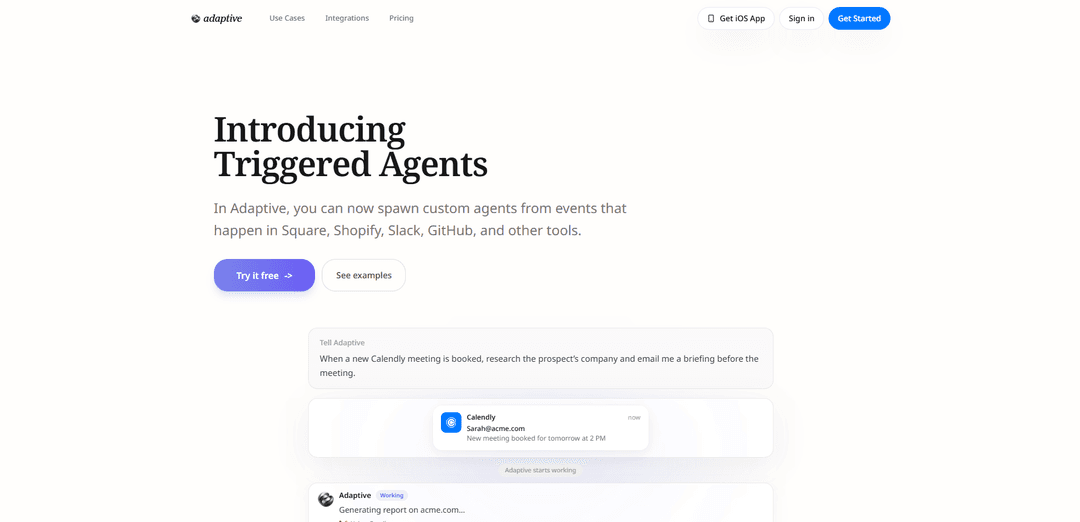
Triggered Agents by Adaptive lets you automatically spawn custom AI agents from real-world events across tools like Calendly, Stripe, Shopify, GitHub, Slack, Typeform, or any webhook, so they can immediately research, draft, update, and notify using your connected apps.
https://adaptive.ai/triggered-agents?ref=producthunt
Product Information
Updated:Jun 8, 2026
What is Triggered Agents by Adaptive
Triggered Agents by Adaptive is a capability in the Adaptive platform that runs AI agents automatically when events happen in the tools you already use. Instead of manually prompting an assistant, you define an event-and-instructions pairing—such as “When a new Calendly meeting is booked, research the prospect and email me a briefing”—and Adaptive executes the work end-to-end. It supports common business systems (e.g., Shopify, Stripe, Square, GitHub, Slack, Typeform, Notion, Google Sheets) and also works with any service that can send webhooks, making it a flexible way to turn operational events into automated outcomes.
Key Features of Triggered Agents by Adaptive
Triggered Agents by Adaptive let you automatically spawn custom AI agents when events occur in connected tools (e.g., Calendly, Stripe, Shopify, GitHub, Slack, Typeform) or via any webhook. When an event fires, the agent starts immediately with the event payload plus your instructions, and can take multi-step actions using the tools you’ve already connected—such as researching, drafting emails, preparing briefings, updating spreadsheets, or coordinating follow-ups—asking you for missing context when needed. Triggered Agents are available on all plans.
Event-driven agent spawning: Automatically starts a new agent run when a specified event happens (e.g., meeting booked, order placed, form submitted), using the event data as context.
Broad integrations + webhook support: Connect triggers from common business tools (Calendly, Stripe, Shopify, GitHub, Slack, Typeform, Notion, Discord, Google Sheets, etc.) and from any service that can send webhooks.
Tool-using, multi-step execution: Agents can complete end-to-end work (research, drafting, updating records, messaging) by operating within the set of tools you’ve connected to Adaptive.
Natural-language automation setup: Define what should happen in plain English (e.g., “When X happens, do Y and send me Z”), rather than building rigid workflow logic.
Context-aware and interactive runs: If required information isn’t available (e.g., supplier list, internal process details), the agent can ask you, then proceed with the task.
Works across customer and ops workflows: Supports both external-facing actions (emails, briefings, customer follow-ups) and internal operations (inventory checks, spreadsheet updates, issue triage).
Use Cases of Triggered Agents by Adaptive
Sales meeting intelligence (Calendly → email briefing): When a meeting is booked, the agent researches the prospect’s company and sends a concise briefing to the salesperson before the call.
E-commerce restock automation (Shopify/Square → supplier outreach): When a new order arrives, the agent checks inventory and proactively emails suppliers to restock when thresholds are reached.
Payments and finance ops (Stripe → follow-ups and reconciliation): When a payment event occurs (or fails), the agent drafts personalized follow-ups, updates tracking sheets, and prepares internal notes for finance teams.
Engineering workflow support (GitHub → triage and reporting): When issues/PRs are created or updated, the agent summarizes changes, flags risks, and posts updates to Slack or a tracking doc.
Customer intake processing (Typeform → routing and responses): When a form submission comes in, the agent categorizes the request, drafts a reply, and updates a CRM or spreadsheet for routing.
Ops notifications and coordination (Slack/Discord → action runs): When a message or alert appears in a channel, the agent can investigate context, compile status, and trigger the next operational steps.
Pros
Fast, event-driven automation that runs immediately with real-time context from your tools
Flexible: works with many common apps and any webhook-enabled service
Reduces manual busywork by handling multi-step tasks (research, drafting, updating systems) end-to-end
Low setup overhead: define behaviors in natural language and reuse connected tools
Cons
Outcome quality depends on having the right tools connected and sufficient internal context/data available
Webhook/event configuration and permissions across third-party tools can add setup complexity
Autonomous actions may require oversight/guardrails for sensitive workflows (e.g., finance, customer comms)
Reliability can be affected by upstream tool changes or incomplete/ambiguous event payloads
How to Use Triggered Agents by Adaptive
1) Decide the event you want to react to: Pick a real-world event from a tool you already use (e.g., a new Calendly meeting booked, a new Shopify order, a Stripe payment, a GitHub event, a Typeform submission, a Slack event) or any service that can send a webhook.
2) Connect the source tool (or webhook) to Adaptive: In Adaptive, connect the app where the event happens (Calendly/Shopify/Stripe/Square/GitHub/Slack/Typeform/Notion/Discord/Google Sheets/etc.). If your event source isn’t listed, plan to use a generic webhook connection (Adaptive supports any service that supports webhooks).
3) Create a Triggered Agent: Set up a Triggered Agent so that an agent run is automatically spawned when your chosen event fires. The spawned agent will receive the event payload/data as its input context.
4) Define the trigger condition (the “When…”): Specify which event should start the agent. Example from the docs: “When a new Calendly meeting is booked…” or “When a new Shopify order comes in…”.
5) Write the agent instructions (the “Then…”): Describe exactly what the agent should do with the event data. Examples from the docs: research a prospect’s company and email a briefing; check inventory and email the supplier if restock is needed; draft an email; prepare a briefing; update a spreadsheet.
6) Ensure the agent has the tools it needs: Make sure Adaptive has access to the tools required for actions (e.g., Gmail to send an email, Google Sheets to update a spreadsheet). Triggered agents can use any tools you’ve already connected to Adaptive.
7) Provide any missing reference data the first time: If the agent needs information that isn’t already available in your connected tools (e.g., a supplier list), Adaptive will ask you for it. Provide it so the workflow can complete.
8) Test by firing the event: Trigger the event in the source system (e.g., book a test Calendly meeting, submit a Typeform response, create a test Shopify order, send a webhook). Confirm Adaptive starts working automatically with the event data.
9) Verify the output in the destination channel: Check the place where results should appear (e.g., an email arrives in Gmail with the briefing, a spreadsheet row is updated, a message is posted, or another connected tool is updated).
10) Iterate on instructions and connected tools: Refine the Triggered Agent instructions to match your exact workflow (what to research, what format to email, what fields to update, etc.), and connect any additional tools needed for end-to-end automation.
Triggered Agents by Adaptive FAQs
Triggered Agents are custom agents that run automatically when specific events happen in connected tools (e.g., Calendly, Stripe, Shopify, GitHub, Typeform) or via any webhook, instead of running continuously.
Popular Articles

Vosko AI: Localize and Dub Videos for Global Audiences
Oct 15, 2026

Atoms: A Multi-Agent AI Platform That Transforms Ideas into Launch-Ready Products
Oct 13, 2026

Nano Banana SBTI: What It Is, How It Works, and How to Use It in 2026
Apr 15, 2026

Atoms Review — The AI Product Builder Redefining Digital Creation in 2026
Apr 10, 2026
Latest AI Tools Similar to Triggered Agents by Adaptive

Inbox AI
Inbox AI is a privacy-focused MacOS productivity app that combines voice-driven AI automation with email management capabilities, allowing users to create custom workflows and commands while offering both cloud-based and on-device AI options.

Cart.ai
Cart.ai is an AI-powered service platform that provides comprehensive business automation solutions including coding, customer relations management, video editing, e-commerce setup, and custom AI development with 24/7 support.

Hiyllo Work
Hiyllo Work is an all-in-one team workspace platform that combines chat, project management, calendar, email, file storage and video meetings in a single integrated environment.

MailSense
MailSense is an AI-powered email assistant that filters, summarizes, and generates replies to emails through a Telegram bot interface to help users manage their inbox more efficiently.
Popular AI Tools Like Triggered Agents by Adaptive

Magentic-UI
Magentic-UI is an open-source, human-centered web agent prototype by Microsoft Research that enables collaborative planning and execution of complex web-based tasks through transparent interaction between humans and AI agents.

Microsoft Copilot Cowork
Microsoft Copilot Cowork is an AI-powered assistant that turns user intent into actionable plans and autonomously executes multi-step tasks across Microsoft 365 apps while keeping users in control through checkpoints and approvals.

Upsonic
Upsonic is a reliability-focused AI agent framework with dockerized server-client architecture that enables trusted agent workflows through advanced features like verification layers, triangular architecture, and Model Context Protocol (MCP) integration.

CampEd Hire
CampEd Hire is a powerful Chrome extension that streamlines recruitment by automatically collecting and organizing job applicant data from LinkedIn job posts, with features like automated data collection, CSV export, and batch resume downloads.