
Gather
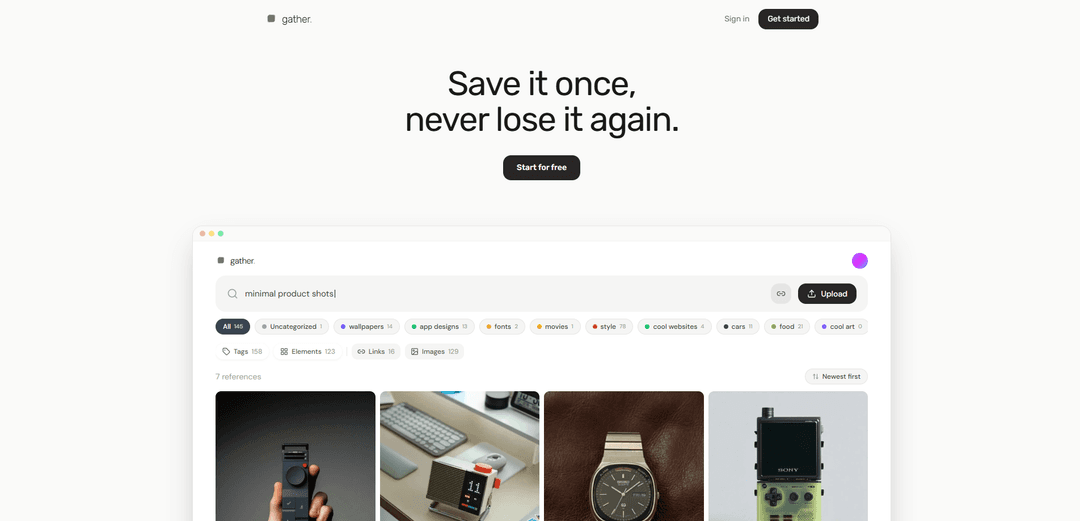
Gather is an AI-powered reference library that lets you save screenshots, photos, links, and more in one place, automatically tags them, and helps you rediscover anything fast with “search-by-vibe.”
https://gatherit.app/?ref=producthunt
Product Information
Updated:Jun 8, 2026
What is Gather
Gather is a web-based tool built for creatives who collect inspiration across the internet and their devices but struggle to find it again later. Instead of relying on messy screenshot folders, dated bookmarks, or Pinterest boards that become hard to search, Gather centralizes your references into a private library tied to your account. It focuses on making saved content easy to retrieve by meaning—style, mood, palette, and subject—so your inspiration stays usable, not buried.
Key Features of Gather
Gather is an AI-powered reference library for creatives that lets you save anything (images, screenshots, URLs, PDFs) into one private place and then quickly find it again using natural-language, “search-by-vibe” queries. With a Chrome extension for one-click saving, automatic tagging (style, mood, palette, subject), and search/filter tools, it replaces messy bookmark piles and unsearchable screenshot folders with a searchable, organized inspiration system. It also emphasizes data ownership (private library, no model training on your saves) and offers a free tier with an upgrade for unlimited storage and premium AI analysis.
Save anything, from anywhere: Capture screenshots, images, URLs, photos, and PDF pages via drag-and-drop or a Chrome extension that supports right-click saving.
AI-powered auto-tagging: Automatically tags references by attributes like style, mood, palette, composition, and dominant subject, with the option to correct or add tags.
Search-by-vibe discovery: Find saved items in seconds by describing what you remember (e.g., “muted retro car ad”), rather than relying on folder structures or dates.
Search, filter, and de-duplicate: Includes filtering and duplicate detection to keep large inspiration libraries tidy and easy to navigate.
Privacy and portability controls: Keeps references in a private library tied to your account, doesn’t train models on your saves, and supports export from settings.
Simple free + pro pricing: Free tier includes up to 50 references; Pro removes the cap and enables a more expensive/premium AI analysis model with priority support.
Use Cases of Gather
Design & branding inspiration library: Designers can collect UI patterns, typography, layouts, and brand references and retrieve them quickly during concepting and reviews.
Creative research for marketing teams: Marketers can save campaign examples, landing pages, and visual directions, then search by mood or style to build cohesive creative briefs.
Photography & art direction mood boards: Photographers and art directors can gather lighting, color palette, and composition references and locate them later using descriptive queries.
Product and industrial design references: Teams can store product shots, materials, and form-factor inspiration and use AI tags to compare aesthetics across categories.
Personal knowledge curation: Individuals can replace chaotic bookmarks/screenshot folders with a structured, searchable archive for hobbies (cars, interiors, fashion, travel).
Pros
Fast capture workflow (Chrome extension + drag-and-drop) reduces friction versus manual bookmarking/foldering.
Search-by-vibe plus auto-tagging makes old inspiration findable, not just stored.
Clear privacy stance (private library, no training on your saves) and export support improves trust and portability.
Affordable entry point with a usable free tier (50 references) and low-cost Pro.
Cons
AI analysis has limits (e.g., may miss tiny text and can misclassify subjects), so occasional manual correction is needed.
Free tier is capped at 50 references, which may be restrictive for heavy users.
Mobile experience is web-based; a native iOS app is described as “on the roadmap,” so mobile workflows may feel less seamless for some users.
How to Use Gather
1) Open Gather in your browser: On desktop or mobile, open a web browser and go to Gather’s website. If you already have an account, use the “Sign in” link; otherwise choose “Get started” / “Sign up” to create one.
2) Create your account (if needed): Complete the sign-up flow on the site to create your Gather account, then log in.
3) Start saving references (the core workflow): Gather is designed to store references like screenshots, URLs, photos, and PDF pages in one private library tied to your account.
4) Install the Gather Chrome extension (optional, for faster web saving): From Gather’s site, click “Add to Chrome” and install the extension from the Chrome Web Store. This enables quick saving from webpages.
5) Save an image from the web with the extension: When browsing, right-click an image and use the Gather extension option to save it to your Gather account (the site describes saving images directly via right-click using the Chrome extension).
6) Save by uploading or dropping files into Gather: In the web app, add references by dropping them in (e.g., screenshots or photos). Gather supports saving a screenshot, a URL, a photo, or a PDF page.
7) Let Gather auto-tag your saves: After saving, Gather automatically generates tags based on style, mood, palette, composition, and dominant subject. This reduces the need for manual folders.
8) Edit or correct tags when needed: If auto-tags aren’t quite right, update them yourself—Gather allows you to correct or add tags anytime.
9) Find anything later using search-by-vibe: Use Gather’s search to describe what you remember (e.g., “muted retro car ad” or “moody coastal monochrome”) and filter results to surface the right reference quickly.
10) Use Gather on your phone (no dedicated app required): Gather works in a mobile web browser. Open your browser, go to the Gather sign-in page, and log in with your credentials.
11) Add Gather to your phone’s home screen (app-like access): On iOS Safari or Android Chrome, use the browser menu and choose “Add to Home Screen” or “Install App,” then confirm. This creates a one-tap icon like an app.
12) Understand the free vs. pro limits: Free includes up to 50 references forever (no card required). Pro removes the cap and enables a more expensive AI model for premium analysis.
13) Export your library (if you ever need to leave): Gather states export is available from settings so your library can be taken with you.
Gather FAQs
Gather is a tool for saving and organizing references (images, screenshots, URLs, photos, PDF pages) into a private library, then finding them again quickly using AI-powered tagging and search-by-description.
Gather Video
Popular Articles

Vosko AI: Localize and Dub Videos for Global Audiences
Oct 15, 2026

Atoms: A Multi-Agent AI Platform That Transforms Ideas into Launch-Ready Products
Oct 13, 2026

Nano Banana SBTI: What It Is, How It Works, and How to Use It in 2026
Apr 15, 2026

Atoms Review — The AI Product Builder Redefining Digital Creation in 2026
Apr 10, 2026
Latest AI Tools Similar to Gather

Folderr
Folderr is a comprehensive AI platform that enables users to create custom AI assistants by uploading unlimited files, integrating with multiple language models, and automating workflows through a user-friendly interface.
InDesign Translator
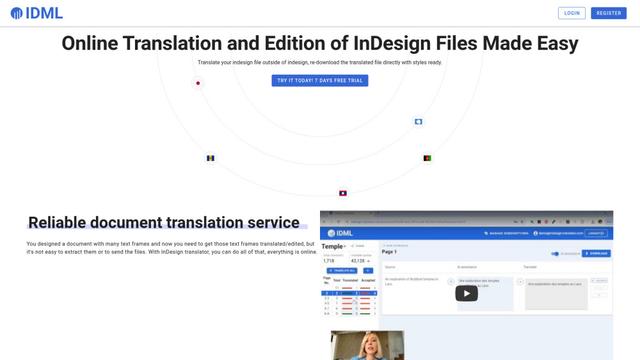
InDesign Translator is an online translation service that enables users to translate InDesign files while maintaining formatting and styles, offering AI-assisted translation and easy collaboration features without requiring translators to have InDesign installed.

Specgen.ai
Specgen.ai is an AI-powered platform that helps businesses optimize their bid responses by automatically analyzing tender requirements and generating personalized responses while ensuring 100% data confidentiality through proprietary AI models.

TurboDoc
TurboDoc is an AI-powered invoice processing software that automatically extracts and transforms unstructured invoice data into organized, easy-to-read structured data through Gmail integration and intelligent document processing.
Popular AI Tools Like Gather

R2R
R2R (Reason to Retrieve) is an advanced AI retrieval system that provides production-ready Retrieval-Augmented Generation (RAG) capabilities with multimodal content ingestion, hybrid search, knowledge graphs, and comprehensive document management through a RESTful API.

Claude Folder Upload
A Chrome extension that enables users to upload entire folders to Claude AI while intelligently preserving directory structures and file relationships, with smart filtering capabilities for irrelevant files.

Web Clipper for NotebookLM
Web Clipper for NotebookLM is a Chrome extension that saves web pages, PDFs, YouTube content, social posts/threads, and even AI chat conversations directly into Google NotebookLM in one click, plus adds powerful export, sync, and notebook-management tools.

ReadHero
ReadHero is a comprehensive book tracking and note-taking app that helps readers remember and retain more of what they read by enabling progress tracking, note-taking, and book management all in one place.