
REAPER Daemon
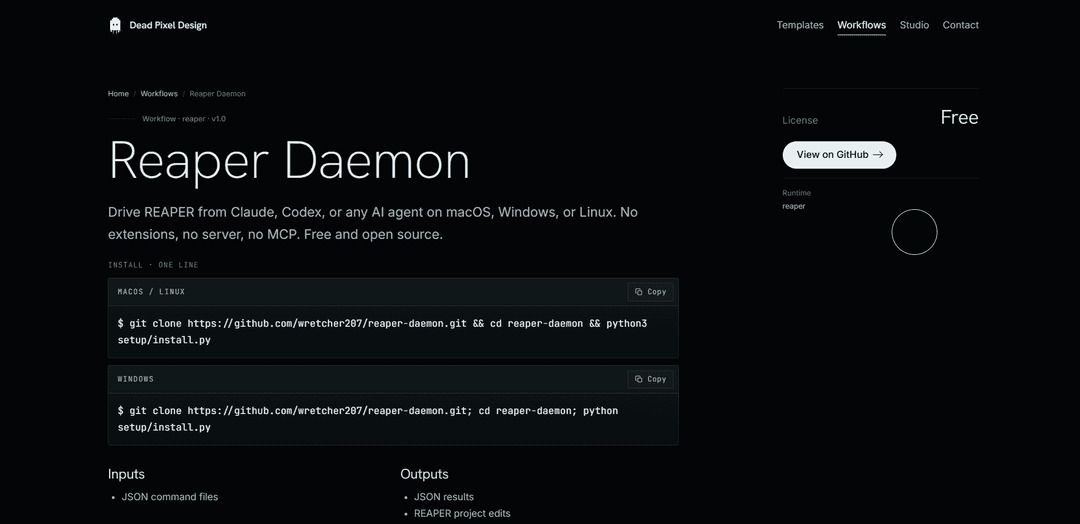
REAPER Daemon is a free, open-source (MIT) local file-bridge that lets Claude, Codex, or any AI agent control REAPER on macOS/Windows/Linux via JSON commands—no extensions, no server, no sockets, and no MCP.
https://deadpixeldesign.com/workflows/reaper-daemon?ref=producthunt
Product Information
Updated:Jul 8, 2026
What is REAPER Daemon
REAPER Daemon is a lightweight workflow tool for driving the REAPER DAW from an AI agent or script using only local files. It’s designed for creators and tool-builders who want an agent to make real edits in a REAPER project—transport control, track and FX changes, markers/regions, item edits, rendering, and more—without installing third-party REAPER extensions or running any network service. It installs in about thirty seconds (REAPER + Python 3) and is available as free and open source software on GitHub under the MIT license.
Key Features of REAPER Daemon
REAPER Daemon is a free, open-source local file-bridge that lets an AI agent (or any script) directly control the REAPER DAW on macOS, Windows, or Linux without extensions, sockets, servers, or MCP. An agent writes JSON command files into an inbox folder; a Lua script running as a persistent defer loop inside REAPER executes those commands via the native REAPER API, applies edits within undo blocks, and writes JSON results to an outbox along with a heartbeat file for status checks. It supports broad project operations—tracks, FX, items, markers/regions, MIDI insertion, rendering, and project/FX discovery—so automation and session edits can be generated and applied programmatically while staying entirely on the local machine.
Local JSON file bridge (no network): Agents drop JSON commands into an inbox folder and read JSON results from an outbox; everything stays on-device with no socket server, network connection, or MCP.
Runs inside REAPER via Lua defer loop: A single Lua bridge script runs continuously inside REAPER, polling for one command per tick and emitting a heartbeat file to confirm it’s live.
Wide DAW control surface: Supports transport/tempo/cursor/time selection/render plus track operations (add/delete/rename/select/volume/pan/mute/solo/arm/color), markers/regions/items, and MIDI insertion/audition.
FX management + parameter automation: Add/remove/bypass/reorder FX, set parameters, and write automation envelopes—enabling AI-assisted mixing moves and repeatable processing chains.
Project & FX discovery (scan_fx): Can dump every FX and parameter in the project so an agent can learn what’s present and then act on tracks/FX/params by name.
Undo-safe edits + reusable recipes: Each mutating command runs in a REAPER undo block for easy rollback, and command sequences can be saved as “recipes” and replayed across projects.
Use Cases of REAPER Daemon
AI-assisted music production: Generate and apply mix moves (FX chains, parameter tweaks, automation envelopes), set up tracks/busses, or prep sessions for different stages of production with repeatable recipes.
Podcast/dialogue post-production automation: Automate common editing and session prep tasks—track setup, region/marker creation, item edits, and rendering—driven by an agent that writes structured JSON commands.
Sound design & game audio batch workflows: Rapidly create regions/markers, apply standardized FX processing, and render variations; use scan_fx to adapt actions to the project’s available tools.
Studio pipeline tooling & internal utilities: Build lightweight in-house tools that control REAPER without maintaining a network service—just file I/O—useful for standardized templates and repeatable deliverables.
Education & training labs: Provide students with scripted, reproducible REAPER operations (track/FX setup, MIDI insertion, renders) that can be audited via JSON inputs/outputs.
Pros
No server, sockets, or network required—simple local file-based integration that’s easy to reason about and keeps data on the machine.
Cross-platform (macOS/Windows/Linux) and extension-free—uses the native REAPER API only.
Undo-block safety for mutating commands—mistakes are reversible with standard REAPER undo.
Discovery tooling (scan_fx) enables agent-driven adaptation to the current project’s FX and parameters.
Cons
Requires installing/wiring a startup Lua bridge into REAPER (via installer) and restarting REAPER to activate it.
Command execution is polled (one command per tick), which may be less immediate than a direct IPC/socket approach for some real-time needs.
Designed around file I/O (inbox/outbox), so workflows must be structured as JSON commands rather than interactive UI control.
How to Use REAPER Daemon
1) Install REAPER prerequisites: Make sure REAPER is installed on your machine (macOS, Windows, or Linux) and that you have Python 3 available in your terminal ("python3" on macOS/Linux, usually "python" on Windows).
2) Clone the repo and run the one-line installer (macOS/Linux): In a terminal, run: git clone https://github.com/wretcher207/reaper-daemon.git && cd reaper-daemon && python3 setup/install.py
3) Clone the repo and run the one-line installer (Windows): In a terminal (PowerShell), run: git clone https://github.com/wretcher207/reaper-daemon.git; cd reaper-daemon; python setup/install.py
4) Let the installer wire REAPER startup: The installer detects your OS, finds REAPER’s resource folder, and writes a managed block into REAPER’s startup script so the Lua bridge loads automatically on every REAPER launch.
5) Restart REAPER to load the bridge: Quit and reopen REAPER once. After restart, the Lua bridge runs continuously as a defer loop inside REAPER.
6) Understand the file-bridge workflow (no server, no network): Your agent (Claude, Codex, etc.) writes JSON command files into an inbox folder. The Lua bridge inside REAPER polls that inbox, executes one command per tick, and writes JSON results to an outbox folder. Everything stays local—no sockets, no MCP server.
7) Point your AI agent (or script) at the daemon folders: Tell your agent where the cloned reaper-daemon folder lives so it can write JSON commands into inbox/ and read responses from outbox/.
8) Confirm the daemon is live (heartbeat + project info): From the cloned repo folder, run: python3 reaperd.py status (use "python reaperd.py status" on Windows). A live heartbeat file and a JSON description of the open project indicate the daemon is running.
9) Start with discovery: scan FX and parameters: Use the discovery capability (scan_fx) to dump every FX and parameter in the current project. The bridge is plugin-agnostic, so the agent typically learns what exists via scan_fx, then targets tracks/FX/parameters by name.
10) Drive common REAPER actions via JSON commands: Send JSON commands (via inbox/) to control transport, tempo, cursor, time selection, and render; manage tracks (add/delete/rename/select/volume/pan/mute/solo/arm/color); manage FX (add/remove/bypass/reorder/set parameters/write automation envelopes); and edit markers, regions, media items, and MIDI (insert/audition MIDI files). Read the JSON results from outbox/.
11) Use undo safely for project-changing commands: Every mutating command runs inside a REAPER undo block. If the agent makes an incorrect edit, revert it with REAPER’s normal undo (Cmd+Z / Ctrl+Z).
12) Save and replay command sequences (recipes): Create a repeatable workflow by saving a command sequence as a recipe, then replay it on any project to apply the same set of edits/operations.
REAPER Daemon FAQs
REAPER Daemon is a free, open-source local file bridge that lets an AI agent (or any script) control REAPER on macOS, Windows, or Linux by exchanging JSON command/result files—no extensions, no network server, no sockets, and no MCP.
REAPER Daemon Video
Popular Articles

Vosko AI: Localize and Dub Videos for Global Audiences
Oct 15, 2026

Atoms: A Multi-Agent AI Platform That Transforms Ideas into Launch-Ready Products
Oct 13, 2026

Nano Banana SBTI: What It Is, How It Works, and How to Use It in 2026
Apr 15, 2026

Atoms Review — The AI Product Builder Redefining Digital Creation in 2026
Apr 10, 2026
Latest AI Tools Similar to REAPER Daemon

Gait
Gait is a collaboration tool that integrates AI-assisted code generation with version control, enabling teams to track, understand, and share AI-generated code context efficiently.

invoices.dev
invoices.dev is an automated invoicing platform that generates invoices directly from developers' Git commits, with integration capabilities for GitHub, Slack, Linear, and Google services.

EasyRFP
EasyRFP is an AI-powered edge computing toolkit that streamlines RFP (Request for Proposal) responses and enables real-time field phenotyping through deep learning technology.

Cart.ai
Cart.ai is an AI-powered service platform that provides comprehensive business automation solutions including coding, customer relations management, video editing, e-commerce setup, and custom AI development with 24/7 support.
Popular AI Tools Like REAPER Daemon

GitHub Copilot Chat
GitHub Copilot Chat is an AI-powered coding assistant that provides natural language interactions, real-time code suggestions, and contextual support directly within supported IDEs and GitHub.com.

CopilotForXcode
CopilotForXcode is an Xcode Source Editor Extension that integrates GitHub Copilot, Codeium, and ChatGPT to provide AI-powered code suggestions, chat assistance, and prompt-to-code functionality within Xcode.

BrowserAI
BrowserAI is an open-source library that enables running local Large Language Models (LLMs) directly in web browsers with WebGPU acceleration, offering privacy-focused AI capabilities without requiring server infrastructure.

OpenAI Codex CLI
OpenAI Codex CLI is a lightweight, open-source coding agent that runs in your terminal, enabling developers to translate natural language into code execution while providing ChatGPT-level reasoning with the ability to run code, manipulate files, and iterate under version control.