
readywhen
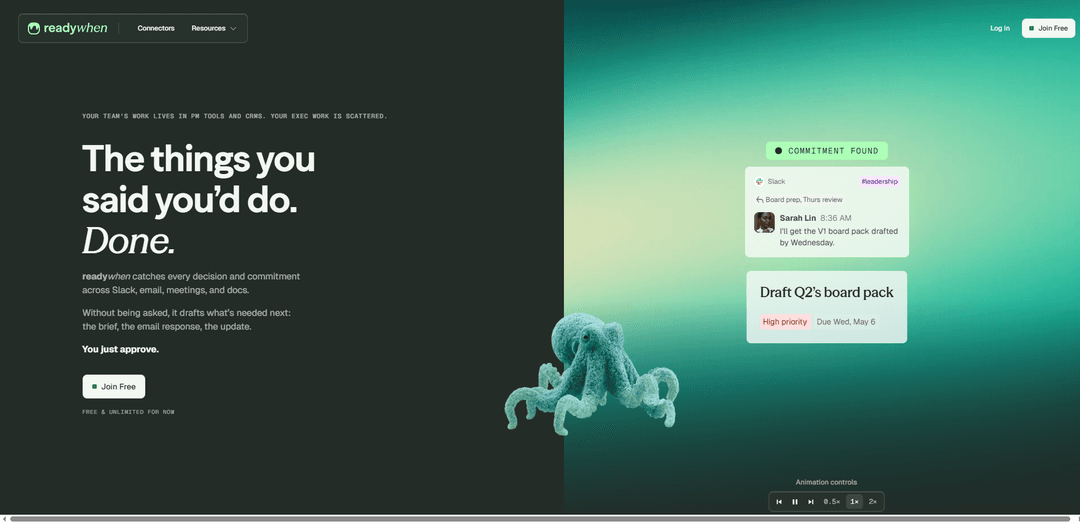
readywhen is an AI “done list” that automatically captures decisions and commitments across Slack, email, meetings, and docs, then drafts the next-step deliverables for you to approve.
https://www.readywhen.ai/?ref=producthunt
Product Information
Updated:Jul 8, 2026
What is readywhen
readywhen is built for the unstructured, executive work that doesn’t live neatly in project management tools or CRMs—things like follow-ups, updates, briefs, and decisions buried across conversations. It runs in the background across the tools you already use (e.g., Slack, email, meetings, and documents), detects what you said you’d do, and turns those commitments into actionable next steps. Instead of acting like a chat-based assistant that waits for prompts, readywhen is designed to proactively move work forward and bring it back “done and ready to approve.”
Key Features of readywhen
readywhen is an “executive work” copilot that runs in the background across tools like Slack, email, meetings, and docs to automatically capture decisions and commitments, pull the relevant context, and draft the next required artifacts (e.g., follow-up emails, briefs, updates) for your approval—positioning itself as a “done list” that helps leaders avoid dropped balls without heavy setup or prompting.
Automatic commitment & decision capture: Detects and logs what people said they’ll do (and what was decided) across messages, meeting conversations, and document threads—without you having to ask or manually create tasks.
Cross-tool connectors: Works across common work surfaces (e.g., Slack, email, meetings, docs) so commitments buried in different places don’t get lost; includes a connectors directory to link sources.
Proactive drafting of next steps: Generates what’s needed next—such as a brief, an email response, or a status update—based on the captured commitment and surrounding context.
Approval-first workflow (you stay in control): Prepares outputs “done and ready to approve,” but keeps final sign-off with the user rather than sending messages or acting autonomously.
Minimal setup / no prompt-driven workflow: Designed for “zero building” and “no learning curve,” avoiding fragile automations and reducing the need to repeatedly prompt an AI for summaries or actions.
Done-list orientation: Frames work around completed outcomes by turning spoken/written commitments into ready-to-send deliverables, reducing follow-through gaps common in leadership work.
Use Cases of readywhen
Sales follow-ups & deal momentum: Captures promised follow-ups from calls and email threads, then drafts recap and next-step emails so reps and AEs don’t lose momentum after meetings.
Founder/exec operations (mini Chief of Staff): Tracks leadership commitments across internal comms and meetings, then drafts updates/briefs to reduce “founder chaos” and prevent dropped action items.
Customer success & account management: Turns meeting promises (send docs, confirm timelines, provide updates) into drafted client communications and internal handoffs to improve reliability and retention.
Project/program management across teams: Surfaces commitments scattered in Slack and docs, drafts status updates and action summaries, and helps keep cross-functional execution aligned.
Agency/service delivery handovers: Captures deliverables and owner commitments from client threads and meetings, then drafts client recaps and internal briefs to reduce missed steps.
Pros
Proactive (acts without prompting): captures commitments and drafts next artifacts automatically rather than waiting for user requests.
Works across multiple work surfaces: reduces lost context and missed follow-ups that happen when work is scattered across tools.
Approval-first control: keeps humans in the loop for final review before anything is sent or finalized.
Low setup overhead: positioned as quick to set up with minimal learning curve compared to building automations.
Cons
Connector and access requirements: value depends on integrating core tools (email/Slack/meetings/docs), which may be constrained by IT/security policies.
Draft quality may vary: automatically generated briefs/emails/updates may still require edits to match tone, accuracy, or compliance needs.
Potential ambiguity in commitment detection: inferring “promises” and decisions from natural conversation can create false positives/negatives.
Product maturity/pricing uncertainty: marketed as “free & unlimited for now,” which may change and affects long-term planning.
How to Use readywhen
1) Sign up and log in: Go to https://www.readywhen.ai/ and create an account (the site states it’s “Free & unlimited for now”).
2) Connect your work tools (connectors): Open the connectors page (“See all connectors”) and link the places where your commitments happen—e.g., Slack, email, meetings/calendar (e.g., Google Meet), and docs (e.g., Notion). The goal is to let readywhen “catch every decision and commitment across Slack, email, meetings, and docs.”
3) Use your tools normally (no prompts, no building): Keep working as usual—send Slack messages, comment in docs, and join calls. readywhen is designed to run in the background with “zero building” and “no learning curve,” capturing commitments without you having to ask it.
4) Make (or notice) commitments in natural language: When you say things like “I’ll follow up,” “I’ll send an email summary,” or “I’ll add my board update by EOD,” readywhen detects these as commitments—whether they’re in Slack threads, emails, meeting conversations, or doc comments.
5) Review what readywhen captured (your ‘done list’ queue): Check readywhen for the items it has captured from across your connected tools. The product positions this as “Not a to-do list. A done list,” meaning it tracks what you said you’d do and prepares it for completion.
6) Open an item to see the pulled context: For any captured commitment, open it to view the relevant context readywhen gathered from the source (e.g., the Slack thread, the meeting, or the doc/comment) so the drafted output matches what was discussed.
7) Review the draft readywhen prepared: readywhen automatically drafts “what’s needed next” based on the commitment—examples from the site include: a brief, an email response, or a status/update.
8) Approve (and finalize) before anything goes out: Approve the draft when it’s correct. The site emphasizes you remain in control: “You’re still the boss… You always have full control of final approval.”
9) Repeat as you work—let it catch commitments everywhere: Continue using Slack, email, meetings, and docs as normal. readywhen keeps capturing new commitments “anywhere” (e.g., ‘deep in Slack,’ ‘buried in a Notion comment,’ or ‘said in passing on a call’) and preparing the next step for approval.
readywhen FAQs
readywhen is an AI tool that catches decisions and commitments across Slack, email, meetings, and docs, then drafts what’s needed next (e.g., a brief, an email response, an update) for you to approve.
Popular Articles

Vosko AI: Localize and Dub Videos for Global Audiences
Oct 15, 2026

Atoms: A Multi-Agent AI Platform That Transforms Ideas into Launch-Ready Products
Oct 13, 2026

Nano Banana SBTI: What It Is, How It Works, and How to Use It in 2026
Apr 15, 2026

Atoms Review — The AI Product Builder Redefining Digital Creation in 2026
Apr 10, 2026
Latest AI Tools Similar to readywhen

Ticknotes
Ticknotes is an AI-powered meeting assistant that automatically records, transcribes, and generates personalized meeting summaries, action items, and key insights from audio, video, and text content.

Feta
Feta is an AI-powered meeting tool that helps product and engineering teams run efficient meetings by capturing discussions, automating tasks, and providing actionable insights through smart summaries and integrations.

Aimeet
Aimeet is a comprehensive AI-powered communication platform that combines real-time translation, transcription, screen sharing, and unlimited meeting capabilities for effective virtual collaboration.

MinutesLink
MinutesLink is an advanced AI-powered note-taking assistant that automatically records, transcribes, summarizes and organizes virtual meetings while building personalized digital avatars from meeting data.
Popular AI Tools Like readywhen

Second Brain for AI
Second Brain for AI is a self-hosted, MCP-compatible persistent memory layer on Cloudflare that lets Claude, ChatGPT, Cursor, and other AI clients store and semantically recall shared context across sessions.

Slack
Slack is an AI-powered work platform that brings team communication, channels, files, automation, and app integrations into one conversational workspace.

24me Smart Personal Assistant
24me is an award-winning smart personal assistant app that combines calendar, to-do lists, notes, and personal accounts in one unified platform to help boost productivity and time management.

Granola for iOS
Granola for iOS is an AI-powered notepad app that helps users effortlessly capture, transcribe and summarize meeting conversations through intelligent note-taking and one-tap recording capabilities.