
ClariLayer
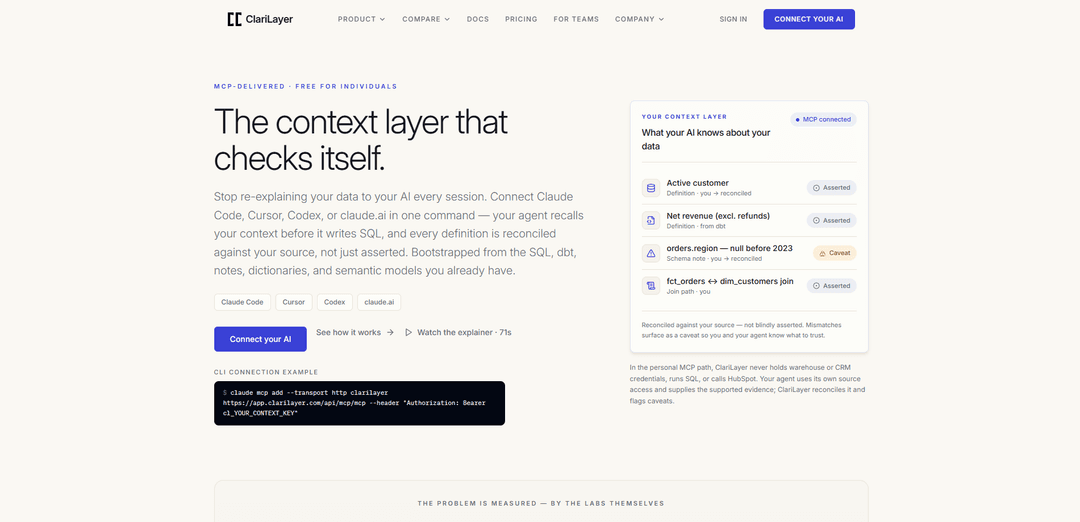
ClariLayer is an MCP-delivered personal context layer for AI data agents that bootstraps from your existing SQL/dbt/notes, remembers corrections across sessions, and reconciles saved definitions against real source evidence to surface mismatches as caveats.
https://clarilayer.com/?ref=producthunt
Product Information
Updated:Aug 8, 2026
What is ClariLayer
ClariLayer is a context layer designed for individual analysts using AI coding agents like Claude Code, Cursor, Codex, or claude.ai. Instead of repeatedly re-explaining tables, joins, and metric definitions every new session, you connect ClariLayer as an MCP server so your agent can recall the right, structured context mid-task. ClariLayer focuses on trust: it treats hand-written definitions (like a CLAUDE.md) as “asserted” until they are checked against supported evidence, and it clearly labels provenance and status so your agent doesn’t confidently reuse stale or incorrect business logic.
Key Features of ClariLayer
ClariLayer is an MCP-delivered personal context layer that plugs into the AI agent you already use (Claude Code, Cursor, Codex, or claude.ai) so the agent can reliably recall and persist your data definitions, schema notes, join paths, and reusable queries across sessions. It bootstraps context from existing assets (SQL files, dbt models, notes/CLAUDE.md, dictionaries, and semantic models) and adds a key trust mechanism: “reconcile,” where saved definitions are checked against supported evidence from your real sources (run by your agent with its own access). When declared logic and actual results drift, ClariLayer flags a caveat instead of letting the agent confidently reuse stale or wrong assumptions—without ClariLayer ever holding warehouse/CRM credentials or running SQL server-side.
MCP-native in-agent integration: Installs as an MCP server into Claude Code, Cursor, Codex, or connects via OAuth in claude.ai—no separate destination app, so context is available mid-task inside your normal workflow.
Bootstrap from existing analytics artifacts: Ingests and structures context from SQL (validated SELECTs, deterministically structured), dbt models, CLAUDE.md/notes, data dictionaries (one schema-note per variable), and semantic models (e.g., Databricks Metric Views normalized by your agent).
Recall-first context retrieval: Your agent can pull the most relevant definitions, schema notes, and prior corrections in-flow before writing SQL, with explicit scoping and signals when context was intentionally left out.
Persistent memory for corrections and definitions: Saves metric definitions, join paths, assumptions, and schema caveats so you stop re-explaining the same business logic every new chat/session.
Reconcile against real source evidence: Your agent runs queries with its own warehouse access (or collects bounded, row-free HubSpot metadata evidence) and sends back result shape/signals; ClariLayer compares declared vs actual and records outcomes, surfacing drift as a caveat.
Honest labeling and caveat system: Instead of claiming “verified,” ClariLayer labels entries as asserted or caveat and shows provenance, so stale definitions don’t masquerade as truth.
Use Cases of ClariLayer
Revenue analytics and QBR firefighting: When dashboards and ad-hoc SQL disagree (e.g., net revenue vs gross), reconcile can flag drift (missing joins/filters/columns) so analysts can quickly isolate why numbers don’t match before exec reviews.
Self-serve BI consistency for lean teams: Solo analysts or small teams can build a durable “working semantic layer” for their AI agent—definitions, joins, and caveats persist across sessions without a platform team rollout.
Data engineering handoffs (dbt + warehouse): Bootstrap from dbt models and SQL to give agents reliable context for lineage-adjacent tasks (correct base tables, join paths, known null periods), reducing repeated onboarding and mis-joins.
CRM operations with controlled evidence (HubSpot): Store contracts for CRM properties (expected stages/values/aliases) and reconcile using bounded distributions/metadata collected by the agent—helpful for RevOps and sales ops without moving CRM rows into the tool.
Cross-industry metric definition standardization: In e-commerce, fintech, SaaS, or healthcare analytics, teams can prevent repeated metric drift (refund handling, active customer rules, cohort logic) by persisting and caveat-flagging definitions as underlying data changes.
Pros
Works inside existing agents via MCP (Claude Code/Cursor/Codex/claude.ai), minimizing workflow disruption.
Reconciliation model flags definition drift as caveats, reducing confident wrong answers compared to plain notes/CLAUDE.md.
Keeps warehouse/CRM credentials with the user’s agent; ClariLayer does not run SQL server-side or hold source credentials.
Bootstraps from existing SQL/dbt/dictionaries/semantic models, enabling day-1 usefulness rather than blank-slate setup.
Cons
Reconcile depends on the agent to run queries and provide evidence payloads (result shape/optional previews), so quality can vary with agent configuration and access.
Does not mark entries as fully “verified” in the current version; outcomes are asserted or caveat rather than a strong verification stamp.
Team-governance features (shared canon, ownership/approval workflows) are described as a separate expansion path and appear to be in pilot rather than broadly available.
How to Use ClariLayer
1) Sign up and mint a context key (for local agents): Create a ClariLayer account, then mint a context key. Keep it handy: the key is shown once at creation and is used by local coding agents (Claude Code, Cursor, Codex). Note: a read-only key can only call read tools; write actions (e.g., saving new context) require context:write.
2) Connect ClariLayer to your AI tool (choose one path): Pick either (A) a local coding agent using your context key, or (B) claude.ai using OAuth approval. Both connect to the same remote MCP endpoint: https://app.clarilayer.com/api/mcp/mcp.
3A) Connect from a local coding agent (Claude Code / Cursor / Codex): Run the MCP install command in your terminal to register ClariLayer as an MCP server. Example:
claude mcp add --transport http clarilayer https://app.clarilayer.com/api/mcp/mcp --header "Authorization: Bearer cl_YOUR_CONTEXT_KEY"
Replace cl_YOUR_CONTEXT_KEY with your minted key.
3B) Connect from claude.ai (OAuth, no context key): In claude.ai go to Settings → Connectors → Add custom connector. Paste only the MCP URL: https://app.clarilayer.com/api/mcp/mcp. Then sign in to ClariLayer in the browser and approve the connection.
4) Verify the connection with the health check tool: Ask your agent to call the clarilayer__health tool. A successful authenticated response returns something like { ok: true, user, org }. If you see an authentication error, re-check that you pasted the full cl_… key (local agents) or that OAuth approval completed (claude.ai).
5) Bootstrap your context (day-1 setup): Run a bootstrap flow to load the context you already have so you don’t start from a blank slate. ClariLayer supports bootstrapping from: SQL, dbt models, CLAUDE.md/notes, data dictionaries, and semantic models. This turns your existing work into durable, structured context your agent can reuse.
6) Use Recall during analysis (in-flow retrieval): While working on a question, have your agent call recall to pull relevant saved definitions, schema notes, join paths, and caveats before it writes SQL. Recall is designed to keep scoping explicit (e.g., naming ambiguous candidates rather than guessing) and to surface caveats alongside definitions.
7) Use Remember to persist corrections and new context: When you discover a rule, definition, join gotcha, or schema nuance, have your agent save it with remember so it persists across sessions. This is how you stop re-explaining the same business logic every new chat.
8) Reconcile saved definitions against real results (the trust loop): Have your agent run reconcile to ground a saved definition against supported evidence. For warehouses: your agent runs SQL locally with its own warehouse access and reports back result metadata (and optional preview rows if you choose). ClariLayer compares declared vs actual signals and records a caveat on mismatch; a clean pass leaves the entry asserted (not “verified”).
9) (Optional) Reconcile HubSpot contracts with row-free evidence: If you use HubSpot, you can store a row-free contract for a property (expected stages, canonical values, deprecated aliases, expected labels). Your agent reads HubSpot with its own authorized access and sends only bounded property metadata and value distributions—no CRM rows and no credentials. Mismatches become a caveat; otherwise the contract remains asserted.
10) Close the loop before finishing: file a completion receipt: Before your agent says “done,” have it persist what it learned (or explicitly record that there’s nothing to update). This keeps your context durable and prevents improvements from living only in the chat transcript.
11) Keep using the loop: Bootstrap → Recall → Reconcile → Remember: In normal work, repeatedly: recall the relevant context, run queries with your own access, reconcile when definitions matter, and remember corrections. Over time, your personal context compounds across sessions and across supported agents.
ClariLayer FAQs
ClariLayer is an MCP-delivered context layer for AI data agents (e.g., Claude Code, Cursor, Codex, claude.ai) that helps your agent recall saved definitions and notes across sessions and reconcile those definitions against supported evidence from your sources, surfacing mismatches as caveats instead of letting stale context be treated as truth.
ClariLayer Video
Popular Articles

Vosko AI: Localize and Dub Videos for Global Audiences
Oct 15, 2026

Atoms: A Multi-Agent AI Platform That Transforms Ideas into Launch-Ready Products
Oct 13, 2026

Nano Banana SBTI: What It Is, How It Works, and How to Use It in 2026
Apr 15, 2026

Atoms Review — The AI Product Builder Redefining Digital Creation in 2026
Apr 10, 2026
Latest AI Tools Similar to ClariLayer

Gait
Gait is a collaboration tool that integrates AI-assisted code generation with version control, enabling teams to track, understand, and share AI-generated code context efficiently.

invoices.dev
invoices.dev is an automated invoicing platform that generates invoices directly from developers' Git commits, with integration capabilities for GitHub, Slack, Linear, and Google services.

EasyRFP
EasyRFP is an AI-powered edge computing toolkit that streamlines RFP (Request for Proposal) responses and enables real-time field phenotyping through deep learning technology.

Cart.ai
Cart.ai is an AI-powered service platform that provides comprehensive business automation solutions including coding, customer relations management, video editing, e-commerce setup, and custom AI development with 24/7 support.
Popular AI Tools Like ClariLayer

GitHub Copilot Chat
GitHub Copilot Chat is an AI-powered coding assistant that provides natural language interactions, real-time code suggestions, and contextual support directly within supported IDEs and GitHub.com.

CopilotForXcode
CopilotForXcode is an Xcode Source Editor Extension that integrates GitHub Copilot, Codeium, and ChatGPT to provide AI-powered code suggestions, chat assistance, and prompt-to-code functionality within Xcode.

BrowserAI
BrowserAI is an open-source library that enables running local Large Language Models (LLMs) directly in web browsers with WebGPU acceleration, offering privacy-focused AI capabilities without requiring server infrastructure.

OpenAI Codex CLI
OpenAI Codex CLI is a lightweight, open-source coding agent that runs in your terminal, enabling developers to translate natural language into code execution while providing ChatGPT-level reasoning with the ability to run code, manipulate files, and iterate under version control.