
pumaDB
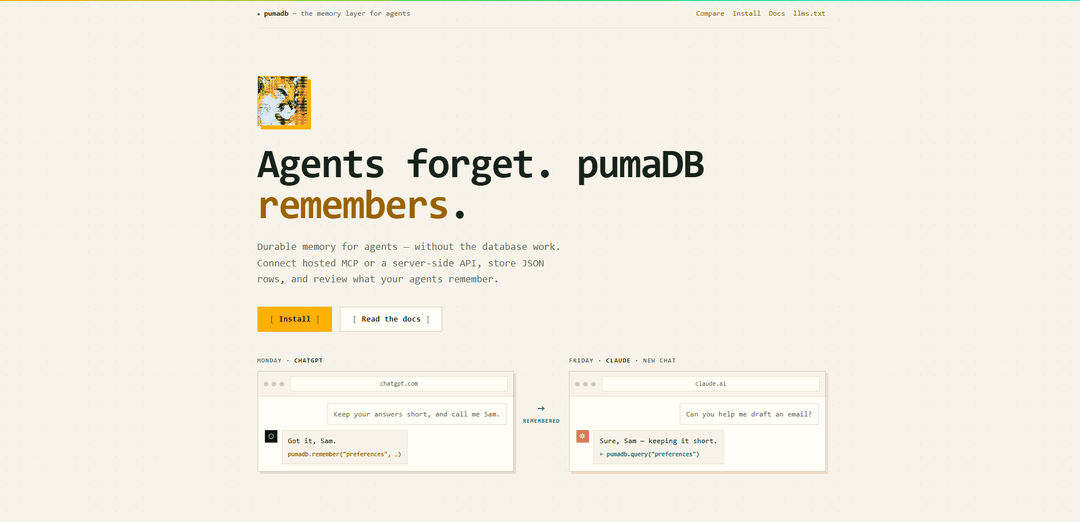
pumaDB is a durable, lightweight memory layer for AI agents that stores small JSON records via hosted MCP or a server-side REST API, with reviewable history, limits, and safety-focused “remember” tooling.
https://pumadb.ai/?ref=producthunt
Product Information
Updated:Jul 8, 2026
What is pumaDB
pumaDB is a “memory layer for agents” designed to help AI assistants persist useful context across sessions—without requiring you to build and operate a full database project. It lets agents or backend services store and retrieve small, durable JSON rows (e.g., user preferences, project conventions, research clippings, task state, and reusable instructions) so future conversations and tool calls can pick up where they left off. pumaDB emphasizes explicit, compact, and reviewable memory so teams can see what an agent remembers and keep it under control.
Key Features of pumaDB
pumaDB is a lightweight, durable memory layer for AI agents and small server-side apps that lets you store and query small JSON “rows” without running a database project. It offers two access surfaces—hosted MCP for agent clients and a REST API for trusted backends—plus a simple schema for common agent memory types (preferences, conventions, notes, task state, research clippings). Memory is designed to be explicit and reviewable, with scoped limits, rate limits, natural-language edits to avoid duplication, and automatic version history with restore support.
Hosted MCP memory endpoint: Connect agents via a hosted MCP server (`https://api.pumadb.ai/mcp`) using Streamable HTTP, compatible with clients like ChatGPT and Claude, to write and retrieve durable memory through tool calls.
Server-side REST API: Use `https://api.pumadb.ai` from trusted backends/serverless code with bearer keys to create, query, update, and delete JSON rows via `/v1/{table}` endpoints (including update-by-row and update-by-filter operations).
Lightweight JSON row schema for agent memory: Store small, durable records such as skills markdown, project conventions, user preferences, research clippings, scratchpads, and task state—designed to make future tool calls and sessions smarter.
Reviewable memory with safety rails: Keeps memory deliberately small and controlled using table/row/storage caps and per-key rate limits, helping constrain growth and reduce runaway writes.
Version history + recovery: Every update/delete archives the previous row content; the last 10 versions are kept for 30 days and can be restored, enabling auditability and rollback.
Natural-language edits and viewer links: Supports “natural edits” (e.g., updating preferences without duplicating rows) and can generate short-lived viewer/download links for larger results or text outputs.
Use Cases of pumaDB
Customer support agent personalization: Store per-customer preferences (tone, formatting, escalation rules) and past resolution notes so support agents respond consistently across sessions.
Engineering team project memory: Persist repo conventions, architecture decisions, branch rules, and reusable workflows so coding agents stop re-discovering the same project context.
Research and analysis continuation: Save research clippings, source links, summaries, comparison notes, and follow-up questions for multi-day investigations that need continuity.
Long-running task state for operations: Track open threads, blockers, handoff notes, and pending actions for ops/IT agents coordinating work across shifts or multiple tools.
Serverless app settings and lightweight records: Use the REST API from a small backend/worker to store app settings, notes, or state as JSON rows without provisioning a traditional database.
Pros
No database project required; quick to set up for durable agent memory.
Two integration modes (hosted MCP for agents, REST for backends) cover common deployment patterns.
Built-in version history and restore improves safety and auditability.
Clear operational guardrails (limits and rate limits) help keep memory small and manageable.
Cons
Designed for small memory footprints (e.g., table/row/storage limits), so it may not fit large-scale datasets.
REST API keys must stay server-side (not usable directly from client apps), which can add backend requirements.
Rate limits may constrain high-throughput workloads or heavy read/write patterns.
How to Use pumaDB
1) Choose how you will connect to pumaDB: Pick one of two access methods: (a) Hosted MCP for agent clients (ChatGPT, Claude, Codex, or any client that supports Streamable HTTP MCP), or (b) the server-side REST API for backends/serverless/CLIs. Hosted MCP endpoint: https://api.pumadb.ai/mcp. REST API base: https://api.pumadb.ai.
2) If using Hosted MCP: connect your agent client to the pumaDB MCP server: In your MCP-capable client, add a new MCP server using Streamable HTTP transport and set the server URL to https://api.pumadb.ai/mcp. Authenticate via OAuth as prompted by your client.
3) If using REST: set up a server-side API key safely: Create and store a named puma_live_* API key in a trusted server-side environment (backend, serverless function, Worker, CLI). Do not place API keys in React bundles, static sites, mobile apps, browser code, or public repos.
4) Decide what you want pumaDB to remember (your schema): pumaDB stores small durable JSON rows. Common memory types include: skills markdown, project conventions, user preferences, research clippings, task state, and typed safe memory (resources/snippets/config examples stored as inert records for later review).
5) Create/select a table for your memory: Organize memory into tables (for example: preferences, project_conventions, task_state). Each account supports up to 20 tables, 1,000 rows per table, and 25 MB total storage.
6) Write memory (Hosted MCP recommended: use the consolidated remember tool): From your agent client connected via MCP, call the pumaDB remember tool to store a JSON row (for example, saving user preferences like “keep answers short”). The remember tool stores common memory types with inert safety metadata.
7) Write memory (REST alternative: POST a JSON row to /v1/{table}): From server-side code, send an authenticated request to create a row in a table using POST /v1/{table} at https://api.pumadb.ai. Use a bearer API key. Store JSON fields that your app/agent will query later.
8) Read/query memory when you need it: Use MCP query-style tool calls in your agent client (for example, querying the preferences table before responding), or use REST GET /v1/{table} from server-side code. Small queries can return inline JSON; larger results can return short-lived viewer/download links (or request includeLink: true).
9) Update memory explicitly when facts change: Use REST endpoints to update stored rows: POST /v1/{table}/update_row for targeted updates, or POST /v1/{table}/update_where for filtered updates. pumaDB supports “natural edits” so plain-language changes can be applied as filtered updates without creating duplicates; bulk updates require explicit opt-in.
10) Delete memory you no longer want stored: Use DELETE /v1/{table} to remove rows from a table (server-side). Deletions and updates archive prior row content automatically.
11) Recover from mistakes using version history: pumaDB keeps automatic version history for every update and delete: the last 10 versions are retained for 30 days and can be restored with a single call.
12) Stay within limits and rate limits: Plan usage around account limits (20 tables, 1,000 rows/table, 25 MB total). Observe rate limits: 30 writes/minute per key and 60 reads/minute per key.
pumaDB FAQs
pumaDB is a durable memory layer for AI agents that lets you store small, reviewable JSON records (rows) so agents can remember facts, preferences, notes, state, and other context across sessions—without running your own database project.
pumaDB Video
Popular Articles

Vosko AI: Localize and Dub Videos for Global Audiences
Oct 15, 2026

Atoms: A Multi-Agent AI Platform That Transforms Ideas into Launch-Ready Products
Oct 13, 2026

Nano Banana SBTI: What It Is, How It Works, and How to Use It in 2026
Apr 15, 2026

Atoms Review — The AI Product Builder Redefining Digital Creation in 2026
Apr 10, 2026
Latest AI Tools Similar to pumaDB

Gait
Gait is a collaboration tool that integrates AI-assisted code generation with version control, enabling teams to track, understand, and share AI-generated code context efficiently.

invoices.dev
invoices.dev is an automated invoicing platform that generates invoices directly from developers' Git commits, with integration capabilities for GitHub, Slack, Linear, and Google services.

EasyRFP
EasyRFP is an AI-powered edge computing toolkit that streamlines RFP (Request for Proposal) responses and enables real-time field phenotyping through deep learning technology.

Cart.ai
Cart.ai is an AI-powered service platform that provides comprehensive business automation solutions including coding, customer relations management, video editing, e-commerce setup, and custom AI development with 24/7 support.
Popular AI Tools Like pumaDB

GitHub Copilot Chat
GitHub Copilot Chat is an AI-powered coding assistant that provides natural language interactions, real-time code suggestions, and contextual support directly within supported IDEs and GitHub.com.

CopilotForXcode
CopilotForXcode is an Xcode Source Editor Extension that integrates GitHub Copilot, Codeium, and ChatGPT to provide AI-powered code suggestions, chat assistance, and prompt-to-code functionality within Xcode.

BrowserAI
BrowserAI is an open-source library that enables running local Large Language Models (LLMs) directly in web browsers with WebGPU acceleration, offering privacy-focused AI capabilities without requiring server infrastructure.

OpenAI Codex CLI
OpenAI Codex CLI is a lightweight, open-source coding agent that runs in your terminal, enabling developers to translate natural language into code execution while providing ChatGPT-level reasoning with the ability to run code, manipulate files, and iterate under version control.