
Phasr
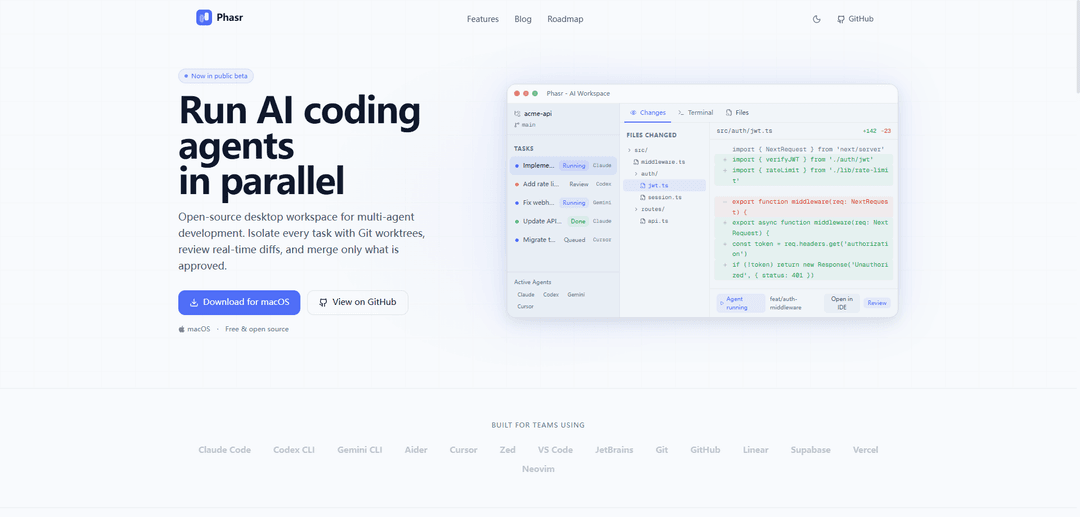
Phasr is a free, open-source desktop workspace that orchestrates multiple CLI AI coding agents in parallel using Git worktree isolation, real-time diffs, and review-first merges with IDE deep links.
https://phasr.sh/?ref=producthunt
Product Information
Updated:Jun 8, 2026
What is Phasr
Phasr is an open-source AI agent workspace designed for multi-agent software development. It lets individuals and teams run several coding agents at the same time (e.g., Claude Code, Codex CLI, Gemini CLI, Aider, Cursor Agent) while keeping each task isolated and easy to review. Available as a macOS desktop app (public beta) and released under the MIT license, Phasr focuses on controlled, human-in-the-loop workflows: you can see what each agent is doing, inspect the exact code changes it produced, and merge only what you approve.
Key Features of Phasr
Phasr is a free, open-source macOS desktop workspace for orchestrating multiple AI coding agents in parallel while keeping humans in control. It is agent-agnostic (works with any terminal-based agent like Claude Code, Codex CLI, Gemini CLI, Aider, Cursor Agent), isolates each task using Git worktrees to avoid file collisions, and provides review-first workflows with real-time diffs and controlled merges into the main branch. It also supports one-click deep links to common IDEs/editors (VS Code, JetBrains, Cursor, etc.) so teams can review and edit agent output in their preferred environment without vendor lock-in.
Parallel agent execution: Run many coding agents simultaneously across independent tasks with visible status/progress tracking, enabling faster throughput than a single-agent workflow.
Universal CLI compatibility (agent-agnostic): Works with any AI coding agent that can run in a terminal—no proprietary protocols or forced model/provider choices—supporting mixed-agent stacks (Claude, Codex, Gemini, Aider, Cursor, etc.).
Git worktree isolation per task: Automatically puts each agent in its own Git worktree so changes remain isolated, preventing working-directory conflicts and simplifying clean merges back to main.
Review-first code change visibility: Provides per-agent diffs, file-level change summaries, and an approval/reject workflow so humans can validate what each agent changed before merging.
Editor/IDE deep linking: Open any agent’s worktree directly in your preferred editor (e.g., VS Code, JetBrains, Cursor) for quick inspection, edits, and conventional code review.
Open-source, no lock-in: MIT-licensed and designed to avoid vendor lock-in, letting teams adopt it as an orchestration layer without committing to a single ecosystem.
Use Cases of Phasr
Engineering teams shipping multiple features in parallel: Assign separate agents to features/bugs/docs simultaneously (e.g., auth middleware, rate limiting, webhook retries), then review and merge only approved changes.
Startup teams optimizing for speed with limited staff: Use parallel agents to cover backend, frontend, and documentation tasks at once while maintaining control via diff-based review and isolated branches.
Large codebase maintenance and refactoring: Run multiple agents on scoped refactors or dependency upgrades in isolated worktrees to reduce merge conflicts and keep changes auditable.
Platform/DevOps automation work: Delegate agents to infrastructure code updates (CI tweaks, runtime migrations, config changes) in separate worktrees to minimize risk and simplify rollback/merge decisions.
Education and code review training: Instructors or learners can compare agent approaches side-by-side, inspect diffs, and practice review-first workflows without polluting the main branch.
Pros
Agent-agnostic design enables mixing best-in-class models/tools without vendor lock-in.
Git worktree isolation reduces conflicts and makes parallel development safer and cleaner.
Review-first diffs and controlled merges keep humans in charge of what lands in main.
Open-source (MIT) and free, which can ease adoption and customization.
Cons
macOS-only desktop availability (per provided source) may limit adoption in Windows/Linux environments.
Requires Git/worktree familiarity and a review discipline to get full value from the workflow.
Quality still depends on the underlying agents/models and their CLI tooling, which can vary widely.
How to Use Phasr
1) Install Phasr (macOS): Download the macOS DMG from the Phasr releases page (linked from the official site) and install the app. Phasr is free and open-source (MIT).
2) Prepare a Git repository: Open or clone the codebase you want to work on. Phasr’s isolation model is based on Git worktrees, so the project should be a Git repo with a main branch (or equivalent).
3) Open the repository in Phasr: Launch Phasr and open your project workspace so Phasr can manage tasks, agents, and worktrees for that repo.
4) Create parallel tasks: In the Tasks area, add multiple independent tasks (e.g., “Implement auth middleware”, “Add rate limiting”, “Fix webhook retry logic”, “Update API docs”). Each task is intended to run in parallel without stepping on each other.
5) Choose an agent per task (any CLI agent): Assign a CLI-based coding agent to each task. Phasr is agent-agnostic: if it runs in a terminal, it runs in Phasr (examples listed: Claude Code, Codex CLI, Gemini CLI, Aider, Cursor Agent, etc.).
6) Start agents in parallel: Run multiple agents at the same time. Phasr shows live status/progress per task (e.g., queued/running/done and progress percentages) so you can track work across agents.
7) Let Phasr isolate changes with Git worktrees: As each agent starts, Phasr creates an isolated Git worktree/branch for that task (e.g., feat/auth-middleware, feat/rate-limit). This prevents file collisions, shared working-directory conflicts, and forced merges.
8) Monitor what each agent changes: Use the per-agent “Files Changed” and diff views to see exactly what changed (file-level diffs, line additions/deletions, and summaries) before anything touches your main branch.
9) Open the agent’s worktree in your preferred editor: Use Phasr’s one-click deep links to open the task/worktree in VS Code, Cursor, JetBrains, Xcode, or another editor. Review and edit the agent-generated code in your native environment.
10) Review-first workflow: approve, reject, or request changes: For each task, decide whether to approve the changes, reject them, or request modifications. Phasr is designed to keep humans in control with an approval workflow before merging.
11) Merge only approved work into main: After review, merge the approved task branches/worktrees back into your main branch using Phasr’s controlled merge path (keeping unapproved work isolated).
12) Repeat and scale up: Continue adding tasks and running more agents concurrently. Phasr is built to orchestrate dozens of parallel agents with isolation and review-first merge control.
Phasr FAQs
Phasr is an open-source desktop workspace for running AI coding agents in parallel, isolating each task with Git worktrees, showing real-time diffs, and allowing controlled, review-first merges.
Phasr Video
Popular Articles

Vosko AI: Localize and Dub Videos for Global Audiences
Oct 15, 2026

Atoms: A Multi-Agent AI Platform That Transforms Ideas into Launch-Ready Products
Oct 13, 2026

Nano Banana SBTI: What It Is, How It Works, and How to Use It in 2026
Apr 15, 2026

Atoms Review — The AI Product Builder Redefining Digital Creation in 2026
Apr 10, 2026
Latest AI Tools Similar to Phasr

Gait
Gait is a collaboration tool that integrates AI-assisted code generation with version control, enabling teams to track, understand, and share AI-generated code context efficiently.

invoices.dev
invoices.dev is an automated invoicing platform that generates invoices directly from developers' Git commits, with integration capabilities for GitHub, Slack, Linear, and Google services.

EasyRFP
EasyRFP is an AI-powered edge computing toolkit that streamlines RFP (Request for Proposal) responses and enables real-time field phenotyping through deep learning technology.

Cart.ai
Cart.ai is an AI-powered service platform that provides comprehensive business automation solutions including coding, customer relations management, video editing, e-commerce setup, and custom AI development with 24/7 support.
Popular AI Tools Like Phasr

GitHub Copilot Chat
GitHub Copilot Chat is an AI-powered coding assistant that provides natural language interactions, real-time code suggestions, and contextual support directly within supported IDEs and GitHub.com.

CopilotForXcode
CopilotForXcode is an Xcode Source Editor Extension that integrates GitHub Copilot, Codeium, and ChatGPT to provide AI-powered code suggestions, chat assistance, and prompt-to-code functionality within Xcode.

BrowserAI
BrowserAI is an open-source library that enables running local Large Language Models (LLMs) directly in web browsers with WebGPU acceleration, offering privacy-focused AI capabilities without requiring server infrastructure.

OpenAI Codex CLI
OpenAI Codex CLI is a lightweight, open-source coding agent that runs in your terminal, enabling developers to translate natural language into code execution while providing ChatGPT-level reasoning with the ability to run code, manipulate files, and iterate under version control.