NexaSDK for Mobile
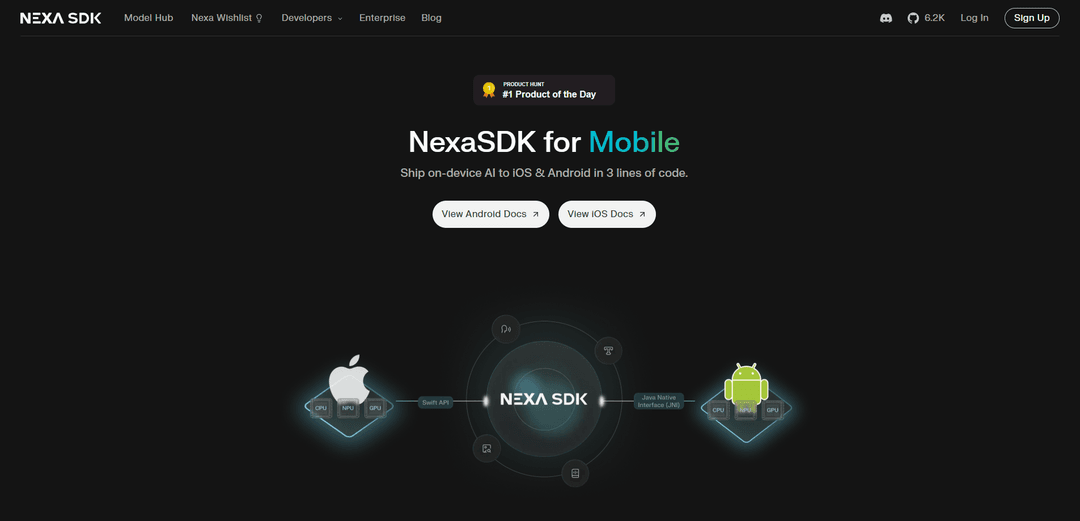
NexaSDK for Mobile is a comprehensive mobile development toolkit that enables on-device AI inference across multiple model types with hardware acceleration support for Android and iOS platforms.
https://sdk.nexa.ai/mobile?ref=producthunt
Product Information
Updated:Jan 8, 2026
What is NexaSDK for Mobile
NexaSDK for Mobile is an on-device AI inference framework designed to help developers easily integrate and run state-of-the-art AI models on mobile devices. It provides a unified SDK that supports various AI capabilities including Large Language Models (LLMs), Vision Language Models (VLMs), speech recognition, computer vision, and more. The SDK is specifically optimized for mobile platforms with support for both Android (via Kotlin/Java APIs) and iOS (via Swift), allowing developers to leverage AI capabilities while maintaining privacy and performance by running models locally on device.
Key Features of NexaSDK for Mobile
NexaSDK for Mobile is a comprehensive on-device AI inference framework that enables developers to run various AI models (LLMs, VLMs, ASR, Computer Vision) directly on mobile devices with support for NPU, GPU, and CPU acceleration. It provides cross-platform support for both Android and iOS, offering optimized performance, energy efficiency, and easy integration through native APIs while maintaining data privacy through local processing.
Multi-Model Support: Supports various AI model types including LLMs, VLMs, Embeddings, ASR, Reranker, and Computer Vision models with multiple format compatibility (GGUF, MLX, .nexa)
Hardware Acceleration: Optimized performance across different hardware including CPU, GPU, and NPU (specifically Qualcomm Hexagon NPU), delivering 2X faster performance and 9X better energy efficiency
Easy Integration: Simple implementation through native APIs (Kotlin/Java for Android, Swift for iOS) with builder pattern and straightforward deployment process
Cross-Platform Compatibility: Unified architecture supporting both Android and iOS platforms with comprehensive documentation and demo applications
Use Cases of NexaSDK for Mobile
On-device LLM Copilot: Build personal AI assistants for notes, documents, and messaging applications that can process data locally without internet connectivity
Multimodal Understanding: Develop applications that can understand and process screen content, camera input, and files offline for enhanced user interaction
Speech Recognition Systems: Implement private, low-latency voice features in applications without concerns about audio streaming or compliance issues
Automotive AI Assistants: Create real-time in-car assistants with vision-language capabilities optimized for automotive hardware
Pros
Enhanced privacy through local processing
Optimized performance with hardware acceleration
Comprehensive model support and format compatibility
Easy integration with native development workflows
Cons
Requires sufficient device hardware capabilities
Model size limitations based on device storage
May have higher initial resource consumption
How to Use NexaSDK for Mobile
Install NexaSDK: Download and install the NexaSDK package for your target platform (Android or iOS). For Android, follow the Android SDK Doc installation instructions.
Download Model: Download your desired AI model (e.g. OmniNeural-4B, Ministral-3-3B, etc.) and place it in your app's assets folder. For Android, the path would be like /data/data/com.nexa.demo/files/models/
Initialize SDK: Initialize the NexaSDK in your application code using the provided Kotlin/Java API with builder pattern for Android or Swift API for iOS
Configure Hardware Acceleration: Set up hardware acceleration by specifying whether to use NPU (Neural Processing Unit), GPU, or CPU. NexaSDK supports Qualcomm Hexagon NPU for Android and Apple Neural Engine for iOS
Implement Model Features: Integrate the desired AI capabilities into your app - LLMs for text generation, VLMs for vision tasks, ASR for speech recognition, etc. using the SDK's simple API
Optimize Performance: Use model quantization techniques provided by NexaSDK to reduce model size and improve performance while maintaining accuracy
Test and Debug: Test the implementation using the provided Demo Apps and verify model outputs. Join the Discord community for support and troubleshooting
NexaSDK for Mobile FAQs
NexaSDK is a developer toolkit that allows running AI models locally on mobile devices (Android & iOS), supporting multiple model types including LLMs, VLMs, ASR, and Computer Vision models with hardware acceleration on NPU, GPU, and CPU.
NexaSDK for Mobile Video
Popular Articles

Vosko AI: Localize and Dub Videos for Global Audiences
Oct 15, 2026

Atoms: A Multi-Agent AI Platform That Transforms Ideas into Launch-Ready Products
Oct 13, 2026

Nano Banana SBTI: What It Is, How It Works, and How to Use It in 2026
Apr 15, 2026

Atoms Review — The AI Product Builder Redefining Digital Creation in 2026
Apr 10, 2026
Latest AI Tools Similar to NexaSDK for Mobile

Gait
Gait is a collaboration tool that integrates AI-assisted code generation with version control, enabling teams to track, understand, and share AI-generated code context efficiently.

invoices.dev
invoices.dev is an automated invoicing platform that generates invoices directly from developers' Git commits, with integration capabilities for GitHub, Slack, Linear, and Google services.

EasyRFP
EasyRFP is an AI-powered edge computing toolkit that streamlines RFP (Request for Proposal) responses and enables real-time field phenotyping through deep learning technology.

Cart.ai
Cart.ai is an AI-powered service platform that provides comprehensive business automation solutions including coding, customer relations management, video editing, e-commerce setup, and custom AI development with 24/7 support.
Popular AI Tools Like NexaSDK for Mobile

GitHub Copilot Chat
GitHub Copilot Chat is an AI-powered coding assistant that provides natural language interactions, real-time code suggestions, and contextual support directly within supported IDEs and GitHub.com.

CopilotForXcode
CopilotForXcode is an Xcode Source Editor Extension that integrates GitHub Copilot, Codeium, and ChatGPT to provide AI-powered code suggestions, chat assistance, and prompt-to-code functionality within Xcode.

BrowserAI
BrowserAI is an open-source library that enables running local Large Language Models (LLMs) directly in web browsers with WebGPU acceleration, offering privacy-focused AI capabilities without requiring server infrastructure.

OpenAI Codex CLI
OpenAI Codex CLI is a lightweight, open-source coding agent that runs in your terminal, enabling developers to translate natural language into code execution while providing ChatGPT-level reasoning with the ability to run code, manipulate files, and iterate under version control.