
Dune
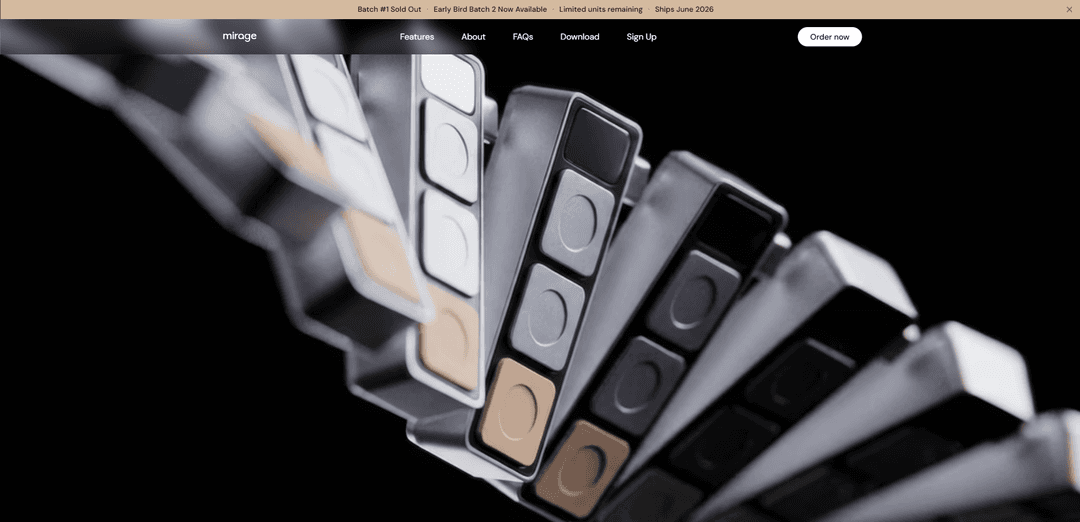
Dune is a three-key, context-aware macOS keypad that dynamically remaps per foreground app to automate developer workflows and meetings, offering one-press actions like join-call, mic/camera toggles, and triggering AI agents/scripts.
https://www.projectmirage.ai/?ref=producthunt
Product Information
Updated:Jun 8, 2026
What is Dune
Dune (by Project Mirage) is a compact, premium hardware keypad designed to reduce everyday friction on a Mac by putting the most relevant actions on three physical keys that change based on what you’re doing. Built for people who constantly switch between dev tools (e.g., VS Code, GitHub, Claude) and back-to-back calls (Zoom, Google Meet, Teams), it pairs a simple physical interface with software automation so common tasks—meeting controls, shortcuts, and agent-driven routines—are always one press away.
Key Features of Dune
Dune is a compact, three-key, context-aware keypad for macOS that dynamically remaps its buttons based on the foreground app to surface the most relevant actions at the moment you need them. It’s designed to reduce repetitive clicks and shortcut memorization by providing on-screen guidance for what each key does, while also supporting one-press meeting workflows (join links, mic/camera toggles, bring meeting window forward) and configurable automations such as triggering scripts, URLs, system commands, and AI agents (including integrations like Openclaw and “Build with Claude”/community scripts).
Context-aware key remapping: Detects the active macOS app in the foreground and automatically changes what its three keys do, so the most-used actions for each tool are always one press away.
Calendar-aware meeting launcher: Syncs with your calendar and surfaces the upcoming meeting link shortly before a call; a single key can join directly without hunting for the link.
Physical meeting controls: Provides one-press mic and camera toggles and can bring your active meeting window to the front, reducing friction during Zoom/Teams/Google Meet calls.
Configurable automations: Assign each key to trigger shortcuts, scripts, URLs, or system commands—tailored per app—so repetitive workflows can be executed instantly.
AI agent and workflow integration: Can invoke AI agents and custom routines (e.g., via Openclaw and community/marketplace scripts), enabling actions like drafting emails, surfacing notes, or running personalized follow-ups.
On-screen shortcut guidance: Displays what each key will do on screen, reducing the need to memorize complex keyboard shortcuts across different apps.
Use Cases of Dune
Software development workflows: In tools like VS Code and GitHub, map keys to frequent actions (run tests, open PRs, trigger scripts, navigate issues) that automatically change per app to keep flow state.
Back-to-back meeting operations: For teams in constant calls, use one-press join, mic/camera toggles, and “bring meeting to front” to reduce fumbling and context switching.
IT and system maintenance: Run routine maintenance scripts (e.g., clearing caches, launching diagnostics, toggling system settings) with a single keypress instead of manual multi-step procedures.
Customer support and inbox triage: Trigger an email assistant/agent workflow to sort inboxes, draft replies, or open relevant tools instantly—especially useful for high-volume support roles.
Sales and client success follow-ups: Automate post-call actions like generating follow-up emails, pulling prior notes, and opening CRM pages with context-aware key mappings.
Creator and knowledge-worker productivity: Assign per-app macros for writing, research, and AI tools (e.g., open prompts, summarize notes, launch frequently used links) without remembering different shortcuts.
Pros
Reduces context switching by bringing the right action to a single press based on the active app.
Strong meeting convenience features (calendar join + mic/camera controls) for daily real-world use.
Highly configurable: supports scripts, commands, URLs, and AI-agent workflows, enabling deep personalization.
On-screen guidance lowers the learning curve vs. traditional macro pads that require memorization.
Cons
macOS-focused (positioned as a keypad for Mac), which may limit usefulness for Windows/Linux-first setups.
Only three physical keys, which may feel limiting for users who want dense macro layouts.
Some advanced value depends on setting up scripts/agents/marketplace workflows, which can add configuration overhead.
How to Use Dune
1) Plug in Dune and open the Dune app on your Mac: Connect the 3-key Dune keypad to your Mac, then launch the Dune software so it can detect your foreground app and show on-screen key guidance.
2) Verify context-aware key mapping is working: Switch between apps (e.g., browser, editor, meeting app). Dune should automatically update what its three keys do based on the active (foreground) app, with no manual setup needed, and display each key’s current function on your screen.
3) Use Dune for meetings: join with one tap: Enable calendar syncing in Dune. Two minutes before a scheduled call, Dune surfaces the meeting link; press the assigned key to join without using your trackpad.
4) Use Dune for meetings: send a “running late” email: When Dune surfaces an upcoming meeting, press the key mapped to send a “running late” email to attendees—without moving your cursor.
5) Use Dune for meetings: mic/camera toggles + bring meeting to front: During a meeting, use Key 1 as mic toggle and Key 2 as camera toggle. Use the mapped key to snap the active meeting window to the front instantly.
6) Trigger shortcut sequences (macros) with a single tap: Assign a multi-step shortcut sequence to any key so one press runs the full sequence. Dune ships with commonly used shortcuts enabled by default for apps like Notion, Figma, and Excel.
7) Open frequently used links instantly: Configure a key to open a specific URL (docs, dashboards, tickets, etc.) so you can launch it the moment you need it.
8) Run custom scripts to automate daily workflows: Create or install scripts and bind them to keys to automate repetitive tasks you do every day (e.g., project setup steps, file operations, or app-specific routines).
9) Configure all three keys to fit your workflow: In the Dune app, customize what each key does per app context (meeting apps, dev tools, productivity tools). Dune will remap keys in real time as you switch apps.
10) Trigger AI agents (including meeting assistants) from Dune: Map keys to actions like surfacing notes from previous conversations, sending personalized follow-ups after calls, or triggering your meeting assistant (e.g., Granola) and other custom agents.
11) (Optional) Use Openclaw to invoke agents you’ve built: If you use Openclaw, connect it so Dune can trigger your Openclaw agents (e.g., an Email Assistant that sorts inbox and drafts responses). Note: Openclaw use cases are examples and are not pre-installed in Dune.
12) Browse and install community workflows from the Dune Marketplace: Open the Dune Marketplace to find community-built scripts/workflows, install them in seconds, and assign them to your keys across any app.
Dune FAQs
Dune is a context-aware, three-key keypad for macOS designed to automate workflows and simplify actions in meetings and developer tools. Its keys can change behavior based on what you’re doing and are fully configurable.
Dune Video
Popular Articles

Vosko AI: Localize and Dub Videos for Global Audiences
Oct 15, 2026

Atoms: A Multi-Agent AI Platform That Transforms Ideas into Launch-Ready Products
Oct 13, 2026

Nano Banana SBTI: What It Is, How It Works, and How to Use It in 2026
Apr 15, 2026

Atoms Review — The AI Product Builder Redefining Digital Creation in 2026
Apr 10, 2026
Latest AI Tools Similar to Dune

GPT Engineer
GPT Engineer is an AI-powered software development tool that enables anyone to build web applications by chatting with an AI engineer.

Lucky Robots
Lucky Robots is a premier virtual training boot camp for robots, offering a simulation platform to rapidly iterate, train, and test robot models using cutting-edge technologies.
Popular AI Tools Like Dune
GPT Engineer
GPT Engineer is an AI-powered software development tool that enables anyone to build web applications by chatting with an AI engineer.
IBM
IBM (International Business Machines Corporation) is a leading multinational technology company that pioneered the computer industry and continues to innovate in areas like AI, cloud computing, consulting, and enterprise solutions.