
Co-Desk
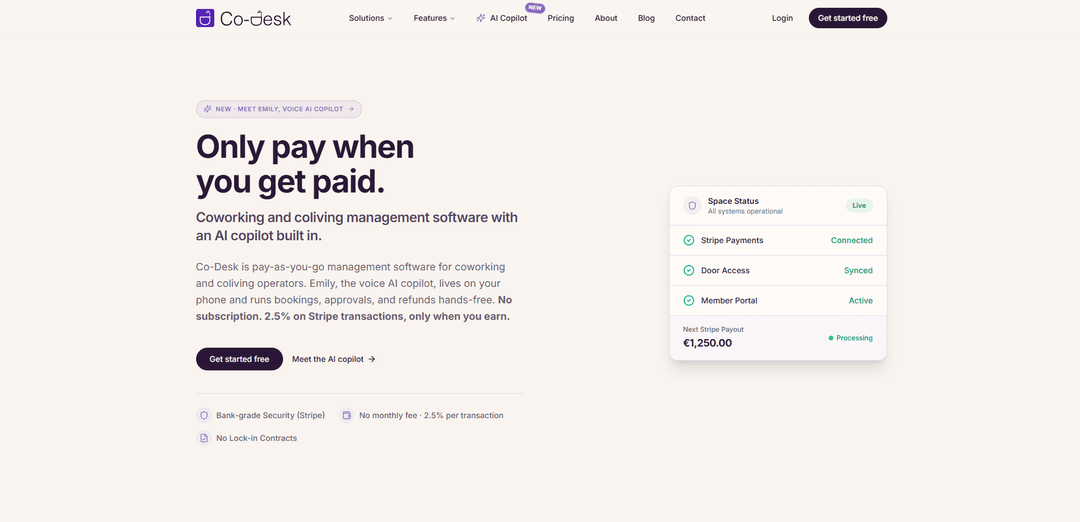
Co-Desk is a pay-as-you-go coworking and coliving management platform with a built-in voice AI copilot, offering bookings, billing, access integrations, and analytics with no subscription—charging 2.5% per Stripe transaction only when you earn.
https://www.co-desk.eu/?ref=producthunt
Product Information
Updated:Jun 8, 2026
What is Co-Desk
Co-Desk is coworking and coliving management software designed to help operators run day-to-day space operations in one place. It combines real-time bookings for desks, meeting rooms, private offices, and bedrooms with automated billing, subscriptions, and reporting, and adds “Emily,” a phone-based voice AI copilot for hands-free operational tasks. Co-Desk is built on Stripe Connect, so payments settle directly into the operator’s own bank account, and the product is priced with no monthly fee—operators pay a 2.5% fee only on successful Stripe transactions.
Key Features of Co-Desk
Co-Desk is pay-as-you-go coworking and coliving management software designed for operators to run bookings, billing, subscriptions, and day-to-day space operations without a monthly subscription. It includes real-time scheduling for desks/rooms/beds, self-service member onboarding, multi-location support with a central identity for cross-location access, reporting and AI analytics for revenue and occupancy, and integrations via an open API and tools like Stripe, Slack, Zapier, and Google Calendar. Payments are built on Stripe Connect so payouts go directly to the operator’s bank, and Co-Desk adds an “Emily” voice AI copilot for hands-free workflows like bookings, approvals, and refunds with tap-to-confirm safety.
Pay-as-you-go pricing (no subscription): No monthly fee; Co-Desk charges 2.5% per Stripe transaction only when you earn, with unlimited locations, resources, and members included.
Real-time bookings & scheduling engine: Manage availability and reservations for desks, meeting rooms, private offices, and coliving beds with live timelines and instant booking visibility.
Stripe Connect billing & recurring invoices: Automates subscriptions, invoicing, and payment collection through Stripe Connect, with payouts settling directly to the operator’s bank account.
Multi-location operations with central identity: Supports multi-site portfolios using a unified member profile and cross-location login/access to reduce friction for members moving between spaces.
AI copilot + analytics & reporting: Emily (voice AI copilot) helps run bookings, approvals, and refunds with scope-locked, audited workflows; dashboards provide revenue, occupancy, and growth insights.
Open API and integrations: Extend workflows through integrations and automation (e.g., Slack, Zapier, Google Calendar) plus API/webhooks for custom tooling.
Use Cases of Co-Desk
Independent coworking space operations: Launch quickly (setup to go-live in ~30 minutes) with a shareable booking link, self-onboarding members, automated billing, and real-time desk/room scheduling.
Coliving property and resident management: Manage coliving leases/recurring rent, resident records, and bed inventory while automating payments and occupancy reporting.
Multi-location coworking portfolios: Run multiple sites under one system with central identity and consolidated analytics, enabling members to use one login across locations.
Meeting rooms and shared resource monetization: Offer hourly/daily booking for meeting rooms, studios, and shared amenities with dynamic pricing options and automated payment capture.
Operator on-the-go administration: Use the voice AI copilot to check arrivals, handle approvals, and initiate refunds from a phone—useful for managers who aren’t desk-bound.
Pros
No monthly subscription; costs scale with revenue (2.5% per Stripe transaction).
Stripe Connect model pays operators directly and improves transparency/security (Co-Desk doesn’t touch funds).
Fast setup and self-service onboarding reduce operational overhead.
Strong operational breadth: bookings, billing/subscriptions, multi-location identity, analytics, and integrations.
Cons
Primary pay-as-you-go plan depends on Stripe; non-Stripe setups require a custom plan.
Transaction-based pricing may become expensive at high payment volume compared to fixed-fee alternatives.
Some advanced needs (custom SLAs, dedicated onboarding/account management) are only available via the custom plan.
How to Use Co-Desk
1) Register and start your trial: Go to https://co-desk.app/register (e.g., the Pay-as-you-go or trial entry) and create your Co-Desk account to access the operator dashboard.
2) Create and configure your location(s): In the initial setup, add your location(s) and define the currency per location (note: changing currency later affects new invoices only, not existing ones).
3) Set up your inventory (spaces/resources): Configure what members can book: desks, meeting rooms, offices, or beds (for coliving). Define availability and how each resource is scheduled (hourly/daily/weekly).
4) Configure pricing and products: Set pricing for memberships, day passes, and bookable resources. Ensure each offering matches your intended billing cadence (one-off vs recurring).
5) Connect Stripe (recommended): Connect your Stripe account (via Stripe Connect) so members can pay online and payouts settle directly into your bank account. Co-Desk deducts its platform fee automatically from Stripe transactions (e.g., 2.5% per transaction on Pay-as-you-go).
6) Configure billing and subscriptions: Enable automated billing for recurring invoices and subscriptions through Stripe Connect. Review invoice statuses (paid/pending) and confirm your billing rules align with your memberships and resource bookings.
7) Invite your staff and set roles: Go to Settings → Users to invite staff (e.g., managers, front desk). Assign appropriate roles/permissions so each team member can manage bookings, billing, and member support as needed.
8) Set up amenities, branding, and company settings: After initial setup, configure amenities and apply your branding and company settings so the member experience matches your space.
9) Customize the member portal navigation: Go to Settings → Menu to control what appears in the member portal navigation. Reorder or hide sections to match your operating model.
10) Enable self-service member onboarding: Turn on member self-registration so members can create accounts, book resources, and manage their own details—reducing admin work from day one.
11) Share your booking link and go live: Publish/share your booking link so members can self-onboard, view real-time availability, book desks/rooms/beds, and pay automatically. Co-Desk is designed to be live quickly once inventory and Stripe are configured.
12) Manage bookings with the real-time scheduling engine: Use the visual timeline/scheduling view to monitor availability and bookings in real time across desks, rooms, and shared resources, and to handle changes as they come in.
13) Use Emily (voice AI copilot) for hands-free operations (optional): Use Emily on your phone to ask for operational updates (e.g., today’s arrivals, invoices, tickets) and initiate actions like bookings, approvals, and refunds. Actions require a tap-to-confirm for safety.
14) Track performance with analytics and reports: Review real-time revenue and occupancy reporting to understand trends across locations (e.g., revenue, occupancy rates, member growth) and make operational decisions.
15) Extend Co-Desk with integrations and the API: If needed, connect tools via native integrations and automation (e.g., Slack, Zapier, Google Calendar, Xero) and use webhooks/API access to integrate Co-Desk into your broader software stack.
16) Get support or discuss custom setups: For help, contact Co-Desk support via email ([email protected]). If you can’t use Stripe or need fixed-fee/enterprise terms, use the Custom plan contact flow at https://co-desk.eu/contact?reason=custom-plan.
Co-Desk FAQs
Co-Desk is coworking and coliving management software for operators, with features for bookings, billing, subscriptions, reporting, and member onboarding. It also includes an AI copilot (Emily) for voice-assisted operations.
Co-Desk Video
Popular Articles

Vosko AI: Localize and Dub Videos for Global Audiences
Oct 15, 2026

Atoms: A Multi-Agent AI Platform That Transforms Ideas into Launch-Ready Products
Oct 13, 2026

Nano Banana SBTI: What It Is, How It Works, and How to Use It in 2026
Apr 15, 2026

Atoms Review — The AI Product Builder Redefining Digital Creation in 2026
Apr 10, 2026
Latest AI Tools Similar to Co-Desk

Ticknotes
Ticknotes is an AI-powered meeting assistant that automatically records, transcribes, and generates personalized meeting summaries, action items, and key insights from audio, video, and text content.

Feta
Feta is an AI-powered meeting tool that helps product and engineering teams run efficient meetings by capturing discussions, automating tasks, and providing actionable insights through smart summaries and integrations.

Aimeet
Aimeet is a comprehensive AI-powered communication platform that combines real-time translation, transcription, screen sharing, and unlimited meeting capabilities for effective virtual collaboration.

MinutesLink
MinutesLink is an advanced AI-powered note-taking assistant that automatically records, transcribes, summarizes and organizes virtual meetings while building personalized digital avatars from meeting data.
Popular AI Tools Like Co-Desk

Second Brain for AI
Second Brain for AI is a self-hosted, MCP-compatible persistent memory layer on Cloudflare that lets Claude, ChatGPT, Cursor, and other AI clients store and semantically recall shared context across sessions.

Slack
Slack is an AI-powered work platform that brings team communication, channels, files, automation, and app integrations into one conversational workspace.

24me Smart Personal Assistant
24me is an award-winning smart personal assistant app that combines calendar, to-do lists, notes, and personal accounts in one unified platform to help boost productivity and time management.

Granola for iOS
Granola for iOS is an AI-powered notepad app that helps users effortlessly capture, transcribe and summarize meeting conversations through intelligent note-taking and one-tap recording capabilities.