
Mesh LLM
Mesh LLM is a peer-to-peer inference cloud that automatically pools spare GPU capacity to serve multiple LLM models with distributed computing, agent collaboration via blackboard messaging, and OpenAI-compatible APIs.
https://www.anarchai.org/?ref=producthunt
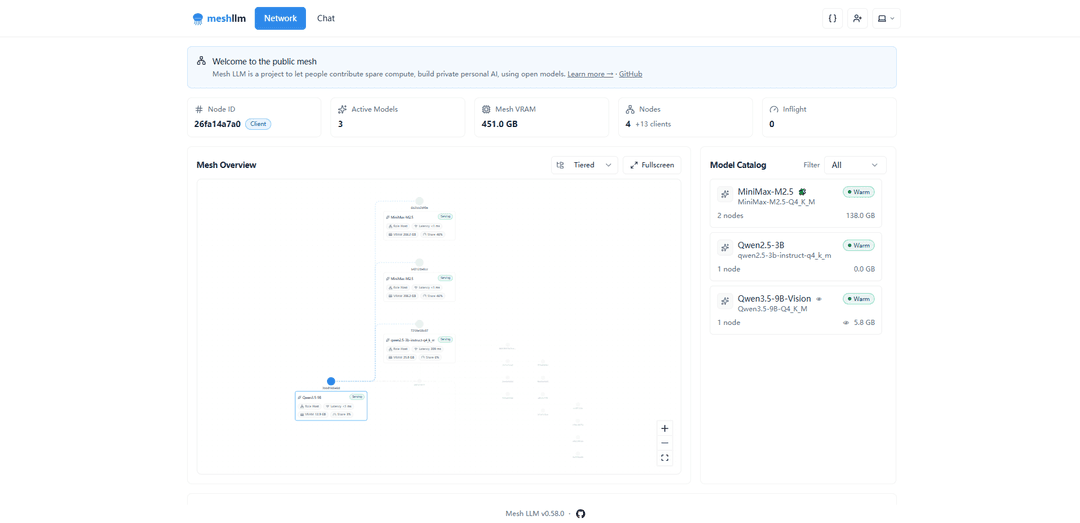
Product Information
Updated:Apr 10, 2026
What is Mesh LLM
Mesh LLM is an open-source platform developed by AnarchAI that transforms spare computing capacity into an auto-configured peer-to-peer inference cloud for running large language models. Launched in 2026 as part of the Goose project, it enables users to serve multiple models simultaneously, access private models from anywhere, and share compute resources with others without manual configuration. The platform provides an OpenAI-compatible API endpoint, supports any GGUF model from HuggingFace, and includes a built-in blackboard system for agent collaboration. Models that don't fit on a single machine are automatically distributed using pipeline parallelism for dense models and expert sharding for Mixture-of-Experts (MoE) models, with zero cross-node inference traffic for MoE deployments.
Key Features of Mesh LLM
Mesh LLM is a peer-to-peer distributed inference platform that automatically pools spare GPU capacity across multiple machines to serve large language models without manual configuration. It features auto-configured mesh networking that handles model distribution through pipeline parallelism for dense models and expert sharding for MoE models, eliminating cross-node inference traffic. The platform provides an OpenAI-compatible API endpoint, supports any GGUF model from HuggingFace, and includes a decentralized 'blackboard' feature for agent collaboration via gossip protocols. Users can join public meshes with --auto, create private meshes with invite tokens, or contribute compute as host nodes while accessing models as client-only nodes without GPU requirements.
Auto-Configured P2P Mesh Networking: Automatically distributes models across nodes using pipeline parallelism for dense models and expert sharding for MoE models, with demand maps propagating via gossip protocol and standby nodes auto-promoting to serve hot or unserved models.
OpenAI-Compatible API: Exposes a standard OpenAI-compatible endpoint at localhost:9337/v1, allowing existing agent tooling and applications to work seamlessly without custom clients or code changes.
Decentralized Blackboard for Agent Collaboration: Enables agents to gossip across the mesh to share status updates, findings, and questions without a central server, available via CLI or as an MCP server with tools like blackboard_post, blackboard_search, and blackboard_feed.
Universal Model Support: Works with any GGUF model from HuggingFace, includes a curated catalog of recommended models, and provides commands to search, download, install, and manage model updates from the HuggingFace ecosystem.
Flexible Node Roles: Supports multiple node types including GPU host nodes that serve models, worker nodes for distributed inference, and client-only nodes that access the mesh API without contributing compute resources.
Public and Private Mesh Options: Allows users to join auto-configured public meshes discoverable via Nostr relays or create private invite-only meshes with token-based access control for trusted compute sharing.
Use Cases of Mesh LLM
Collaborative AI Agent Development Teams: Development teams can share GPU resources and enable their AI agents to communicate progress, share findings about code refactoring, and ask questions across the mesh using the blackboard feature, improving coordination without central infrastructure.
Community-Driven Model Hosting: Open source communities and research groups can pool spare GPU capacity to collectively host and serve large models that individual members couldn't run alone, democratizing access to powerful LLMs.
Distributed Enterprise AI Infrastructure: Organizations with GPU resources across multiple offices or data centers can create private meshes to efficiently utilize spare capacity, automatically load-balance inference requests, and serve specialized models without manual orchestration.
Multi-Agent System Coordination: AI agent frameworks like Goose and Pi can leverage the blackboard system to enable multiple agents to share status updates, coordinate tasks, and collaborate on complex workflows in a decentralized manner.
Cost-Efficient Model Experimentation: Researchers and developers can access various open models through shared mesh capacity for testing and experimentation without investing in dedicated GPU infrastructure or cloud API costs.
Large Model Distribution: Models too large for a single machine can be automatically split and distributed across multiple nodes using pipeline parallelism or expert sharding, enabling inference on models that exceed individual hardware capacity.
Pros
Zero-configuration auto-setup eliminates manual model routing and node management required by traditional self-hosted solutions
OpenAI-compatible API enables drop-in replacement for existing agent tooling without custom integration
Decentralized architecture with no central server dependency increases resilience and reduces infrastructure costs
Supports any GGUF model from HuggingFace, providing extensive model compatibility and flexibility
Cons
Spare capacity is inherently volatile, creating reliability challenges when nodes drop mid-task during agent workflows
Handling partial failures and retry behavior in growing meshes is a non-trivial coordination problem that may surface errors to clients
Public mesh blackboard posts are visible to all peers, raising privacy concerns for sensitive information
Relay connections can degrade over hours requiring health monitoring and periodic reconnects, with some nodes becoming isolated
How to Use Mesh LLM
1. Install Mesh LLM: Install mesh-llm on your machine using the installation command provided in the documentation.
2. Start a Basic Node: Run 'mesh-llm --auto' to auto-select a model for your hardware, join the mesh, and serve a local OpenAI-compatible API at http://127.0.0.1:9337/v1
3. Join with a Token (GPU Node): To join an existing mesh with GPU capabilities, run 'mesh-llm --join <token>' where <token> is your invite token.
4. Join as API-Only Client (No GPU): If you don't have GPU resources, run 'mesh-llm --client --join <token>' to join as an API-only client.
5. Select a Specific Model: Choose a model using various methods: short name (mesh-llm --model Qwen3-8B), full catalog name, HuggingFace URL, HuggingFace shorthand (org/repo/file.gguf), or local GGUF file path.
6. Browse Available Models: Run 'mesh-llm download' to browse the model catalog, or use 'mesh-llm models recommended' to list built-in recommended models.
7. Set Up Blackboard for Agent Communication: The blackboard feature is enabled by default when starting a node. Install the agent skill with 'mesh-llm blackboard install-skill' to enable agent collaboration.
8. Post Status Updates to Blackboard: Share status updates with 'mesh-llm blackboard "STATUS: working on auth refactor"' to let other agents know what you're working on.
9. Search the Blackboard: Search for specific information using 'mesh-llm blackboard --search "CUDA OOM"' or check for unanswered questions with 'mesh-llm blackboard --search "QUESTION"'.
10. Use with Existing Tools: Connect your existing agent tools (goose, pi, opencode, etc.) to the local OpenAI-compatible API endpoint at localhost:9337 to leverage the mesh.
11. Manage Models: Use model management commands: 'mesh-llm models installed' to list local models, 'mesh-llm models search qwen 8b' to search HuggingFace, 'mesh-llm models download' to download models, and 'mesh-llm models updates --check' to check for updates.
12. Create a Named Mesh: Start a custom mesh with 'mesh-llm --auto --model GLM-4.7-Flash-Q4_K_M --mesh-name "poker-night"' to create a named mesh for your team.
Mesh LLM FAQs
Mesh LLM is a decentralized network that allows users to share and access Large Language Models across multiple nodes. It provides a local OpenAI-compatible API and enables users to contribute compute resources to a shared mesh network, making open models easily accessible without requiring individual GPU capacity.
Popular Articles

Atoms: A Multi-Agent AI Platform That Transforms Ideas into Launch-Ready Products
May 22, 2026

Nano Banana SBTI: What It Is, How It Works, and How to Use It in 2026
Apr 15, 2026

Atoms Review — The AI Product Builder Redefining Digital Creation in 2026
Apr 10, 2026

Kilo Claw: How to Deploy and Use a True "Do‑It‑For‑You" AI Agent(2026 Update)
Apr 3, 2026
Latest AI Tools Similar to Mesh LLM

Gait
Gait is a collaboration tool that integrates AI-assisted code generation with version control, enabling teams to track, understand, and share AI-generated code context efficiently.

invoices.dev
invoices.dev is an automated invoicing platform that generates invoices directly from developers' Git commits, with integration capabilities for GitHub, Slack, Linear, and Google services.

EasyRFP
EasyRFP is an AI-powered edge computing toolkit that streamlines RFP (Request for Proposal) responses and enables real-time field phenotyping through deep learning technology.

Cart.ai
Cart.ai is an AI-powered service platform that provides comprehensive business automation solutions including coding, customer relations management, video editing, e-commerce setup, and custom AI development with 24/7 support.
Popular AI Tools Like Mesh LLM

GitHub Copilot Chat
GitHub Copilot Chat is an AI-powered coding assistant that provides natural language interactions, real-time code suggestions, and contextual support directly within supported IDEs and GitHub.com.

CopilotForXcode
CopilotForXcode is an Xcode Source Editor Extension that integrates GitHub Copilot, Codeium, and ChatGPT to provide AI-powered code suggestions, chat assistance, and prompt-to-code functionality within Xcode.

BrowserAI
BrowserAI is an open-source library that enables running local Large Language Models (LLMs) directly in web browsers with WebGPU acceleration, offering privacy-focused AI capabilities without requiring server infrastructure.

OpenAI Codex CLI
OpenAI Codex CLI is a lightweight, open-source coding agent that runs in your terminal, enabling developers to translate natural language into code execution while providing ChatGPT-level reasoning with the ability to run code, manipulate files, and iterate under version control.