
marpy.io
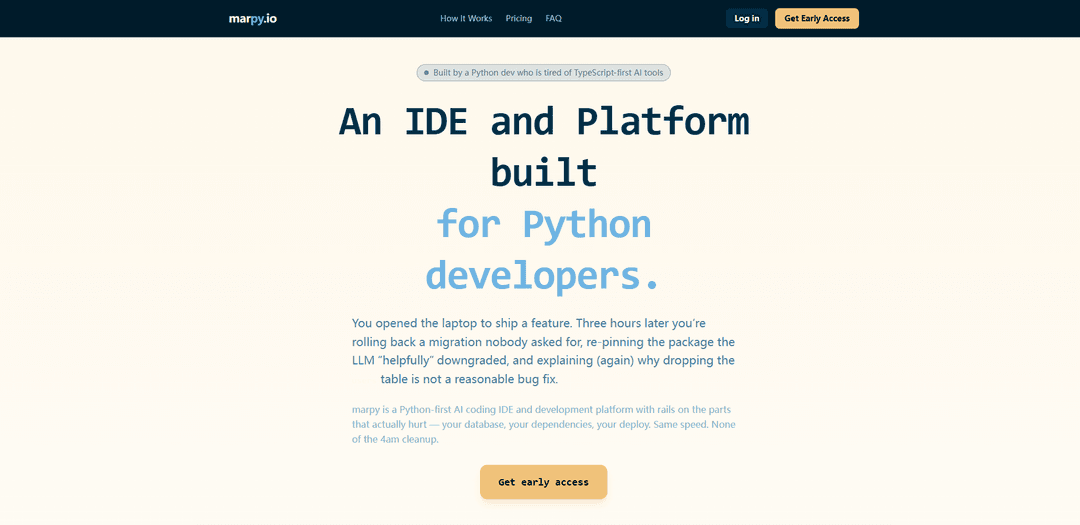
marpy.io is a Python-first, browser-based IDE with an AI assistant and built-in Kubernetes-style deployments that adds guardrails for database migrations, dependency management, secrets, and safe production releases.
https://marpy.io/?ref=producthunt
Product Information
Updated:Jun 8, 2026
What is marpy.io
marpy.io is a Python-focused AI coding IDE and development platform designed to help developers build and ship Flask, FastAPI, and Django backends without the common “JS-first” platform pitfalls. It combines a browser-based development environment with supervised AI assistance and an opinionated production workflow—covering databases, dependencies, secrets, and deployments—so you can move fast while avoiding risky changes like destructive schema edits or fragile dependency downgrades.
Key Features of marpy.io
marpy.io is a Python-first, browser-based coding IDE with an AI assistant and built-in deployment workflow designed to prevent common “LLM-induced” production mistakes. It focuses on safe database changes via guarded Alembic migrations, dependency/package correctness by intercepting installs and indexing real docs, and production-ready hosting with managed MariaDB, secrets vaulting, and containerized deployments driven by date-based tags—aiming to take a Python backend from sandbox to production with fewer operational foot-guns.
Python-first browser IDE + AI assistant: A web IDE oriented around real Python workflows (virtualenvs, proper dependencies, logs) with an AI assistant intended for backend development (Flask/FastAPI/Django), not a JS-first control plane.
Migration safety guardrails: Schema changes are funneled through versioned Alembic migrations with hooks; destructive operations (e.g., DROP/destructive ALTER on prod) are blocked, and out-of-band DDL is rewritten into reviewable migration files.
Package freshness & install interception: Intercepts pip installs to resolve current PyPI versions and indexes package docs so the assistant targets the APIs your runtime actually has, reducing dependency drift and outdated-code suggestions.
Managed MariaDB with backups: Provides persistent, managed MariaDB with backups and point-in-time recovery to avoid container-reset data loss and to support production-grade persistence.
Secrets vault + sandboxed terminal: Secrets are stored in a managed vault and injected as environment variables (not written to files the LLM can read); the terminal is wrapped to the project root to reduce risk from destructive shell commands.
Containerized deploys with date-based tags: Deployments are triggered via date-based tags (e.g., 202603061430) that create an auditable, readable deployment history and repeatable container builds.
Use Cases of marpy.io
SaaS backend development (Flask/FastAPI/Django): Build and ship Python web backends with safer migrations, managed DB persistence, and an AI assistant that’s constrained by guardrails for production changes.
Startup MVP to production pipeline: Rapidly prototype in the browser sandbox, connect a persistent managed database, and deploy with traceable tags—useful for small teams that want speed without fragile ops.
Teams with strict data integrity requirements: Organizations that fear accidental destructive schema changes can use migration gating and reviewable Alembic workflows to reduce operational risk.
Education & training for production-minded Python: Teach learners not just Python coding, but production practices (migrations, secrets handling, UTC timestamps) in an environment that enforces safer defaults.
AI-assisted maintenance of legacy Python services: Use the assistant for refactors and fixes while relying on dependency/version checks, migration controls, and deploy logs to reduce regressions during ongoing maintenance.
Pros
Strong guardrails around migrations and production safety (blocks destructive DB operations, enforces Alembic workflows).
Python-first experience with opinionated defaults for common backend pitfalls (secrets, persistence, UTC, utf8mb4).
Integrated path from IDE to deployment with auditable, repeatable containerized releases.
Cons
Opinionated platform choices (e.g., managed MariaDB/Alembic workflow) may not fit teams standardized on different databases or migration tooling.
Best suited to Python backend workflows; teams needing deep frontend-first tooling may still rely on other platforms for UI work.
Platform-managed guardrails can reduce flexibility for advanced users who want full control over infra and deployment conventions.
How to Use marpy.io
1) Create an account and start a new project: Go to https://marpy.io/ and sign up/log in. Create a new Python project in the browser-based IDE (the platform is designed for Flask, FastAPI, and Django).
2) Open the browser IDE and confirm the Python-first environment: Work inside marpy’s in-browser IDE where Python is the primary runtime. Use the built-in terminal/logs to run your app and iterate without managing local dependency setup.
3) Install dependencies through marpy (package freshness guardrails): When you install Python packages (e.g., via pip), do it from the marpy project environment so installs are intercepted: marpy resolves current PyPI versions and indexes the package’s real docs so the assistant codes against the API you actually have.
4) Connect/provision a managed MariaDB database: Attach a managed MariaDB instance to your project so data persists beyond container restarts and you get backups/point-in-time recovery (instead of keeping production data inside the container).
5) Make schema changes using Alembic migrations (migration safety): Apply database schema changes via versioned Alembic migrations. marpy enforces guardrails: destructive operations like DROP or destructive ALTER on production are blocked, and out-of-band DDL is rewritten into a reviewable migration file.
6) Store blobs in object storage (the “S3 habit”): For images/PDFs and other large files, store them in S3-style object storage rather than in MariaDB to keep backups/restores fast and the database lean.
7) Configure secrets using the managed vault: Put credentials/API keys in marpy’s managed secrets vault. Secrets are injected as environment variables at runtime and are not written to files the assistant can read.
8) Use the sandboxed terminal safely: Run shell commands in the project terminal; it is wrapped to the project root to reduce the risk of accidental destructive commands (e.g., preventing a stray rm -rf from reaching outside the project).
9) Standardize app conventions (UTF-8, UTC): Ensure your app and database use utf8mb4 (so emoji/user-generated text won’t break) and store timestamps in UTC to avoid daylight-saving related bugs.
10) Deploy using date-based tags: Trigger deployments using marpy’s date-based tags (e.g., 202603061430) to produce a readable, auditable deployment history rather than semantic version guessing.
11) Verify production health with observability: Use marpy’s structured logs/metrics/alerts to confirm the deployment is healthy and to diagnose issues from real runtime signals.
12) Iterate safely with AI assistance (AI with supervision): Use the AI assistant to scaffold and edit code, while relying on marpy’s guardrails for the risky parts (migrations, dependencies, secrets, deploy workflow) so AI-generated changes don’t silently damage your database or environment.
marpy.io FAQs
marpy.io is a Python-first, browser-based AI coding IDE and development platform that includes Kubernetes-based deployment workflows, with guardrails around dependencies, databases, and production deploys.
marpy.io Video
Popular Articles

Vosko AI: Localize and Dub Videos for Global Audiences
Oct 15, 2026

Atoms: A Multi-Agent AI Platform That Transforms Ideas into Launch-Ready Products
Oct 13, 2026

Nano Banana SBTI: What It Is, How It Works, and How to Use It in 2026
Apr 15, 2026

Atoms Review — The AI Product Builder Redefining Digital Creation in 2026
Apr 10, 2026
Latest AI Tools Similar to marpy.io

Gait
Gait is a collaboration tool that integrates AI-assisted code generation with version control, enabling teams to track, understand, and share AI-generated code context efficiently.

invoices.dev
invoices.dev is an automated invoicing platform that generates invoices directly from developers' Git commits, with integration capabilities for GitHub, Slack, Linear, and Google services.

EasyRFP
EasyRFP is an AI-powered edge computing toolkit that streamlines RFP (Request for Proposal) responses and enables real-time field phenotyping through deep learning technology.

Cart.ai
Cart.ai is an AI-powered service platform that provides comprehensive business automation solutions including coding, customer relations management, video editing, e-commerce setup, and custom AI development with 24/7 support.
Popular AI Tools Like marpy.io

GitHub Copilot Chat
GitHub Copilot Chat is an AI-powered coding assistant that provides natural language interactions, real-time code suggestions, and contextual support directly within supported IDEs and GitHub.com.

CopilotForXcode
CopilotForXcode is an Xcode Source Editor Extension that integrates GitHub Copilot, Codeium, and ChatGPT to provide AI-powered code suggestions, chat assistance, and prompt-to-code functionality within Xcode.

BrowserAI
BrowserAI is an open-source library that enables running local Large Language Models (LLMs) directly in web browsers with WebGPU acceleration, offering privacy-focused AI capabilities without requiring server infrastructure.

OpenAI Codex CLI
OpenAI Codex CLI is a lightweight, open-source coding agent that runs in your terminal, enabling developers to translate natural language into code execution while providing ChatGPT-level reasoning with the ability to run code, manipulate files, and iterate under version control.