
Guardian IDE
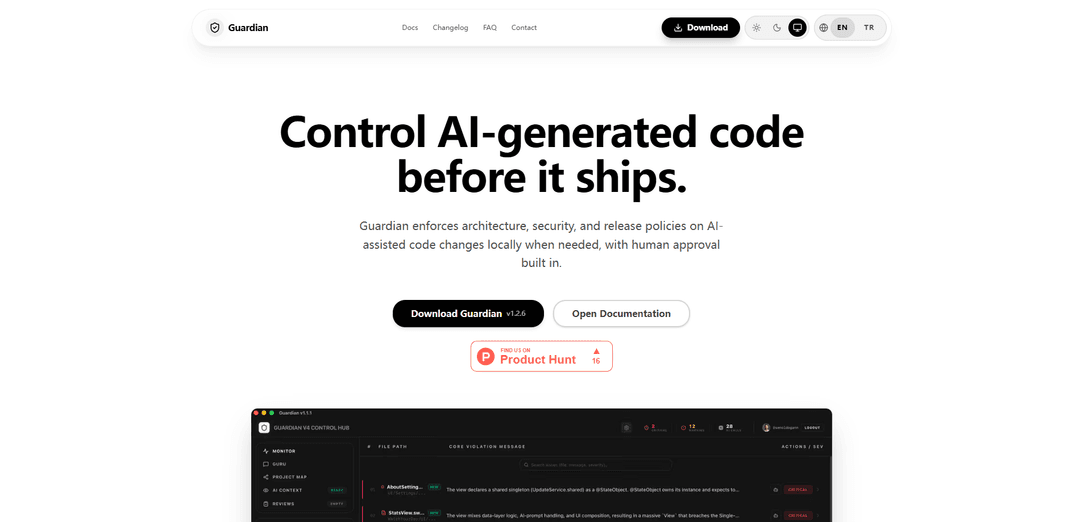
Guardian IDE is a local-first governance tool that enforces architecture, security, and release policies on AI-generated code changes with built-in human approval workflows before deployment.
https://www.guardianide.com/en?ref=producthunt
Product Information
Updated:Apr 10, 2026
What is Guardian IDE
Guardian IDE is an innovative desktop and CLI application designed specifically for small engineering teams to control AI-assisted code changes before they ship to production. Unlike generic code scanners or AI assistants, Guardian functions as a release decision layer that enforces team-defined policies on code generated by tools like GitHub Copilot, Claude, or Cursor. The platform operates on a policy-as-code model that stays versioned in your repository, enabling consistent governance across desktop, command-line, and CI/CD environments. Guardian distinguishes itself by producing explicit release decisions—pass, pass with warning, or block—rather than simply listing detected issues, ensuring that every AI-generated code change is evaluated against your team's architectural, security, and quality standards before deployment.
Key Features of Guardian IDE
Guardian IDE is a governance and policy enforcement tool designed specifically for controlling AI-generated code before it ships to production. Unlike generic scanners that simply detect issues, Guardian acts as a release decision layer that enforces architecture, security, and quality policies on AI-assisted code changes. It provides a structured workflow that includes AI-generated code intake detection, policy enforcement, human approval requirements with audit trails, and explicit release decisions (pass/warn/block). The tool works locally via desktop application and CLI, integrates with CI/CD pipelines, and maintains versioned policies as code within repositories to ensure consistent governance across teams.
AI-Generated Code Detection & Intake: Automatically identifies AI-assisted or unusually large code changes from tools like Copilot, Claude, or Cursor, routing them into stricter review paths with enhanced scrutiny before release.
Policy-as-Code Enforcement: Applies team-defined architecture, security, and quality rules consistently across desktop, CLI, and CI environments, with versioned policies stored in repositories to prevent governance drift.
Human Approval Workflow with Audit Trail: Requires named approvers for high-risk changes, captures override owners and reasons, and maintains a complete auditable decision trail showing who approved what and why.
Release Decision Surface: Produces explicit release decisions (pass, pass with warning, or block) backed by evidence and rationale, rather than just listing issues, enabling clear go/no-go determinations.
Guardian Guru AI Architect: Explains architectural drift and risky patterns in plain language, highlights policy violations with context about why they matter, and suggests policy-aligned fixes for human reviewers.
Local-First with CI Integration: Works locally on developer machines when needed while also supporting strict/warn/off gate modes in CLI and CI pipelines for flexible deployment across development workflows.
Use Cases of Guardian IDE
AI-Assisted Development Governance: Engineering teams using AI coding assistants (GitHub Copilot, Cursor, Claude) can enforce consistent architecture and security policies on AI-generated code before it reaches production, preventing drift from team standards.
Large Refactoring Review: When developers perform significant code refactoring with AI assistance, Guardian automatically detects the large change scope and applies stricter review requirements with mandatory human approval and documented rationale.
Security-Critical Release Gates: Organizations with strict security requirements can block releases containing policy violations in AI-generated code, requiring named security approvers and explicit override justifications before deployment.
Small Team Code Quality Control: Small engineering teams without dedicated architecture review boards can use Guardian to automatically enforce architectural standards and maintain code quality as AI tools become more prevalent in their workflow.
Compliance and Audit Requirements: Companies needing audit trails for code releases can use Guardian to document who approved each AI-assisted change, what risks were identified, and why overrides were granted, creating accountability records.
Pre-Production Risk Assessment: Before merging pull requests, teams can use Guardian to surface architectural drift, security vulnerabilities, and policy violations in AI-generated code with clear explanations and remediation suggestions.
Pros
Provides explicit release decisions with evidence and rationale, not just issue lists, making go/no-go determinations clear and actionable
Enforces consistent policy-as-code across desktop, CLI, and CI environments, preventing governance drift between team members and tools
Maintains complete audit trails with named approvers, override owners, and reasons, ensuring accountability for release decisions
Works locally-first for developer privacy while supporting CI integration for team-wide enforcement
Cons
Adds an additional approval layer to development workflow, potentially slowing down release velocity for teams not accustomed to strict governance
Requires upfront investment in defining and maintaining policy-as-code configurations tailored to team architecture and security standards
May generate false positives or overly strict blocks on legitimate AI-assisted code, requiring careful policy tuning and override processes
Limited to controlling AI-generated code changes rather than providing broader IDE functionality or development tools
How to Use Guardian IDE
1. Download and Install Guardian: Visit https://www.guardianide.com/en/download to download Guardian for your operating system. Install the application on your local machine. Guardian works as both a desktop application and CLI tool.
2. Configure Your Repository Policy: Set up policy-as-code in your repository that defines your team's architecture, security, and quality rules. This policy stays versioned in your repo and will be applied consistently across desktop, CLI, and CI environments.
3. Monitor AI-Generated Code Changes: Guardian automatically detects AI-assisted or unusually large code changes (from tools like Copilot, Claude, or Cursor) and routes them into stricter evaluation paths. These changes are separated for enhanced review before release.
4. Review Policy Violations: Guardian surfaces architecture and security policy violations with plain-language explanations. The Guru AI feature highlights architectural drift and risky patterns in AI-heavy pull requests, then suggests policy-aligned fixes.
5. Execute Human Approval Workflow: Review the detected issues and choose from: Pass, Pass with warning, Block, or Override. High-risk flows require a named approver. If overriding a block, you must provide an explicit reason and identify the override owner.
6. Generate Release Decision: Guardian produces a final release decision with evidence - not just an issue list. The output clearly answers: can this code ship now, and what evidence supports that decision? This includes an audit trail with approver, override owner, and reasoning.
7. Integrate with CI/CD (Optional): Use Guardian's CLI in your CI/CD pipeline with strict/warn/off gate modes to enforce release gates automatically. This ensures the same policy enforcement happens in automated workflows as in local development.
8. Review Audit Trail: Access the complete audit history showing who approved changes, who overrode blocks, and the reasons provided. This creates accountability and a versioned record of all release decisions for AI-generated code.
Guardian IDE FAQs
Guardian IDE is a governance tool that controls AI-generated code before it ships. It enforces architecture, security, and release policies on AI-assisted code changes locally, with human approval built in. It acts as a release decision layer rather than just a code scanner.
Popular Articles

Atoms: A Multi-Agent AI Platform That Transforms Ideas into Launch-Ready Products
May 22, 2026

Nano Banana SBTI: What It Is, How It Works, and How to Use It in 2026
Apr 15, 2026

Atoms Review — The AI Product Builder Redefining Digital Creation in 2026
Apr 10, 2026

Kilo Claw: How to Deploy and Use a True "Do‑It‑For‑You" AI Agent(2026 Update)
Apr 3, 2026
Latest AI Tools Similar to Guardian IDE

Gait
Gait is a collaboration tool that integrates AI-assisted code generation with version control, enabling teams to track, understand, and share AI-generated code context efficiently.

invoices.dev
invoices.dev is an automated invoicing platform that generates invoices directly from developers' Git commits, with integration capabilities for GitHub, Slack, Linear, and Google services.

EasyRFP
EasyRFP is an AI-powered edge computing toolkit that streamlines RFP (Request for Proposal) responses and enables real-time field phenotyping through deep learning technology.

Cart.ai
Cart.ai is an AI-powered service platform that provides comprehensive business automation solutions including coding, customer relations management, video editing, e-commerce setup, and custom AI development with 24/7 support.
Popular AI Tools Like Guardian IDE

GitHub Copilot Chat
GitHub Copilot Chat is an AI-powered coding assistant that provides natural language interactions, real-time code suggestions, and contextual support directly within supported IDEs and GitHub.com.

CopilotForXcode
CopilotForXcode is an Xcode Source Editor Extension that integrates GitHub Copilot, Codeium, and ChatGPT to provide AI-powered code suggestions, chat assistance, and prompt-to-code functionality within Xcode.

BrowserAI
BrowserAI is an open-source library that enables running local Large Language Models (LLMs) directly in web browsers with WebGPU acceleration, offering privacy-focused AI capabilities without requiring server infrastructure.

OpenAI Codex CLI
OpenAI Codex CLI is a lightweight, open-source coding agent that runs in your terminal, enabling developers to translate natural language into code execution while providing ChatGPT-level reasoning with the ability to run code, manipulate files, and iterate under version control.