
GitHits beta 0.9
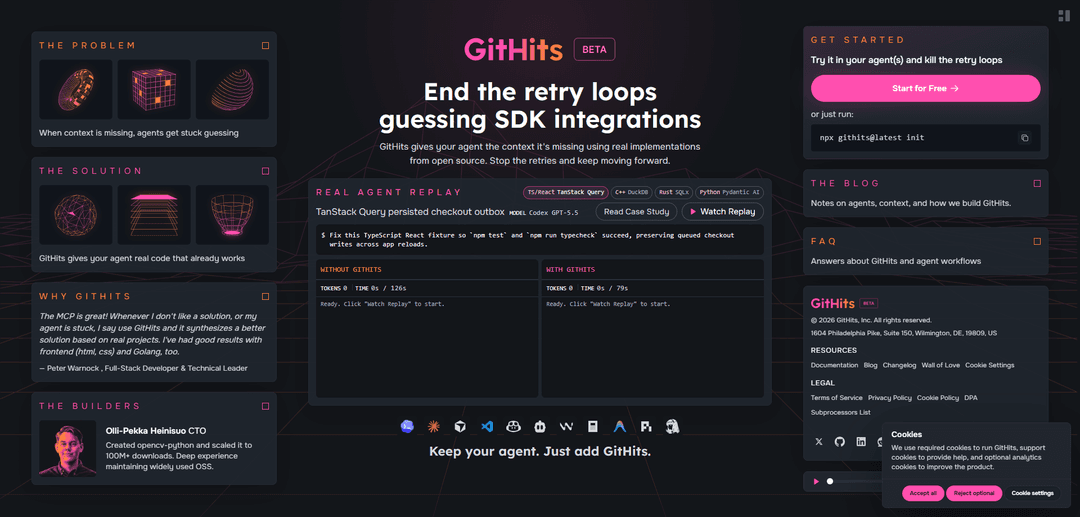
GitHits beta 0.9 is an MCP-connected, version-aware open-source context layer that gives coding agents grounded code examples, source navigation (search/grep/read), documentation access, and package intelligence (dependencies, vulnerabilities, changelogs) to stop retry loops caused by guessed APIs and stale integrations.
https://githits.com/?ref=producthunt
Product Information
Updated:Jul 8, 2026
What is GitHits beta 0.9
GitHits beta 0.9 is a code example and package-intelligence engine built to ground AI coding agents in real open-source implementations instead of probabilistic guesses. It targets a common failure mode in AI-assisted development: when an agent can read your local repo but cannot “see” the open-source stack underneath (frameworks, SDKs, package internals, and version-specific behavior), it starts looping through retries and hallucinated APIs. GitHits integrates via a hybrid CLI that configures a local MCP server for your coding tool, letting the agent retrieve verified examples and inspect the exact dependency/source context relevant to what you are building—without requiring access to your private repositories.
Key Features of GitHits beta 0.9
GitHits beta 0.9 is an agent-oriented, version-aware open-source context layer delivered via a CLI + local MCP server that helps AI coding tools stop “retry loops” caused by missing or stale dependency knowledge. It provides grounded context from real implementations across public GitHub and package registries—covering source code, docs, dependency graphs, vulnerabilities, changelogs, and upgrade diffs—so agents can retrieve, navigate, and cite the exact code that matches a pinned package version or commit, improving correctness and reducing hallucinated APIs and brittle integrations.
Version-aware open-source indexing: Builds an index pinned to immutable commits or package versions so results are stable and reproducible; supports moving refs (e.g., HEAD) when you intentionally want the latest.
Agent integration via CLI + MCP server: Runs through a hybrid CLI that configures a local MCP server so coding agents (e.g., Claude, Cursor, VS Code workflows) can call GitHits tools for source-backed context when needed.
Example distillation from real implementations: Produces short, focused code examples grounded in real repositories (and relevant issues/PRs/discussions) rather than returning long lists of search results.
Code navigation tools (search/grep/read/list): Enables agents to search, grep, list files, and read exact line ranges across repositories and packages to verify behavior directly from the source.
Package intelligence for dependency triage: Provides package/dependency inspection such as overview, latest version, license, repository health, vulnerabilities/advisories, dependency graphs, changelogs, release notes, and upgrade reviews.
License filtering + safer context guardrails: Supports excluding copyleft or unknown-license repos by default (strict mode) and emphasizes structured retrieval of code/docs with guardrails to reduce malicious-content risk compared to arbitrary web browsing.
Use Cases of GitHits beta 0.9
Debugging undocumented or changing APIs: When official docs lag behind releases (e.g., SDK objects or methods), GitHits can surface the definition and real usage patterns directly from the upstream repo at the relevant version.
Security and compliance dependency review: Teams can quickly check vulnerability/advisory history, transitive dependencies, and licenses before approving or upgrading packages in regulated environments.
Upgrade planning and regression avoidance: Engineering teams can review changelogs, release notes, and upgrade diffs to anticipate breaking changes and align patches with ecosystem conventions.
Faster integration work in product engineering: Developers integrating frameworks/SDKs (cloud, infra tooling, web stacks) can retrieve proven implementation snippets from widely adopted projects to reduce trial-and-error.
AI-assisted development in low-coverage ecosystems: For languages/stacks where LLMs are less reliable (e.g., Go/Rust/C++), GitHits grounds the agent in real code and conventions to improve correctness.
Pros
Grounded, source-linked answers reduce hallucinated APIs and retry loops by letting agents inspect real implementations.
Reproducible results via pinned versions/commits, enabling consistent debugging and long-lived references.
Broad “package intelligence” (vulns, graphs, changelogs, upgrades, licenses) supports practical dependency triage beyond code search.
Works alongside existing coding agents via MCP, enabling on-demand retrieval without requiring access to private repos.
Cons
Requires authentication/signup (GitHub-based) and setup via CLI/MCP, which may add friction for some environments.
Focused on public open-source context; it does not index or search private repositories, limiting usefulness for proprietary-only stacks.
Example quality can vary with the health and clarity of upstream repositories; users still must review code before shipping.
Product messaging indicates private beta/early-stage evolution, so workflows, coverage, and features may change rapidly.
How to Use GitHits beta 0.9
1) Create a GitHits account (beta access): Go to https://app.githits.com/ and sign up/sign in with GitHub. GitHits uses GitHub authentication for public open-source search and metadata lookups; it does not access or index your private repositories.
2) Initialize GitHits from your project: In your terminal (inside your repo), run: `npx githits@latest init`. This signs you in and configures GitHits’ local MCP server connection for your coding tool.
3) Confirm your AI coding tool is connected via MCP: After `init`, ensure your agent/IDE is configured to use the GitHits MCP server. GitHits is designed to be called by your agent when it needs external context (open-source code, docs, package metadata) beyond your local repo.
4) Use GitHits when the agent lacks context: Trigger GitHits when you need to verify library behavior from source, find real implementations, investigate version-specific APIs, or research integrations. If your tool doesn’t auto-invoke GitHits, explicitly instruct the agent to use GitHits.
5) Retrieve a grounded open-source implementation example: Ask your agent to use GitHits’ example capability (e.g., `get_example`) to pull a short, focused example based on real repositories (and potentially issues/PRs/discussions linked to code). Review the returned source links.
6) Navigate and verify code directly from indexed sources: Use code navigation tools through your agent (e.g., `search`, `code_grep`, `code_read`, and file listing) to inspect exact files/line ranges and confirm APIs and behavior from the actual source.
7) Inspect dependency/package metadata for your stack: Use package intelligence tools (e.g., `pkg_info`) to check versions, licenses, repository health, and other metadata for dependencies you rely on.
8) Check vulnerabilities and advisory history: Use vulnerability tooling (e.g., `pkg_vulns`) to review known vulnerabilities/CVEs/advisories for a package and understand risk before upgrading or shipping.
9) Review changelogs and upgrade changes before bumping versions: Use GitHits’ package/dependency triage features to examine changelogs, release notes, and upgrade-related changes so you can anticipate breaking changes and required code updates.
10) Control license exposure (strict vs broader modes): By default, GitHits runs in a strict mode that excludes copyleft-licensed code and repos without a declared license. If you need broader coverage, adjust license filtering in your account preferences (strict/yolo/custom) and re-run your searches/examples.
GitHits beta 0.9 FAQs
GitHits is an agentic code search engine and “context layer” for AI coding agents. It provides version-aware access to real open-source implementations, dependency source code, documentation, and package metadata so agents can ground solutions in code that actually exists and works.
GitHits beta 0.9 Video
Popular Articles

Vosko AI: Localize and Dub Videos for Global Audiences
Oct 15, 2026

Atoms: A Multi-Agent AI Platform That Transforms Ideas into Launch-Ready Products
Oct 13, 2026

Nano Banana SBTI: What It Is, How It Works, and How to Use It in 2026
Apr 15, 2026

Atoms Review — The AI Product Builder Redefining Digital Creation in 2026
Apr 10, 2026
Latest AI Tools Similar to GitHits beta 0.9

Gait
Gait is a collaboration tool that integrates AI-assisted code generation with version control, enabling teams to track, understand, and share AI-generated code context efficiently.

invoices.dev
invoices.dev is an automated invoicing platform that generates invoices directly from developers' Git commits, with integration capabilities for GitHub, Slack, Linear, and Google services.

EasyRFP
EasyRFP is an AI-powered edge computing toolkit that streamlines RFP (Request for Proposal) responses and enables real-time field phenotyping through deep learning technology.

Cart.ai
Cart.ai is an AI-powered service platform that provides comprehensive business automation solutions including coding, customer relations management, video editing, e-commerce setup, and custom AI development with 24/7 support.
Popular AI Tools Like GitHits beta 0.9

GitHub Copilot Chat
GitHub Copilot Chat is an AI-powered coding assistant that provides natural language interactions, real-time code suggestions, and contextual support directly within supported IDEs and GitHub.com.

CopilotForXcode
CopilotForXcode is an Xcode Source Editor Extension that integrates GitHub Copilot, Codeium, and ChatGPT to provide AI-powered code suggestions, chat assistance, and prompt-to-code functionality within Xcode.

BrowserAI
BrowserAI is an open-source library that enables running local Large Language Models (LLMs) directly in web browsers with WebGPU acceleration, offering privacy-focused AI capabilities without requiring server infrastructure.

OpenAI Codex CLI
OpenAI Codex CLI is a lightweight, open-source coding agent that runs in your terminal, enabling developers to translate natural language into code execution while providing ChatGPT-level reasoning with the ability to run code, manipulate files, and iterate under version control.