
GitAgent by Lyzr
GitAgent is an open standard framework that allows you to define, version, and run AI agents natively in git repositories, supporting multiple AI frameworks like Claude, OpenAI, CrewAI, and Lyzr.
https://www.gitagent.sh/?ref=producthunt
Product Information
Updated:Apr 8, 2026
What is GitAgent by Lyzr
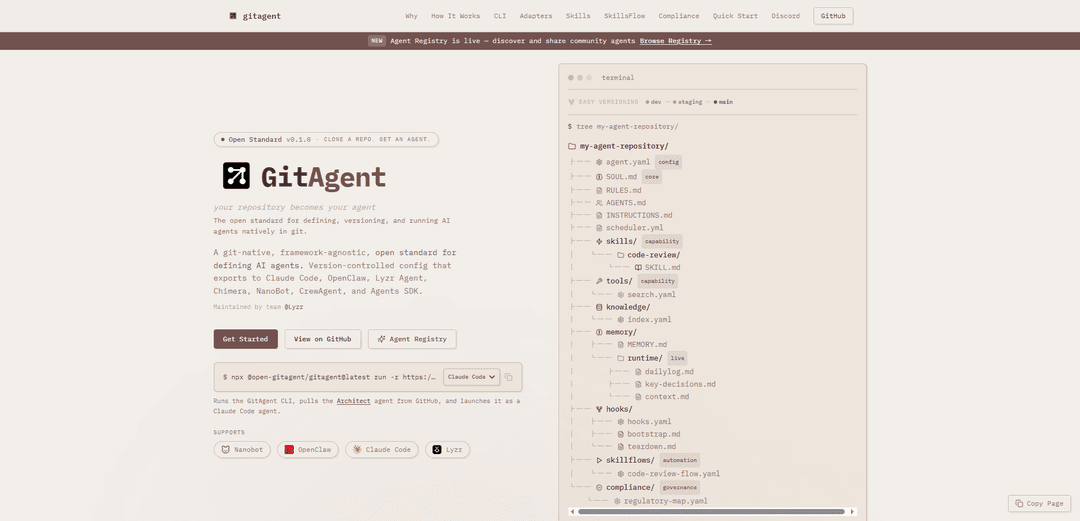
GitAgent by Lyzr is a git-native, framework-agnostic open standard for defining AI agents where your git repository becomes your agent. It introduces a standardized way to structure AI agents using familiar git concepts and files, making agent development and deployment more systematic and collaborative. The core of an agent is defined by three main files - agent.yaml (configuration), SOUL.md (personality/instructions), and SKILL.md (capabilities), along with additional optional components for enhanced functionality.
Key Features of GitAgent by Lyzr
GitAgent by Lyzr is an open standard framework that allows developers to define, version, and run AI agents natively in git repositories. It provides a framework-agnostic approach where the entire agent definition lives in git files, supporting multiple AI frameworks like Claude, OpenAI, CrewAI, and others. The system includes built-in version control, compliance management, skill systems, and workflow automation while maintaining human oversight through git-based processes like branching and pull requests.
Git-Native Version Control: Agents are defined entirely through git repositories with full version control capabilities including branching, pull requests, rollbacks and audit trails through git history
Framework Agnostic Architecture: Single agent definition can be exported to multiple AI frameworks including Claude Code, OpenAI, CrewAI, LangChain and others through built-in adapters
Skill System & Workflows: Modular skill system allows reusing capabilities across agents, with SkillsFlow feature enabling deterministic multi-step workflows through YAML configurations
Enterprise Compliance Support: Built-in support for regulatory compliance including FINRA, SEC, and Federal Reserve requirements with audit logging and validation tools
Use Cases of GitAgent by Lyzr
Code Review Automation: Automated code review agents that can analyze pull requests, check for security vulnerabilities, and ensure code quality standards
Financial Services Compliance: Regulated institutions can deploy compliant AI agents with built-in audit trails, supervision, and regulatory validation capabilities
Development Workflow Automation: Teams can create agents to automate routine development tasks while maintaining version control and human oversight through git processes
Pros
Strong version control and collaboration features through git integration
Framework agnostic design allows flexibility in AI platform choice
Enterprise-ready with built-in compliance and governance features
Cons
Requires git knowledge and setup for effective use
Still in early stages with potential stability issues
May have steep learning curve for teams new to AI agents
How to Use GitAgent by Lyzr
Install GitAgent CLI: Run 'npm install -g gitagent' or 'npx @open-gitagent/gitagent@latest' to install the GitAgent command line tool
Initialize a new agent: Run 'gitagent init --template <minimal|standard|full>' to scaffold a new agent repository with the desired template structure
Configure core agent files: Set up the three required files: agent.yaml (configuration), SOUL.md (personality/identity), and RULES.md (constraints). Add optional skills, tools and knowledge in respective folders
Validate the agent: Run 'gitagent validate' to check if your agent definition follows the specification and passes all compliance checks
Add API credentials: Create a local .env file (which will be gitignored) to store any required API keys for the AI model you plan to use (e.g. OPENAI_API_KEY)
Run the agent locally: Use 'gitagent run ./my-agent --adapter <claude|openai|lyzr>' to run your agent with your chosen AI model adapter
Run existing agents: Run any public GitAgent directly from GitHub using 'gitagent run -r https://github.com/user/repo -a <adapter>'
Version control changes: Use standard git commands (commit, branch, PR) to version control your agent changes and promote them through environments (dev → staging → main)
Export to other frameworks: Use 'gitagent export --format <format>' to export your agent definition to other frameworks like Claude Code, OpenAI Agents SDK, CrewAI etc.
Set up CI/CD: Configure GitHub Actions to run 'gitagent validate' on every push to automatically test agent behavior and block bad merges
GitAgent by Lyzr FAQs
GitAgent is an open standard for defining, versioning, and running AI agents natively in git. It allows you to define your AI agent through files in a git repository, where the repository itself becomes the agent. It's framework-agnostic and works with various AI platforms like Claude, OpenAI, CrewAI, Lyzr, and more.
GitAgent by Lyzr Video
Popular Articles

Atoms: A Multi-Agent AI Platform That Transforms Ideas into Launch-Ready Products
May 22, 2026

Nano Banana SBTI: What It Is, How It Works, and How to Use It in 2026
Apr 15, 2026

Atoms Review — The AI Product Builder Redefining Digital Creation in 2026
Apr 10, 2026

Kilo Claw: How to Deploy and Use a True "Do‑It‑For‑You" AI Agent(2026 Update)
Apr 3, 2026
Latest AI Tools Similar to GitAgent by Lyzr

Gait
Gait is a collaboration tool that integrates AI-assisted code generation with version control, enabling teams to track, understand, and share AI-generated code context efficiently.

invoices.dev
invoices.dev is an automated invoicing platform that generates invoices directly from developers' Git commits, with integration capabilities for GitHub, Slack, Linear, and Google services.

EasyRFP
EasyRFP is an AI-powered edge computing toolkit that streamlines RFP (Request for Proposal) responses and enables real-time field phenotyping through deep learning technology.

Cart.ai
Cart.ai is an AI-powered service platform that provides comprehensive business automation solutions including coding, customer relations management, video editing, e-commerce setup, and custom AI development with 24/7 support.
Popular AI Tools Like GitAgent by Lyzr

GitHub Copilot Chat
GitHub Copilot Chat is an AI-powered coding assistant that provides natural language interactions, real-time code suggestions, and contextual support directly within supported IDEs and GitHub.com.

CopilotForXcode
CopilotForXcode is an Xcode Source Editor Extension that integrates GitHub Copilot, Codeium, and ChatGPT to provide AI-powered code suggestions, chat assistance, and prompt-to-code functionality within Xcode.

BrowserAI
BrowserAI is an open-source library that enables running local Large Language Models (LLMs) directly in web browsers with WebGPU acceleration, offering privacy-focused AI capabilities without requiring server infrastructure.

OpenAI Codex CLI
OpenAI Codex CLI is a lightweight, open-source coding agent that runs in your terminal, enabling developers to translate natural language into code execution while providing ChatGPT-level reasoning with the ability to run code, manipulate files, and iterate under version control.