
fcontext
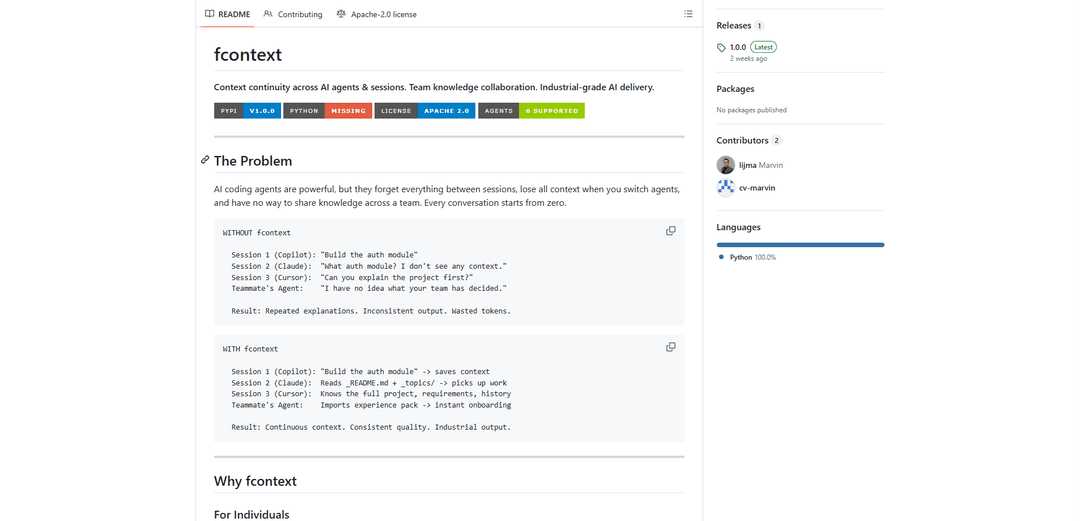
fcontext is a context management system that enables AI coding agents to maintain continuous context across sessions, share knowledge across teams, and deliver industrial-grade output through structured context engineering.
https://github.com/lijma/agent-skill-fcontext?ref=producthunt
Product Information
Updated:Feb 28, 2026
What is fcontext
fcontext is an open-source tool designed to solve the context continuity problem in AI-assisted development. It addresses the fundamental limitation where AI coding agents forget everything between sessions and lack the ability to share knowledge across different agents or team members. The system works with multiple mainstream AI coding agents including GitHub Copilot, Claude Code, Cursor, and others, providing a local, secure way to manage and persist context without any cloud dependencies.
Key Features of fcontext
fcontext is a comprehensive context management system for AI coding agents that enables continuous context preservation across sessions, cross-agent compatibility, and team knowledge sharing. It provides document indexing, requirements tracking, experience pack sharing, and local data storage capabilities, allowing for more efficient and consistent AI-assisted development work across individuals and teams.
Cross-session Memory: Maintains context continuity between conversations by storing and persisting topics and conclusions in structured formats that can be accessed across multiple sessions
Multi-Agent Support: Compatible with major AI coding agents including GitHub Copilot, Claude Code, Cursor, and others, allowing seamless context sharing between different AI tools
Experience Packs: Enables export and import of domain knowledge and project context across teams and projects through portable experience packages
Document Indexing: Converts various document formats (PDF, DOCX, XLSX, etc.) into markdown for AI consumption and maintains an organized cache of indexed content
Use Cases of fcontext
Team Onboarding: Quickly bring new team members up to speed by importing existing project knowledge and context into their AI development environment
Enterprise Development: Maintain consistent development standards and knowledge across large teams while tracking requirements and architectural decisions
Documentation Management: Convert and manage various documentation formats while maintaining traceability between requirements and implementation
Cross-Project Knowledge Transfer: Share domain expertise and best practices across different projects within an organization through exportable experience packs
Pros
Fully offline capable with local storage for security and compliance
Supports multiple AI agents and seamless context switching
Structured approach to requirements and knowledge management
Cons
Requires Python 3.9+ environment
Additional setup and maintenance overhead for teams
May require significant storage space for document caching
How to Use fcontext
Install fcontext: Install fcontext using pip: 'pip install fcontext' (requires Python 3.9+)
Initialize fcontext: Navigate to your project directory and run 'fcontext init' to create the .fcontext/ directory structure
Enable AI agent: Run 'fcontext enable <agent>' where <agent> can be copilot, claude, cursor, trae, opencode, or openclaw to activate your preferred AI agent
Index documents: Use 'fcontext index <directory>' to convert and index your project documents (PDF, DOCX, XLSX, etc.) into markdown format that AI can read
Add requirements: Use 'fcontext req add "title" -t TYPE' to add requirements (stories/tasks/bugs) that the AI should work on
Check status: Run 'fcontext status' to verify everything is set up correctly and see indexing statistics
Work with AI: Start working with your AI agent - it will automatically read context from _README.md and _topics/ directory
Export knowledge (optional): Use 'fcontext export team-knowledge.zip' to export accumulated knowledge that can be shared with team members
Import knowledge (optional): Other team members can import shared knowledge using 'fcontext experience import team-knowledge.zip'
Maintain requirements: Use 'fcontext req' commands to manage requirements, view boards, track progress, and add comments as development continues
fcontext FAQs
fcontext is a tool that solves the problem of AI agents forgetting context between sessions and losing knowledge when switching between agents. It provides context continuity across AI sessions, enables team knowledge collaboration, and supports industrial-grade AI delivery by maintaining persistent context in structured files.
fcontext Video
Popular Articles

Atoms: A Multi-Agent AI Platform That Transforms Ideas into Launch-Ready Products
May 22, 2026

Nano Banana SBTI: What It Is, How It Works, and How to Use It in 2026
Apr 15, 2026

Atoms Review — The AI Product Builder Redefining Digital Creation in 2026
Apr 10, 2026

Kilo Claw: How to Deploy and Use a True "Do‑It‑For‑You" AI Agent(2026 Update)
Apr 3, 2026
Latest AI Tools Similar to fcontext

Gait
Gait is a collaboration tool that integrates AI-assisted code generation with version control, enabling teams to track, understand, and share AI-generated code context efficiently.

invoices.dev
invoices.dev is an automated invoicing platform that generates invoices directly from developers' Git commits, with integration capabilities for GitHub, Slack, Linear, and Google services.

EasyRFP
EasyRFP is an AI-powered edge computing toolkit that streamlines RFP (Request for Proposal) responses and enables real-time field phenotyping through deep learning technology.

Cart.ai
Cart.ai is an AI-powered service platform that provides comprehensive business automation solutions including coding, customer relations management, video editing, e-commerce setup, and custom AI development with 24/7 support.
Popular AI Tools Like fcontext

GitHub Copilot Chat
GitHub Copilot Chat is an AI-powered coding assistant that provides natural language interactions, real-time code suggestions, and contextual support directly within supported IDEs and GitHub.com.

CopilotForXcode
CopilotForXcode is an Xcode Source Editor Extension that integrates GitHub Copilot, Codeium, and ChatGPT to provide AI-powered code suggestions, chat assistance, and prompt-to-code functionality within Xcode.

BrowserAI
BrowserAI is an open-source library that enables running local Large Language Models (LLMs) directly in web browsers with WebGPU acceleration, offering privacy-focused AI capabilities without requiring server infrastructure.

OpenAI Codex CLI
OpenAI Codex CLI is a lightweight, open-source coding agent that runs in your terminal, enabling developers to translate natural language into code execution while providing ChatGPT-level reasoning with the ability to run code, manipulate files, and iterate under version control.