
CodeBreak
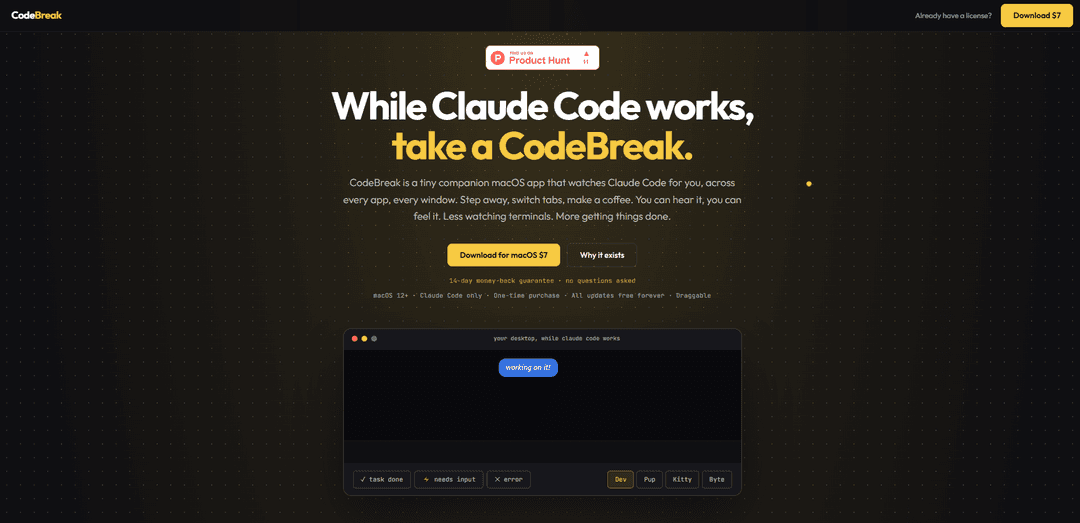
CodeBreak is a tiny macOS companion app that watches Claude Code across every app and window, using visual states and distinct sounds to alert you when it’s thinking, processing, needs input, finishes, or errors—so you stop constantly checking the terminal.
https://thecodebreak.com/?ref=producthunt
Product Information
Updated:Jun 8, 2026
What is CodeBreak
CodeBreak is a lightweight companion for Claude Code on macOS (12+) designed to keep you informed about your AI coding run without tab-switching or staring at a terminal. It places a small, draggable on-screen “companion” above your desktop that remains visible across apps, and it pairs status changes with clear audio cues. It’s a one-time purchase with a 14-day money-back guarantee, supports both Apple Silicon and Intel Macs, works on up to two Macs, and includes multiple companions and sound packs with free updates forever.
Key Features of CodeBreak
CodeBreak is a lightweight macOS companion app for Claude Code that stays visible across all apps and windows, giving clear visual and audio signals about what your agent is doing—working, waiting for input, finished, or errored—so you don’t have to keep checking terminals. It offers multiple animated “companions,” distinct sound packs, and simple controls to drag, pause, snooze, or toggle audio/visual alerts, with a one-time purchase model and support for two Macs.
Always-on-top cross-app status companion: A draggable on-screen character that remains visible across every app/window so you can monitor Claude Code without tab-switching.
Semantic states with distinct alerts: Five clear states—Thinking, Processing, Needs input, Task done, Error—paired with different animations and sounds so you instantly know what changed.
Needs-input detection: Signals when Claude hits a decision point and is waiting for your response, using urgent audio and faster animation to grab attention.
Companions and sound pack customization: Includes multiple companion characters (e.g., Dev, Pup, Kitty, Byte) and multiple sound packs you can mix-and-match for done/input/error cues.
Control options for focus: Toggle character and sounds independently, use ghost mode/snooze, and pause/resume animations to reduce distraction while staying informed.
Simple licensing and compatibility: One-time purchase, macOS 12+ (Apple Silicon + Intel), works on two Macs, and targets Claude Code specifically.
Use Cases of CodeBreak
Software development while multitasking: Keep coding, reviewing PRs, or writing docs in other apps while CodeBreak alerts you the moment Claude needs input or finishes a long run.
Data/ML workflows with long-running tasks: Monitor extended analysis or refactoring sessions driven by Claude Code and get immediate notice on completion or errors without watching a terminal.
Consulting and client support responsiveness: Stay in email, tickets, or meetings and still respond quickly when Claude pauses for decisions—reducing idle time and turnaround delays.
Learning and training environments: Students or trainees can step away from the terminal and be prompted when guidance is needed, keeping attention on the right moment to intervene.
Solo founders and indie makers: Run agent tasks in the background while handling product, marketing, or ops work, and return exactly when output is ready.
Pros
Reduces constant terminal/IDE checking by providing persistent, glanceable status across apps
Clear “needs input” and “done/error” alerts help prevent wasted idle time
Highly customizable companions/sounds with simple controls (toggle, snooze, pause)
One-time purchase with support for two Macs and free updates (per site)
Cons
macOS-only and requires macOS 12+
Works with Claude Code only (not universal across other agents/tools yet)
Audio/visual alerts may be distracting in quiet environments unless tuned via toggles/snooze
How to Use CodeBreak
1) Check requirements: Use a Mac running macOS 12+ (Apple Silicon or Intel). CodeBreak currently works with Claude Code only.
2) Get CodeBreak: Purchase and download CodeBreak from https://thecodebreak.com/ (one-time purchase; includes all companions/sound packs; works on 2 Macs).
3) Install the app: Open the downloaded installer/app and place CodeBreak in your Applications folder (standard macOS install flow). Launch CodeBreak.
4) Start a Claude Code task: Run Claude Code as you normally would (e.g., from Terminal) and start a job (example shown: `$ claude run task.py`).
5) Keep working elsewhere while CodeBreak watches: Switch to other apps/windows or step away. CodeBreak stays visible across every app and window so you don’t need to keep checking the terminal.
6) Learn the 5 states CodeBreak signals: Watch/listen for status changes: Thinking (silent/still), Processing (actively working), Needs input (urgent sound + faster character), Task done (distinct completion sound), Error (error signal).
7) Respond when 'Needs input' triggers: When CodeBreak indicates Claude needs you (urgent sound; faster animation), return to Claude Code and provide the requested input so the run can continue.
8) Act on 'Task done': When CodeBreak signals completion (distinct sound), go back to Claude Code to review results/output—useful if you stepped away and would otherwise miss the finish.
9) Handle 'Error' quickly: If CodeBreak signals an error, return to Claude Code/Terminal to inspect logs/output and fix the issue before re-running.
10) Position the companion so it’s not in your way: Drag the on-screen companion to any spot on your screen where it won’t obstruct your work.
11) Customize your companion and sounds: Choose a companion (Dev, Pup, Kitty, Byte) and pick a sound pack. Mix and match freely; you can also show/hide the character and sounds.
12) Use control features as needed: Use available controls such as pausing/resuming animations and toggling audio/visuals (and features like ghost mode/snooze if present in your version) to fit your workflow.
CodeBreak FAQs
CodeBreak is a tiny companion macOS app that watches Claude Code for you across every app and window, so you don’t have to keep checking your terminal while Claude runs.
Popular Articles

Vosko AI: Localize and Dub Videos for Global Audiences
Oct 15, 2026

Atoms: A Multi-Agent AI Platform That Transforms Ideas into Launch-Ready Products
Oct 13, 2026

Nano Banana SBTI: What It Is, How It Works, and How to Use It in 2026
Apr 15, 2026

Atoms Review — The AI Product Builder Redefining Digital Creation in 2026
Apr 10, 2026
Latest AI Tools Similar to CodeBreak

Gait
Gait is a collaboration tool that integrates AI-assisted code generation with version control, enabling teams to track, understand, and share AI-generated code context efficiently.

invoices.dev
invoices.dev is an automated invoicing platform that generates invoices directly from developers' Git commits, with integration capabilities for GitHub, Slack, Linear, and Google services.

EasyRFP
EasyRFP is an AI-powered edge computing toolkit that streamlines RFP (Request for Proposal) responses and enables real-time field phenotyping through deep learning technology.

Cart.ai
Cart.ai is an AI-powered service platform that provides comprehensive business automation solutions including coding, customer relations management, video editing, e-commerce setup, and custom AI development with 24/7 support.
Popular AI Tools Like CodeBreak

GitHub Copilot Chat
GitHub Copilot Chat is an AI-powered coding assistant that provides natural language interactions, real-time code suggestions, and contextual support directly within supported IDEs and GitHub.com.

CopilotForXcode
CopilotForXcode is an Xcode Source Editor Extension that integrates GitHub Copilot, Codeium, and ChatGPT to provide AI-powered code suggestions, chat assistance, and prompt-to-code functionality within Xcode.

BrowserAI
BrowserAI is an open-source library that enables running local Large Language Models (LLMs) directly in web browsers with WebGPU acceleration, offering privacy-focused AI capabilities without requiring server infrastructure.

OpenAI Codex CLI
OpenAI Codex CLI is a lightweight, open-source coding agent that runs in your terminal, enabling developers to translate natural language into code execution while providing ChatGPT-level reasoning with the ability to run code, manipulate files, and iterate under version control.