
cmux
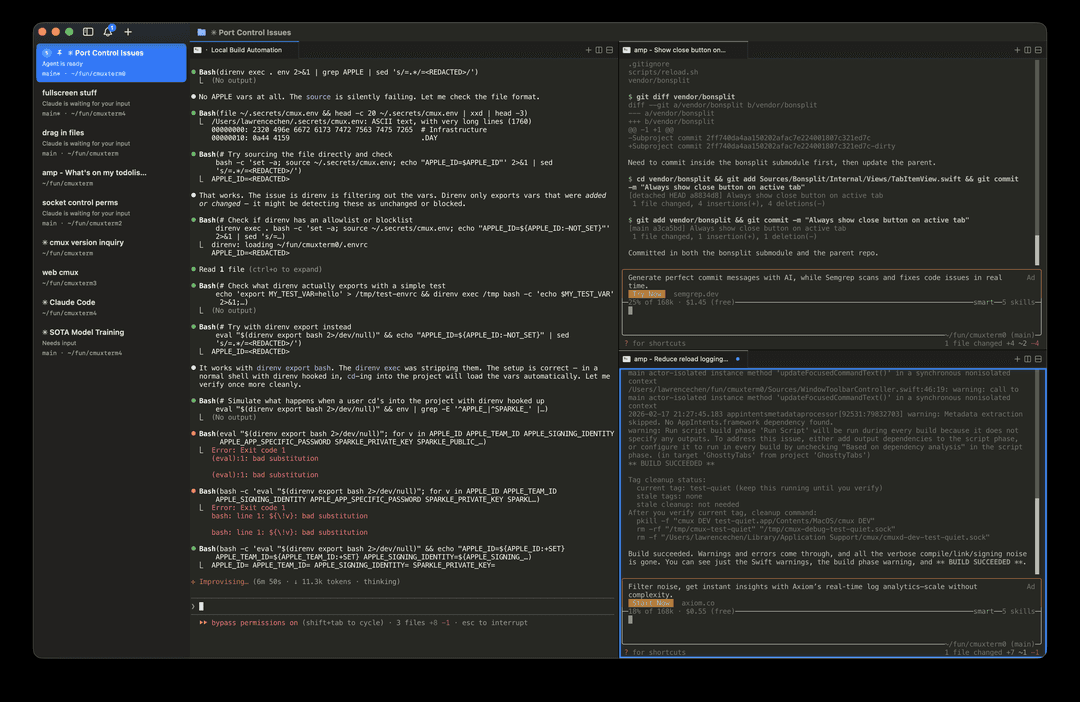
cmux is a native macOS terminal application built with Swift/AppKit that features vertical tabs, notifications system, and in-app browser specifically designed for managing multiple AI coding agents.
https://github.com/manaflow-ai/cmux?ref=producthunt
Product Information
Updated:Mar 8, 2026
What is cmux
cmux is an open-source terminal application that reimagines how developers interact with AI coding agents. Built as a native macOS app using Swift and AppKit, it integrates Ghostty for terminal rendering while adding crucial features like vertical tabs, notification systems, and an in-app browser. The application was created to solve the challenges of managing multiple AI coding sessions simultaneously, such as those from Claude Code, Codex, OpenCode, and other coding CLIs, while maintaining high performance and user flexibility.
Key Features of cmux
cmux is a native macOS terminal application that combines Ghostty-based terminal emulation with vertical tabs, notifications, and an integrated browser specifically designed for AI coding agents. It features GPU-accelerated rendering, scriptable CLI and socket APIs, and seamless integration with existing Ghostty configurations while providing visual context through git branch information, PR status, and workspace notifications.
Notification System: Features blue rings around panes and illuminated tabs when AI agents need attention, with a centralized notification panel and quick-jump functionality to the most recent unread notifications
Integrated Browser with API: Includes a built-in browser that can be split alongside terminals, with a scriptable API compatible with agent-browser for automation and testing
Smart Vertical Tabs: Displays contextual information including git branch, PR status, working directory, and listening ports in a vertical sidebar for better workspace organization
Native Performance: Built with Swift and AppKit instead of Electron, utilizing GPU acceleration through libghostty for smooth rendering and fast startup times
Use Cases of cmux
AI Development Workflow: Manage multiple AI coding agents (Claude Code, Codex, etc.) simultaneously while maintaining clear visual feedback on their status and requirements
Full-Stack Development: Run development servers, view results in the integrated browser, and manage git operations all within the same window with split panes
Code Review and Testing: Review AI-generated code changes across multiple tasks with integrated preview environments and automated testing capabilities
Multi-Project Management: Organize multiple projects with distinct workspaces, each showing relevant git information and development status at a glance
Pros
High performance native macOS app with GPU acceleration
Extensive scriptability through CLI and socket API
Seamless integration with existing Ghostty configurations
Cons
Limited to macOS platform only
Does not restore live process state after restart
Requires manual configuration for some AI agent integrations
How to Use cmux
Install cmux: Download and install cmux either by downloading the .dmg file from GitHub releases and dragging it to Applications folder, or using Homebrew with command: 'brew tap manaflow-ai/cmux && brew install --cask cmux'
Launch cmux: Open cmux from Applications folder. On first launch, macOS may show a security warning - click 'Open' to proceed. The app will auto-update via Sparkle.
Create workspaces: Use Cmd+N to create new workspaces (tabs). Each workspace shows git branch, working directory, ports and notifications in the sidebar. Use Cmd+1-8 to switch between workspaces.
Split panes: Use Cmd+D to split panes horizontally (right) or Cmd+Shift+D to split vertically (down). Navigate between panes using Option+Cmd+Arrow keys.
Use browser integration: Press Cmd+Shift+L to open browser in split pane. Use Cmd+L to focus address bar. The browser supports developer tools (Option+Cmd+I) and console (Option+Cmd+C).
Monitor notifications: When AI agents need attention, panes get blue rings and tabs light up. Press Cmd+I to show notifications panel, Cmd+Shift+U to jump to latest unread notification.
Customize appearance: cmux reads themes, fonts and colors from ~/.config/ghostty/config file. Open Settings (Cmd+,) to customize keyboard shortcuts and other preferences.
Use CLI automation: cmux provides CLI and socket API to automate workspace creation, pane splitting, keystrokes, and browser control. Use 'cmux notify' to integrate with AI agent notifications.
cmux FAQs
cmux is a Ghostty-based macOS terminal app with vertical tabs and notifications designed specifically for AI coding agents. It provides a terminal, browser, notifications, workspaces, splits, tabs, and a CLI to control all of it.
cmux Video
Popular Articles

Atoms: A Multi-Agent AI Platform That Transforms Ideas into Launch-Ready Products
May 22, 2026

Nano Banana SBTI: What It Is, How It Works, and How to Use It in 2026
Apr 15, 2026

Atoms Review — The AI Product Builder Redefining Digital Creation in 2026
Apr 10, 2026

Kilo Claw: How to Deploy and Use a True "Do‑It‑For‑You" AI Agent(2026 Update)
Apr 3, 2026
Latest AI Tools Similar to cmux

Gait
Gait is a collaboration tool that integrates AI-assisted code generation with version control, enabling teams to track, understand, and share AI-generated code context efficiently.

invoices.dev
invoices.dev is an automated invoicing platform that generates invoices directly from developers' Git commits, with integration capabilities for GitHub, Slack, Linear, and Google services.

EasyRFP
EasyRFP is an AI-powered edge computing toolkit that streamlines RFP (Request for Proposal) responses and enables real-time field phenotyping through deep learning technology.

Cart.ai
Cart.ai is an AI-powered service platform that provides comprehensive business automation solutions including coding, customer relations management, video editing, e-commerce setup, and custom AI development with 24/7 support.
Popular AI Tools Like cmux

GitHub Copilot Chat
GitHub Copilot Chat is an AI-powered coding assistant that provides natural language interactions, real-time code suggestions, and contextual support directly within supported IDEs and GitHub.com.

CopilotForXcode
CopilotForXcode is an Xcode Source Editor Extension that integrates GitHub Copilot, Codeium, and ChatGPT to provide AI-powered code suggestions, chat assistance, and prompt-to-code functionality within Xcode.

BrowserAI
BrowserAI is an open-source library that enables running local Large Language Models (LLMs) directly in web browsers with WebGPU acceleration, offering privacy-focused AI capabilities without requiring server infrastructure.

OpenAI Codex CLI
OpenAI Codex CLI is a lightweight, open-source coding agent that runs in your terminal, enabling developers to translate natural language into code execution while providing ChatGPT-level reasoning with the ability to run code, manipulate files, and iterate under version control.