
Caveman
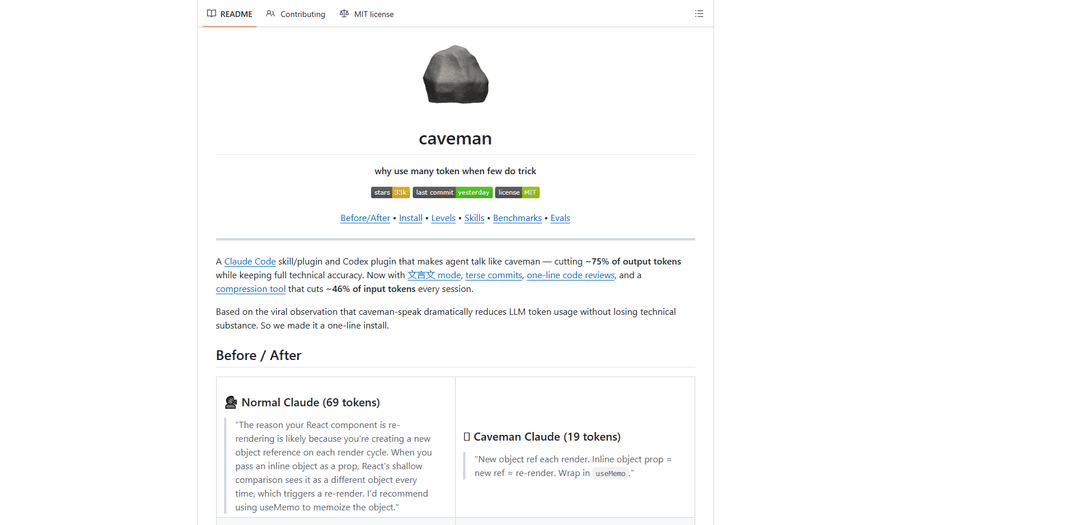
Caveman is a Claude Code skill that reduces AI output tokens by up to 75% by forcing ultra-compressed caveman-style communication while maintaining 100% technical accuracy.
https://github.com/JuliusBrussee/caveman?ref=producthunt
Product Information
Updated:Apr 16, 2026
What is Caveman
Caveman is a semantic constraint engine developed by Julius Brussee that transforms how AI coding assistants communicate by eliminating verbose filler language and forcing responses into minimal-token 'lithic structures.' Available as a one-line install for Claude Code, Codex, Gemini CLI, and 40+ other AI agents, Caveman cuts output tokens by 65-87% while preserving complete technical accuracy. The tool operates on a simple premise: 'why use many token when few token do trick.' It removes sycophantic hedging like 'I'd be happy to help' and 'It might be worth considering' while keeping all code blocks, technical jargon, error messages, and Git commits completely unchanged. With multiple intensity levels from Lite to Ultra, plus a unique 文言文 (Classical Chinese) mode, Caveman has become a viral sensation with over 27,000 GitHub stars and trending #1 on Hacker News.
Key Features of Caveman
Caveman is a semantic constraint engine and skill/plugin for Claude Code and other AI coding agents that dramatically reduces token usage by forcing responses into compressed, caveman-style communication. It cuts approximately 65-75% of output tokens while maintaining 100% technical accuracy by eliminating filler words, pleasantries, and hedging phrases while preserving all technical terminology, code blocks, and error messages. The tool offers multiple intensity levels (lite, full, ultra) including a classical Chinese 文言文 mode, and includes companion features like caveman-commit for terse commit messages, caveman-review for one-line code reviews, and caveman-compress that reduces input tokens by ~46% by compressing memory files.
Extreme Token Reduction: Cuts 65-87% of output tokens by removing articles, filler words, pleasantries, and hedging phrases while keeping all technical substance and accuracy intact, resulting in faster responses and lower costs.
Multiple Intensity Levels: Offers three compression levels (lite, full, ultra) plus 文言文 (classical Chinese) variants, allowing users to choose between professional terseness and maximum compression based on their needs.
Smart Technical Preservation: Automatically preserves technical jargon, code blocks, Git commits, PR descriptions, error messages, and critical security warnings in their original form, applying compression only to natural language explanations.
Companion Compression Tools: Includes caveman-commit for conventional commit messages, caveman-review for one-line PR comments, and caveman-compress that reduces input tokens by ~46% by compressing memory files while maintaining human-readable backups.
Wide Agent Compatibility: Works with Claude Code, Codex, Gemini CLI, Cursor, Windsurf, Cline, Copilot, and 40+ other AI coding agents through simple one-line installation commands.
Persistent Session Activation: Remains active throughout entire sessions without reverting to verbose mode, with auto-activation capabilities for supported agents and manual trigger options for others.
Use Cases of Caveman
Cost Reduction for High-Volume API Usage: Development teams using Claude API extensively can reduce their monthly costs by 65-75% on output tokens while maintaining the same technical quality, making AI-assisted development more economically sustainable.
Faster Code Review Workflows: Engineering teams can use caveman-review to generate concise, actionable PR comments that identify issues in one line (e.g., 'L42: 🔴 bug: user null. Add guard.'), dramatically speeding up code review cycles.
Efficient Git Commit Generation: Developers can leverage caveman-commit to automatically generate terse, conventional commit messages under 50 characters that focus on why rather than what, maintaining clean Git history without verbose descriptions.
Memory-Optimized AI Sessions: Projects with extensive context files can use caveman-compress to reduce input tokens by ~46% on files like CLAUDE.md that load every session, making AI agents more responsive while preserving human-readable originals.
Rapid Technical Troubleshooting: Developers debugging issues can receive compressed, direct answers that cut through verbose explanations to deliver actionable solutions 3x faster, ideal for time-sensitive production incidents.
Multilingual Development Teams: Teams preferring classical Chinese can use 文言文 mode for maximum token efficiency in the most compressed written language, particularly useful for Chinese-speaking developers or projects with Asian market focus.
Pros
Dramatic cost savings of 65-87% on output tokens with proven benchmarks across real-world tasks
Maintains 100% technical accuracy while improving response speed by approximately 3x
Easy one-line installation across 40+ AI coding agents with auto-activation for major platforms
Backed by academic research showing brevity constraints can improve accuracy by 26 percentage points
Cons
Requires manual activation for some agents (Cursor, Windsurf, Cline, Copilot) unless system prompt is manually configured
May take time for users to adjust to reading compressed caveman-style responses despite faster comprehension
Windows users may encounter symlink issues requiring Developer Mode or admin privileges for some installation methods
Caveman-compress tool flagged as High Risk by Snyk due to subprocess/file patterns (noted as false positive)
How to Use Caveman
1. Install Caveman for your AI agent: Choose your agent and run the appropriate install command. For Claude Code: 'claude plugin marketplace add JuliusBrussee/caveman && claude plugin install caveman@caveman'. For Cursor: 'npx skills add JuliusBrussee/caveman -a cursor'. For Windsurf: 'npx skills add JuliusBrussee/caveman -a windsurf'. For other agents, use 'npx skills add JuliusBrussee/caveman' with the appropriate agent flag.
2. Activate Caveman mode: Trigger Caveman in your conversation by typing '/caveman' (or '$caveman' for Codex), or by saying 'talk like caveman', 'caveman mode', or 'less tokens please'. For Claude Code with plugin installed, it may auto-activate on session start.
3. Choose your intensity level (optional): Select compression level based on your needs. Use '/caveman lite' for professional tone with no filler but intact grammar. Use '/caveman full' (default) for classic caveman with dropped articles and fragments. Use '/caveman ultra' for maximum compression with telegraphic style and abbreviations. The level persists until you change it or the session ends.
4. Use specialized Caveman skills (optional): Access additional features: '/caveman-commit' for terse commit messages in Conventional Commits format with ≤50 character subjects. '/caveman-review' for one-line PR comments. '/caveman-compress FILENAME.md' to compress memory files for reduced token usage on session start. '/caveman-help' for quick reference of all commands.
5. Try 文言文 (Wenyan) mode for alternative compression (optional): Switch to Classical Chinese compression with '/caveman wenyan-lite' for semi-classical style, '/caveman wenyan' for full 文言文, or '/caveman wenyan-ultra' for extreme ancient scholar compression. This provides maximum token efficiency using classical Chinese literary forms.
6. Deactivate when needed: Return to normal mode by saying 'stop caveman' or 'normal mode'. Caveman automatically stays off for code blocks, commits, PRs, security warnings, and irreversible action confirmations.
7. Set up always-on mode (optional): For agents without auto-activation (Cursor, Windsurf, Cline, Copilot, etc.), add the always-on snippet to your agent's system prompt or rules file: 'Terse like caveman. Technical substance exact. Only fluff die. Drop: articles, filler (just/really/basically), pleasantries, hedging. Fragments OK. Short synonyms. Code unchanged. Pattern: [thing] [action] [reason]. [next step]. ACTIVE EVERY RESPONSE.' This makes Caveman active from the first message in every session.
Caveman FAQs
Caveman is a Claude Code skill/plugin that makes AI agents communicate in a compressed, caveman-like style. It cuts approximately 65-75% of output tokens on average (ranging from 22-87% depending on the task) while maintaining 100% technical accuracy. It eliminates filler words, articles, and pleasantries but keeps all technical information intact.
Popular Articles

Vosko AI: Localize and Dub Videos for Global Audiences
Oct 14, 2026

Atoms: A Multi-Agent AI Platform That Transforms Ideas into Launch-Ready Products
Oct 13, 2026

Nano Banana SBTI: What It Is, How It Works, and How to Use It in 2026
Apr 15, 2026

Atoms Review — The AI Product Builder Redefining Digital Creation in 2026
Apr 10, 2026
Latest AI Tools Similar to Caveman

Gait
Gait is a collaboration tool that integrates AI-assisted code generation with version control, enabling teams to track, understand, and share AI-generated code context efficiently.

invoices.dev
invoices.dev is an automated invoicing platform that generates invoices directly from developers' Git commits, with integration capabilities for GitHub, Slack, Linear, and Google services.

EasyRFP
EasyRFP is an AI-powered edge computing toolkit that streamlines RFP (Request for Proposal) responses and enables real-time field phenotyping through deep learning technology.

Cart.ai
Cart.ai is an AI-powered service platform that provides comprehensive business automation solutions including coding, customer relations management, video editing, e-commerce setup, and custom AI development with 24/7 support.
Popular AI Tools Like Caveman

GitHub Copilot Chat
GitHub Copilot Chat is an AI-powered coding assistant that provides natural language interactions, real-time code suggestions, and contextual support directly within supported IDEs and GitHub.com.

CopilotForXcode
CopilotForXcode is an Xcode Source Editor Extension that integrates GitHub Copilot, Codeium, and ChatGPT to provide AI-powered code suggestions, chat assistance, and prompt-to-code functionality within Xcode.

BrowserAI
BrowserAI is an open-source library that enables running local Large Language Models (LLMs) directly in web browsers with WebGPU acceleration, offering privacy-focused AI capabilities without requiring server infrastructure.

OpenAI Codex CLI
OpenAI Codex CLI is a lightweight, open-source coding agent that runs in your terminal, enabling developers to translate natural language into code execution while providing ChatGPT-level reasoning with the ability to run code, manipulate files, and iterate under version control.