Buildermark
Buildermark is an open-source, local-first measurement tool that tracks and analyzes how much of your codebase is generated by AI coding agents.
https://buildermark.dev/?ref=producthunt
Product Information
Updated:Apr 15, 2026
What is Buildermark
Buildermark is a desktop application designed to help developers and teams measure their AI-generated code contributions. As an open-source and local-first solution, it runs entirely on your machine without sending data to the cloud, ensuring complete privacy and data ownership. The tool supports popular AI coding agents including Claude Code CLI, Claude Code Cloud, Codex CLI, Codex Cloud, Gemini CLI, and Cursor. Buildermark provides comprehensive insights into coding agent usage by tracking commit percentages written with AI, allowing conversation ratings, and comparing performance across different AI agents. Available for macOS 15+, Windows 10+, and Linux CLI, with browser extensions for Chrome, Firefox, and Safari to import data from cloud-based agents.
Key Features of Buildermark
Buildermark is a local-first, open-source desktop application that measures and tracks AI-generated code in development workflows. It automatically imports conversations from popular coding agents (Claude Code, Codex, Cursor, Gemini) and git commit history, then uses a formatting-agnostic matching system to determine what percentage of code was written by AI agents versus developers. The tool provides conversation ratings, agent performance comparisons, and native notifications for commit attribution, all while keeping data private on the user's machine with no cloud storage or analytics tracking.
Coding Agent Measurement: Automatically tracks the percentage of commits written with AI coding agents by matching conversation diffs to commit diffs using a formatting-agnostic system that remains robust against auto-formatting and code reorganization.
Multi-Agent Support: Supports major coding agents including Claude Code CLI/Cloud, Codex CLI/Cloud, Gemini CLI, and Cursor, with automatic chat history import from local machines, VMs, and containers.
Local-First Privacy: Runs entirely on the user's machine with no cloud storage, accounts, or analytics tracking. All data stays local with the only network request being update checks.
Conversation Ratings: Allows manual rating of coding agent conversations or enables agents to self-rate and log feedback for performance evaluation.
Agent Performance Comparison: Compares how different coding agents perform across projects, helping teams understand which AI tools are most effective for their workflows.
Native Notifications: Provides immediate agent attribution for each commit through native notification center alerts, keeping developers informed in real-time.
Use Cases of Buildermark
Development Team Productivity Analysis: Software development teams can measure the impact of AI coding agents on their productivity by tracking what percentage of their codebase is AI-generated versus manually written, helping justify tool investments.
AI Tool Evaluation and Selection: Engineering managers can compare performance metrics across different AI coding agents (Claude, Codex, Cursor) to determine which tools provide the best results for their specific projects and coding standards.
Code Quality Auditing: Quality assurance teams can identify which portions of code were AI-generated to focus code reviews and testing efforts on areas that may require additional scrutiny or validation.
Developer Workflow Optimization: Individual developers can track their own AI agent usage patterns and conversation ratings to understand which types of tasks benefit most from AI assistance and refine their workflows accordingly.
Enterprise AI Adoption Metrics: Organizations using the upcoming Team Server can aggregate Buildermark data across all developers to measure organization-wide AI adoption rates and ROI on AI coding tools.
Research and Compliance Documentation: Academic institutions and regulated industries can maintain detailed records of AI-generated code for research purposes or compliance requirements while keeping all data private and local.
Pros
Complete privacy with local-first architecture and no cloud data storage or analytics tracking
Open-source and transparent with support for multiple popular AI coding agents
Formatting-agnostic matching system that accurately tracks AI contributions despite code reformatting
Cross-platform support with desktop apps for macOS, Windows, Linux and browser extensions for cloud agent integration
Cons
Team Server feature for organization-wide metrics is still in development and not yet available
Limited to supported coding agents, requiring feature requests for additional tool integrations
Requires manual setup of shared folder paths for importing from VMs and containers
Local-only architecture means no automatic backup or sync capabilities across multiple machines
How to Use Buildermark
1. Download and Install Buildermark: Download the appropriate version for your system: macOS 15+, Windows 10+, or Linux CLI from https://buildermark.dev/download. For cloud-based agents, also install the browser extension (Chrome, Firefox, or Safari).
2. Launch the Application: Start the Buildermark desktop app. It will run a local Go server on your machine at localhost:55022 and serve the web UI. No cloud account or sign-up is required.
3. Import Coding Agent Conversations: Automatically import chat history from your supported coding agents (Claude Code CLI/Cloud, Codex CLI/Cloud, Gemini CLI, or Cursor). Add shared folder paths if you need to import from VMs and containers.
4. Import Git Commit History: Configure Buildermark to automatically import your relevant git commit history from your projects.
5. Match Diffs and Analyze: Buildermark will automatically match conversation diffs from your coding agents to commit diffs using a formatting-agnostic matching system. This determines which code was written by AI agents versus manually.
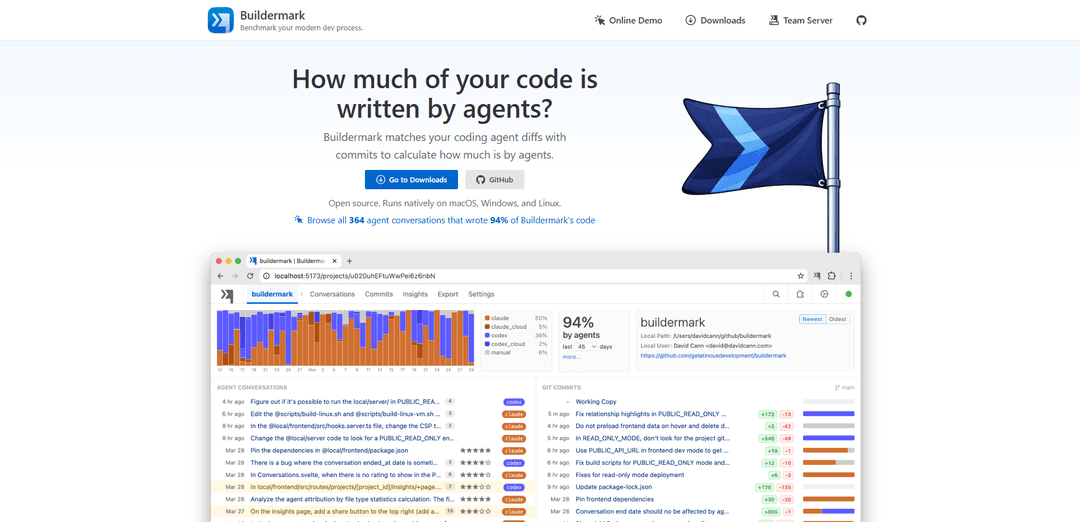
6. View AI Code Metrics: Access the web UI at http://localhost:55022 to view the percentage of your commits written with AI coding agents, compare agent performance across different tools, and see which agents perform best in your projects.
7. Rate Conversations (Optional): Rate your coding agent conversations manually or let the agent automatically rate and log feedback to track conversation quality over time.
8. Monitor Native Notifications: Receive native notifications in your system notification center showing agent attribution for each commit immediately after it's made.
Buildermark FAQs
Buildermark is an open source, local-first tool that measures how much of your code is AI-generated. It tracks the percentage of your commits written with AI coding agents by matching conversation diffs to commit diffs.
Popular Articles

Vosko AI: Localize and Dub Videos for Global Audiences
Oct 14, 2026

Atoms: A Multi-Agent AI Platform That Transforms Ideas into Launch-Ready Products
Oct 13, 2026

Nano Banana SBTI: What It Is, How It Works, and How to Use It in 2026
Apr 15, 2026

Atoms Review — The AI Product Builder Redefining Digital Creation in 2026
Apr 10, 2026
Latest AI Tools Similar to Buildermark

Gait
Gait is a collaboration tool that integrates AI-assisted code generation with version control, enabling teams to track, understand, and share AI-generated code context efficiently.

invoices.dev
invoices.dev is an automated invoicing platform that generates invoices directly from developers' Git commits, with integration capabilities for GitHub, Slack, Linear, and Google services.

EasyRFP
EasyRFP is an AI-powered edge computing toolkit that streamlines RFP (Request for Proposal) responses and enables real-time field phenotyping through deep learning technology.

Cart.ai
Cart.ai is an AI-powered service platform that provides comprehensive business automation solutions including coding, customer relations management, video editing, e-commerce setup, and custom AI development with 24/7 support.
Popular AI Tools Like Buildermark

GitHub Copilot Chat
GitHub Copilot Chat is an AI-powered coding assistant that provides natural language interactions, real-time code suggestions, and contextual support directly within supported IDEs and GitHub.com.

CopilotForXcode
CopilotForXcode is an Xcode Source Editor Extension that integrates GitHub Copilot, Codeium, and ChatGPT to provide AI-powered code suggestions, chat assistance, and prompt-to-code functionality within Xcode.

BrowserAI
BrowserAI is an open-source library that enables running local Large Language Models (LLMs) directly in web browsers with WebGPU acceleration, offering privacy-focused AI capabilities without requiring server infrastructure.

OpenAI Codex CLI
OpenAI Codex CLI is a lightweight, open-source coding agent that runs in your terminal, enabling developers to translate natural language into code execution while providing ChatGPT-level reasoning with the ability to run code, manipulate files, and iterate under version control.