
Banger Mail
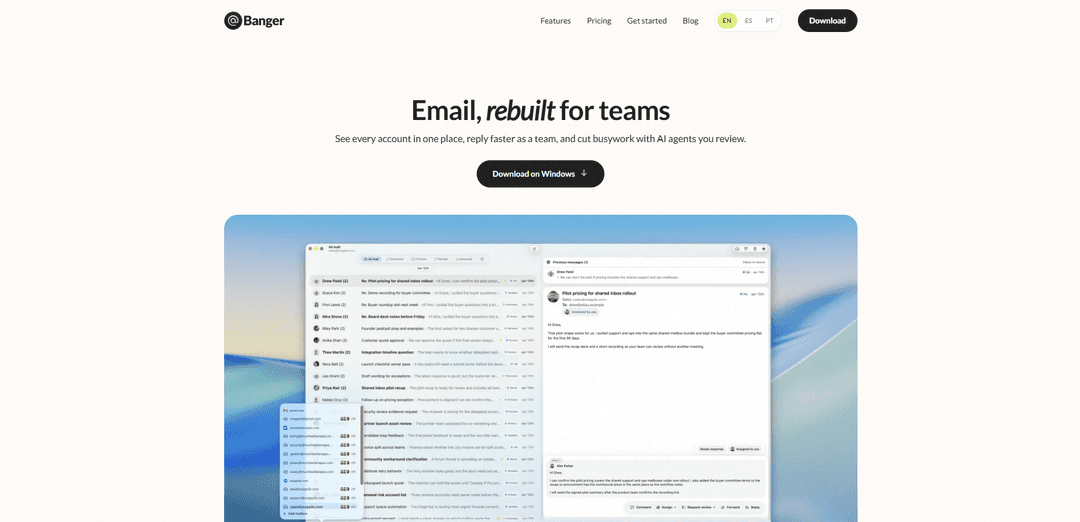
Banger Mail is a native macOS, offline-first work email app that unifies Gmail/Google Workspace and custom-domain inboxes, adds shared team mailboxes, and uses reviewable AI agents to triage and draft replies faster.
https://bangermail.com/?ref=producthunt
Product Information
Updated:Jul 8, 2026
What is Banger Mail
Banger Mail is an email client rebuilt for teams that need to manage multiple inboxes and shared addresses without the usual tab-switching and dropped threads. It brings custom-domain email, Gmail, and Google Workspace accounts into one place, with fast search across every mailbox and a workflow designed for team collaboration. The product is native on macOS and emphasizes speed and an offline-first experience, with additional ecosystem support (like Outlook) noted as coming soon via a waitlist.
Key Features of Banger Mail
Banger Mail is a macOS-native email app designed for teams and AI-assisted workflows. It brings multiple mailboxes—custom domains, Gmail, and Google Workspace—into a single place with unified search, and adds “team inbox” functionality for shared addresses like support@ and sales@. It also includes AI agents that can triage messages, draft replies, and apply labels, with a review-first approval flow (like a pull request) so humans stay in control before anything is sent.
Unified inbox for multiple accounts: Connect custom-domain email, Gmail, and Google Workspace in one app and search across every account at once to reduce tab-switching and missed messages.
Shared team inboxes: Run shared addresses (e.g., support@, sales@, marketing@) collaboratively so work doesn’t bottleneck on one person and the queue keeps moving.
AI agents with human review: Agents can triage incoming mail, draft replies, and apply labels, but every action goes through a review step before it ships—keeping users in control.
Workboard-style triage and drafting: Supports high-volume email handling by organizing agent and teammate actions around triage and drafting workflows (positioned like a reviewable work queue).
Native macOS, fast and offline-first: Built as a native macOS app with an emphasis on speed and offline-first operation for a smoother daily email workflow.
Use Cases of Banger Mail
Customer support shared inbox: Support teams can manage support@ together, using AI to pre-triage and draft responses while agents’ actions are reviewed before sending.
Sales lead follow-up: Sales teams can centralize sales@ and individual accounts, quickly find prior threads via cross-account search, and use AI drafts to speed outreach.
Marketing and partnerships coordination: Marketing teams can run marketing@ as a shared mailbox for inbound inquiries, sponsorships, and partner requests, reducing missed messages and handoff friction.
Small business “one inbox” operations: Founders or small teams can consolidate multiple addresses (info@, billing@, support@) into one place and rely on AI-assisted triage to stay responsive.
Agency or consultancy client communications: Teams managing multiple client-facing mailboxes can keep everything in one app, collaborate on shared addresses, and review AI-prepared replies before sending.
Pros
Consolidates multiple mailboxes (custom domains, Gmail, Google Workspace) into one searchable workspace
Shared inboxes enable real collaboration on support@/sales@ style addresses
AI agents can reduce busywork while the review gate helps prevent accidental sends
Native macOS, positioned as fast and offline-first
Cons
macOS-only (native on macOS), limiting teams on Windows/Linux
Outlook support is not yet available (listed as “coming” with a waitlist)
AI workflows require review steps, which may add process overhead for teams wanting fully automated sending
How to Use Banger Mail
1. Download and install Banger Mail (macOS): Go to https://bangermail.com/download/ and download the macOS app. Install it like any standard macOS application, then open Banger Mail.
2. Add your email accounts into one app: In Banger Mail, connect the mailboxes you use (e.g., custom domain email, Gmail, and Google Workspace). This lets you view and manage multiple inboxes from a single place without switching tabs.
3. Use unified search across all mailboxes: Use the app’s search to query across every connected account at once, so you can quickly find conversations even if you’re not sure which inbox they’re in.
4. Set up shared team inboxes (support@, sales@, marketing@): Create or connect shared addresses (like support@, sales@, and marketing@) so the whole team can work from the same mailbox. This is designed for handling high-volume email without leaving the queue on one person.
5. Collaborate as a team in shared mailboxes: Have teammates triage incoming messages, draft replies, and keep work moving from the shared inbox. Use the shared mailbox view to ensure messages don’t get missed or duplicated.
6. Enable AI agents for triage and drafting: Turn on AI agents to help with repetitive work: triaging incoming mail, drafting replies, and applying labels alongside your team.
7. Review agent actions before anything is sent: Before an AI agent’s draft reply or action goes out, review it first. Banger Mail describes this as a “pull request”-style workflow—agents do the work, you approve what ships.
8. Keep workflows organized with labels and triage: Use labels (manually or via agents) and triage practices in shared inboxes to keep messages categorized and moving through your process.
9. Work fast with the native, offline-first macOS app: Use Banger Mail as your primary email client on macOS. It’s positioned as fast and offline-first, so you can keep working smoothly even when connectivity is limited.
10. If you need Outlook support, join the waitlist: If your team relies on Outlook, use the waitlist link referenced on the site (https://bangermail.com/download/) to get notified when Outlook support becomes available.
Banger Mail FAQs
Banger Mail is an email app rebuilt for teams and AI agents. It lets teams see multiple accounts in one place, collaborate on shared addresses (like support@ and sales@), and use AI agents to triage and draft replies with human review before anything is sent.
Banger Mail Video
Popular Articles

Atoms: A Multi-Agent AI Platform That Transforms Ideas into Launch-Ready Products
May 22, 2026

Nano Banana SBTI: What It Is, How It Works, and How to Use It in 2026
Apr 15, 2026

Atoms Review — The AI Product Builder Redefining Digital Creation in 2026
Apr 10, 2026

Kilo Claw: How to Deploy and Use a True "Do‑It‑For‑You" AI Agent(2026 Update)
Apr 3, 2026
Latest AI Tools Similar to Banger Mail

10xBeast
10xBeast is an AI-powered sales platform that helps businesses automate and personalize cold email outreach to convert leads into customers in just a few clicks.

Inbox AI
Inbox AI is a privacy-focused MacOS productivity app that combines voice-driven AI automation with email management capabilities, allowing users to create custom workflows and commands while offering both cloud-based and on-device AI options.

MailSense
MailSense is an AI-powered email assistant that filters, summarizes, and generates replies to emails through a Telegram bot interface to help users manage their inbox more efficiently.

Voltmailer
Voltmailer is an AI-powered email automation tool that helps businesses scale their cold outreach by generating personalized emails through website data scraping and automated personalization.
Popular AI Tools Like Banger Mail

Mailmeteor AI for Gmail
Mailmeteor is a powerful Gmail extension that combines AI email writing, mail merge, automated follow-ups, and email export capabilities to enhance productivity and email management within Gmail.
MailSnitch
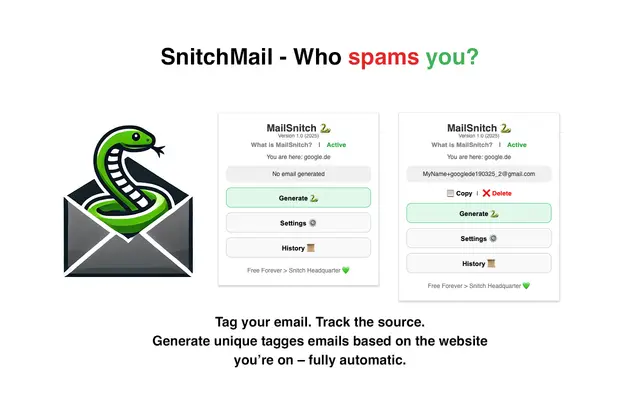
MailSnitch is a free email tracking and anti-spam Chrome extension that helps users identify spam sources through automated email tagging and tracking system.

MailMood - AI Email Rewriter
MailMood is a Chrome extension that instantly transforms Gmail messages into professional, clean, and confident business language with three different tone options - corporate, casual, or assertive - all with just one click.

Apparent for Gmail
Apparent for Gmail is a Chrome extension that enhances Gmail's readability and usability by reorganizing conversations, simplifying layouts, and streamlining workflows while maintaining privacy and security.