
Agentation
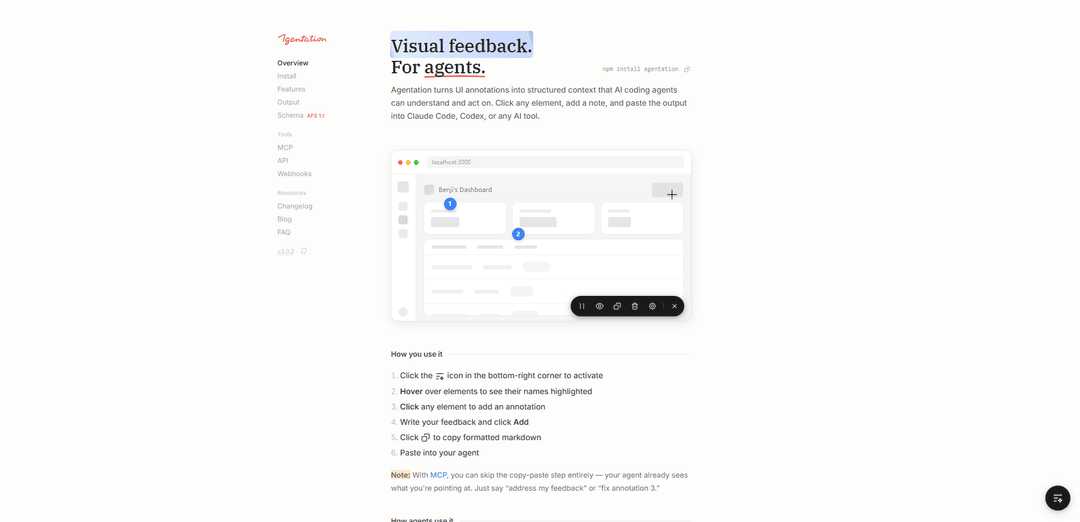
Agentation is an agent-agnostic visual feedback tool that allows developers to annotate UI elements and generate structured context for AI coding agents to understand and act upon.
https://www.agentation.com/?ref=producthunt
Product Information
Updated:Apr 8, 2026
What is Agentation
Agentation is a desktop-based developer tool that bridges the gap between design feedback and code changes. It enables developers to visually interact with their user interface by clicking on elements, adding notes, and generating structured output that AI coding agents can immediately comprehend. The tool has gained significant traction in the developer community, with over 1.8k GitHub stars and hundreds of thousands of installations via npm, becoming an integral part of how developers work with AI on UI.
Key Features of Agentation
Agentation is a visual feedback tool that allows developers to annotate UI elements directly in their web applications and generate structured output for AI coding agents. It enables users to click on elements, add notes, and capture precise selectors, positions, and contextual metadata instead of using vague text descriptions. The tool integrates with various AI coding agents like Claude Code and Codex, making the feedback-to-code implementation process more efficient.
Visual Element Selection: Click and hover functionality to select specific UI elements, with automatic capture of CSS selectors, component hierarchies, and computed styles
Animation Pause Feature: Ability to freeze animations to capture feedback on specific frames that would otherwise be gone in milliseconds
Agent Integration: Two-way communication with AI agents through MCP integration, allowing agents to acknowledge, question, or resolve feedback directly
Structured Output Generation: Automatically generates markdown-formatted output with precise element identifiers, making it easy for AI agents to locate exact code references
Use Cases of Agentation
Frontend Development Iteration: Developers can quickly iterate on UI changes by providing precise feedback to AI coding agents about specific elements that need modification
UI Bug Reporting: Teams can report UI issues with exact element references, making it easier for AI agents or developers to locate and fix problems
Design Implementation Review: Designers can provide specific feedback on implemented UI elements by annotating exactly which components need adjustment
Pros
Smooth installation process
Precise element identification system
Agent-agnostic design supporting multiple AI tools
Cons
Desktop-only limitation
Requires per-project installation
Limited to development environment usage
How to Use Agentation
Install Agentation: Install the package via npm: npm install agentation
Add to your React/Next.js project: Import and add the Agentation component to your app's root: import { Agentation } from 'agentation'; function App() { return (<> <YourApp /> <Agentation /> </>) }
Add development environment check: Add NODE_ENV check to ensure Agentation only loads in development: {process.env.NODE_ENV === 'development' && <Agentation />}
Start your development server: Run your dev server and look for the Agentation toolbar (floating button) in the bottom-right corner
Activate annotation mode: Click the sparkle icon in the bottom-right corner to activate the annotation toolbar
Hover over elements: Hover over UI elements to see their names highlighted
Click to annotate: Click on any element you want to provide feedback on
Add feedback: Write your feedback in the annotation popup and click 'Add'
Copy formatted output: Click the copy button to get the structured markdown output with selectors, positions and context
Use with AI tools: Paste the copied output into AI tools like Claude Code, Codex, or other AI coding agents to get assistance
Optional: Set up MCP integration: For direct agent integration, run 'npx add-mcp' and follow prompts to add agentation-mcp as an MCP server to skip the copy-paste steps
Agentation FAQs
Agentation is a floating toolbar that lets you annotate web pages and generate structured feedback for AI coding agents. It allows users to click elements, select text, and copy markdown that agents can parse to find and fix code issues.
Popular Articles

Vosko AI: Localize and Dub Videos for Global Audiences
Oct 15, 2026

Atoms: A Multi-Agent AI Platform That Transforms Ideas into Launch-Ready Products
Oct 13, 2026

Nano Banana SBTI: What It Is, How It Works, and How to Use It in 2026
Apr 15, 2026

Atoms Review — The AI Product Builder Redefining Digital Creation in 2026
Apr 10, 2026
Latest AI Tools Similar to Agentation

Gait
Gait is a collaboration tool that integrates AI-assisted code generation with version control, enabling teams to track, understand, and share AI-generated code context efficiently.

invoices.dev
invoices.dev is an automated invoicing platform that generates invoices directly from developers' Git commits, with integration capabilities for GitHub, Slack, Linear, and Google services.

EasyRFP
EasyRFP is an AI-powered edge computing toolkit that streamlines RFP (Request for Proposal) responses and enables real-time field phenotyping through deep learning technology.

Cart.ai
Cart.ai is an AI-powered service platform that provides comprehensive business automation solutions including coding, customer relations management, video editing, e-commerce setup, and custom AI development with 24/7 support.
Popular AI Tools Like Agentation

GitHub Copilot Chat
GitHub Copilot Chat is an AI-powered coding assistant that provides natural language interactions, real-time code suggestions, and contextual support directly within supported IDEs and GitHub.com.

CopilotForXcode
CopilotForXcode is an Xcode Source Editor Extension that integrates GitHub Copilot, Codeium, and ChatGPT to provide AI-powered code suggestions, chat assistance, and prompt-to-code functionality within Xcode.

BrowserAI
BrowserAI is an open-source library that enables running local Large Language Models (LLMs) directly in web browsers with WebGPU acceleration, offering privacy-focused AI capabilities without requiring server infrastructure.

OpenAI Codex CLI
OpenAI Codex CLI is a lightweight, open-source coding agent that runs in your terminal, enabling developers to translate natural language into code execution while providing ChatGPT-level reasoning with the ability to run code, manipulate files, and iterate under version control.