
Agentation
Agentation is an agent-agnostic visual feedback tool that allows developers to annotate UI elements and generate structured context for AI coding agents to understand and act upon.
https://www.agentation.com/?ref=producthunt
Información del Producto
Actualizado:08/04/2026
¿Qué es Agentation?
Agentation is a desktop-based developer tool that bridges the gap between design feedback and code changes. It enables developers to visually interact with their user interface by clicking on elements, adding notes, and generating structured output that AI coding agents can immediately comprehend. The tool has gained significant traction in the developer community, with over 1.8k GitHub stars and hundreds of thousands of installations via npm, becoming an integral part of how developers work with AI on UI.
Características Principales de Agentation
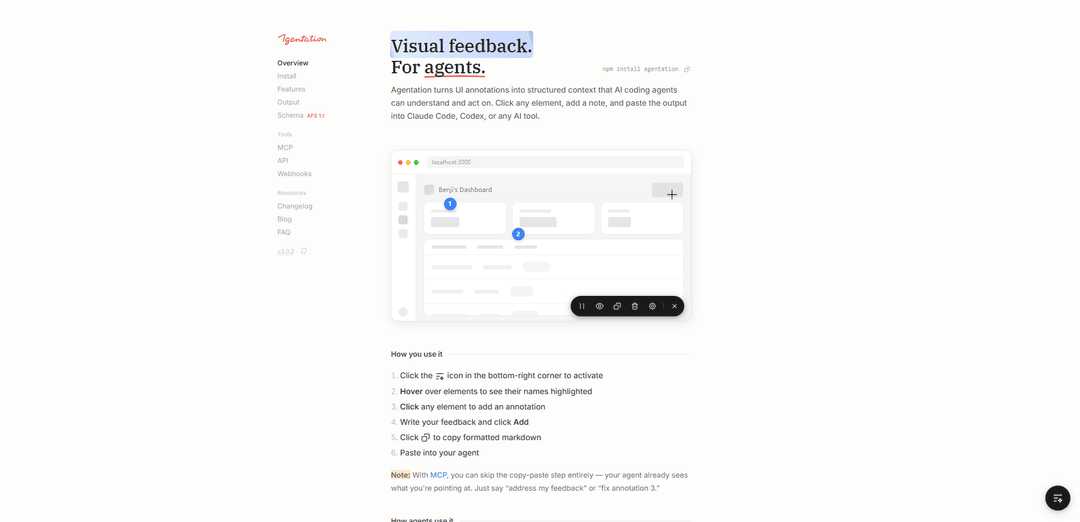
Agentation is a visual feedback tool that allows developers to annotate UI elements directly in their web applications and generate structured output for AI coding agents. It enables users to click on elements, add notes, and capture precise selectors, positions, and contextual metadata instead of using vague text descriptions. The tool integrates with various AI coding agents like Claude Code and Codex, making the feedback-to-code implementation process more efficient.
Visual Element Selection: Click and hover functionality to select specific UI elements, with automatic capture of CSS selectors, component hierarchies, and computed styles
Animation Pause Feature: Ability to freeze animations to capture feedback on specific frames that would otherwise be gone in milliseconds
Agent Integration: Two-way communication with AI agents through MCP integration, allowing agents to acknowledge, question, or resolve feedback directly
Structured Output Generation: Automatically generates markdown-formatted output with precise element identifiers, making it easy for AI agents to locate exact code references
Casos de Uso de Agentation
Frontend Development Iteration: Developers can quickly iterate on UI changes by providing precise feedback to AI coding agents about specific elements that need modification
UI Bug Reporting: Teams can report UI issues with exact element references, making it easier for AI agents or developers to locate and fix problems
Design Implementation Review: Designers can provide specific feedback on implemented UI elements by annotating exactly which components need adjustment
Ventajas
Smooth installation process
Precise element identification system
Agent-agnostic design supporting multiple AI tools
Desventajas
Desktop-only limitation
Requires per-project installation
Limited to development environment usage
Cómo Usar Agentation
Install Agentation: Install the package via npm: npm install agentation
Add to your React/Next.js project: Import and add the Agentation component to your app's root: import { Agentation } from 'agentation'; function App() { return (<> <YourApp /> <Agentation /> </>) }
Add development environment check: Add NODE_ENV check to ensure Agentation only loads in development: {process.env.NODE_ENV === 'development' && <Agentation />}
Start your development server: Run your dev server and look for the Agentation toolbar (floating button) in the bottom-right corner
Activate annotation mode: Click the sparkle icon in the bottom-right corner to activate the annotation toolbar
Hover over elements: Hover over UI elements to see their names highlighted
Click to annotate: Click on any element you want to provide feedback on
Add feedback: Write your feedback in the annotation popup and click 'Add'
Copy formatted output: Click the copy button to get the structured markdown output with selectors, positions and context
Use with AI tools: Paste the copied output into AI tools like Claude Code, Codex, or other AI coding agents to get assistance
Optional: Set up MCP integration: For direct agent integration, run 'npx add-mcp' and follow prompts to add agentation-mcp as an MCP server to skip the copy-paste steps
Preguntas Frecuentes de Agentation
Agentation is a floating toolbar that lets you annotate web pages and generate structured feedback for AI coding agents. It allows users to click elements, select text, and copy markdown that agents can parse to find and fix code issues.
Artículos Populares

Vosko AI: Localiza y dobla videos para audiencias globales
Oct 15, 2026

Atoms: Una Plataforma de IA Multiagente Que Transforma Ideas en Productos Listos para Lanzar
May 22, 2026

Nano Banana SBTI: Qué es, cómo funciona y cómo usarlo en 2026
Apr 15, 2026

Reseña de Atoms: El Constructor de Productos de IA que Redefine la Creación Digital en 2026
Apr 10, 2026
Últimas herramientas de IA similares a Agentation

Gait
Gait es una herramienta de colaboración que integra la generación de código asistido por IA con el control de versiones, permitiendo a los equipos rastrear, entender y compartir el contexto del código generado por IA de manera eficiente.

invoices.dev
invoices.dev es una plataforma de facturación automatizada que genera facturas directamente de los commits de Git de los desarrolladores, con capacidades de integración para GitHub, Slack, Linear y servicios de Google.

EasyRFP
EasyRFP es un kit de herramientas de computación en el borde impulsado por IA que agiliza las respuestas a RFP (Solicitud de Propuesta) y permite el fenotipado de campo en tiempo real a través de tecnología de aprendizaje profundo.

Cart.ai
Cart.ai es una plataforma de servicios impulsada por IA que proporciona soluciones integrales de automatización empresarial, incluyendo codificación, gestión de relaciones con clientes, edición de video, configuración de comercio electrónico y desarrollo de IA personalizada con soporte 24/7.
Herramientas de IA populares como Agentation

GitHub Copilot Chat
GitHub Copilot Chat es un asistente de codificación impulsado por IA que proporciona interacciones en lenguaje natural, sugerencias de código en tiempo real y soporte contextual directamente dentro de los IDEs compatibles y GitHub.com.

CopilotForXcode
CopilotForXcode es una Extensión del Editor de Código de Xcode que integra GitHub Copilot, Codeium y ChatGPT para proporcionar sugerencias de código impulsadas por IA, asistencia de chat y funcionalidad de prompt-a-código dentro de Xcode.

BrowserAI
BrowserAI es una biblioteca de código abierto que permite ejecutar modelos de lenguaje grandes (LLM) locales directamente en navegadores web con aceleración WebGPU, ofreciendo capacidades de IA centradas en la privacidad sin necesidad de infraestructura de servidor.

OpenAI Codex CLI
OpenAI Codex CLI es un agente de codificación ligero de código abierto que se ejecuta en su terminal, lo que permite a los desarrolladores traducir el lenguaje natural en la ejecución de código al tiempo que proporciona un razonamiento a nivel de ChatGPT con la capacidad de ejecutar código, manipular archivos e iterar bajo control de versiones.