
memi
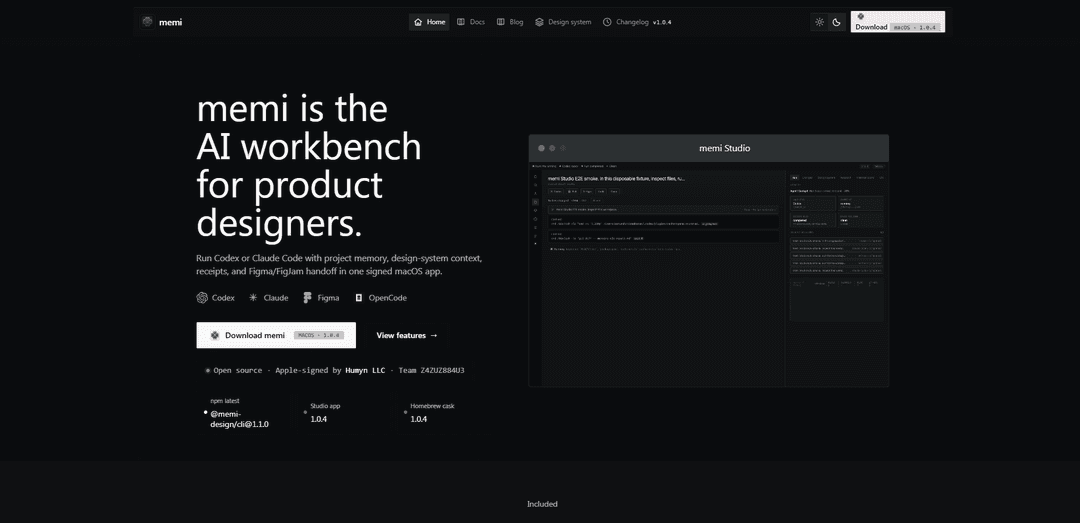
memi is an AI workbench for product designers that runs design-aware agents (Codex/Claude), keeps editable project “design memory” (Markdown/YAML), and provides inspectable run receipts plus exportable planning boards (Mermaid/FigJam) with an optional Figma bridge.
https://memoire.cv/?ref=producthunt
Produktinformationen
Aktualisiert:Jul 8, 2026
Was ist memi
memi (by memoire.cv) is a product-design workbench that brings AI agent runs and product-system context into one readable, controllable desktop workflow. It’s positioned around transparency and reuse: you can start agents like Codex or Claude Code with visible auth/permissions/session controls, inspect what happened via prompts/plans/tools/files/cost “receipts,” and then convert useful outputs—research, decisions, tokens, and specs—into editable project memory rather than hidden prompt history. memi Studio is offered as a signed macOS app that keeps runtime, sessions, artifacts, and run history together for design teams and individual designers.
Hauptfunktionen von memi
memi is a macOS “AI workbench” for product designers that runs design-aware agents (notably Codex and Claude Code) with visible setup, permissions, and session controls, then turns the resulting prompts, plans, tools, files, costs, and artifacts into editable project “design memory.” It keeps research, specs, tokens, decisions, and reviews in a readable Markdown/YAML layer that can be diffed and reused, supports exporting local Mermaid and FigJam-ready planning sources before any external sync, and can optionally bridge into Figma to pull tokens, components, trees, and screenshots when needed. A key concept is “skill files” (e.g., tenets/traps, audit checklists) that encode taste and critique as executable, repeatable practice for continuous improvement.
Design-aware agent runs with visible controls: Run agents like Codex or Claude Code inside a project with explicit auth, permissions, model selection, and session controls kept visible rather than hidden.
Run spine + receipts for inspectability: A compact run timeline that lets you inspect prompts, plans, tool calls, files, and cost as “receipts,” expanding to raw logs only when needed.
Editable design memory (not hidden prompts): Convert decisions, research findings, tokens, artifacts, and notes into a readable, editable project state that agents can reuse—avoiding opaque prompt accumulation.
Plain-text memory in Markdown/YAML: Store project memory in diffable Markdown/YAML so teams can review, version, and reuse context across runs and iterations.
Board preparation exports (Mermaid / FigJam-ready): Generate local planning sources (Mermaid diagrams, FigJam-ready content) and keep them inspectable before approving any external synchronization.
Skills as executable practice: Use “skill files” (e.g., UX tenets/traps, Figma audit checklists) to capture critique loops (OBSERVE→PLAN→EXECUTE→VALIDATE→ITERATE), score outputs, and guide the next iteration.
Anwendungsfälle von memi
Product design system stewardship: Maintain a durable, readable memory of tokens, component decisions, and review outcomes; pull Figma context when necessary and keep a consistent system across iterations.
UX audit and quality assurance loop: Capture screenshots, run structured UX audits using tenets/traps skill files, produce actionable findings, and enforce self-healing validation before handoff.
Research-to-spec workflow for teams: Turn research notes and agent outputs into structured specs and project context, then export board-ready plans for cross-functional alignment.
Design ops and handoff packaging: Create inspectable “review packets” with run history, artifacts, and costs for stakeholders, improving traceability and reducing back-and-forth.
Agency/consulting multi-client delivery: Keep per-client project memory isolated and editable, reuse proven skill files across engagements, and provide transparent receipts for decisions and deliverables.
Vorteile
High transparency: prompts, tool use, files, and costs are inspectable as receipts, aiding trust and debugging.
Durable, editable project memory in Markdown/YAML enables reuse, versioning, and collaboration.
Designed for real design workflows: integrates agent runs, artifacts, board exports, and optional Figma context.
Repeatable quality via skill files that encode critique, tenets, and validation steps.
Nachteile
macOS-only (signed macOS app), which may limit teams on other platforms.
Best value depends on adopting its workflow conventions (run spine, memory layer, skill files), which can add process overhead.
Figma integration appears conditional/bridge-based and may require setup/permissions, adding operational complexity.
Wie verwendet man memi
1) Install and open memi Studio (macOS): Download the signed macOS app and launch it. Create/open a workspace (project) where your runs and “design memory” will live.
2) Create or open a project: Start a new project for the product/design initiative you’re working on, or open an existing one so memi can keep all runs, artifacts, and memory in one place.
3) Choose an agent for the job: From the project, select an agent run (e.g., Codex or Claude Code). Pick the agent that matches your task (research, spec drafting, UX audit, implementation support).
4) Configure auth, permissions, and session controls: Before running, confirm the agent’s authentication and permissions. Keep these visible so you understand what the agent can access and what it will do during the run.
5) Start an agent run and watch the run spine: Kick off the run. Use the run spine to follow progress and quickly jump between stages (prompts, plans, tool calls, files, and outputs).
6) Inspect the work with receipts (prompts, plans, tools, files, cost): Open the inspection view to read the raw log when needed. Review what was asked, what the agent planned, which tools/files were used, and the cost/usage details.
7) Convert useful output into editable design memory: Promote decisions, research findings, specs, tokens, and review notes into memi’s “design memory” so it becomes reusable project state (not hidden prompt history).
8) Store memory in plain formats (Markdown/YAML) for diffing and reuse: Keep project memory as readable Markdown/YAML so it can be reviewed, versioned, and reused across future runs and collaborators.
9) Use skill files to standardize quality (tenets/traps/audit loops): Apply memi’s skill files (e.g., SUPERPOWER.md, FIGMA_AUDIT.md, UX_TENETS_TRAPS.md) to run consistent workflows like OBSERVE → PLAN → EXECUTE → VALIDATE → ITERATE and to enforce audit/critique standards.
10) Run a UX audit from a screenshot (example workflow): Capture the relevant screen and run a UX audit using the UX tenets/traps skill. Use the resulting findings to patch recurring issues and generate the next iteration plan.
11) Prepare planning boards (Mermaid / FigJam-ready source): Export local Mermaid and FigJam-ready planning source from your project so you can review it before syncing or sharing externally.
12) Connect the Figma bridge when needed: Enable the Figma bridge only when a run needs Figma context. Confirm the bridge is active (port shown, plugin connected) and then pull tokens/components/trees/screenshots as required.
13) Monitor bridge health and events: Check the bridge port status and event stream (connections, token pulls, selections). If disconnected, wait for reconnection and retry the pull/inspect actions.
14) Keep external sync gated by approval: Review exported sources and memory updates locally first. Only approve external sync/sharing after you’ve verified the content is correct and intended.
15) Iterate: reuse memory + rerun agents with improved context: As the project evolves, keep updating design memory (decisions, tokens, specs, reviews). Re-run agents using that memory to maintain continuity and reduce repeated re-explaining.
memi FAQs
memi is an AI workbench for product designers that lets you run design-aware agent sessions (e.g., Codex or Claude Code), inspect the work (prompts, plans, tools, files, costs), and turn results into editable project “design memory” (e.g., specs, decisions, research, tokens).
Beliebte Artikel

Vosko AI: Videos für ein globales Publikum lokalisieren und synchronisieren
Oct 15, 2026

Atoms: Eine Multi-Agenten-KI-Plattform, die Ideen in startbereite Produkte verwandelt
May 22, 2026

Nano Banana SBTI: Was es ist, wie es funktioniert und wie man es im Jahr 2026 einsetzt
Apr 15, 2026

Atoms Review – Der KI-Produkt-Builder, der die digitale Erstellung im Jahr 2026 neu definiert
Apr 10, 2026
Neueste KI-Tools ähnlich wie memi

Gait
Gait ist ein Collaboration-Tool, das KI-unterstützte Codegenerierung mit Versionskontrolle integriert und es Teams ermöglicht, KI-generierten Codekontext effizient zu verfolgen, zu verstehen und zu teilen.

invoices.dev
invoices.dev ist eine automatisierte Rechnungsplattform, die Rechnungen direkt aus den Git-Commits der Entwickler generiert und Integrationsmöglichkeiten für GitHub, Slack, Linear und Google-Dienste bietet.

EasyRFP
EasyRFP ist ein KI-gestütztes Edge-Computing-Toolkit, das RFP (Request for Proposal)-Antworten optimiert und eine Echtzeit-Feldphänotypisierung durch Deep-Learning-Technologie ermöglicht.

Cart.ai
Cart.ai ist eine KI-gestützte Dienstleistungsplattform, die umfassende Lösungen zur Automatisierung von Geschäftsprozessen bietet, einschließlich Programmierung, Kundenbeziehungsmanagement, Videobearbeitung, E-Commerce-Setup und benutzerdefinierter KI-Entwicklung mit 24/7 Unterstützung.
Beliebte KI-Tools wie memi

GitHub Copilot Chat
GitHub Copilot Chat ist ein KI-gestützter Codierungsassistent, der Interaktionen in natürlicher Sprache, Echtzeit-Codevorschläge und kontextuelle Unterstützung direkt innerhalb unterstützter IDEs und GitHub.com bietet.

CopilotForXcode
CopilotForXcode ist eine Xcode-Quell-Editor-Erweiterung, die GitHub Copilot, Codeium und ChatGPT integriert, um KI-gestützte Codevorschläge, Chat-Unterstützung und Prompt-to-Code-Funktionalität innerhalb von Xcode bereitzustellen.

BrowserAI
BrowserAI ist eine Open-Source-Bibliothek, die die Ausführung lokaler Large Language Models (LLMs) direkt in Webbrowsern mit WebGPU-Beschleunigung ermöglicht und datenschutzorientierte KI-Funktionen bietet, ohne dass eine Serverinfrastruktur erforderlich ist.

OpenAI Codex CLI
OpenAI Codex CLI ist ein schlanker Open-Source-Coding-Agent, der in Ihrem Terminal ausgeführt wird und es Entwicklern ermöglicht, natürliche Sprache in Codeausführung zu übersetzen und gleichzeitig ChatGPT-ähnliche Argumentation mit der Möglichkeit, Code auszuführen, Dateien zu bearbeiten und unter Versionskontrolle zu iterieren, bereitzustellen.