
VEXI
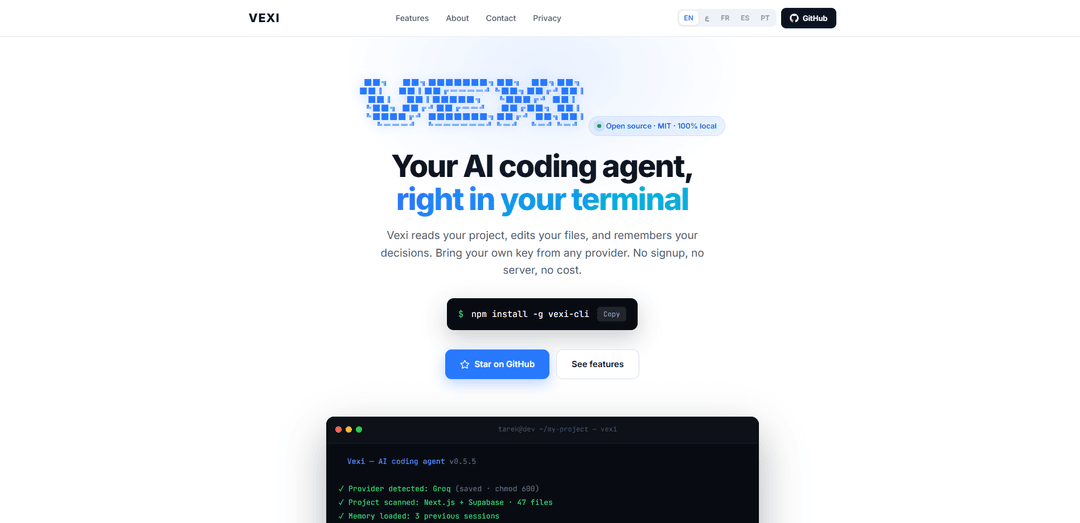
VEXI (Vexi CLI) is an open-source, MIT-licensed, 100% local terminal AI coding agent that scans your codebase, edits files, remembers decisions across sessions, and works with bring-your-own API keys from multiple providers.
https://vexi.pro/?ref=producthunt
Product Information
Updated:Jun 16, 2026
What is VEXI
VEXI is a command-line AI coding agent designed for developers who work primarily in the terminal. Installed with a single npm command, it can read and understand your project (while respecting .gitignore and skipping directories like node_modules), make code changes directly in your files, and keep a persistent memory of prior decisions so you don’t have to re-explain context each time. VEXI is positioned as a lightweight, no-signup tool: it runs locally, stores configuration and session data on your machine, and supports multiple AI providers via your own API key.
Key Features of VEXI
VEXI (Vexi CLI) is an open-source, MIT-licensed AI coding agent that runs entirely in your terminal and works 100% locally—no signup, no vendor server, and no required cloud app. It scans your whole project (respecting .gitignore), edits files, keeps a compressed “memory” of prior decisions across sessions, and can replay sessions as shareable interactive HTML. You bring your own API key from multiple providers (auto-detected), and VEXI can also execute common build/tooling commands across many languages while explaining code in several human languages.
One-command CLI install: Install with a single command (npm install -g vexi-cli) and run on Windows, macOS, or Linux without complex configuration.
Bring-your-own-key, multi-provider support: Auto-detects the AI provider from your key format and supports providers such as Groq, Google Gemini, Anthropic, OpenAI, OpenRouter, and Mistral—keys are stored locally.
Project-wide understanding: Scans the full codebase (not just one file), respects .gitignore, and skips folders like node_modules to ground edits in real project context.
Local memory & context compression: Maintains a running summary of decisions across sessions (saved in the project) so you don’t need to re-explain architecture and preferences.
Session replay & shareability: Exports sessions as interactive HTML replays so teammates can review what the agent changed and why, step by step.
Build/run automation + multilingual explanations: Can execute common build commands (e.g., pip, gcc, javac, cargo) and explain code in Arabic, Spanish, Portuguese, French, or English.
Use Cases of VEXI
Bug fixing and refactoring in existing repos: Scan a project, locate issues (e.g., auth/JWT bugs), apply targeted edits across files, and preserve rationale via session memory and replay.
Onboarding and knowledge transfer: New engineers can replay prior sessions to understand decisions, see changes applied, and get explanations in their preferred language.
Polyglot build and CI troubleshooting: Useful for teams working across Python/Java/C/Rust/Go where the agent can run builds/tests and iterate on fixes directly from the terminal.
Privacy-conscious development workflows: Fits regulated or security-sensitive environments by avoiding vendor-hosted “agent servers,” keeping memory and configs local while only sending code to the chosen model provider.
Documentation and code comprehension support: Generate clear explanations of unfamiliar modules and decisions for internal docs, with multilingual output to support global teams.
Pros
100% local workflow (no VEXI servers): memory, sessions, and keys are stored on your machine.
Open source (MIT) with simple CLI-first setup and shareable session replays.
Flexible provider choice (BYOK) with automatic provider detection.
Project-wide context + persistent memory reduces repeated prompting.
Cons
Still depends on third-party AI providers—your code is sent to whichever provider you configure, under their privacy terms.
You are responsible for API costs and for reviewing/validating code changes before applying them.
CLI-first approach may be less convenient for users who prefer full IDE-native experiences.
How to Use VEXI
1) Install Vexi CLI: In your terminal, run: npm install -g vexi-cli
2) Go to your project folder: cd into the repository you want Vexi to read and edit (e.g., cd ~/my-project).
3) Start Vexi: Run: vexi
4) Add an AI provider key (BYOK): Provide an API key from a supported provider (Groq, Gemini, Anthropic, OpenAI, OpenRouter, Mistral). Vexi auto-detects the provider from the key format and stores it locally in ~/.vexi/config.json with owner-only permissions.
5) Let Vexi scan your codebase: Vexi scans the project to understand context (it respects .gitignore and skips folders like node_modules).
6) Use memory (optional, automatic): If you’ve used Vexi before in this project, it loads prior session memory from the project’s .vexi/ folder so you don’t have to re-explain decisions.
7) Ask Vexi to make a change: Type a concrete instruction (example from the docs: “fix the JWT bug in auth.ts”). Vexi will locate the relevant file/line(s) and propose edits.
8) Review the edits Vexi makes: Confirm the change in your files (example shown: changing jwt.sign(..., { expiresIn: 30 }) to expiresIn: "30m"). Always review modifications before committing.
9) Build/run from chat when needed: Ask Vexi to run build commands; it can execute common toolchains (e.g., pip install, gcc, javac, cargo) directly from the chat workflow.
10) Export a session replay (optional): Use Vexi’s session replay feature to export the session as an interactive HTML you can share and review step-by-step.
11) Get explanations in your preferred language (optional): Ask Vexi to explain code in Arabic, Spanish, Portuguese, French, or English.
12) Keep using it—Vexi learns your style over time: As you correct or refine outputs, Vexi mines past sessions to build a personal skill file that it injects into future sessions to better match your preferences.
VEXI FAQs
Vexi es un agente de programación con IA para la terminal. Lee tu proyecto, edita archivos y recuerda decisiones, funcionando 100% de forma local.
Popular Articles

Vosko AI: Localize and Dub Videos for Global Audiences
Oct 15, 2026

Atoms: A Multi-Agent AI Platform That Transforms Ideas into Launch-Ready Products
Oct 13, 2026

Nano Banana SBTI: What It Is, How It Works, and How to Use It in 2026
Apr 15, 2026

Atoms Review — The AI Product Builder Redefining Digital Creation in 2026
Apr 10, 2026
Latest AI Tools Similar to VEXI

Gait
Gait is a collaboration tool that integrates AI-assisted code generation with version control, enabling teams to track, understand, and share AI-generated code context efficiently.

invoices.dev
invoices.dev is an automated invoicing platform that generates invoices directly from developers' Git commits, with integration capabilities for GitHub, Slack, Linear, and Google services.

EasyRFP
EasyRFP is an AI-powered edge computing toolkit that streamlines RFP (Request for Proposal) responses and enables real-time field phenotyping through deep learning technology.

Cart.ai
Cart.ai is an AI-powered service platform that provides comprehensive business automation solutions including coding, customer relations management, video editing, e-commerce setup, and custom AI development with 24/7 support.
Popular AI Tools Like VEXI

GitHub Copilot Chat
GitHub Copilot Chat is an AI-powered coding assistant that provides natural language interactions, real-time code suggestions, and contextual support directly within supported IDEs and GitHub.com.

CopilotForXcode
CopilotForXcode is an Xcode Source Editor Extension that integrates GitHub Copilot, Codeium, and ChatGPT to provide AI-powered code suggestions, chat assistance, and prompt-to-code functionality within Xcode.

BrowserAI
BrowserAI is an open-source library that enables running local Large Language Models (LLMs) directly in web browsers with WebGPU acceleration, offering privacy-focused AI capabilities without requiring server infrastructure.

OpenAI Codex CLI
OpenAI Codex CLI is a lightweight, open-source coding agent that runs in your terminal, enabling developers to translate natural language into code execution while providing ChatGPT-level reasoning with the ability to run code, manipulate files, and iterate under version control.