Timmy-TUI
Timmy-TUI is a TypeScript-based, OpenRouter-powered terminal UI scaffold that gives you a runnable agent harness with streaming chat, configurable tools, and built-in session persistence out of the box.
https://github.com/woodman33/openrouter-tui-agent?ref=producthunt
Product Information
Updated:Jun 15, 2026
What is Timmy-TUI
Timmy-TUI is a terminal user interface (TUI) project template for building AI agents on top of OpenRouter. Conceptually similar to “create-react-app” but for terminal agents, it scaffolds a complete, runnable codebase in TypeScript that includes the agent runner, configuration system, an interactive CLI entry point, and a starter tool suite (file operations, search, and shell execution). The goal is to let developers quickly create an agent that feels native in the terminal while remaining fully customizable—both in UI behavior (input styles, tool rendering modes, banners) and in agent capabilities (tool definitions and modules).
Key Features of Timmy-TUI
Timmy-TUI is a terminal-native AI agent interface and scaffold that helps you quickly build and run customizable agent-driven workflows from the command line. Based on the referenced sources around OpenRouter’s agent TUI scaffolding, it emphasizes a ready-to-run TypeScript project structure with configurable models/providers, streaming output, session persistence, and a pluggable tool system (e.g., file ops, search, shell execution). It’s designed to give developers a “create-react-app”-like starting point for agent TUIs, so they can focus on agent logic and tools while retaining a polished interactive terminal experience.
Scaffolded agent TUI project: Generates a runnable TypeScript/Node project (config, agent runner, CLI entrypoint, and optional modules) so you can start building an agent TUI from a single prompt rather than assembling infrastructure by hand.
Customizable terminal UX: Supports multiple interaction styles and tool display modes, with terminal-friendly rendering (e.g., banners, adaptive UI behaviors) aimed at making long agent sessions readable and operator-friendly.
Streaming responses + token visibility: Designed for live, streaming model output and status-style feedback (including token counts in some implementations), which improves usability during iterative tasks like coding and debugging.
Session persistence and replayability: Stores conversations (commonly JSONL-style) to preserve context across runs, enabling auditing, resuming work, and comparing agent behavior over time.
Tool/plugin-style architecture: Provides a tool registry pattern where you can enable built-in tools (file read/write/edit, grep/glob, list directories, shell commands) and add your own tools following a consistent schema.
Provider/model flexibility via OpenRouter: Targets OpenRouter-style routing so the same TUI can work across many models/providers through unified configuration (keys via env/config layering).
Use Cases of Timmy-TUI
Developer coding agent in the terminal: Use Timmy-TUI as a local-first coding assistant that can read/edit files, run shell commands, and iteratively implement features while keeping a persistent session log.
Internal ops/runbook automation: Wrap common operational tasks (log inspection, config edits, scripted checks) into tools and let operators drive them through a guided agent TUI with streaming feedback.
Security and compliance triage: Build workflows for scanning repositories, grepping for risky patterns, summarizing findings, and producing auditable session records for reviews.
Customer support troubleshooting console: Create an agent that follows troubleshooting playbooks, queries local artifacts (logs/configs), and generates step-by-step remediation guidance in a consistent terminal UI.
Data/ML experimentation harness: Prototype small agent tools for dataset inspection, experiment orchestration, and result summarization, while retaining reproducible sessions and configurable model choices.
Pros
Fast time-to-first-agent: scaffolding provides a complete working baseline (config, runner, tools, UI) with minimal setup.
Extensible tool system: built-in file/search/shell utilities and a clear pattern for adding custom tools.
Good operator ergonomics: streaming output, readable tool rendering, and session persistence support long-running workflows.
Cons
Terminal-first UX limits audience: users who prefer web GUIs may find a TUI less accessible.
Tooling power increases risk: enabling shell/file-write tools requires careful sandboxing and permission controls in sensitive environments.
Model/provider configuration can be confusing: multi-provider routing and model selection may require extra config tuning to match expectations.
How to Use Timmy-TUI
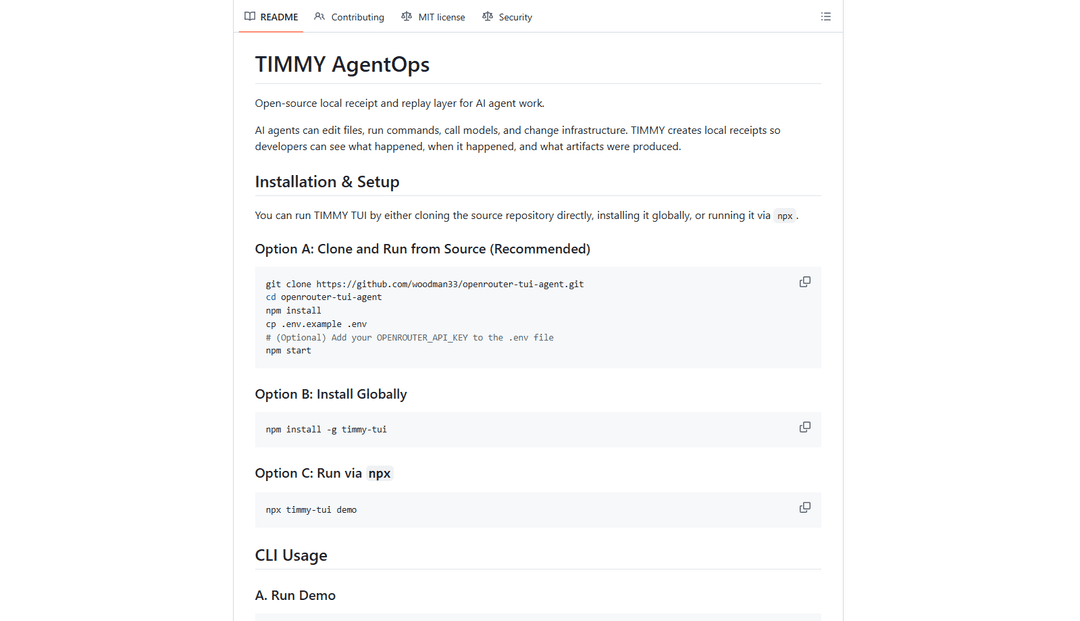
1) Install prerequisites: Install Node.js (modern LTS recommended) and ensure you have an OpenRouter API key available.
2) Get the Timmy-TUI project (scaffold or clone): If you’re creating Timmy-TUI from scratch, install the OpenRouter skill and scaffold a TUI agent project: `gh skill install OpenRouterTeam/skills create-agent-tui`. Then run your coding agent and ask it to generate a TUI agent (it will use the skill). If you already have a Timmy-TUI repo, clone it instead.
3) Install dependencies: In the project folder, install packages: `npm install`.
4) Configure your OpenRouter key: Create an environment file from the template (commonly `.env.example` -> `.env`) and set `OPENROUTER_API_KEY=your-key-here`.
5) Review and set model/config: Open `src/config.ts` (layered config: defaults -> file -> env) and set the model/provider options you want. This is where you choose which OpenRouter model Timmy-TUI uses.
6) Start Timmy-TUI: Run the TUI in dev mode (commonly): `npm start` (or the project’s equivalent script). You should see a terminal UI with streaming output.
7) Use the interactive REPL: Type prompts directly into the TUI input. Timmy-TUI streams responses and typically shows token counts and tool activity in the interface.
8) Use built-in tools (if enabled): Timmy-TUI projects scaffolded by create-agent-tui commonly include tools under `src/tools/` such as file read/write/edit, glob, grep, list-dir, and shell execution. When the agent decides to use a tool, the TUI renders the tool call and result.
9) Add or customize tools: Edit `src/tools/index.ts` to register tools and add new tool files in `src/tools/` following the `@openrouter/agent/tool` pattern. Restart the app to load changes.
10) Customize the terminal UI: Adjust rendering and display behavior in the scaffolded UI modules (commonly `src/renderer.ts` and related files). The scaffold supports multiple input styles and tool display modes; select the one you prefer and tweak formatting.
11) Use session persistence: Timmy-TUI scaffolds typically persist conversations as JSONL via `src/session.ts`. Start new sessions or resume prior ones according to the project’s CLI/TUI controls; verify saved session files in the configured storage location.
12) Troubleshoot model/config mismatches: If the UI shows an unexpected model, confirm the config layering order (defaults -> file -> env) and ensure your model identifier matches OpenRouter’s expected format. Re-check that `OPENROUTER_API_KEY` is loaded in the environment used to launch the TUI.
Timmy-TUI FAQs
Timmy-TUI refers to a terminal user interface (TUI) scaffolding approach from the OpenRouter Skills ecosystem that lets an AI coding agent generate a complete, runnable agent TUI project in TypeScript—similar in spirit to create-react-app, but for terminal-based AI agents.
Popular Articles

Atoms: A Multi-Agent AI Platform That Transforms Ideas into Launch-Ready Products
May 22, 2026

Nano Banana SBTI: What It Is, How It Works, and How to Use It in 2026
Apr 15, 2026

Atoms Review — The AI Product Builder Redefining Digital Creation in 2026
Apr 10, 2026

Kilo Claw: How to Deploy and Use a True "Do‑It‑For‑You" AI Agent(2026 Update)
Apr 3, 2026
Latest AI Tools Similar to Timmy-TUI

Gait
Gait is a collaboration tool that integrates AI-assisted code generation with version control, enabling teams to track, understand, and share AI-generated code context efficiently.

invoices.dev
invoices.dev is an automated invoicing platform that generates invoices directly from developers' Git commits, with integration capabilities for GitHub, Slack, Linear, and Google services.

EasyRFP
EasyRFP is an AI-powered edge computing toolkit that streamlines RFP (Request for Proposal) responses and enables real-time field phenotyping through deep learning technology.

Cart.ai
Cart.ai is an AI-powered service platform that provides comprehensive business automation solutions including coding, customer relations management, video editing, e-commerce setup, and custom AI development with 24/7 support.
Popular AI Tools Like Timmy-TUI

GitHub Copilot Chat
GitHub Copilot Chat is an AI-powered coding assistant that provides natural language interactions, real-time code suggestions, and contextual support directly within supported IDEs and GitHub.com.

CopilotForXcode
CopilotForXcode is an Xcode Source Editor Extension that integrates GitHub Copilot, Codeium, and ChatGPT to provide AI-powered code suggestions, chat assistance, and prompt-to-code functionality within Xcode.

BrowserAI
BrowserAI is an open-source library that enables running local Large Language Models (LLMs) directly in web browsers with WebGPU acceleration, offering privacy-focused AI capabilities without requiring server infrastructure.

OpenAI Codex CLI
OpenAI Codex CLI is a lightweight, open-source coding agent that runs in your terminal, enabling developers to translate natural language into code execution while providing ChatGPT-level reasoning with the ability to run code, manipulate files, and iterate under version control.