Termi Protocol
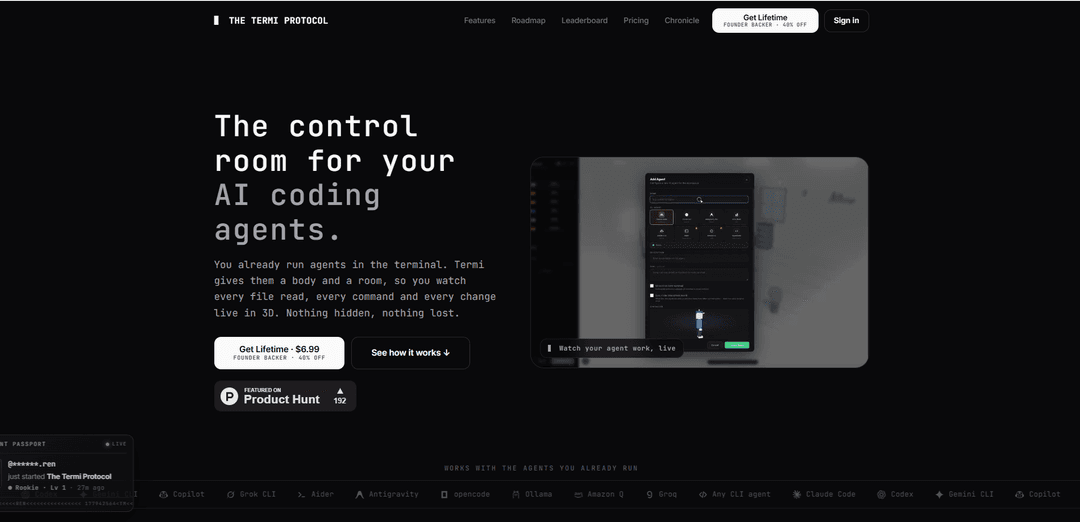
Termi Protocol is a local-first 3D control room that visualizes your existing AI coding agents’ terminal workflows live—showing file reads/writes, commands, tasks, checkpoints, memory, and cost tracking in one cockpit.
https://termiprotocol.com/?ref=producthunt
Product Information
Updated:Jul 8, 2026
What is Termi Protocol
Termi Protocol is a 3D simulation and visualization app for AI coding agent workflows. Instead of treating agent work as an opaque stream of terminal text, it gives each agent a body and a virtual room so you can watch what it’s doing—reading files, writing code, and running commands—in real time like a game. It’s designed to work with the CLI agents you already use (e.g., Claude Code, Codex, Gemini CLI and other BYOK tools), runs on your machine, and focuses on making agent sessions visible, controllable, and persistent across restarts.
Key Features of Termi Protocol
Termi Protocol is a local-first 3D simulation and control room that visualizes terminal-based AI coding agent workflows (e.g., file reads/writes, shell commands, git operations) as live, game-like actions in a virtual room. You bring and run your own CLI agents (Claude Code, Codex, Gemini CLI, etc.) with your own keys on your own machine, while Termi provides a cockpit-style Command Center with a real per-agent terminal, tasks, checkpoints/rewind, saved project memory, live cost tracking, and safety controls like approvals and file locks to keep multi-agent work understandable and manageable.
Live 3D workflow visualization: Transforms terminal activity into a real-time 3D “room” where you can watch agents read files, write code, and run commands as visible actions rather than opaque scrolling logs.
Bring-your-own agent (BYOK, local-first): Works with the CLI agents you already run (e.g., Claude Code, Codex, Gemini CLI, Aider, Ollama, etc.); agents execute on your machine using provider keys you supply—Termi does not sell or proxy model APIs.
Command Center cockpit: Central panel for steering work: a genuine per-agent shell (xterm + PTY), live status, task management, checkpoints, and session controls without tab-juggling.
Checkpoints and rewind: Automatically snapshots changes so you can roll back quickly to a prior checkpoint after a bad edit or runaway command.
Tasks + persistent agent memory: Built-in task boards the agent can drive, plus saved project memory and session history so you can resume work without re-explaining context.
Multi-agent safety controls: Approval/pause controls and notifications when the agent needs input, plus file locks to prevent two agents from editing the same file at the same time.
Use Cases of Termi Protocol
Software engineering teams running coding agents: Increase transparency and control over agent-driven coding by watching every command and file change, using approvals, and rewinding via checkpoints when changes go off-track.
DevOps / release automation with guardrails: Monitor and intervene in agent-executed shell and git workflows during builds, migrations, or incident fixes, reducing risk with step approvals and rollback checkpoints.
AI-assisted code review and audit trails: Use the visualized, step-by-step workflow plus saved history/checkpoints to understand how changes were produced, making agent output easier to inspect and validate.
Education and onboarding for agentic workflows: Teach newcomers how CLI-based agents operate by making file operations and command execution legible and replayable, helping students learn safe agent usage patterns.
Solo developer productivity and focus: Run multiple agents in parallel with less mental overhead using a single cockpit (tasks, memory, live cost), notifications for approvals, and collision prevention via file locks.
Pros
Makes agent actions observable and less opaque by turning terminal steps into a clear, live 3D visualization.
Local-first and BYOK: you run agents on your machine with your own API keys; code stays on-device by design.
Strong control and recovery tools (approvals, checkpoints/rewind, file locks) for safer multi-agent work.
Cons
Requires you to already have and configure compatible CLI agents and provider keys; Termi does not provide model access.
Platform support is limited to macOS and Windows (per the provided sources).
Some features are roadmap-based and may change, slip, or be removed as the product ships in chapters.
How to Use Termi Protocol
1) Install and open Termi Protocol: Download the Termi Protocol app (supported on macOS and Windows) and launch it to access your first room/workspace.
2) Prepare an AI coding agent CLI (BYOK): Make sure you already have an AI coding agent you can run from a terminal (e.g., Claude Code, Codex, Gemini CLI, Copilot, Grok CLI, Aider, Ollama, Amazon Q, Groq, or any CLI agent). You will use your own API keys on your own machine.
3) Bring/connect your agent inside Termi: In Termi, choose to connect/bring your existing CLI agent so Termi can visualize its terminal workflow. Termi does not provide model APIs; it runs what you run locally.
4) Create or open a Room (Milano / Chapter 01): Start with the live chapter (Milano). Create a room (or open an existing one) where your agents will appear and work.
5) Add an Agent Desk (one desk per agent): Place an agent desk in the room so each agent has a dedicated workspace. This is where the agent’s activity will be represented in 3D.
6) Open the Command Center for the agent: Open the Command Center panel behind/beside the agent desk to access the controls and visibility tools in one place.
7) Use the real terminal (xterm + PTY) to run the agent: Run your agent in the provided real shell (not a replayed log). As it executes commands, reads files, and writes code, Termi visualizes those steps live in 3D.
8) Watch the agent’s workflow in 3D: Observe the agent’s actions as a live choreography (e.g., reading from storage/cabinet, sitting to write code, running commands). This is meant to make terminal workflows less opaque.
9) Create and manage Tasks (Kanban): Use the Tasks board in the Command Center to structure work. Track planned items through completion; the agent can drive progress as tasks move toward done.
10) Use Checkpoints to snapshot and rewind: Rely on checkpoints to snapshot changes. If the agent makes a bad edit, rewind to a prior checkpoint to recover quickly.
11) Stay in control: stop, pause, approve steps: When needed, intervene by stopping or pausing the agent, or approving/denying steps. Termi is designed so you can steer work rather than just accept outcomes.
12) Monitor Live Cost per agent/session: Use the Live Cost view in the Command Center to see token and dollar cost as the agent runs, broken down per agent and per session.
13) Use Memory to persist project context: Let Termi save what each agent learns about your project automatically so you can resume later without re-explaining the same context each session.
14) Run multiple agents safely (avoid collisions): If you use multiple agents, rely on file locks to prevent two agents from editing the same file at the same time.
15) Step away and respond to approval alerts: When an agent needs your approval, Termi can alert/notify you so you can return, approve or reject, and let it continue—without constant screen-watching.
16) Customize your workspace (Room Editor): Use the Room Editor to arrange furniture, toys, and focus tools so the environment matches how you like to work.
17) Enable the Pet System (optional): Activate the pet system; your pet grows with your real coding days as you continue using Termi.
18) Use the game layer (optional): XP, leagues, leaderboard: Earn XP from real workflow steps, climb ranks (Rookie → Legend), and optionally appear on the global leaderboard.
19) Close and resume later: When you close the app, your task boards, checkpoints, and each agent’s project memory are saved. Reopen the room to continue where you left off.
20) Follow the chapter/protocol roadmap (optional): Milano is live now; additional protocols unlock over time as new chapters/cities. If you have Lifetime Pass access, future protocols are included as they release.
Termi Protocol FAQs
Termi Protocol is a 3D simulation and visualization tool for AI coding agent workflows. It renders the terminal-based steps your agents perform (like reading/writing files, running shell commands, and git operations) as live 3D actions inside a virtual room.
Termi Protocol Video
Popular Articles

Proferex: A Cloud-Based Ad Tracking and Campaign Optimization Platform
Nov 4, 2026

How to Create Viral Talking Baby Podcast Videos with AI: Step-by-Step Guide
Nov 2, 2026

Vosko AI: Localize and Dub Videos for Global Audiences
Oct 15, 2026

Atoms: A Multi-Agent AI Platform That Transforms Ideas into Launch-Ready Products
Oct 13, 2026
Latest AI Tools Similar to Termi Protocol

Gait
Gait is a collaboration tool that integrates AI-assisted code generation with version control, enabling teams to track, understand, and share AI-generated code context efficiently.

invoices.dev
invoices.dev is an automated invoicing platform that generates invoices directly from developers' Git commits, with integration capabilities for GitHub, Slack, Linear, and Google services.

EasyRFP
EasyRFP is an AI-powered edge computing toolkit that streamlines RFP (Request for Proposal) responses and enables real-time field phenotyping through deep learning technology.

Cart.ai
Cart.ai is an AI-powered service platform that provides comprehensive business automation solutions including coding, customer relations management, video editing, e-commerce setup, and custom AI development with 24/7 support.
Popular AI Tools Like Termi Protocol

GitHub Copilot Chat
GitHub Copilot Chat is an AI-powered coding assistant that provides natural language interactions, real-time code suggestions, and contextual support directly within supported IDEs and GitHub.com.

CopilotForXcode
CopilotForXcode is an Xcode Source Editor Extension that integrates GitHub Copilot, Codeium, and ChatGPT to provide AI-powered code suggestions, chat assistance, and prompt-to-code functionality within Xcode.

BrowserAI
BrowserAI is an open-source library that enables running local Large Language Models (LLMs) directly in web browsers with WebGPU acceleration, offering privacy-focused AI capabilities without requiring server infrastructure.

OpenAI Codex CLI
OpenAI Codex CLI is a lightweight, open-source coding agent that runs in your terminal, enabling developers to translate natural language into code execution while providing ChatGPT-level reasoning with the ability to run code, manipulate files, and iterate under version control.