
SureThing.io
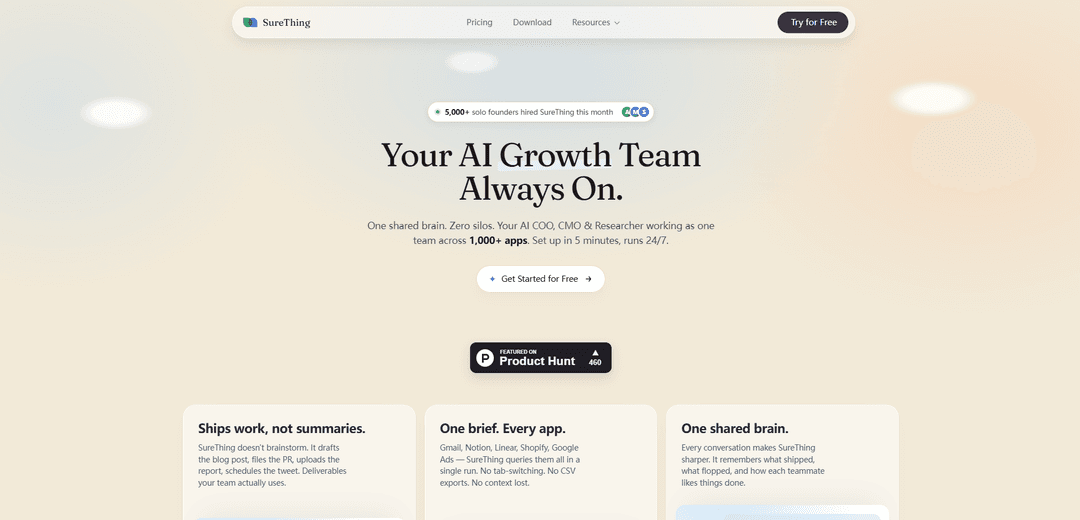
SureThing.io is a “general AI agency” that runs 24/7 with persistent memory and 1,000+ app integrations, proactively executing real work (email, scheduling, reporting, research, and ops) from a single dashboard with minimal setup.
https://surething.io/?ref=producthunt
Product Information
Updated:May 19, 2026
What is SureThing.io
SureThing.io positions itself as the world’s first General AI Agency—an autonomous, always-on AI agent (or team of agents) designed to operate like an internal COO/CMO/research function with “one shared brain” instead of siloed tools. Rather than acting like a chatbot that only responds to prompts, it aims to manage ongoing business workflows across email, calendar, project tools, CRM, and more, learning your preferences and voice over time. It offers a web app (and mentions desktop/mobile availability), quick onboarding, and plans starting around $30/month with daily free credits and no credit card required to start.
Key Features of SureThing.io
SureThing.io is an autonomous “general AI agency” that runs work across your email, calendar, and 1,000+ connected apps from a single dashboard. Unlike typical chatbots or brittle automations, it operates proactively (monitoring, drafting, scheduling, filing, and reporting), and uses persistent memory to learn your preferences, voice, contacts, and goals over time so you don’t have to repeat context. It’s positioned as a low-setup, always-on alternative to human agencies, vertical point-solution agents, and workflow tools like Zapier/n8n, with an emphasis on adaptability, centralized oversight, and enterprise-grade security (SOC 2, Google CASA Tier 2).
Autonomous, proactive execution: Works 24/7 to monitor signals (e.g., inbox, calendar, project tools), draft outputs, schedule meetings, flag priorities, and prepare actions for approval—so work progresses without constant prompting.
Persistent agentic memory (“one shared brain”): Remembers your goals, writing style, preferences, contacts, and workflow context across sessions, reducing re-briefing and enabling more consistent decisions and output quality over time.
1,000+ app integrations in one run: Connects across common business tools (e.g., Gmail, Notion, Linear, Shopify, Google Ads) to pull data and take actions without tab-switching, manual exports, or stitching together multiple agents.
Single dashboard with “reporting line” control: Central place to chat with agents, review deliverables, approve actions, and track running tasks—designed so the user stays in control without becoming the operational bottleneck.
Low setup, adaptive workflows (no wiring): Marketed as requiring minimal configuration compared to automation platforms; adapts when priorities shift rather than breaking rigid workflows.
Multi-platform + security posture: Available as a web app plus desktop/mobile (iOS/Android) with voice input; positioned for trust with SOC 2 and Google CASA Tier 2 compliance.
Use Cases of SureThing.io
Founder/exec ops: board packs and investor updates: Automatically pulls KPIs from sources like payments, CRM, spreadsheets, and headcount tools to assemble polished monthly board materials and investor updates with minimal manual assembly.
Sales/marketing ops: cross-channel reporting and execution: Queries ad platforms and commerce/CRM tools to generate performance reports, draft campaign updates, and coordinate follow-up actions (e.g., tasks, tickets, posts) from one workflow.
Recruiting and HR coordination: Screens inbound applicants, drafts replies in your voice, schedules interviews, and keeps calendars organized—surfacing only decisions that require human input.
Customer support and inbox triage: Monitors email, drafts responses consistent with your tone, flags priority threads, and coordinates next steps across tools (tickets, notes, tasks) to close loops faster.
Finance/vendor management: Handles operational back-office tasks like pursuing refunds or subscription disputes by gathering usage/context, drafting negotiation emails, and tracking outcomes.
Product/engineering coordination across tools: Bridges project management and documentation systems (e.g., Linear + Notion) by drafting specs/PRs, filing issues, and keeping status reporting current for stakeholders.
Pros
Persistent memory reduces repeated briefing and improves consistency in voice and decisions across weeks of work.
Proactive, always-on execution can advance tasks without constant prompts, saving operator time.
Broad integrations and a single dashboard reduce tool switching and siloed “one agent per job” setups.
Security/compliance positioning (SOC 2, Google CASA Tier 2) supports use in more sensitive business workflows.
Cons
Autonomous action across many apps may require careful permissions, oversight, and approval settings to avoid unwanted changes.
Effectiveness depends on successful integrations and access to accurate source data; gaps in connected tools can limit outcomes.
Costs can scale with heavy usage (credit/token consumption) for teams running large volumes of automated work.
Persistent memory, while valuable, may raise governance/privacy concerns for some organizations if not tightly managed.
How to Use SureThing.io
1) Create an account and sign in: Go to https://surething.io/login (or surething.io) and sign in. If access is gated, complete the onboarding/interview flow to receive access.
2) Open the SureThing dashboard (your control center): After signing in, you’ll land in the main dashboard where you can chat with your AI team, review deliverables, approve actions, and track running tasks in one place.
3) Connect your core apps (email, calendar, and work tools): Link the tools you already use so SureThing can read context and execute work across them (examples mentioned: Gmail, Google Calendar, Notion, Linear, Shopify, Google Ads; plus 1,000+ integrations).
4) Start with a real outcome (brief once, not prompts forever): In the chat, tell SureThing what you want owned end-to-end (e.g., “Draft and send replies to these emails in my voice,” “Assemble a board pack monthly,” “Create a Q2 competitive brief with pricing comparison,” or “Give me a weekly exec pulse every Monday”).
5) Use human-in-the-loop approvals early: At the beginning, review what SureThing drafts or proposes and explicitly approve, override, or redirect. This is how it learns your preferences and decision patterns.
6) Turn feedback into repeatable behavior (build memory through cycles): Each approval/correction becomes procedural state (not just notes). Keep giving quick feedback on tone, priorities, and what “good” looks like so it stops repeating mistakes and adapts to how you work.
7) Let it execute across tools (no tab-switching): Ask SureThing to query multiple connected apps in a single run and produce a deliverable (e.g., pull data from Stripe/CRM/Sheets/headcount tools for investor updates; or cross-reference calendar availability and draft invites).
8) Review deliverables inside the dashboard: When SureThing finishes, review the output (briefs, summaries, drafts, dashboards) in the same place you requested it. Use the dashboard to track what’s running, what’s stuck, and what needs your input.
9) Delegate recurring workflows (run 24/7): Assign ongoing responsibilities like: weekly exec pulse (Monday summary), inbox triage, hiring coordination, fundraise/competitor monitoring, or monthly board pack assembly—so it runs continuously without re-briefing.
10) Use scheduling automation via calendar integration: With Google Calendar connected, ask SureThing to handle scheduling logic: check availability, manage time zones, draft invites, and reorganize your calendar based on constraints and preferences.
11) Expand to “one shared brain” workflows (reduce silos): Instead of using separate vertical agents, route related work through SureThing so context is shared (e.g., SEO monitoring + content shipped + performance results) and the system coordinates actions as a unified team.
12) Ask it to monitor and surface changes proactively: Set monitoring tasks like competitor pricing changes, new raises in your space, or KPI movement. SureThing can flag updates and summarize what changed and what to do next.
13) Increase autonomy as trust builds (stop reviewing the boring 80%): After enough approve/override cycles, let SureThing make more decisions automatically and only escalate what truly needs you—so you move from operator to “chairman.”
14) Use mobile and voice (optional): If available to your account, install the iOS/Android app and use voice input to speak requests directly; continue managing tasks from anywhere.
15) Keep refining with natural language corrections: When something is off, tell SureThing what’s wrong and what you prefer. It’s designed to adapt continuously and remember how each teammate likes things done.
SureThing.io FAQs
SureThing.io describes itself as the “world’s first general AI agency”: an autonomous AI agent/team that remembers who you are and works on your behalf 24/7 from a single dashboard.
SureThing.io Video
Popular Articles

Atoms: A Multi-Agent AI Platform That Transforms Ideas into Launch-Ready Products
May 22, 2026

Nano Banana SBTI: What It Is, How It Works, and How to Use It in 2026
Apr 15, 2026

Atoms Review — The AI Product Builder Redefining Digital Creation in 2026
Apr 10, 2026

Kilo Claw: How to Deploy and Use a True "Do‑It‑For‑You" AI Agent(2026 Update)
Apr 3, 2026
Latest AI Tools Similar to SureThing.io

Ticknotes
Ticknotes is an AI-powered meeting assistant that automatically records, transcribes, and generates personalized meeting summaries, action items, and key insights from audio, video, and text content.

Feta
Feta is an AI-powered meeting tool that helps product and engineering teams run efficient meetings by capturing discussions, automating tasks, and providing actionable insights through smart summaries and integrations.

Aimeet
Aimeet is a comprehensive AI-powered communication platform that combines real-time translation, transcription, screen sharing, and unlimited meeting capabilities for effective virtual collaboration.

MinutesLink
MinutesLink is an advanced AI-powered note-taking assistant that automatically records, transcribes, summarizes and organizes virtual meetings while building personalized digital avatars from meeting data.
Popular AI Tools Like SureThing.io

Second Brain for AI
Second Brain for AI is a self-hosted, MCP-compatible persistent memory layer on Cloudflare that lets Claude, ChatGPT, Cursor, and other AI clients store and semantically recall shared context across sessions.

Slack
Slack is an AI-powered work platform that brings team communication, channels, files, automation, and app integrations into one conversational workspace.

24me Smart Personal Assistant
24me is an award-winning smart personal assistant app that combines calendar, to-do lists, notes, and personal accounts in one unified platform to help boost productivity and time management.

Granola for iOS
Granola for iOS is an AI-powered notepad app that helps users effortlessly capture, transcribe and summarize meeting conversations through intelligent note-taking and one-tap recording capabilities.