
Samepage Signals
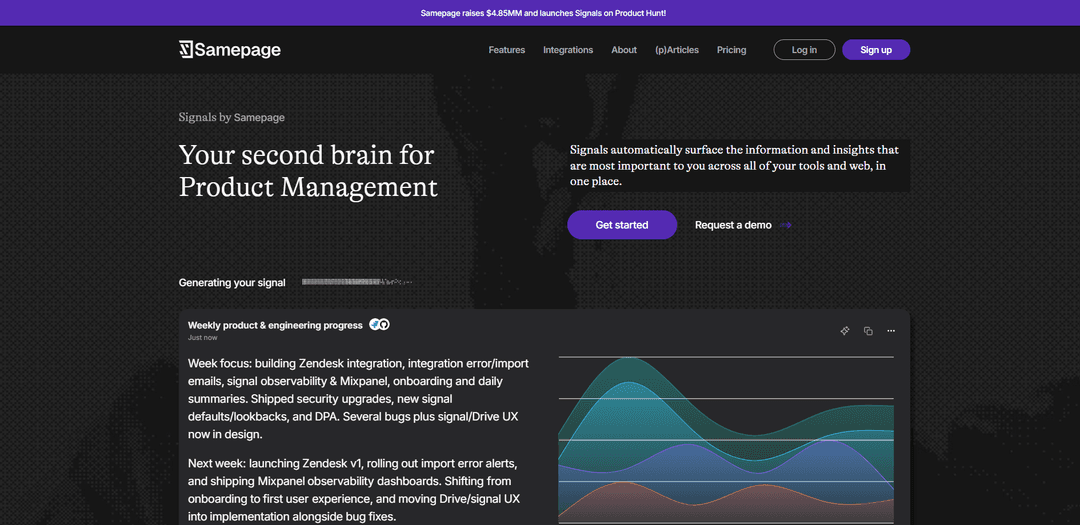
Samepage Signals is an AI-powered “second brain” for product managers that securely connects to your workplace tools, continuously analyzes context, and automatically surfaces the most important updates and insights in one place.
https://www.samepage.ai/?ref=producthunt
Product Information
Updated:Jul 8, 2026
What is Samepage Signals
Samepage Signals is a product management AI agent built to help teams stay aligned by cutting through the noise across the tools they already use. Instead of manually hunting for updates in Slack threads, Jira/Linear tickets, docs, dashboards, or sales call transcripts, Signals consolidates what matters and turns scattered information into structured, decision-ready summaries. Positioned as a “second brain for Product Management,” it focuses on making the invisible work of staying informed and aligned radically easier through automated signals, a context-aware copilot, and native integrations to critical systems.
Key Features of Samepage Signals
Samepage Signals is an AI-powered “second brain” for product management that connects to your existing tools (e.g., Slack, Jira/Linear/Shortcut, Confluence/Notion, Pendo/Mixpanel, sales call transcripts like Gong/Zoom, etc.) and continuously synthesizes what’s happening across them into actionable, structured insights. Instead of manually scanning tickets, docs, dashboards, and conversations, Signals monitors your connected data, performs analysis (trends, themes, anomalies), and publishes ongoing updates (“signals”) so product leaders can stay aligned, spot risks early, and make better prioritization and communication decisions with less status-chasing.
Cross-tool signal synthesis: Aggregates and connects insights across common PM systems (tickets, docs, chat, analytics, and call transcripts) so you can understand what’s happening without hopping between tools.
Automated, continuous monitoring: Scans connected data daily and automatically publishes signals based on what it learns matters to you (e.g., overdue responses, bug trends, new feature ideas, pending comments).
Backlog and work-pattern analytics: Treats project trackers (Jira/Linear/Shortcut, etc.) as datasets to identify trends like shifting investment (infra vs. features), recurring UX issues, and emerging themes over recent sprints/cycles.
Custom signal definitions: Lets you define what to analyze (e.g., “group stories created in the last 2 weeks into themes” or “analyze customer-facing Slack channels for recurring issues”) and runs it continuously.
Integrated context for decisions and prioritization: Surfaces actionable recommendations from patterns (e.g., suggesting a focused usability/design sprint when many small UX issues accumulate, or flagging release risk when blockers remain open).
Native integrations with critical systems: Securely connects to key workplace sources (examples shown include Slack, Notion, Asana, Jira/Linear/Shortcut, Confluence, and meeting/call sources like Zoom/Gong) to consolidate signals in one place.
Use Cases of Samepage Signals
Product & engineering weekly progress reporting: Automatically compiles what shipped, what’s in progress, and what’s next from trackers and team updates—reducing manual status gathering and making progress visible to stakeholders.
Release risk and dependency detection: Monitors Slack threads and linked issue trackers to flag pending decisions, open blockers, and regression risks (e.g., identifying high-confidence regressions still lacking merged fixes).
Customer feedback and issue trend mining (SaaS/Support-led orgs): Analyzes customer-facing channels, support conversations, and call transcripts to surface recurring complaints, feature requests, and decision-worthy themes for roadmap input.
UX quality and design-debt prioritization (consumer or B2B apps): Detects patterns like a high volume of small UX issues and recommends a focused design overhaul or dedicated usability sprint rather than piecemeal fixes.
Documentation and research synthesis (regulated or complex products): Treats knowledge bases (e.g., Confluence) as a connected layer to identify consistent vs. missing information and extract recurring pain points from research/spec pages.
Portfolio-level work mix tracking (platform/infrastructure teams): Quantifies shifts in work allocation (e.g., increased infrastructure work over multiple cycles while feature development declines) to support resourcing and strategy conversations.
Pros
Reduces manual “status chasing” by continuously surfacing the most important updates and insights across tools.
Improves alignment by consolidating fragmented context (tickets, chat, docs, calls, analytics) into one place with ongoing signals.
Supports better prioritization via trend detection and pattern-based recommendations (themes, work mix shifts, recurring issues).
Cons
Output quality depends on the completeness and correctness of connected tools’ data (gaps/noise in sources can affect signals).
AI-generated summaries/insights may occasionally be inaccurate or misleading and require human review before decisions or external communication.
Requires integrations and permissions across multiple systems, which may introduce setup and access-control overhead for some organizations.
How to Use Samepage Signals
1) Sign up (or log in) to Samepage: Go to https://app.samepage.ai/sign-up to create an account, or https://app.samepage.ai/login to log in. Signals is the Samepage feature that surfaces important updates and insights across your connected tools.
2) Open the Integrations page: In Samepage, navigate to Integrations (also accessible from https://www.samepage.ai/integrations). This is where you securely connect the workplace systems that Signals will analyze.
3) Connect your data sources (native integrations): Choose the tools you want Signals to monitor (examples mentioned in the sources include Slack, Jira, Linear, Shortcut, Confluence, Zoom, and Gong). Follow the connect flow for each tool to authorize access so Samepage can ingest the relevant objects (e.g., Slack channels/messages, Jira issues/epics/sprints, Linear issues/projects/cycles, etc.).
4) (Example) Connect Gong: In Samepage, go to Integrations → select Gong → click Connect → sign in with your Gong credentials → approve access. Samepage will periodically sync recent recorded meeting transcriptions and make them available for analysis and surfacing in your Signals feed.
5) (Example) Connect Zoom: Install/add the Samepage app for Zoom so Samepage can receive Zoom meeting metadata (date, duration, attendees), transcripts, and Zoom meeting summaries. This meeting context can then be used by Signals to surface themes, requests, and decisions.
6) Choose what Signals should analyze by defining a Signal prompt: Create a Signal and specify: (a) the data source(s), (b) the time window/lookback, and (c) what analysis you want. Examples from the sources: Jira/Linear/Shortcut: “Analyze issues/stories created in the last 2 weeks and group them into themes.” Confluence: “Analyze all user research pages and identify recurring pain points.” Slack: “Analyze messages from customer-facing channels over the past 7 days and identify recurring issues.”
7) Configure scope and access (what gets included): When connecting sources like Slack, select which channels are included. Signals is designed to cut through noise, so scoping to the most relevant channels/spaces/projects helps ensure the output is actionable.
8) Enable automated Signals (daily scanning): Use Automated Signals so Samepage scans your data daily, learns what matters to you, and automatically publishes signals. The sources describe automated signal types such as: spotting bug tickets in QA, tracking resolutions, highlighting overdue responses/pending comments, and surfacing new feature ideas via automated triage.
9) Set the cadence for a Signal (e.g., weekly): Configure how often a Signal runs (the sources show an example that “Runs every Monday” for a weekly product & engineering progress signal). Choose a cadence that matches the workflow you want to monitor (daily for support/feedback, weekly for progress summaries, etc.).
10) Review generated Signals in one place: Open your Signals feed to see synthesized updates across tools. Signals are meant to replace manual status gathering by consolidating what’s important across systems (e.g., progress summaries, emerging themes, recurring issues, and what needs action).
11) Use Signals outputs to drive action and alignment: Use the surfaced insights to prioritize work and communicate clearly. The sources emphasize that Signals connects insights across tools so you always know what’s going on—without sifting through emails, Slack threads, tickets, dashboards, or call transcripts.
12) Iterate: refine prompts, sources, and lookbacks to reduce noise: If a Signal is too broad or misses key context, adjust the definition: narrow/expand the included channels/projects/spaces, change the lookback window (e.g., last 7 days vs. last 2 weeks), or rewrite the analysis request (e.g., group into themes, identify recurring pain points, highlight blockers).
13) Validate before sharing externally: Samepage notes that Signals uses LLMs and AI-generated content may be inaccurate, incomplete, or misleading. Review and verify important outputs before using them for decisions or external communication.
Samepage Signals FAQs
Signals by Samepage is a product-management “second brain” that automatically surfaces the most important information and insights for you across your tools and the web, in one place.
Popular Articles

Atoms: A Multi-Agent AI Platform That Transforms Ideas into Launch-Ready Products
May 22, 2026

Nano Banana SBTI: What It Is, How It Works, and How to Use It in 2026
Apr 15, 2026

Atoms Review — The AI Product Builder Redefining Digital Creation in 2026
Apr 10, 2026

Kilo Claw: How to Deploy and Use a True "Do‑It‑For‑You" AI Agent(2026 Update)
Apr 3, 2026
Latest AI Tools Similar to Samepage Signals

Ticknotes
Ticknotes is an AI-powered meeting assistant that automatically records, transcribes, and generates personalized meeting summaries, action items, and key insights from audio, video, and text content.

Feta
Feta is an AI-powered meeting tool that helps product and engineering teams run efficient meetings by capturing discussions, automating tasks, and providing actionable insights through smart summaries and integrations.

Aimeet
Aimeet is a comprehensive AI-powered communication platform that combines real-time translation, transcription, screen sharing, and unlimited meeting capabilities for effective virtual collaboration.

MinutesLink
MinutesLink is an advanced AI-powered note-taking assistant that automatically records, transcribes, summarizes and organizes virtual meetings while building personalized digital avatars from meeting data.
Popular AI Tools Like Samepage Signals

Second Brain for AI
Second Brain for AI is a self-hosted, MCP-compatible persistent memory layer on Cloudflare that lets Claude, ChatGPT, Cursor, and other AI clients store and semantically recall shared context across sessions.

Slack
Slack is an AI-powered work platform that brings team communication, channels, files, automation, and app integrations into one conversational workspace.

24me Smart Personal Assistant
24me is an award-winning smart personal assistant app that combines calendar, to-do lists, notes, and personal accounts in one unified platform to help boost productivity and time management.

Granola for iOS
Granola for iOS is an AI-powered notepad app that helps users effortlessly capture, transcribe and summarize meeting conversations through intelligent note-taking and one-tap recording capabilities.