
RunInfra
RunInfra turns plain-English requirements into production AI inference endpoints by benchmarking GPUs, tuning serving stacks (engines, kernels, quantization), and deploying or exporting an inspectable, portable deployment kit.
https://runinfra.ai/?ref=producthunt
Product Information
Updated:Jul 8, 2026
What is RunInfra
RunInfra is an AI-powered model optimization and inference infrastructure platform from RightNow that helps teams run open-source models in production without treating deployment as a black box. You describe the inference workload you want (model, latency/cost goals, hardware constraints), and RunInfra builds a measurable serving stack that you can deploy as a managed API or export to self-host. It supports a wide range of open models (LLMs, embeddings, ASR/TTS, vision) and common serving engines, while emphasizing reproducible benchmarking, cost tracking, and ownership of the final stack.
Key Features of RunInfra
RunInfra is a chat-native platform for taking open-source/“open weight” AI models from selection to production inference: you describe the endpoint/workload you want, and it benchmarks compatible serving engines and GPU options, applies runtime and kernel-level optimizations (e.g., quantization, FlashAttention, batching, KV cache tuning), and then deploys a production API or exports an inspectable, runnable deployment kit so your team can own and reproduce the winning stack with measured latency/throughput/VRAM/cost results.
Plain-English pipeline builder: Describe the inference workload you want to deploy; RunInfra turns it into an execution plan/runbook that captures model, engine, performance goals, and constraints without hand-writing configs.
Model + engine comparison and benchmarking: Automatically compares serving engines (e.g., vLLM, SGLang, TensorRT-LLM, TEI, Transformers) and benchmarks real performance metrics like p95/p99 latency, throughput, VRAM fit, and cost per million tokens.
GPU right-sizing across providers: Evaluates GPU candidates (e.g., L4, A10, L40S, RTX 4090, A100, H100, H200, B200) and helps pick the best cost/performance option, then deploys on RunInfra Cloud or to your own accounts (Modal, RunPod, Vast.ai).
Inference optimization and kernel/runtime tuning: Applies optimizations where supported—quantization (e.g., AWQ int4), FlashAttention v2, continuous batching, paged KV cache, CUDA graph capture, speculative decoding, prefix caching, and serving-config tuning—to reduce latency and cost while increasing throughput.
Exportable, inspectable deployment kit: Produces a benchmark “receipt” plus a portable stack (e.g., Dockerfile, compose/K8s manifests, scripts, runinfra.yaml) so teams can reproduce results, modify settings, and avoid black-box lock-in.
Production API compatibility + security posture: Supports OpenAI-SDK-compatible usage patterns (per site copy) and emphasizes enterprise controls such as end-to-end encryption, isolated GPU infrastructure, zero data retention, and SOC 2 Type II claims.
Use Cases of RunInfra
SaaS LLM chat or copilot endpoints: Deploy an OpenAI-compatible chat/completions API backed by open models (e.g., Llama, Qwen, Mistral) with tuned latency/throughput and predictable cost per million tokens.
Customer support and contact-center automation: Run low-latency instruction-following models for ticket triage, response drafting, and agent assist, using benchmarking to meet p95 targets and exportable stacks for compliance needs.
Speech and audio pipelines (ASR/TTS): Serve models like Whisper or TTS systems with p95 and cost checks, selecting the best engine/GPU combo for real-time transcription or voice generation.
RAG and search infrastructure (embeddings + reranking): Deploy embedding models (e.g., BGE-M3, NV-Embed) and rerankers with batch throughput metrics to optimize retrieval pipelines for knowledge bases and enterprise search.
Vision and multimodal inference: Host vision or vision-language models (e.g., Pixtral, Qwen2-VL, Llama Vision) with hardware sizing and runtime tuning to meet interactive latency constraints.
Cost optimization for self-hosted AI: For teams moving off closed APIs, RunInfra helps find a cheaper GPU/engine/quantization configuration and provides a reproducible kit to run on chosen infrastructure.
Pros
Measured, benchmark-driven decisions (latency/throughput/VRAM/cost) instead of assumptions.
Portable, inspectable deployment artifacts reduce lock-in and enable team ownership and reproducibility.
Cross-engine and cross-GPU optimization can materially reduce cost and improve performance for open models.
Multiple deployment targets (managed endpoint or deploy to your own cloud accounts) provide flexibility.
Cons
Optimization depth and kernel tuning benefits may vary by model/engine/GPU; not every workload will see large gains.
Operational responsibility may shift to the user when exporting/self-hosting (monitoring, scaling, updates).
Platform-specific workflow (chat/pipeline builder) may require adoption effort compared to DIY infra scripts.
Some claims (e.g., security assurances, “zero retention”) may require contractual verification for regulated environments.
How to Use RunInfra
1) Decide what you want to deploy (model + task + priorities): Pick the inference workload you care about (e.g., chat LLM, embeddings, ASR, TTS, vision-language, image generation). Decide your primary priority (lowest cost, lowest p95 latency, highest throughput, best quality) and any constraints (GPU/VRAM limits, latency target, budget).
2) Sign in to RunInfra and open the Pipeline Builder: Go to https://runinfra.ai/ and sign in (or sign up). Open the Pipeline Builder (dashboard) to start a new session where you describe your endpoint in plain English.
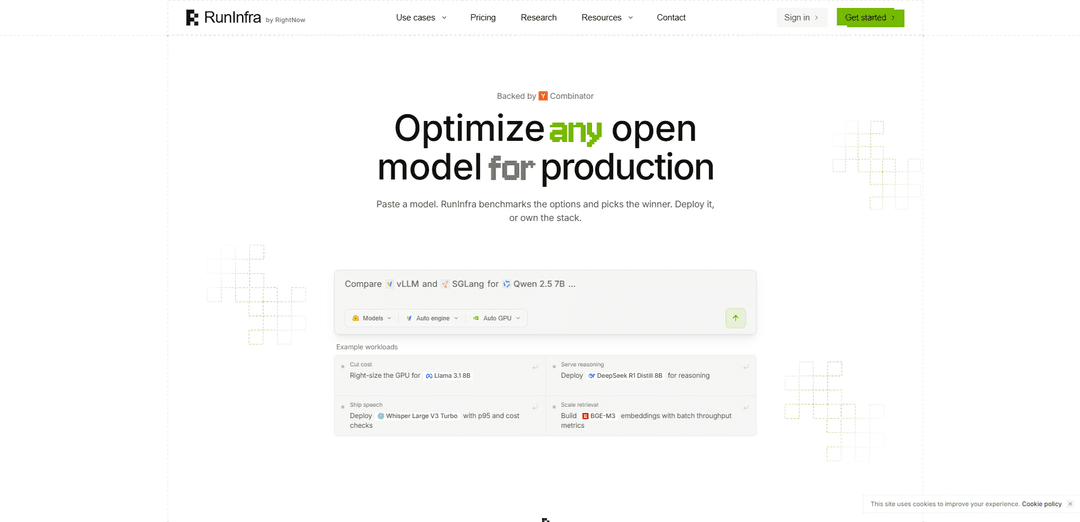
3) Describe the workload in plain English: In the builder prompt box, describe what you want to run. Include: (a) model name (or a Hugging Face model), (b) endpoint type (e.g., chat/completions, embeddings), (c) performance goal (cost/latency/throughput/quality), and (d) any checks (VRAM fit, p95/p99 latency). Example asks shown on the site include: “Tune latency: Qwen 2.5 7B for low latency” or “Scale retrieval: BGE-M3 embeddings with batch throughput metrics.”
4) Let RunInfra propose a plan (engines + GPUs + optimizations): RunInfra will draft an execution plan that compares compatible serving engines (e.g., vLLM, SGLang, TensorRT-LLM, vLLM Omni, TEI, Transformers) and considers GPU targets (e.g., L4, A10, L40S, RTX 4090, A100, H100, H200, B200). Review the plan before running.
5) Review and accept the optimization plan: The plan typically lists phases such as quantization (e.g., AWQ/GPTQ/FP8/FP16 depending on goal), FlashAttention/other fused kernels, continuous batching, paged KV cache, CUDA graph capture, speculative decoding, prefix caching, tensor-parallel sizing, warmup/autotune, and serving-config tuning. Accept the plan to start the run.
6) Run the optimization + benchmarking job: RunInfra executes the phases and benchmarks candidates. It measures key metrics like p95/p99 latency, time-to-first-token, throughput per GPU, VRAM usage/fit, and cost per 1M tokens. The system compares baseline vs optimized configurations and identifies a “winner” stack (engine + GPU + settings).
7) Inspect the benchmark receipt (before you ship): After the run, inspect the benchmark receipt that records the measured results (latency, throughput, VRAM, cost) and the exact runtime configuration used. This is designed to be reproducible and not a black box.
8) Inspect and edit the optimized runtime configuration (optional): Review the generated config (e.g., a runinfra.yaml) and engine flags (batch/concurrency settings, quantization choice, KV cache dtype, prefix caching, speculative decoding, GPU memory utilization). Adjust settings if you want different tradeoffs, then re-run benchmarks if needed.
9) Choose a deployment target (managed or export): Pick where to run the winning stack: (a) RunInfra-managed endpoint (billed per million tokens), or (b) export and deploy to your own environment. The site shows targets such as RunInfra Cloud, your RunPod account, Modal, or your own Modal workspace.
10) Deploy as an API endpoint: Deploy the optimized stack as an inference API. RunInfra supports deploying pipelines as APIs and provides a managed endpoint option with autoscaling. Once deployed, you can call the endpoint from common clients (the site mentions Python, TypeScript, curl, LangChain, LlamaIndex, Vercel AI SDK).
11) Export the deployment kit to self-host (optional): If you want to own and run the stack yourself, export the generated deployment kit. The platform provides runnable artifacts such as a Dockerfile, launch scripts (e.g., serve.sh/serve.py), Kubernetes manifests, compose files, and benchmark reports so you can reproduce the measured setup elsewhere.
12) Operate and iterate (optimize again when requirements change): If your traffic pattern, latency target, budget, or model changes, repeat the workflow: update the plain-English requirements, re-run comparisons across engines/GPUs, and ship the new measured winner. This keeps performance/cost tuned to your workload rather than relying on fixed closed-source API defaults.
RunInfra FAQs
RunInfra is an AI-powered platform that turns a plain-English description of an inference workload into a production-ready deployment. It selects compatible open models, benchmarks GPU/engine options, tunes the runtime, and produces a deployable (and exportable) stack with measured results.
RunInfra Video
Popular Articles

Atoms: A Multi-Agent AI Platform That Transforms Ideas into Launch-Ready Products
May 22, 2026

Nano Banana SBTI: What It Is, How It Works, and How to Use It in 2026
Apr 15, 2026

Atoms Review — The AI Product Builder Redefining Digital Creation in 2026
Apr 10, 2026

Kilo Claw: How to Deploy and Use a True "Do‑It‑For‑You" AI Agent(2026 Update)
Apr 3, 2026
Latest AI Tools Similar to RunInfra

Gait
Gait is a collaboration tool that integrates AI-assisted code generation with version control, enabling teams to track, understand, and share AI-generated code context efficiently.

invoices.dev
invoices.dev is an automated invoicing platform that generates invoices directly from developers' Git commits, with integration capabilities for GitHub, Slack, Linear, and Google services.

EasyRFP
EasyRFP is an AI-powered edge computing toolkit that streamlines RFP (Request for Proposal) responses and enables real-time field phenotyping through deep learning technology.

Cart.ai
Cart.ai is an AI-powered service platform that provides comprehensive business automation solutions including coding, customer relations management, video editing, e-commerce setup, and custom AI development with 24/7 support.
Popular AI Tools Like RunInfra

GitHub Copilot Chat
GitHub Copilot Chat is an AI-powered coding assistant that provides natural language interactions, real-time code suggestions, and contextual support directly within supported IDEs and GitHub.com.

CopilotForXcode
CopilotForXcode is an Xcode Source Editor Extension that integrates GitHub Copilot, Codeium, and ChatGPT to provide AI-powered code suggestions, chat assistance, and prompt-to-code functionality within Xcode.

BrowserAI
BrowserAI is an open-source library that enables running local Large Language Models (LLMs) directly in web browsers with WebGPU acceleration, offering privacy-focused AI capabilities without requiring server infrastructure.

OpenAI Codex CLI
OpenAI Codex CLI is a lightweight, open-source coding agent that runs in your terminal, enabling developers to translate natural language into code execution while providing ChatGPT-level reasoning with the ability to run code, manipulate files, and iterate under version control.