ReactVision Studio
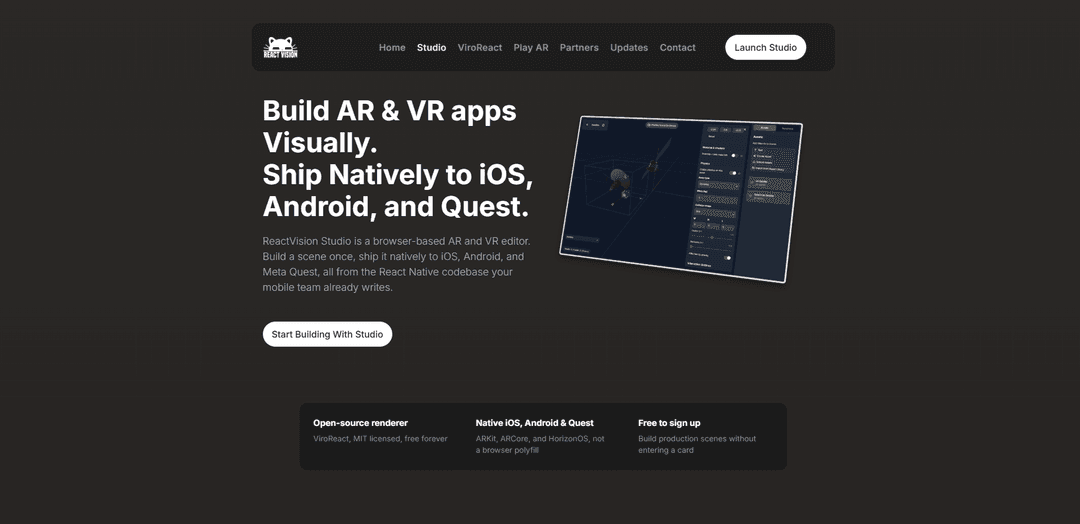
ReactVision Studio is a browser-based, AI-powered visual editor for building AR/VR scenes with live device preview (via StudioGo) and one-click deployment into React Native apps through the open-source ViroReact renderer for native iOS (ARKit), Android (ARCore), and Meta Quest (HorizonOS) runtime support.
https://reactvision.xyz/studio?ref=producthunt
Product Information
Updated:Jun 8, 2026
What is ReactVision Studio
ReactVision Studio is the visual editor in the ReactVision spatial stack for creating AR and VR experiences without writing low-level 3D rendering code. It lets you compose scenes by dragging components onto a canvas, manage assets (models, textures, audio), and iterate quickly with real-time preview on physical devices using the StudioGo companion app. When you’re ready to ship, Studio scenes load inside any React Native (or Expo dev build) application using ViroReact—ReactVision’s MIT-licensed, open-source native renderer—so the same authored scene can run across iOS, Android, and Meta Quest.
Key Features of ReactVision Studio
ReactVision Studio is a browser-based visual editor for building AR and VR scenes for React Native apps. It lets you drag-and-drop components to create a scene graph, manage assets, and preview changes live on real devices via the StudioGo companion app. Scenes are shipped inside apps through ViroReact (MIT-licensed, open-source) and render natively across iOS (ARKit), Android (ARCore), and Meta Quest (HorizonOS), with built-in access to ReactVision Platform services like cloud/geospatial anchors and AI-assisted 3D asset generation.
Browser-based visual scene editor: Design AR/VR scenes with drag-and-drop composition, component inspection, and multi-scene project structure—without writing low-level rendering or scene-graph code.
Native cross-platform rendering via ViroReact: Author one scene format and run it natively on iOS (ARKit), Android (ARCore), and Meta Quest (HorizonOS) through React Native, avoiding WebXR/browser performance tradeoffs.
Live device preview with StudioGo: Preview and interact with scenes on physical phones/headsets in near real time as you edit, enabling fast iteration without repeated rebuild cycles.
One-component app integration: Ship Studio-authored scenes in a React Native app by adding a single component (e.g., StudioSceneNavigator), keeping the rest of your app architecture and navigation intact.
AI-powered 3D asset generation: Generate 3D assets from prompts directly inside Studio and drop them into your project’s asset library, using standard formats that can be reused outside Studio.
Platform-backed advanced AR features: Access managed backend capabilities (ReactVision Platform) such as Cloud Anchors, Geospatial Anchors, and asset storage/delivery through your Studio project and ViroReact runtime.
Use Cases of ReactVision Studio
Marketing activations and brand experiences: Rapidly prototype and ship interactive AR product showcases or experiential campaigns with visual authoring and native performance on iOS/Android.
Retail and e-commerce visualization: Build “place-in-room” AR experiences for furniture, home goods, or product previews, with the option to persist placements using cloud anchors.
Location-based AR and tourism: Create geospatially pinned content (e.g., landmarks, guided tours, scavenger hunts) using geospatial anchors tied to real-world coordinates.
Training, simulation, and safety walkthroughs: Develop guided AR/VR procedures and interactive learning modules, iterating quickly with live device preview and shipping through a React Native app.
Prototype-to-production XR for product teams: Let designers/creatives build scenes visually while engineers integrate them with minimal code, reducing handoff friction and speeding iteration.
WebAR-to-native migration (e.g., 8th Wall alternatives): Recreate drag-and-drop style authoring while gaining native ARKit/ARCore performance and deeper OS-level capabilities than browser-based AR.
Pros
Native rendering across iOS, Android, and Meta Quest from a single scene format (ARKit/ARCore/HorizonOS).
Fast iteration workflow: browser editor + live on-device preview via StudioGo.
Low integration overhead for React Native teams (single-component embedding) and open-source renderer foundation (ViroReact, MIT).
Free tier available with no card required; no runtime fees for ViroReact itself.
Cons
Requires physical devices for AR preview/testing (simulators/emulators not supported).
Some advanced Platform features (e.g., Cloud/Geospatial Anchors) are gated by platform availability/beta status and usage quotas.
Expo Go is not supported; requires Expo development builds or a standard React Native native build pipeline.
Platform coverage beyond iOS/Android/Quest (e.g., visionOS, Android XR) is not fully general availability yet.
How to Use ReactVision Studio
1) Create a free ReactVision Studio account: Go to https://studio.reactvision.xyz and register (no card required). Create a new project to store your scenes and assets.
2) Open ReactVision Studio in the browser: From your project dashboard, open Studio (the browser-based visual editor). You’ll author AR/VR scenes by dragging components onto a canvas; Studio writes the scene graph for you (no low-level 3D/rendering code required).
3) Build your first scene visually (drag-and-drop): In the editor, add scene components (e.g., 3D objects, anchors) onto the canvas. Use the inspector to position/rotate/scale nodes and configure properties. Organize content into multi-scene projects if needed.
4) Add assets to your project (import or AI-generate): Use the asset library to bring in models/textures/audio/video, or use Studio’s AI generation to create 3D assets from text (and/or images) and automatically add them to your project library for placement in scenes.
5) Install StudioGo on a physical device for live preview: Download StudioGo on iOS (App Store) or Android (Google Play). AR preview requires a real device (simulators/emulators aren’t supported). Ensure your device and computer are on the same local network.
6) Link StudioGo to your Studio project and preview live: Open StudioGo, connect it to your Studio project, then preview your scene on-device. As you edit in the browser (move models, tweak properties), changes appear on the device in near real time—no native rebuild required.
7) Iterate: adjust layout, navigation, and animations: Continue refining the scene: reposition objects, update materials, add transform/material animations, and set up navigation across multiple scenes (e.g., anchor-driven flows) while continuously validating on-device via StudioGo.
8) (Optional) Use Platform features: Cloud Anchors and Geospatial Anchors: If your experience needs persistence or real-world placement, enable Platform-backed features from your Studio project: Cloud Anchors (persist content across sessions/devices) and Geospatial Anchors (pin content to GPS coordinates).
9) Create a React Native (or Expo dev build) app with ViroReact: Set up a React Native app (or Expo project using a development build). ViroReact cannot run in Expo Go because it requires native modules, but it works with dev builds.
10) Add ViroReact and load your Studio scene with StudioSceneNavigator: Install and configure ViroReact in your app, then render your Studio-authored scene by adding the StudioSceneNavigator component from '@reactvision/react-viro' (one component integration).
11) Run on target platforms (iOS, Android, Meta Quest): Build and run your app on supported devices. The same Studio scene is rendered natively via ARKit (iOS), ARCore (Android), and HorizonOS (Meta Quest), with ViroReact handling platform differences.
12) Ship updates without rebuilding the app (scene iteration workflow): Because ViroReact loads scenes at runtime from your Studio project, you can update scenes in Studio and have users receive changes on next launch—reducing the need for frequent native rebuilds for scene-only changes.
ReactVision Studio FAQs
ReactVision Studio is a browser-based visual editor for building AR and VR scenes in the ReactVision stack. You drag and drop components onto a canvas, preview in real time on a phone or headset via StudioGo, and ship the scene inside a React Native app using ViroReact.
ReactVision Studio Video
Popular Articles

Atoms: A Multi-Agent AI Platform That Transforms Ideas into Launch-Ready Products
May 22, 2026

Nano Banana SBTI: What It Is, How It Works, and How to Use It in 2026
Apr 15, 2026

Atoms Review — The AI Product Builder Redefining Digital Creation in 2026
Apr 10, 2026

Kilo Claw: How to Deploy and Use a True "Do‑It‑For‑You" AI Agent(2026 Update)
Apr 3, 2026
Latest AI Tools Similar to ReactVision Studio

EzVideos
EzVideos is an all-in-one video creation tool that helps users generate viral videos for social media platforms like Instagram, TikTok, and YouTube with automated editing features and built-in resources.

Blanc AI
Blanc AI is a revolutionary AI solution that enables video content translation and dubbing into 47+ languages while preserving the original voice, emotions, and lip synchronization.

Wink Mody
Wink Mody is a modified version of the Wink video editing app that offers premium features like AI-powered retouching, 4K exports, and watermark-free editing completely free of charge.

Shortmake AI
ShortMake is an AI-powered video creation platform that transforms ideas into viral-ready videos by automatically generating scripts, voiceovers, visuals, and subtitles specifically optimized for platforms like TikTok and YouTube Shorts.
Popular AI Tools Like ReactVision Studio

AI Clips - New Gen
AI Clips - New Gen is an AI-powered video clipping tool that automatically generates engaging short-form content from long videos for multiple social media platforms like YouTube Shorts, TikTok, Instagram Reels and more.

Edit Mind
Edit Mind is an open-source, AI-powered video indexing and semantic search platform that enables users to analyze and search through video content using natural language queries, with features including transcription, frame analysis, face recognition, and object detection.

Dinamo Notebook
FreeAI Video Editing
Dinamo Notebook is a free, MIT-licensed, local-first browser extension for football video analysis that lets you draw tactical annotations on YouTube/Dailymotion/Twitch footage and optionally use AI (with your own OpenAI API key) for tactical insights.

MediaSeg
MediaSeg is a stable, local-first macOS utility that splits large MP4/WEBM media files into upload-ready chunks under a configurable size limit while preserving quality using ffmpeg/ffprobe and an AI-assisted, target-based sizing strategy.