Radar
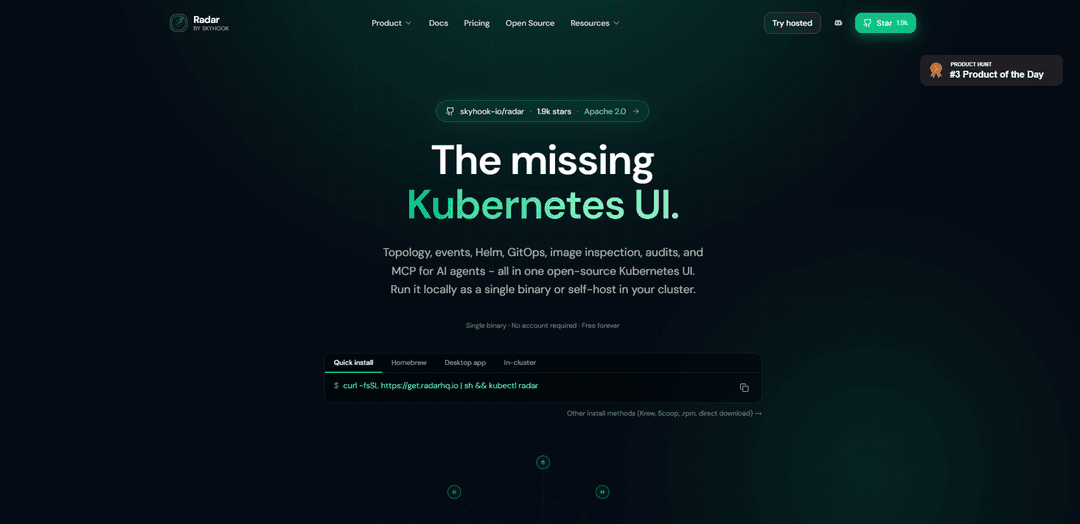
Radar is an open-source, local-first Kubernetes UI that provides live topology, event timelines, Helm and GitOps (ArgoCD/Flux) visibility, image inspection, audits, and MCP support for AI agents—running as a single fast binary or self-hosted in-cluster.
https://radarhq.io/?ref=producthunt
Product Information
Updated:May 19, 2026
What is Radar
Radar (by Skyhook) is “the missing Kubernetes UI”: a modern visibility and troubleshooting tool designed to help engineers understand what’s happening across Kubernetes clusters without juggling multiple tools or relying solely on kubectl. It is Apache 2.0 licensed, open source, and can be used without creating an account or sending data to a cloud service when run locally. Radar brings together core operational views—like resource browsing, topology visualization, Kubernetes events, Helm release management, GitOps state, and more—into one cohesive web UI.
Key Features of Radar
Radar is an open-source, local-first Kubernetes UI (Apache 2.0) that provides modern cluster visibility through live topology graphs, an event timeline with retention beyond Kubernetes’ default TTL, resource and Helm/GitOps management, traffic/service dependency views, image filesystem inspection, and built-in cluster audit checks. It can run as a fast single Go binary on your machine (no Electron, no account, no agents/CRDs, and no data leaving your machine) or be self-hosted in-cluster via Helm, and it also includes an MCP server so AI assistants can query cluster context through Radar.
Single-binary, local-first Kubernetes UI: Runs as a lightweight Go binary with an embedded React frontend; connects via existing kubeconfig with no cloud login, no agents, and no required cluster-side installation.
Live topology graph: Visualizes Deployments/Services/Ingress and their relationships as a real-time graph with updates, helping teams understand dependencies and cross-namespace connections quickly.
Event timeline with extended retention: Captures Kubernetes events and deltas in a navigable timeline to help you rewind incidents beyond the typical in-cluster event TTL window.
Helm & GitOps visibility: Browse Helm releases, revisions, and values and view GitOps state with native ArgoCD/Flux support to connect desired state with the resources it produced.
Image filesystem viewer: Browse container image filesystems without kubectl exec or Docker, useful for debugging packaging issues and verifying image contents.
AI integration via built-in MCP server: Exposes cluster context to AI assistants (e.g., Claude/Cursor/Copilot) through MCP for safer, token-optimized querying and troubleshooting workflows.
Use Cases of Radar
On-call incident troubleshooting: When alerts fire, operators can search resources, inspect topology dependencies, review logs, and rewind the event timeline to pinpoint regressions faster than kubectl-only workflows.
Platform engineering fleet operations (self-hosted or local): Standardize how engineers explore clusters, namespaces, and workloads, reducing tool sprawl (multiple dashboards/CLIs) and speeding up day-to-day operational tasks.
GitOps-driven delivery oversight: Teams using ArgoCD or Flux can correlate application sync status with the workloads and services deployed, improving change tracking and rollout confidence.
Helm release governance and rollback: Application teams can audit what changed between Helm revisions, review value files, and roll back releases quickly during failed upgrades.
Security and best-practice posture checks: Use the cluster audit checks to spot common misconfigurations and operational risks during reviews, migrations, or before production launches.
AI-assisted cluster exploration for support and debugging: Enable an AI agent to query Radar’s cluster context (via MCP) to accelerate “what’s running/what changed/what depends on this” questions during investigations.
Pros
Open source (Apache 2.0) with no feature gates; can self-host forever
Fast, lightweight, no-Electron single binary; can run locally with kubeconfig and keep data on your machine
Strong visualization and debugging workflow: topology + timeline + resource browsing + Helm/GitOps
Multiple deployment modes: local binary or in-cluster via Helm
Cons
Fleet-wide capabilities like aggregation, SSO, persistent retention, routed alerts, and audit logs are positioned as Radar Cloud add-ons rather than single-binary features
Some topology connections (e.g., GitOps resources to workloads) depend on how/where ArgoCD/Flux are deployed and which cluster Radar is connected to
How to Use Radar
1) Choose how you want to run Radar (local or in-cluster): Radar can run locally as a single binary that uses your existing kubeconfig, or be deployed into a cluster via Helm for shared/team access. Both modes provide the same UI and features.
2) Install Radar locally (fastest start): Run: `curl -fsSL https://get.radarhq.io | sh && kubectl radar` to install Radar and launch it against the cluster in your current kubeconfig context.
3) (Optional) Install Radar via package managers: If you prefer, install using Homebrew (`brew install skyhook-io/tap/radar`) or Krew (`kubectl krew install radar`). Then launch with `kubectl radar`.
4) (Optional) Deploy Radar in-cluster with Helm (shared access): Add the Helm repo and install: `helm repo add skyhook https://skyhook-io.github.io/helm-charts` then `helm install radar skyhook/radar -n radar --create-namespace`. Expose it via your preferred ingress to share the UI with your team.
5) Open Radar and connect to your cluster(s): In local mode, Radar reads your kubeconfig and opens a browser UI. In in-cluster mode, you access the served UI (typically through an ingress).
6) Use the global search to find resources quickly: Use the single search bar to locate resources by name/label/kind. This is designed to avoid “kubectl roulette” when you don’t remember the namespace or exact resource.
7) Explore Topology (live resource graph): Open the Topology view to see Deployments/Services/Ingresses as a live graph with real-time updates. Click nodes to drill into details and understand dependencies and cross-namespace relationships.
8) Inspect service traffic and TLS health (where available): Use the traffic/topology views to understand east-west and ingress flows and check TLS certificate health indicators surfaced in the UI.
9) Rewind and review the Event Timeline: Open the Timeline to view Kubernetes events and deltas beyond the default in-cluster event TTL. Use it to reconstruct what changed leading up to an incident.
10) Jump to logs and troubleshoot failing workloads: From a resource (pod/workload) view, jump directly to logs to diagnose crashes, restarts, and rollout issues without manually stitching together kubectl commands.
11) Browse and manage Helm releases: Use the Helm views to see releases, revisions, and values. Compare revisions, audit what changed between them, and roll back to a previous revision when needed.
12) Monitor GitOps workflows (ArgoCD and Flux): If you use ArgoCD or Flux, open the GitOps views to see application sync state alongside the Kubernetes resources those apps produced.
13) Inspect container image filesystems (no exec required): Use the Image Filesystem feature to browse the contents of container images directly from the UI, without `kubectl exec` or local Docker image pulls.
14) Run Cluster Audit checks: Open the Cluster Audit page to run best-practice checks (framework-labeled) and use the results to prioritize hardening and reliability improvements.
15) Share what you see with a link: When collaborating during incidents, use Radar’s shareable links to point teammates directly to the relevant resource, timeline window, or view.
16) (Optional) Use AI via MCP for safe, token-optimized summaries: Enable and use the MCP integration to let supported AI tools (e.g., Claude/Cursor/Copilot) read Radar’s cluster context for summaries and guided troubleshooting, while keeping actions clearly annotated and non-destructive.
Radar FAQs
Radar is an open-source Kubernetes UI that provides topology visualization, event timelines, Helm and GitOps visibility, image inspection, cluster audits, and an MCP server for AI agents.
Popular Articles

Atoms: A Multi-Agent AI Platform That Transforms Ideas into Launch-Ready Products
May 22, 2026

Nano Banana SBTI: What It Is, How It Works, and How to Use It in 2026
Apr 15, 2026

Atoms Review — The AI Product Builder Redefining Digital Creation in 2026
Apr 10, 2026

Kilo Claw: How to Deploy and Use a True "Do‑It‑For‑You" AI Agent(2026 Update)
Apr 3, 2026
Latest AI Tools Similar to Radar

Hapticlabs
Hapticlabs is a no-code toolkit that enables designers, developers and researchers to easily design, prototype and deploy immersive haptic interactions across devices without coding.

Deployo.ai
Deployo.ai is a comprehensive AI deployment platform that enables seamless model deployment, monitoring, and scaling with built-in ethical AI frameworks and cross-cloud compatibility.

CloudSoul
CloudSoul is an AI-powered SaaS platform that enables users to instantly deploy and manage cloud infrastructure through natural language conversations, making AWS resource management more accessible and efficient.

Devozy.ai
Devozy.ai is an AI-powered developer self-service platform that combines Agile project management, DevSecOps, multi-cloud infrastructure management, and IT service management into a unified solution for accelerating software delivery.
Popular AI Tools Like Radar

A2A Protocol
A2A (Agent2Agent) Protocol is an open interoperability protocol developed by Google that enables seamless communication and collaboration between AI agents across different frameworks and vendors, regardless of their underlying architecture.

VoltOps
VoltOps is a framework-agnostic LLM observability platform that provides real-time visual monitoring, debugging, and optimization tools for AI agents across any technology stack.

Chaterm
Chaterm is an open-source AI-native terminal and SRE copilot that enables engineers to manage complex infrastructure through natural language, automating deployment, troubleshooting, and operations without memorizing commands.

Open Browser Use
Open Browser Use is an open-source, agent-runtime-neutral browser automation layer that pairs a Chrome extension with a CLI/SDK/MCP to enable DOM-aware, CDP-powered tab control, navigation, and actions across different AI agent tools.