
PMB | Local-first memory for AI
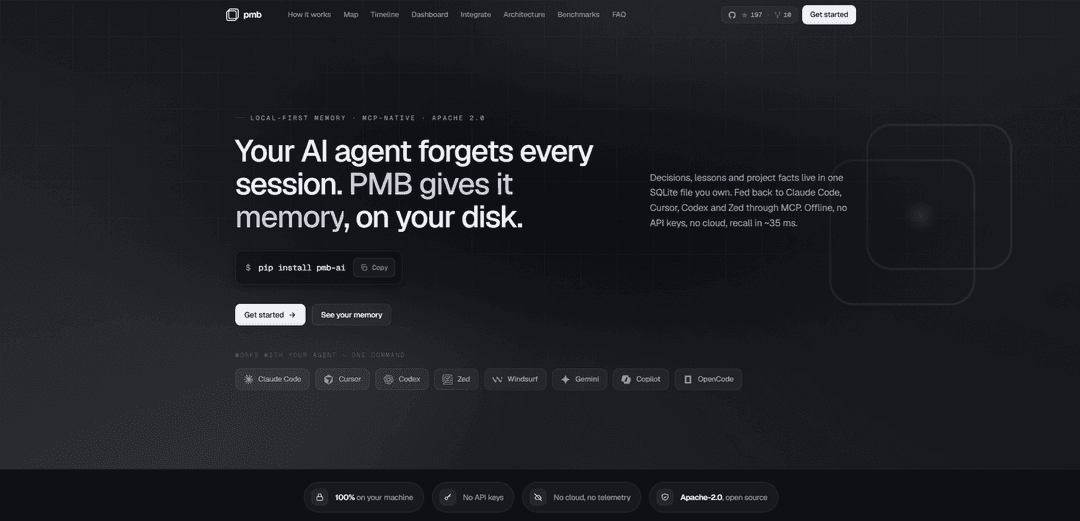
PMB is an Apache-2.0, MCP-native, local-first persistent memory layer that stores agent knowledge in on-disk SQLite + LanceDB and automatically injects fast hybrid recall (BM25 + vectors + entity graph) into tools like Claude Code, Cursor, Codex, and Zed—offline, with no API keys or cloud.
https://pmbai.dev/?ref=producthunt
Product Information
Updated:Jul 8, 2026
What is PMB | Local-first memory for AI
PMB (Personal Memory Brain) is a local-first memory system designed to solve the “AI forgets every session” problem for coding agents. Instead of relying on chat history or cloud services, PMB stores durable, reusable memories—such as project facts, decisions, lessons, and file context—directly on your machine in a single workspace you control. It integrates with MCP-compatible clients (including Claude Code, Cursor, Codex, Zed, Windsurf, Gemini, and Copilot MCP setups) so your agent can carry context across sessions and even across different tools, while keeping everything private and offline-first. PMB also provides a local dashboard UI to inspect, audit, and explore what has been stored.
Key Features of PMB | Local-first memory for AI
PMB (Personal Memory Brain) is an Apache-2.0, local-first persistent memory layer for AI coding agents that stores decisions, lessons, project facts, and workflow context on your machine (SQLite + LanceDB) and automatically surfaces the most relevant memories to MCP-compatible tools (e.g., Claude Code, Cursor, Codex, Zed) before the model responds. It emphasizes fast, offline retrieval (no API keys, no cloud, no telemetry), hybrid search quality (BM25 + dense vectors + entity graph with optional reranking), and “memory hygiene” features like follow-rate scoring that helps you prune unhelpful rules. A local dashboard provides visibility and control through a graph (Map) and journal (Timeline), while backups/sync/export options support portability across machines.
Local-first persistent memory store: Keeps long-term agent memory on your disk in a durable SQLite database with LanceDB vectors alongside it—copyable, inspectable, and usable offline with zero API keys.
MCP-native, one-command agent integration: Connects to popular coding agents via MCP over stdio (child-process server) using simple commands like `pmb connect ...`, enabling multiple agents to share one workspace.
Automatic pre-prompt memory injection: Recalls and injects relevant decisions/lessons/files into the agent context before it reasons, so the agent doesn’t need to remember to call a memory tool.
Hybrid retrieval with ranked fusion: Combines BM25 lexical search, dense embeddings, and an entity graph, fused via Reciprocal Rank Fusion (with optional reranking) to improve recall quality and relevance.
Fast, non-blocking writes and low-latency recall: Writes return immediately while embedding/vector inserts run asynchronously; recall is designed to be fast on local CPU (tens of milliseconds in typical use).
Auditable dashboard: Map + Timeline: Provides a local web UI to explore memory as an entity graph and a git-graph-like journal of decisions/lessons/changes, improving transparency and control.
Use Cases of PMB | Local-first memory for AI
Software engineering continuity across sessions: Teams or solo developers can preserve architectural decisions, conventions, and prior debugging lessons so every new coding session starts with stable context instead of re-explaining.
Multi-tool developer workflows (IDE/agent switching): Developers who alternate between Cursor, Claude Code, Codex CLI, Zed, etc. can keep one shared memory workspace so context follows them across tools.
Offline/private coding environments: Security-sensitive orgs (finance, healthcare, defense) or air-gapped setups can use PMB for durable memory and retrieval without sending code or notes to the cloud.
Long-running product development and maintenance: For projects with months/years of evolution, PMB can store recurring gotchas, dependency migration notes, and historical rationale to reduce regressions and repeated incidents.
Research and evaluation of memory/retrieval systems: Applied AI researchers can benchmark and iterate on hybrid recall pipelines (BM25 + vectors + graph) using reproducible local measurements and visible memory artifacts.
Portable personal knowledge base for builders: Independent creators can maintain a personal “engineering brain” of decisions and lessons, then export/encrypt/sync the workspace across devices for continuity.
Pros
Strong privacy posture: local-first storage, no cloud, no telemetry, no API keys required for recall.
High-quality retrieval approach: hybrid search (BM25 + vectors + entity graph) with ranked fusion and optional rerank.
Low-friction workflow: automatic recall injection and journaling reduce manual prompting and tool-calling overhead.
Transparency and control: local dashboard (Map/Timeline) plus file-based portability (SQLite/LanceDB) make memory auditable.
Cons
Requires local setup/maintenance: users must install/configure and manage workspaces, backups, and model choices for embeddings/extraction.
Relevance/safety depends on correct gating: custom agents must replicate PMB’s instruction/gating behavior to avoid surfacing irrelevant personal facts.
Embedding model choice matters: multilingual workspaces may need explicit configuration to avoid degraded retrieval with English-only embeddings.
Local resource trade-offs: indexing, embeddings, and optional extraction/summarization can consume CPU/RAM and may need tuning for large workspaces.
How to Use PMB | Local-first memory for AI
1) Install PMB: In a terminal, install PMB with pip:
pip install pmb-ai
PMB is pure Python and works on macOS, Linux, and Windows.
2) Connect PMB to your AI coding agent (MCP): Wire PMB into your agent over MCP (stdio). Example for Claude Code:
pmb connect claude-code
PMB runs as a child process of your agent (no network, no port). It will inject relevant memory before the model answers and journal work after.
3) Verify the setup: Run the built-in diagnostics to confirm the MCP wiring and hooks are active:
pmb doctor
4) Use your agent normally (memory is automatic): Start working as you usually do in your agent/editor. PMB automatically:
- Classifies each message quickly
- Recalls matching memories before the model responds
- Writes new events asynchronously (writes return instantly; embedding/vector insert happens in the background)
No special tool calls are required during normal use.
5) Manually test recall from the CLI (optional): You can query your memory directly to see what PMB would surface:
pmb recall
Then type a query (e.g., a bug name or decision) and review the ranked results (lessons/decisions/files/etc.).
6) Open the local dashboard to explore memory: Launch the dashboard:
pmb dashboard
Then open the local web UI (commonly shown as http://127.0.0.1:8765). The dashboard lets you inspect your memory as:
- A graph (entities and connections)
- A timeline/journal (decisions, lessons, commits, failures, etc.)
It’s local-only (no auth, no cloud).
7) Switch to a multilingual embedding model if your workspace isn’t mostly Latin text (recommended when warned): If you see a warning like “Workspace has 81% non-Latin chars but uses all-MiniLM-L6-v2 (English-only)”, switch embeddings to a multilingual model:
pmb config set embedding.model paraphrase-multilingual-MiniLM-L12-v2
This improves retrieval when your memories/queries include non-English text.
8) (Advanced) Ensure your custom agent replicates PMB’s memory safety gate: If you build your own agent integration on top of PMB, replicate the same gating/instruction block PMB injects; otherwise irrelevant personal facts may surface on unrelated questions. The canonical reference is in:
src/pmb/cli/connect.py
9) Back up / sync your PMB workspace with Git (recommended): Initialize a workspace remote and push regularly:
pmb workspace init --remote [email protected]:you/my-memory.git
pmb workspace push
On another machine:
pmb workspace pull
Or clone to a fresh device:
pmb workspace clone <url> work-laptop
(Conflict behavior noted in the docs: remote wins on conflict.)
10) Export an encrypted backup bundle (portable restore): Create an encrypted, authenticated bundle:
pmb workspace export memory.enc
Restore it anywhere into a workspace:
pmb workspace import memory.enc personal
This uses AES + HMAC with a scrypt-derived key (per the provided source snippet).
11) If you need to start fresh, copy the workspace directory (recovery option): Worst case, you can copy your workspace directory and start fresh. The snippet indicates the workspace lives under:
~/.pmb/workspaces/<id>/
Copy it as a manual backup or to migrate state.
PMB | Local-first memory for AI FAQs
PMB (Personal Memory Brain) is a local-first persistent memory system for AI coding agents. It stores decisions, lessons, project facts, and other memories on your machine (primarily in a SQLite file) and feeds relevant context back to agents via MCP (Model Context Protocol).
Popular Articles

Atoms: A Multi-Agent AI Platform That Transforms Ideas into Launch-Ready Products
May 22, 2026

Nano Banana SBTI: What It Is, How It Works, and How to Use It in 2026
Apr 15, 2026

Atoms Review — The AI Product Builder Redefining Digital Creation in 2026
Apr 10, 2026

Kilo Claw: How to Deploy and Use a True "Do‑It‑For‑You" AI Agent(2026 Update)
Apr 3, 2026
Latest AI Tools Similar to PMB | Local-first memory for AI

Gait
Gait is a collaboration tool that integrates AI-assisted code generation with version control, enabling teams to track, understand, and share AI-generated code context efficiently.

invoices.dev
invoices.dev is an automated invoicing platform that generates invoices directly from developers' Git commits, with integration capabilities for GitHub, Slack, Linear, and Google services.

EasyRFP
EasyRFP is an AI-powered edge computing toolkit that streamlines RFP (Request for Proposal) responses and enables real-time field phenotyping through deep learning technology.

Cart.ai
Cart.ai is an AI-powered service platform that provides comprehensive business automation solutions including coding, customer relations management, video editing, e-commerce setup, and custom AI development with 24/7 support.
Popular AI Tools Like PMB | Local-first memory for AI

GitHub Copilot Chat
GitHub Copilot Chat is an AI-powered coding assistant that provides natural language interactions, real-time code suggestions, and contextual support directly within supported IDEs and GitHub.com.

CopilotForXcode
CopilotForXcode is an Xcode Source Editor Extension that integrates GitHub Copilot, Codeium, and ChatGPT to provide AI-powered code suggestions, chat assistance, and prompt-to-code functionality within Xcode.

BrowserAI
BrowserAI is an open-source library that enables running local Large Language Models (LLMs) directly in web browsers with WebGPU acceleration, offering privacy-focused AI capabilities without requiring server infrastructure.

OpenAI Codex CLI
OpenAI Codex CLI is a lightweight, open-source coding agent that runs in your terminal, enabling developers to translate natural language into code execution while providing ChatGPT-level reasoning with the ability to run code, manipulate files, and iterate under version control.