
Opviva
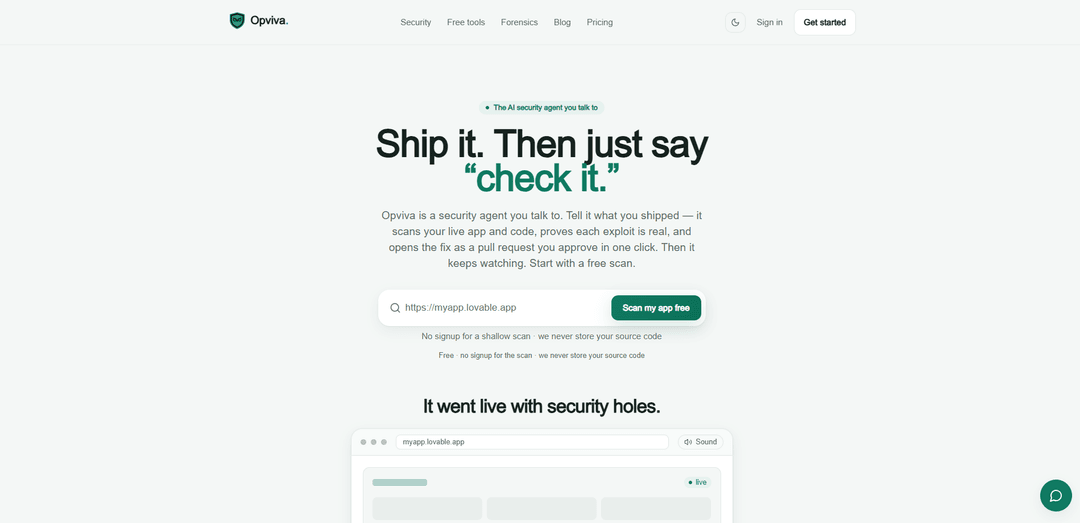
Opviva est un agent de sécurité d'application IA conversationnel qui analyse votre application en direct et votre code, prouve les exploits réels sur un Evidence Canvas infalsifiable, ouvre des demandes de tirage de correctifs que vous approuvez (ou fusionne automatiquement les petites), et surveille en continu après le lancement.
https://opviva.com/?ref=producthunt&utm_source=aipure
Informations sur le produit
Mis à jour:Jul 15, 2026
Qu'est-ce que Opviva
Opviva (opviva.com) est un agent de sécurité IA conçu pour les applications web modernes, en particulier les projets "vibe-coded" rapidement livrés et construits par IA. Au lieu de configurer des tableaux de bord et de jongler avec les sorties de scanners, vous décrivez ce que vous avez livré en langage clair ou collez une URL, et l'agent vérifie votre application pour les problèmes courants et à fort impact (comme les en-têtes de sécurité manquants, les secrets exposés, les fichiers sensibles et les paramètres HTTPS/cookies faibles). Opviva met l'accent sur une sécurité pratique et vérifiable : il vise à montrer ce qui est réellement exploitable, puis à vous aider à le corriger via des demandes de tirage révisables, tout en déclarant qu'il ne stocke pas votre code source et utilise un accès à privilège minimum pour des analyses plus approfondies.
Caractéristiques principales de Opviva
Opviva est un agent de sécurité d'applications basé sur l'IA avec lequel vous interagissez via le langage naturel pour analyser les applications web en direct et (éventuellement) le code source, prouver les vulnérabilités en reproduisant de véritables exploits, puis générer des correctifs sous forme de requêtes de tirage (pull requests) révisables que vous pouvez approuver (avec de petits correctifs fusionnant automatiquement si vous le souhaitez). Il assure également une surveillance continue après le lancement, avec des alertes lorsque de nouveaux problèmes apparaissent, et met l'accent sur l'accès au moindre privilège ainsi que sur la promesse de ne pas stocker votre code source. Une analyse gratuite, sans inscription et uniquement par URL, vérifie les problèmes de production courants tels que les en-têtes de sécurité manquants, les secrets exposés, les fichiers sensibles et les faiblesses HTTPS/cookies, renvoyant un score de sécurité et un rapport en langage clair, étayé par un "Evidence Canvas" infalsifiable.
Agent de sécurité conversationnel: Décrivez ce que vous avez livré en langage clair ou collez une URL ; Opviva exécute le flux de travail de sécurité de bout en bout sans que vous ayez à configurer des tableaux de bord ou des outils.
Preuve d'exploit sur un "Evidence Canvas": Va au-delà des découvertes "possibles" en reproduisant de véritables vulnérabilités contre l'application en direct et en enregistrant les étapes dans un journal forensique infalsifiable et en ajout seulement, afin que l'impact soit clair.
Requêtes de tirage de correctifs automatisées: Écrit les modifications de remédiation et les ouvre en tant que PR ; les petits correctifs peuvent fusionner automatiquement tandis que les modifications à risque plus élevé attendent une approbation en un clic, vous gardant le contrôle.
Analyse superficielle gratuite uniquement par URL: Analyse sans inscription qui vérifie les en-têtes de sécurité manquants (CSP/HSTS, etc.), les secrets exposés dans les bundles, les fichiers sensibles comme les .env/.git publics, et les faiblesses HTTPS/cookies/transport, produisant un score de 0 à 100.
Surveillance continue après le lancement: Ré-analyse selon un calendrier (hebdomadaire/quotidien selon le plan) et alerte lorsque la surface d'attaque change ou que de nouvelles vulnérabilités apparaissent.
Confidentialité et moindre privilège par conception: Déclare ne jamais stocker votre code source ; l'accès au code est en lecture seule par défaut et les correctifs sont livrés sous forme de PR révisables.
Cas d'utilisation de Opviva
Renforcement du MVP de startup "vibe-coded": Les fondateurs qui développent rapidement avec des outils comme Lovable, Bolt, Cursor ou v0 peuvent effectuer une analyse rapide par URL, obtenir la preuve de problèmes réels et fusionner des correctifs basés sur des PR sans avoir à construire un programme de sécurité à partir de zéro.
Sécurité continue des applications web SaaS: Les équipes produit peuvent utiliser Opviva pour surveiller les applications de production à la recherche de régressions (par exemple, en-têtes manquants, cookies non sécurisés, secrets exposés) et recevoir des résultats exploitables et prouvés, ainsi que des correctifs prêts à être fusionnés.
Détection de mauvaise configuration Supabase/RLS: Les applications utilisant Supabase peuvent identifier et valider les lacunes de contrôle d'accès (comme l'absence de sécurité au niveau des lignes - Row Level Security) et déplacer les clés sensibles hors du client avec des PR générées par l'agent.
Automatisation de la sécurité DevOps/CI: Les équipes d'ingénierie peuvent intégrer des analyses pilotées par l'agent et des PR de correctifs dans les flux de travail CI pour réduire le triage manuel et maintenir les contrôles de sécurité alignés sur les déploiements fréquents.
Assurance client pour agence ou freelance: Les agences web peuvent effectuer des vérifications rapides et sans inscription sur les URL des clients pour établir une base de référence de la posture de sécurité, puis offrir des preuves d'exploit documentées et des PR de remédiation dans le cadre de la livraison.
Avantages
Flux de travail de bout en bout : analyse, prouve les exploits et propose des correctifs sous forme de PR au lieu de simplement produire une liste de résultats.
Faible friction pour commencer : analyse URL gratuite et sans inscription avec un rapport en langage clair et un score de sécurité.
Remédiation révisable et contrôlée : approbation en un clic pour les correctifs risqués ; les petits correctifs peuvent fusionner automatiquement.
Positionnement axé sur la confidentialité : affirme ne pas stocker le code source et utilise l'accès au moindre privilège par défaut.
Inconvénients
L'analyse uniquement par URL est superficielle par conception ; des problèmes plus profonds peuvent nécessiter un accès au code et des crédits payants pour les analyses de code/PR de correctifs.
Le comportement de correction automatique peut ne pas convenir à la gouvernance de toutes les équipes ; certaines organisations peuvent exiger un examen manuel plus strict pour toutes les modifications.
L'efficacité dépend de l'intégration/l'accès : prouver et corriger certains problèmes peut nécessiter des identifiants, un accès au référentiel ou une configuration d'environnement.
Comment utiliser Opviva
1) Commencez par l'analyse gratuite (sans inscription): Rendez-vous sur https://opviva.com/ et lancez une analyse gratuite. L'analyse gratuite est uniquement basée sur l'URL (pas d'accès au code) et est conçue pour identifier rapidement les problèmes courants dans les applications web livrées.
2) Dites à Opviva ce que vous avez livré (ou collez l'URL de votre application): En langage clair, décrivez votre application ou fournissez l'URL en direct. Opviva est conçu pour être utilisé de manière conversationnelle – pas de tableaux de bord à configurer.
3) Passez en revue ce que l'analyse gratuite vérifie: Utilisez le rapport pour voir les résultats dans ces domaines : (a) En-têtes de sécurité (par exemple, CSP manquant, HSTS, protections contre le clickjacking et le MIME-sniffing), (b) Secrets exposés (par exemple, clés API, clé service_role Supabase exposée dans un bundle), (c) Fichiers sensibles (par exemple, répertoires .env ou .git téléchargeables publiquement), et (d) HTTPS et cookies (par exemple, cookies non sécurisés, transport faible, divulgation de pile).
4) Lisez votre score de sécurité et la preuve en langage clair: Opviva renvoie un score de sécurité de 0 à 100 (et une note alphabétique) ainsi qu'une explication en langage clair de ce qu'il a trouvé dans la réponse de l'application en direct et le bundle frontal.
5) Demandez une analyse plus approfondie si vous avez besoin d'une couverture au niveau du code: Si l'analyse superficielle de l'URL trouve des problèmes (ou si vous voulez plus d'assurance), demandez à Opviva une analyse approfondie du code. Cela va au-delà des vérifications basées uniquement sur l'URL et inclut l'analyse de votre code en plus de l'application en direct.
6) Demandez à Opviva de prouver que chaque exploit est réel: Pour chaque vulnérabilité, demandez à Opviva de la reproduire afin que vous puissiez voir un impact réel plutôt qu'un avertissement théorique. Opviva enregistre les étapes de reproduction sur son Evidence Canvas.
7) Inspectez l'enregistrement de l'Evidence Canvas: Passez en revue la trace de reproduction de l'exploit capturée sur l'Evidence Canvas, qui est décrite comme étant en mode ajout uniquement, scellée et infalsifiable (chaînée par hachage), afin que vous puissiez vérifier ce qui s'est passé et que l'enregistrement n'a pas été modifié.
8) Connectez votre dépôt (privilège minimum, lecture seule par défaut): Si vous souhaitez que les correctifs soient livrés sous forme de demandes de tirage, fournissez un accès GitHub avec le privilège le plus bas. Opviva déclare qu'il est en lecture seule par défaut et que vous gardez le contrôle des approbations pour les changements risqués.
9) Demandez une correction automatisée sous forme de demande de tirage: Demandez à Opviva de générer un correctif pour une découverte spécifique. Opviva écrira le changement et ouvrira une PR que vous pourrez examiner. Les petites corrections peuvent être fusionnées automatiquement ; les corrections à risque plus élevé attendent votre approbation en un clic.
10) Examinez et fusionnez la PR (approbation en un clic pour les corrections risquées): Lisez le diff de la PR et fusionnez lorsque vous êtes satisfait. Le flux de travail d'Opviva souligne que chaque correctif est révisable et que vous approuvez les correctifs risqués avant qu'ils ne soient livrés.
11) Activez la surveillance continue après le lancement: Mettez à niveau si vous souhaitez une surveillance continue et des réanalyses/alertes automatisées. Opviva décrit des plans payants qui ajoutent des réanalyses hebdomadaires ou quotidiennes et (pour les niveaux supérieurs) des PR de correction ouvertes par l'agent.
12) Réanalysez et itérez chaque fois que vous livrez des modifications: Après avoir déployé des mises à jour, demandez à Opviva de vérifier à nouveau. Le positionnement du produit est "Livrez-le. Puis dites simplement 'vérifiez-le.'" – utilisez des analyses répétées pour détecter de nouveaux problèmes à mesure que votre application évolue.
FAQ de Opviva
Opviva est un agent de sécurité d'applications basé sur l'IA auquel vous parlez. Vous décrivez ce que vous avez livré (ou collez une URL), et il scanne votre application en direct et votre code, prouve les vulnérabilités en reproduisant de véritables exploits, ouvre des correctifs sous forme de requêtes de tirage GitHub que vous pouvez examiner/approuver, et continue de surveiller après le lancement.
Articles populaires

Vosko AI : Localisez et doublez vos vidéos pour une audience mondiale
Oct 15, 2026

Atoms : Une plateforme d'IA multi-agents qui transforme les idées en produits prêts à être lancés
May 22, 2026

Nano Banana SBTI : Qu'est-ce que c'est, comment ça marche et comment l'utiliser en 2026
Apr 15, 2026

Atoms : L'outil de création de produits IA qui redéfinit la création numérique en 2026
Apr 10, 2026
Derniers outils d'IA similaires à Opviva

Gait
Gait est un outil de collaboration qui intègre la génération de code assistée par l'IA avec le contrôle de version, permettant aux équipes de suivre, comprendre et partager efficacement le contexte du code généré par l'IA.

invoices.dev
invoices.dev est une plateforme de facturation automatisée qui génère des factures directement à partir des commits Git des développeurs, avec des capacités d'intégration pour GitHub, Slack, Linear et les services Google.

EasyRFP
EasyRFP est un outil de calcul en périphérie alimenté par l'IA qui rationalise les réponses aux RFP (demande de proposition) et permet le phénotypage des champs en temps réel grâce à la technologie d'apprentissage profond.

Cart.ai
Cart.ai is an AI-powered service platform that provides comprehensive business automation solutions including coding, customer relations management, video editing, e-commerce setup, and custom AI development with 24/7 support.
Outils d'IA populaires comme Opviva

GitHub Copilot Chat
GitHub Copilot Chat est un assistant de codage alimenté par l'IA qui fournit des interactions en langage naturel, des suggestions de code en temps réel et un soutien contextuel directement dans les IDE pris en charge et sur GitHub.com.

CopilotForXcode
CopilotForXcode est une extension d'Éditeur de Source Xcode qui intègre GitHub Copilot, Codeium et ChatGPT pour fournir des suggestions de code alimentées par l'IA, une assistance par chat et une fonctionnalité de prompt-à-code au sein de Xcode.

BrowserAI
BrowserAI est une bibliothèque open source qui permet d'exécuter des grands modèles de langage (LLM) locaux directement dans les navigateurs Web avec l'accélération WebGPU, offrant des capacités d'IA axées sur la confidentialité sans nécessiter d'infrastructure de serveur.

OpenAI Codex CLI
OpenAI Codex CLI est un agent de codage open source léger qui s'exécute dans votre terminal, permettant aux développeurs de traduire le langage naturel en exécution de code tout en fournissant un raisonnement de niveau ChatGPT avec la possibilité d'exécuter du code, de manipuler des fichiers et d'itérer sous contrôle de version.