Open Vibe
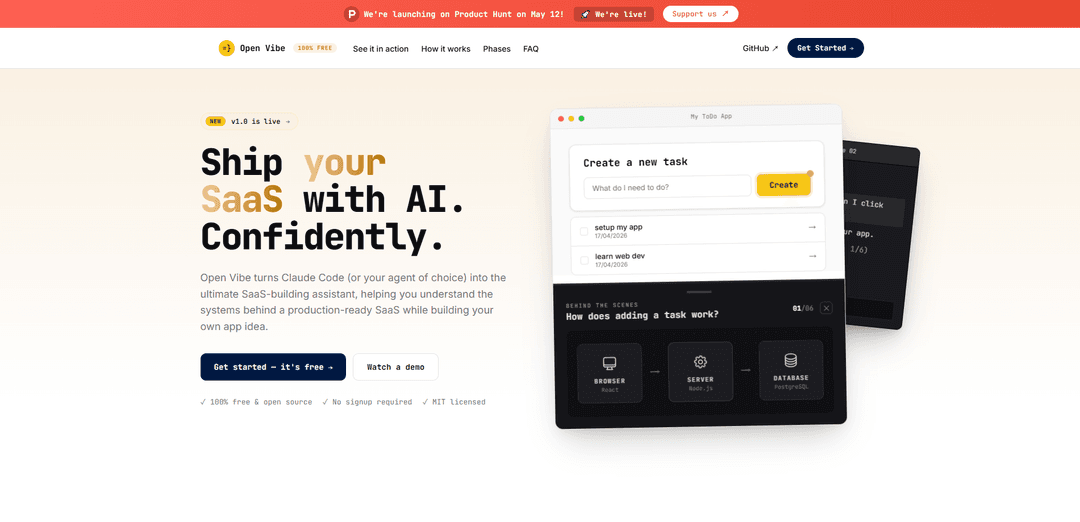
Open Vibe is a free, MIT-licensed, open-source curriculum that turns your coding agent (e.g., Claude Code) into an interactive SaaS tutor, teaching core web-dev concepts with local-first workflows and live, explainable “behind-the-scenes” diagrams as you build a real app.
https://openvibe.sh/?ref=producthunt
Product Information
Updated:May 15, 2026
What is Open Vibe
Open Vibe is an open-source learning system designed for people who want to build and ship a real SaaS while actually understanding what they’re building. Instead of relying on static tutorials or opaque “vibe coding” that can produce fragile apps, Open Vibe embeds a structured course directly into your AI coding agent so it can guide you step-by-step, explain concepts on demand, and help you deploy. It’s free, requires no signup, runs locally on your machine, and is built to work with Claude Code or other capable agents—so you keep full control of your code and workflow.
Key Features of Open Vibe
Open Vibe is a free, open-source (MIT) terminal-first curriculum that turns an AI coding agent (e.g., Claude Code or similar) into an interactive tutor while you build and deploy real web apps and a SaaS. It runs locally on your machine, teaches concepts in-context (not via throwaway tutorials), and helps you understand what you’re shipping through step-by-step guidance, explanations, and interactive “behind-the-scenes” diagrams over your running app—reducing the trial-and-error prompt loop common in vibe-coding platforms.
Agent-embedded course (no videos/PDFs): The curriculum “lives inside your agent,” providing step-by-step instruction, pairing, explanations, and quizzing as you build—so learning happens directly in your development workflow.
One-command onboarding via llms.txt: Start by pasting a single install prompt that instructs your agent to fetch and follow the course instructions from https://openvibe.sh/llms.txt—no signup required.
Local-first development workflow: Everything runs on your machine (your code, your environment), avoiding platform lock-in and reducing token-limit or hosted-environment surprises; the agent can also help you deploy to the web.
Interactive “behind-the-scenes” diagrams: Provides live, app-specific diagrams (e.g., browser → server → database flows) that explain what happens when you click UI actions like “add task,” helping you build mental models of full-stack behavior.
Learn-while-shipping SaaS path with Open SaaS: Includes a track for building a production-style SaaS on top of the Open SaaS starter (auth, payments, admin, email, AI-ready) while learning key product loops like auth → payment → access.
Modular curriculum for different starting points: Structured in phases/modules so beginners can start from web basics, while more advanced builders can jump into SaaS-specific modules and iterate at their own pace.
Use Cases of Open Vibe
First-time founders building an MVP SaaS: Use Open Vibe as an AI tutor to build a real SaaS locally, understand core full-stack concepts, and progress toward deployment—without getting stuck in repetitive prompt-fix cycles.
Self-taught web dev skill-building: Replace static tutorials with an interactive, in-context learning loop where the agent explains architecture, data flow, and implementation decisions as you build.
Rapid prototyping for product teams: Teams can use the guided workflow to prototype features quickly while maintaining shared understanding of how the system works (client/server/DB), reducing “mystery code” risk.
Bootcamps or internal engineering onboarding: Fork/remix the MIT-licensed curriculum to run a structured, hands-on program where learners build a consistent app stack and get interactive explanations from their agent.
Indie hackers adding payments and access control: Follow the SaaS modules focused on the auth → payment → access loop to wire up monetization and gated features in a production-style starter template.
Pros
Free and open source (MIT), with no signup required
Local-first workflow reduces lock-in and keeps code fully under your control
Emphasizes understanding (architecture/flows) while building a real app, not a throwaway tutorial
Works with multiple agents/tools (e.g., Claude Code and other capable coding agents)
Cons
Requires access to and competence with an external AI coding agent/tooling (not a standalone IDE)
Some modules are marked “coming soon,” so the full curriculum may be incomplete depending on your needs
Terminal/agent-driven workflow may be less approachable for users who prefer traditional video-led courses or fully managed platforms
How to Use Open Vibe
1) Pick an AI coding agent to run the course in: Use Claude Code (recommended by Open Vibe) or another capable coding agent (e.g., Cursor, Codex, Open Code). You’ll run everything locally on your machine while the agent tutors you.
2) Start the Open Vibe course by importing its instructions: In your agent chat, paste: "I'm starting the \"Ship Your First App\" course. Run `curl -fsSL https://openvibe.sh/llms.txt` and follow the file's instructions." This tells the agent to fetch Open Vibe’s llms.txt and proceed with the setup steps it contains.
3) Let the agent execute the curl command and follow llms.txt: Have the agent run `curl -fsSL https://openvibe.sh/llms.txt` in your terminal and then follow the instructions from that file to install/initialize the curriculum and project scaffolding.
4) Create (or choose) the app you’ll build while learning: Proceed with the course flow to build a small full-stack app (e.g., a ToDo app) so the agent can teach concepts as they appear in your real codebase.
5) Build locally with the agent as your tutor: Work step-by-step with the agent: implement features, run the app, and ask questions like “what happens behind the scenes when I click add task?” The agent explains the end-to-end flow (browser → server → database) as you build.
6) Use interactive explanations/diagrams when you get stuck: When something is confusing or broken, ask the agent to go deeper. Open Vibe’s approach is to explain what’s happening (often with diagrams over your running app) so you understand fixes instead of looping on prompts.
7) Follow the curriculum modules in the order that fits you: Choose a path: Phase 1 (web app basics: setup, first web app, data & database, styling, connectivity) or Phase 2 (build a SaaS on Open SaaS: understand the template, auth→payment→access loop, payments, etc.). Continue module-by-module at your own pace.
8) Keep everything on your machine (local-first workflow): Run code locally to avoid platform lock-in and token-limit surprises. Iterate by editing code, running tests/dev server, and using the agent to explain architecture and debugging steps.
9) Deploy when your app is ready: After you’ve built the core features, ask the agent to help you deploy your app to the web (Open Vibe emphasizes shipping, not just learning).
10) (Optional) Build a real SaaS using Open SaaS: If you want a production-ready starting point, use the Open SaaS template (auth, payments, admin, email, blog, AI-ready). Then follow the Open Vibe modules that teach how each part works as you customize it.
Open Vibe FAQs
Open Vibe is a free, open-source course that runs inside your AI coding agent (e.g., Claude Code or other capable agents) to teach web development while you build and ship a real SaaS app locally.
Open Vibe Video
Popular Articles

Atoms: A Multi-Agent AI Platform That Transforms Ideas into Launch-Ready Products
May 22, 2026

Nano Banana SBTI: What It Is, How It Works, and How to Use It in 2026
Apr 15, 2026

Atoms Review — The AI Product Builder Redefining Digital Creation in 2026
Apr 10, 2026

Kilo Claw: How to Deploy and Use a True "Do‑It‑For‑You" AI Agent(2026 Update)
Apr 3, 2026
Latest AI Tools Similar to Open Vibe

Gait
Gait is a collaboration tool that integrates AI-assisted code generation with version control, enabling teams to track, understand, and share AI-generated code context efficiently.

invoices.dev
invoices.dev is an automated invoicing platform that generates invoices directly from developers' Git commits, with integration capabilities for GitHub, Slack, Linear, and Google services.

EasyRFP
EasyRFP is an AI-powered edge computing toolkit that streamlines RFP (Request for Proposal) responses and enables real-time field phenotyping through deep learning technology.

Cart.ai
Cart.ai is an AI-powered service platform that provides comprehensive business automation solutions including coding, customer relations management, video editing, e-commerce setup, and custom AI development with 24/7 support.
Popular AI Tools Like Open Vibe

GitHub Copilot Chat
GitHub Copilot Chat is an AI-powered coding assistant that provides natural language interactions, real-time code suggestions, and contextual support directly within supported IDEs and GitHub.com.

CopilotForXcode
CopilotForXcode is an Xcode Source Editor Extension that integrates GitHub Copilot, Codeium, and ChatGPT to provide AI-powered code suggestions, chat assistance, and prompt-to-code functionality within Xcode.

BrowserAI
BrowserAI is an open-source library that enables running local Large Language Models (LLMs) directly in web browsers with WebGPU acceleration, offering privacy-focused AI capabilities without requiring server infrastructure.

OpenAI Codex CLI
OpenAI Codex CLI is a lightweight, open-source coding agent that runs in your terminal, enabling developers to translate natural language into code execution while providing ChatGPT-level reasoning with the ability to run code, manipulate files, and iterate under version control.