
OLO Robotics
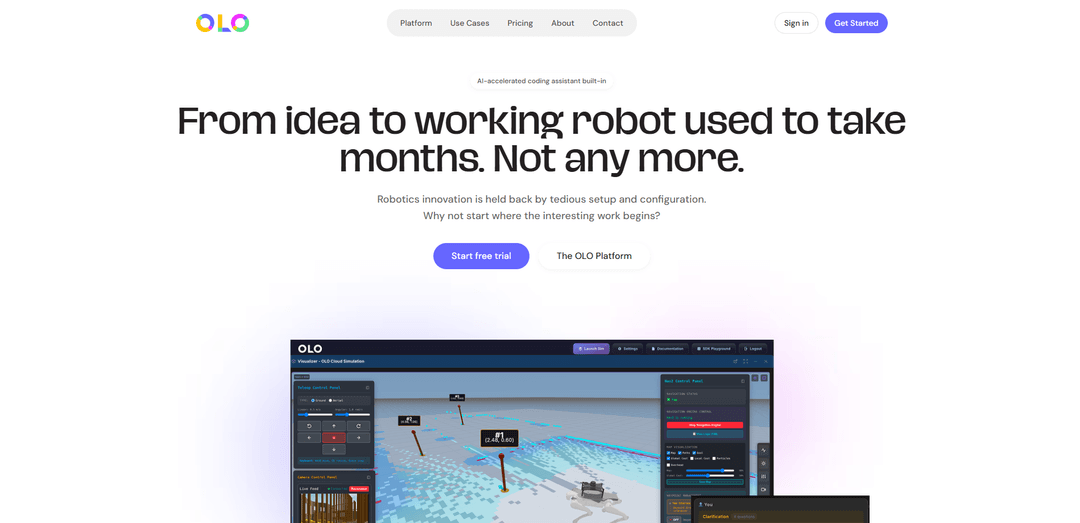
OLO Robotics is a browser-based, ROS 2–native platform that unifies simulation, visualization, teleoperation, and JavaScript/Python scripting with built-in AI-assisted coding for faster robot development and deployment.
https://olo-robotics.com/?ref=producthunt
Product Information
Updated:Jun 15, 2026
What is OLO Robotics
OLO Robotics is a UK-based robotics software company building a web platform that makes it easier to program, simulate, visualize, and control ROS 2 robots from the browser. Instead of stitching together separate tools (simulators, dashboards, IDEs, and remote access), OLO brings key robotics workflows—cloud simulation, real-time 3D visualization, remote control, live video streaming, and SDK-based automation—into a single environment. It’s designed to help robot manufacturers, developers, and research teams start productive work quickly, without weeks of local setup and configuration.
Key Features of OLO Robotics
OLO Robotics is a browser-based, ROS 2–native robotics development platform that unifies simulation, visualization, remote control/teleoperation, live video streaming, and scripting into a single web experience. It provides JavaScript and Python SDKs plus an AI-assisted coding workflow to help developers move from idea to working robot quickly without local installation or complex setup. For real robots, OLO uses an Appliance architecture so time-critical SDK execution can run locally (low-latency, offline-capable, reliable), while still enabling remote orchestration and access to ROS 2 topics, services, and parameters.
All-in-one web robotics workspace: Combines simulation, visualization, control, and scripting in the browser to avoid stitching together separate simulators, dashboards, and IDEs.
ROS 2–native access layer: Provides direct access to ROS 2 topics, services, nodes, and node-scoped parameters, making it compatible with existing ROS 2 robots and drivers.
JavaScript & Python SDK + SDK Playground: Lets developers code robot behaviors in JS or Python with a no-install, in-browser playground; code is portable between the Playground and standalone clients.
Appliance-local execution for production behaviors: When run via the SDK Playground, scripts and the SDK deploy to the Appliance and execute locally for low latency, offline capability, and resilience to cloud/network issues.
Remote operations toolkit: Includes low-latency teleoperation, live camera video streaming with recording/playback, and data capture such as ROS bag recording for debugging and testing.
Built-in autonomy and perception modules: Offers Nav2-based waypoint/pose navigation, joint/arm control, and AI-powered vision analysis performed on the Appliance.
Use Cases of OLO Robotics
Robot hardware OEM onboarding & ecosystem building: Bundle OLO with robots so customers can immediately access streaming, navigation, and control out of the box—reducing setup time and lowering sales/implementation friction.
Sim-to-real prototyping before hardware arrives: Start developing behaviors in cloud simulation and deploy the same scripts to the physical robot later, accelerating product development and integration timelines.
Enterprise robotics automation development: Enable mainstream software teams to build and orchestrate robot workflows (navigation, vision checks, manipulation) without deep ROS 2 expertise.
Academic teaching and research acceleration: Provide students/researchers a ready-to-use robotics environment from day one (no Linux/Gazebo setup hurdles), maximizing time spent on experiments rather than tooling.
Remote inspection, monitoring, and teleoperation: Use live video streaming, remote control, and recording to operate robots across sites for inspection, maintenance support, or supervised autonomy.
Testing, debugging, and reproducible experiments: Record/play back ROS topics (rosbags) and use visualization to diagnose issues, validate autonomy stacks, and reproduce field failures reliably.
Pros
Fast onboarding: no local installation/configuration; start in a browser with simulation and SDK Playground.
ROS 2 compatibility: works with existing ROS 2 ecosystems (topics/services/parameters) rather than replacing them.
Production-friendly execution model: Appliance-local runtime enables low-latency, offline-capable, reliable robot behaviors.
Cons
Requires an OLO Appliance for the full local-execution/vision-processing architecture on real robots.
Standalone client mode can introduce additional network dependency/latency compared with running behaviors locally via the Playground.
Feature set is oriented around ROS 2; non-ROS stacks may require additional integration work.
How to Use OLO Robotics
1) Create an OLO account and open the web platform: Go to https://olo-robotics.com/ and sign up/log in. OLO runs in the browser, so you don’t need to install ROS2, Gazebo, or local tooling to begin.
2) Start in the SDK Playground (recommended first workflow): Launch the SDK Playground to begin coding immediately in a browser-based development environment. This is the fastest path to writing robot behaviors without setup.
3) Choose your target: cloud simulation or a real robot: Select a robot/environment in OLO’s cloud simulation to prototype quickly, or connect to a real ROS2 robot via the OLO Appliance (robot-side software that bridges ROS2 to the OLO portal).
4) Connect to the robot (automatic in Playground): In the SDK Playground, connection is handled for you. If you later build a standalone app, you’ll use the OLO SDK’s authentication and appliance discovery/connection methods to reach the robot through the OLO portal.
5) Use the JavaScript or Python SDK to interact with ROS2: Write code using OLO’s SDK (JavaScript or Python) to access ROS2 primitives directly—topics, services, and node-scoped parameters—without manually wiring multiple tools together.
6) Discover what’s available on the robot: Use SDK capabilities to query the system (e.g., list available ROS topics and nodes) so you can identify the correct interfaces to subscribe/publish to, call, or configure.
7) Visualize and debug in the browser: Use OLO’s integrated visualization and real-time 3D view to observe robot state while you iterate on code, rather than switching between separate dashboards and IDEs.
8) Teleoperate the robot for quick validation: Use low-latency remote teleoperation to manually drive/position the robot and confirm sensors, motion, and basic behaviors before automating.
9) Stream and record live video from robot cameras: Enable live video streaming to view camera feeds in the platform, and use recording/playback to review runs and troubleshoot perception or navigation issues.
10) Add autonomous navigation (Nav2 integration): Use OLO’s built-in Nav2 integration to command waypoint and pose navigation. Test in simulation first, then deploy the same workflow to real hardware.
11) Control joints/arms when applicable: If your robot includes an arm or actuated joints, use OLO’s joint control capabilities to manipulate joints and build higher-level behaviors on top.
12) Run vision analysis on the Appliance: Use the vision module for AI-powered computer vision analysis of camera feeds, processed on the OLO Appliance for robot-adjacent execution.
13) Use the AI-assisted coding assistant to accelerate iteration: Leverage the built-in AI coding assistant to generate or refine scripts, then test immediately in the same browser environment.
14) Orchestrate behaviors with reusable scripts: Chain scripts together using script orchestration to create modular, reusable automation (e.g., ‘navigate → inspect → report’).
15) Record and replay ROS data with ROSBag: Use ROSBag recording to capture ROS topics during tests, then replay them to reproduce bugs, validate changes, and debug without rerunning the robot each time.
16) Move from sim to real with the same interfaces: After validating behaviors in cloud simulation, run the same SDK-driven approach against the real robot through the OLO Appliance, minimizing rework between environments.
17) (Optional) Build a standalone client for custom deployments: When you outgrow the Playground, run the OLO SDK from your own machine/server/cloud as a standalone client. Connect to the robot via the OLO portal for flexible deployment and integration with your preferred tooling.
OLO Robotics FAQs
OLO is a browser-based robotics platform that brings simulation, visualization, robot control, and scripting into one web interface to reduce setup time and help users go from idea to working robot faster.
OLO Robotics Video
Popular Articles

Atoms: A Multi-Agent AI Platform That Transforms Ideas into Launch-Ready Products
May 22, 2026

Nano Banana SBTI: What It Is, How It Works, and How to Use It in 2026
Apr 15, 2026

Atoms Review — The AI Product Builder Redefining Digital Creation in 2026
Apr 10, 2026

Kilo Claw: How to Deploy and Use a True "Do‑It‑For‑You" AI Agent(2026 Update)
Apr 3, 2026
Latest AI Tools Similar to OLO Robotics

Gait
Gait is a collaboration tool that integrates AI-assisted code generation with version control, enabling teams to track, understand, and share AI-generated code context efficiently.

invoices.dev
invoices.dev is an automated invoicing platform that generates invoices directly from developers' Git commits, with integration capabilities for GitHub, Slack, Linear, and Google services.

EasyRFP
EasyRFP is an AI-powered edge computing toolkit that streamlines RFP (Request for Proposal) responses and enables real-time field phenotyping through deep learning technology.

Cart.ai
Cart.ai is an AI-powered service platform that provides comprehensive business automation solutions including coding, customer relations management, video editing, e-commerce setup, and custom AI development with 24/7 support.
Popular AI Tools Like OLO Robotics

GitHub Copilot Chat
GitHub Copilot Chat is an AI-powered coding assistant that provides natural language interactions, real-time code suggestions, and contextual support directly within supported IDEs and GitHub.com.

CopilotForXcode
CopilotForXcode is an Xcode Source Editor Extension that integrates GitHub Copilot, Codeium, and ChatGPT to provide AI-powered code suggestions, chat assistance, and prompt-to-code functionality within Xcode.

BrowserAI
BrowserAI is an open-source library that enables running local Large Language Models (LLMs) directly in web browsers with WebGPU acceleration, offering privacy-focused AI capabilities without requiring server infrastructure.

OpenAI Codex CLI
OpenAI Codex CLI is a lightweight, open-source coding agent that runs in your terminal, enabling developers to translate natural language into code execution while providing ChatGPT-level reasoning with the ability to run code, manipulate files, and iterate under version control.