
Ocean Orchestrator
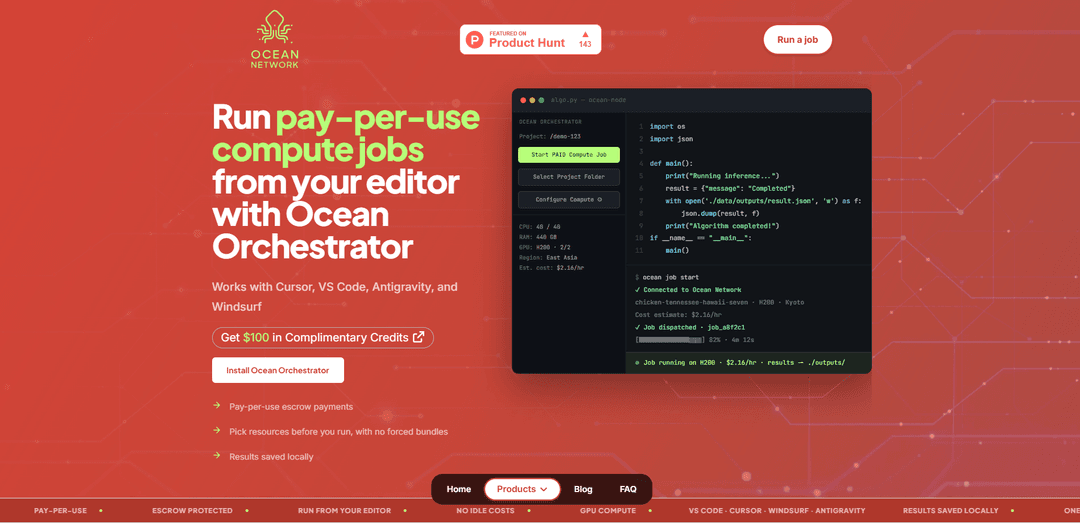
Ocean Orchestrator is an editor-based tool that enables users to run pay-per-use compute jobs directly from their development environment, offering seamless GPU access with integrated workflow management across VS Code, Cursor, Windsurf, and Antigravity editors.
https://www.oncompute.ai/ocean-orchestrator?ref=producthunt
Product Information
Updated:Apr 8, 2026
What is Ocean Orchestrator
Ocean Orchestrator is a decentralized peer-to-peer (P2P) compute orchestration layer developed by Ocean Network that transforms fragmented hardware into a liquid market for on-demand compute resources. Launched in March 2026, it serves as a bridge between users and distributed computing resources, allowing data scientists and developers to access high-performance GPUs without dealing with complex infrastructure management. The platform integrates directly with popular code editors and operates on a pay-per-use model, eliminating the need for fixed commitments or idle infrastructure costs.
Key Features of Ocean Orchestrator
Ocean Orchestrator is an editor-integrated tool that enables users to run pay-per-use compute jobs directly from their development environment. It works seamlessly with popular editors like VS Code, Cursor, Windsurf, and Antigravity, allowing users to select compute resources, manage GPU workloads, and retrieve results locally without dealing with complex infrastructure setup or idle costs. The platform uses an escrow payment system and provides transparent pricing before job execution.
Editor Integration: Native integration with VS Code, Cursor, Windsurf, and Antigravity, allowing users to manage compute jobs directly from their preferred development environment
Pay-per-use Model: Escrow-protected payment system that only charges users for successful job completion, with no costs for idle infrastructure
Flexible Resource Selection: Users can choose specific hardware resources and configurations before each run without being locked into preset bundles
Local Results Management: Automatic saving of outputs and logs to local folders without requiring manual retrieval from remote storage
Use Cases of Ocean Orchestrator
AI Model Training: Run training and evaluation loops with different resources to iterate faster on AI model development
Data Processing: Handle large-scale batch processing jobs for embeddings generation and data preparation tasks
Research and Development: Execute experimental workloads and research computations with flexible resource allocation and cost control
Pros
No infrastructure setup or maintenance required
Transparent pricing and cost control through escrow system
Direct integration with popular development environments
Cons
Limited to containerized workloads
Depends on node availability for job execution
May require initial learning curve for new users
How to Use Ocean Orchestrator
Visit Ocean Network Dashboard: Go to dashboard.oncompute.ai to browse available compute environments and resources
Select Compute Environment: Choose your preferred GPU resources (like H200, Tesla) and specifications (CPU, RAM) based on your workload needs and budget
Fund Escrow Wallet: Add funds to your escrow wallet which will be held securely and only released after successful job completion
Install Ocean Orchestrator: Install the Ocean Orchestrator extension in your preferred editor (VS Code, Cursor, Windsurf, or Antigravity)
Prepare Your Code: Ensure your code is containerized and ready to run on the selected environment
Launch Compute Job: Use Ocean Orchestrator in your editor to start the compute job with one click
Monitor Progress: Track job progress and view logs live in your editor through Ocean Orchestrator
Retrieve Results: Once job completes, results and logs are automatically saved to your local results folder
Payment Processing: Exact runtime cost is released from escrow after job completion, with remaining balance returned to your wallet
Ocean Orchestrator FAQs
The quickest way is to use the Ocean Network dashboard to select resources, then push them to Ocean Orchestrator in your preferred editor (VS Code, Cursor, Antigravity, or Windsurf). Alternatively, you can use ocean-cli to submit jobs and retrieve results.
Ocean Orchestrator Video
Popular Articles

Atoms: A Multi-Agent AI Platform That Transforms Ideas into Launch-Ready Products
May 22, 2026

Nano Banana SBTI: What It Is, How It Works, and How to Use It in 2026
Apr 15, 2026

Atoms Review — The AI Product Builder Redefining Digital Creation in 2026
Apr 10, 2026

Kilo Claw: How to Deploy and Use a True "Do‑It‑For‑You" AI Agent(2026 Update)
Apr 3, 2026
Latest AI Tools Similar to Ocean Orchestrator

Hapticlabs
Hapticlabs is a no-code toolkit that enables designers, developers and researchers to easily design, prototype and deploy immersive haptic interactions across devices without coding.

Deployo.ai
Deployo.ai is a comprehensive AI deployment platform that enables seamless model deployment, monitoring, and scaling with built-in ethical AI frameworks and cross-cloud compatibility.

CloudSoul
CloudSoul is an AI-powered SaaS platform that enables users to instantly deploy and manage cloud infrastructure through natural language conversations, making AWS resource management more accessible and efficient.

Devozy.ai
Devozy.ai is an AI-powered developer self-service platform that combines Agile project management, DevSecOps, multi-cloud infrastructure management, and IT service management into a unified solution for accelerating software delivery.
Popular AI Tools Like Ocean Orchestrator

A2A Protocol
A2A (Agent2Agent) Protocol is an open interoperability protocol developed by Google that enables seamless communication and collaboration between AI agents across different frameworks and vendors, regardless of their underlying architecture.

VoltOps
VoltOps is a framework-agnostic LLM observability platform that provides real-time visual monitoring, debugging, and optimization tools for AI agents across any technology stack.

Chaterm
Chaterm is an open-source AI-native terminal and SRE copilot that enables engineers to manage complex infrastructure through natural language, automating deployment, troubleshooting, and operations without memorizing commands.

Open Browser Use
Open Browser Use is an open-source, agent-runtime-neutral browser automation layer that pairs a Chrome extension with a CLI/SDK/MCP to enable DOM-aware, CDP-powered tab control, navigation, and actions across different AI agent tools.