nudge
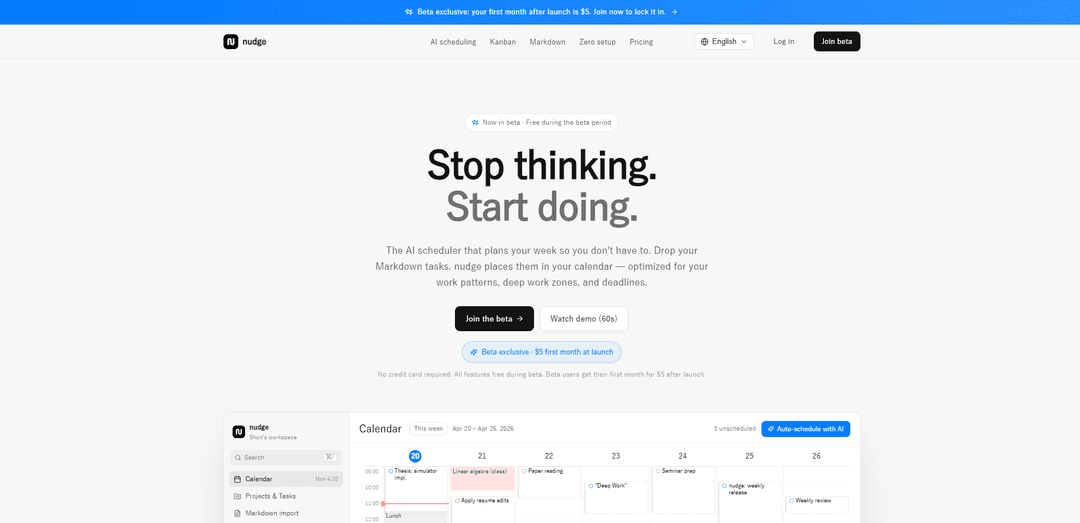
nudge is an AI task scheduler that auto-plans your week by importing Markdown tasks and placing them into calendar slots based on deadlines, priorities, and your deep-work routine.
https://www.nudgetaskai.com/?ref=producthunt
Product Information
Updated:May 19, 2026
What is nudge
nudge (Nudge Task) is a lightweight AI scheduler designed to remove the “thinking tax” of planning—deciding what to do next, manually dragging tasks into calendars, or maintaining complex productivity templates. Instead, you drop or paste tasks (including Markdown with structured frontmatter), and nudge automatically turns them into a realistic weekly plan. It’s built for individuals—students, indie hackers, writers, and researchers—who want a simple system that connects what they need to do with when they’ll do it, without heavy setup.
Key Features of nudge
nudge (Nudge Task) is an AI task scheduler that turns your task list—especially Markdown-based tasks—into a realistic weekly calendar plan. It auto-sorts tasks by deadline and priority, places them into conflict-free 30-minute blocks, and adapts to your routine by respecting deep-work zones, fixed events, meals, sleep, and pre-bedtime buffers. It also offers a lightweight Kanban view for status tracking, aiming to reduce the “thinking tax” of deciding what to do and when.
AI auto-scheduling to calendar: Automatically places tasks into your calendar in 30-minute slots, avoiding conflicts and optimizing around deadlines, priority, and available time.
Routine-aware planning (deep work + buffers): Respects your working hours, deep-work zones, fixed events, meals, sleep, maximum work streaks, and pre-bedtime buffers so schedules match real life.
Deadline & priority auto-sorting: Orders tasks by deadline and priority (high > medium > low) before scheduling so urgent/important work is planned first.
Markdown import with YAML frontmatter parsing: Drag-and-drop Markdown files (e.g., from Obsidian/VSCode/GitHub-style notes); nudge parses fields like duration, priority, deadline, and “deep” to schedule correctly.
Kanban status view synced with schedule: Provides a simple three-column board (Not started / In progress / Done) so you can track execution without complex project-management overhead.
Fast scheduling performance: Designed to place many tasks quickly (e.g., ~50 tasks in under 500 ms) using a greedy approach to keep planning responsive.
Use Cases of nudge
Indie hackers & solo builders: Convert a TODO.md into a time-blocked weekly plan, protecting deep-work hours for coding and shipping while fitting around meetings and life.
Students managing classes + assignments: Auto-schedule study blocks and assignment work around fixed class times, weekends, and personal routines to reduce weekly re-planning.
Writers & researchers using note-based workflows: Turn Obsidian/Markdown research tasks into a calendar plan, ensuring long-form “deep” work lands in the most focused hours.
Freelancers balancing multiple projects: Schedule client deliverables by deadline/priority, add buffers between tasks, and keep evenings protected with pre-bedtime rules.
Personal productivity & habit-compatible planning: Maintain consistent routines (gym, meals, sleep) while still fitting in important tasks, reducing decision fatigue about what to do next.
Pros
Reduces decision fatigue by automating time-blocking around deadlines, priorities, and personal routines.
Low setup and lightweight workflow (Markdown import + simple Kanban) without heavy project-management configuration.
Routine constraints (deep-work zones, fixed events, buffers) make schedules more realistic than naive auto-planners.
Cons
If the week is over-constrained, tasks may remain unplaced when no slot is available.
Time-slotting is based on 30-minute blocks and a greedy placement approach, which may not always produce an optimal plan for complex constraints.
Primarily designed for individuals (no team features like assignees/permissions), limiting use for collaborative planning.
How to Use nudge
1) Sign up (beta): Open https://www.nudgetaskai.com/ and click “Join the beta”. Sign in with Google (one click). No credit card is required during the beta period.
2) Set your routine (so nudge can schedule correctly): Configure your weekly lifestyle settings: working hours, deep-work zones, lunch, sleep/pre-bedtime buffer, and any fixed events (e.g., classes, gym). Set different rules for weekdays vs weekends if needed.
3) Prepare tasks in Markdown (optional but recommended): Create a Markdown file (e.g., in Obsidian/VSCode/GitHub) where each task is a heading plus a YAML block describing it. Include fields like duration, priority, deadline, and whether it’s deep work.
4) Import tasks: Drag-and-drop your Markdown file into nudge (or paste tasks directly). nudge parses the YAML frontmatter per task and shows a preview list of items it detected before importing.
5) Review detected task details: In the import preview, confirm each task’s duration, priority (high/medium/low), deadline date, and deep-work flag. Fix any missing/incorrect fields in your Markdown and re-import if needed.
6) Auto-schedule your week: Click the “Auto-schedule with AI” button. nudge sorts tasks by deadline and priority, then places them into 30-minute calendar slots while avoiding conflicts with fixed events, meals, sleep, and your pre-bedtime buffer.
7) Check what got placed (and what didn’t): Look at the calendar view to see scheduled blocks. If nudge reports an unplaced task (no slot available), adjust your routine (expand work hours, allow weekends, reduce buffers) or reduce task load/durations, then run auto-schedule again.
8) Use the Kanban view to track status: Switch to the 3-column Kanban (Not started / In progress / Done). Drag a card between columns to update status—no extra workflow setup.
9) Keep your calendar aligned with reality: When your week changes (new fixed events, shifting availability), update your fixed events/routine settings and re-run auto-schedule so tasks are re-fit into open slots.
10) Continue adding tasks with minimal overhead: As you create new tasks, add them to your Markdown file (or paste them into nudge), import, then auto-schedule again. nudge is designed to minimize manual dragging and weekly re-planning.
nudge FAQs
nudge is an AI task scheduler that plans your week automatically. You drop in tasks (including Markdown tasks), and it places them into your calendar in 30-minute slots optimized around deadlines, priorities, and your personal work patterns.
nudge Video
Popular Articles

Atoms: A Multi-Agent AI Platform That Transforms Ideas into Launch-Ready Products
May 22, 2026

Nano Banana SBTI: What It Is, How It Works, and How to Use It in 2026
Apr 15, 2026

Atoms Review — The AI Product Builder Redefining Digital Creation in 2026
Apr 10, 2026

Kilo Claw: How to Deploy and Use a True "Do‑It‑For‑You" AI Agent(2026 Update)
Apr 3, 2026
Latest AI Tools Similar to nudge

Inbox AI
Inbox AI is a privacy-focused MacOS productivity app that combines voice-driven AI automation with email management capabilities, allowing users to create custom workflows and commands while offering both cloud-based and on-device AI options.

Cart.ai
Cart.ai is an AI-powered service platform that provides comprehensive business automation solutions including coding, customer relations management, video editing, e-commerce setup, and custom AI development with 24/7 support.

Hiyllo Work
Hiyllo Work is an all-in-one team workspace platform that combines chat, project management, calendar, email, file storage and video meetings in a single integrated environment.

MailSense
MailSense is an AI-powered email assistant that filters, summarizes, and generates replies to emails through a Telegram bot interface to help users manage their inbox more efficiently.
Popular AI Tools Like nudge

Magentic-UI
Magentic-UI is an open-source, human-centered web agent prototype by Microsoft Research that enables collaborative planning and execution of complex web-based tasks through transparent interaction between humans and AI agents.

Microsoft Copilot Cowork
Microsoft Copilot Cowork is an AI-powered assistant that turns user intent into actionable plans and autonomously executes multi-step tasks across Microsoft 365 apps while keeping users in control through checkpoints and approvals.

Upsonic
Upsonic is a reliability-focused AI agent framework with dockerized server-client architecture that enables trusted agent workflows through advanced features like verification layers, triangular architecture, and Model Context Protocol (MCP) integration.

CampEd Hire
CampEd Hire is a powerful Chrome extension that streamlines recruitment by automatically collecting and organizing job applicant data from LinkedIn job posts, with features like automated data collection, CSV export, and batch resume downloads.