
npm i -g hotcell
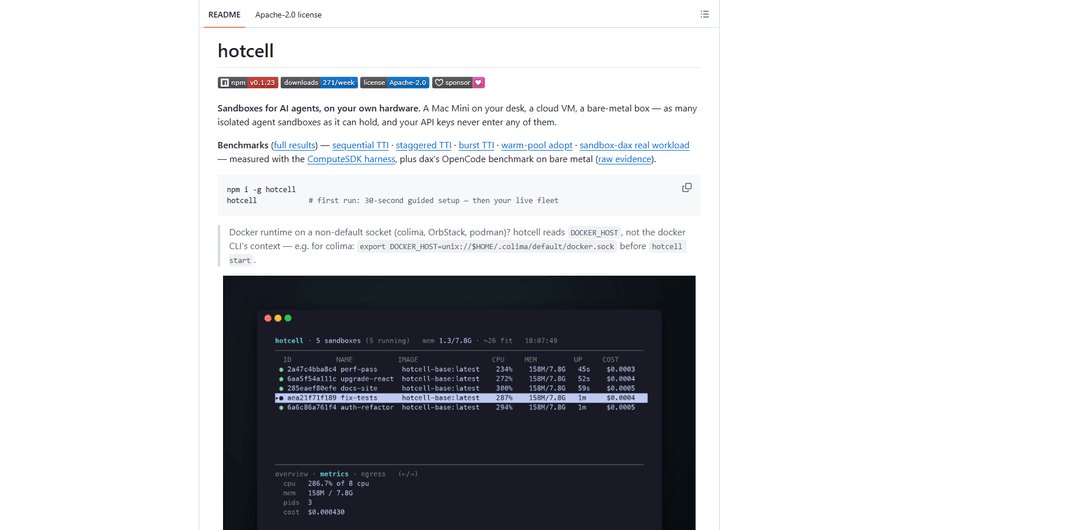
hotcell (installed via `npm i -g hotcell`) is a self-hostable sandbox manager for running many isolated AI-agent workspaces on your own hardware, with optional egress control and a gateway that keeps real API keys out of sandboxes via short-lived per-sandbox tokens.
https://github.com/sinameraji/hotcell?ref=producthunt
Product Information
Updated:Aug 8, 2026
What is npm i -g hotcell
hotcell is an open-source (Apache-2.0) CLI and sandbox SDK inspired by Cloudflare’s Sandbox SDK that lets you create, pause, manage, and tear down isolated “cells” (sandboxes) on devices you control—Mac, Linux, cloud VMs, or bare metal. After installing globally with `npm i -g hotcell`, running `hotcell` launches a guided setup and a live fleet view, then you can spin up one or many sandboxes, clone repos into each, and optionally preinstall agent tooling like OpenCode. It’s designed for agentic development workflows where you want multiple parallel workspaces without branch collisions, leftover state, or leaking credentials into the runtime environment.
Key Features of npm i -g hotcell
hotcell (installed via `npm i -g hotcell`) is a self-hostable sandbox manager for running many isolated “cells” for AI agents and developers on your own hardware (Mac, Linux VM, bare metal). It provisions per-sandbox workspaces (often from a Git repo) with optional branch-per-cell workflows, provides a live fleet view (CPU/mem/cost), and can enforce default-deny egress while still allowing access to LLM providers and other HTTP APIs through a gateway that keeps real API keys on the host (cells receive short-lived, spend-capped tokens). It supports Docker everywhere and can also use microVM-grade isolation via Firecracker (Linux/KVM) or Apple VZ (macOS), and includes an interactive TUI plus one-shot “run then destroy” execution.
Isolated multi-sandbox “fleet” on one machine: Create, pause, manage, and delete many independent sandboxes (“cells”) on a laptop, VM, or bare metal, with per-cell provisioning and no shared leftover state.
Keyless, gateway-routed credentials (keys stay on host): API keys (e.g., OpenRouter, GitHub) never enter the sandbox when using gateway routing; each cell gets a short-lived token, and outbound calls go through hotcell’s gateway with spend caps and revocation on teardown.
Egress control with allow-LLM pattern: Optionally default-deny outbound network access while still permitting LLM/provider access via the gateway; direct calls that bypass the gateway can be blocked under enforcement modes.
Repo cloning + branch-per-cell workflows: Provision cells from a Git repo and automatically put each cell on its own branch (e.g., `feat-1…feat-5`), avoiding git-worktree juggling and branch collisions; git push works via gateway wiring.
Agent-friendly integrations (e.g., OpenCode): Can preinstall and configure agent tooling (like OpenCode) so each sandbox is ready for an agent session, with terminal access per cell and helper workflows for parallel agent work.
Multiple isolation backends: Runs on Docker broadly, with optional VM-grade isolation using Firecracker on Linux and Apple VZ on macOS behind a single interface.
Use Cases of npm i -g hotcell
Parallel AI coding agents on a single repo: Spin up multiple cells, each with the repo cloned and a unique branch, then run separate agents per cell to implement different features concurrently and push changes without distributing GitHub tokens.
Secure evaluation of untrusted code or agent actions: Run third-party scripts, PR builds, or autonomous agent tasks in isolated sandboxes with restricted egress and ephemeral credentials to reduce blast radius.
Reproducible CI-like tasks on developer machines: Use one-shot commands (create → run → destroy) for linting, formatting, tests, or benchmark runs in clean environments, minimizing “works on my machine” drift.
Bring-your-own-hardware sandbox platform for teams: On a shared Mac mini or Linux host, provide self-serve sandboxes with admission control and per-sandbox spend caps, useful for teams prototyping agent workflows without a managed cloud sandbox vendor.
Cost- and quota-controlled LLM experimentation: Route LLM calls through the gateway so each sandbox has its own token and hard spend limits, enabling safe experimentation and preventing runaway agent costs.
Pros
Strong secret hygiene: real API keys can stay on the host while sandboxes use short-lived, revocable tokens via the gateway.
Scales locally: run many isolated workspaces on the hardware you already have, with live fleet visibility and admission control.
Flexible isolation: supports Docker plus microVM options (Firecracker/Apple VZ) for stronger isolation when available.
Cons
Gateway protection is not universal: non-HTTP protocols (e.g., Postgres/Redis) and request-signing schemes (e.g., AWS SigV4) can’t be transparently protected via header substitution.
Egress enforcement varies by platform/runtime (stronger on Linux/microVMs; more limited/advisory in some macOS Docker setups).
Some SDKs may need minor code/config changes if they hardcode provider hosts and ignore injected base-URL settings.
How to Use npm i -g hotcell
1) Install hotcell globally: Run `npm i -g hotcell` to install the Hotcell CLI on your machine.
2) (If needed) point Hotcell at your Docker runtime: If your Docker daemon is on a non-default socket (e.g., colima/OrbStack/podman), set `DOCKER_HOST` before starting Hotcell. Example for colima: `export DOCKER_HOST=unix://$HOME/.colima/default/docker.sock`.
3) Start Hotcell and complete the first-run guided setup: Run `hotcell`. On first run, Hotcell opens a ~30-second guided setup and then shows the fleet/home menu.
4) Add provider keys (kept on the host, not inside sandboxes): Add a key for an LLM/provider route (example): `hotcell keys add openrouter`. This stores the real key on the host; sandboxes will receive only short-lived per-sandbox tokens when using egress/gateway.
5) (Optional) Bulk-import environment variables from a .env file: Run `hotcell keys import .env`. For each variable, choose: `gateway` (real key stays on host; sandbox gets a token), `inject` (real value copied into sandboxes), or `skip`.
6) Create one or more sandboxes (cells) from a repo: Create multiple isolated cells with your repo cloned: `hotcell create -n 5 --repo https://github.com/you/app --branch`. With `--branch`, each cell gets its own branch to avoid collisions.
7) (Optional) Create a multi-agent setup with OpenCode preinstalled: Use: `hotcell create -n 5 --name feat --branch auto --opencode --repo https://github.com/you/app`. This provisions 5 cells, creates branches like `feat-1...feat-5`, and installs OpenCode. (`--opencode` implies `--egress`.)
8) Open a terminal inside a specific cell: Run `hotcell terminal <id>` to get a shell inside that sandbox. Then `cd app` (or your repo folder) and run your commands (e.g., `opencode`).
9) Run one-shot jobs (create → run → destroy): Use `hotcell run --setup "pip install ruff" "ruff check ."` to provision a sandbox, run setup + command(s), then tear it down automatically.
10) Remove sandboxes when done: Run `hotcell rm --all` to delete all cells. This removes sandbox state and revokes per-sandbox tokens; your local repo remains untouched.
npm i -g hotcell FAQs
hotcell is an open-source (Apache-2.0) daemon + CLI for creating, pausing, and managing isolated sandboxes (“cells”) for AI agents on your own hardware (Mac, Linux VM, or bare metal). It can run many sandboxes as your machine can handle, and it’s designed so your provider API keys never need to enter the sandboxes.
npm i -g hotcell Video
Popular Articles

Vosko AI: Localize and Dub Videos for Global Audiences
Oct 15, 2026

Atoms: A Multi-Agent AI Platform That Transforms Ideas into Launch-Ready Products
Oct 13, 2026

Nano Banana SBTI: What It Is, How It Works, and How to Use It in 2026
Apr 15, 2026

Atoms Review — The AI Product Builder Redefining Digital Creation in 2026
Apr 10, 2026
Latest AI Tools Similar to npm i -g hotcell

Gait
Gait is a collaboration tool that integrates AI-assisted code generation with version control, enabling teams to track, understand, and share AI-generated code context efficiently.

invoices.dev
invoices.dev is an automated invoicing platform that generates invoices directly from developers' Git commits, with integration capabilities for GitHub, Slack, Linear, and Google services.

EasyRFP
EasyRFP is an AI-powered edge computing toolkit that streamlines RFP (Request for Proposal) responses and enables real-time field phenotyping through deep learning technology.

Cart.ai
Cart.ai is an AI-powered service platform that provides comprehensive business automation solutions including coding, customer relations management, video editing, e-commerce setup, and custom AI development with 24/7 support.
Popular AI Tools Like npm i -g hotcell

GitHub Copilot Chat
GitHub Copilot Chat is an AI-powered coding assistant that provides natural language interactions, real-time code suggestions, and contextual support directly within supported IDEs and GitHub.com.

CopilotForXcode
CopilotForXcode is an Xcode Source Editor Extension that integrates GitHub Copilot, Codeium, and ChatGPT to provide AI-powered code suggestions, chat assistance, and prompt-to-code functionality within Xcode.

BrowserAI
BrowserAI is an open-source library that enables running local Large Language Models (LLMs) directly in web browsers with WebGPU acceleration, offering privacy-focused AI capabilities without requiring server infrastructure.

OpenAI Codex CLI
OpenAI Codex CLI is a lightweight, open-source coding agent that runs in your terminal, enabling developers to translate natural language into code execution while providing ChatGPT-level reasoning with the ability to run code, manipulate files, and iterate under version control.