
Lightfern for Email
Lightfern, kişisel stilinizde yazarken inanılmaz hızlı otomatik tamamlama işlevi sağlayan, gizliliğe ve varsayılan olarak sıfır veri saklamaya güçlü bir şekilde odaklanan, yapay zeka destekli bir e-posta aracıdır.
https://lightfern.com/?ref=producthunt&utm_source=aipure

Ürün Bilgisi
Güncellendi:Feb 8, 2026
Lightfern for Email Nedir
Lightfern, doğrudan gelen kutunuzda e-posta oluşturmayı geliştirmek için tasarlanmış telepatik bir yapay zeka yazma aracıdır. E-posta istemcinizle sorunsuz bir şekilde entegre olan, minimum kurulum ve yapılandırma gerektiren bir tarayıcı uzantısıdır. Araç, gizliliği ön planda tutan bir yaklaşımla oluşturulmuştur ve e-postalarınızın açık rıza olmadan asla saklanmamasını veya model eğitimi için kullanılmamasını sağlar.
Lightfern for Email Temel Özellikleri
Lightfern, yazma stilinize uyum sağlayan inanılmaz hızlı otomatik tamamlama özelliğine sahip, yapay zeka destekli bir e-posta yazma asistanıdır. Doğrudan tarayıcı uzantısı aracılığıyla gelen kutunuzda çalışır ve varsayılan olarak sıfır veri saklama ile sıkı veri gizliliğini korurken bağlam duyarlı öneriler sunar. Araç, birinci sınıf teknolojiyi kusursuz entegrasyonla birleştiren e-posta oluşturma için ultra eksiksiz bir model sunar.
Yapay Zeka Destekli Otomatik Tamamlama: Yazma stilinize uyan bağlam duyarlı öneriler sunmak için gelişmiş yapay zeka teknolojisini kullanır
Sıfır Veri Saklama: E-postaları asla saklamayarak veya verileri açık izin olmadan model eğitimi için kullanmayarak gizliliği sağlar
Kusursuz Entegrasyon: Karmaşık bir yapılandırma gerektirmeden basit bir tarayıcı uzantısı aracılığıyla doğrudan mevcut gelen kutunuzda çalışır
Avrupa Yapımı Teknoloji: Hız ve bağlam farkındalığına odaklanarak Avrupa'da geliştirilen birinci sınıf teknolojiye sahiptir
Lightfern for Email Kullanım Alanları
Profesyonel İletişim: İş profesyonellerinin günlük yazışmalar için verimli ve düzgün e-postalar hazırlamasına yardımcı olur
Takım İşbirliği: Açık ve tutarlı ekip iletişimleri ve takipler yazmada yardımcı olur
Yatırım İletişimleri: Girişim sermayesi ve yatırım profesyonellerini hassas ve profesyonel e-postalar hazırlamada destekler
Artıları
Hızlı ve verimli e-posta oluşturma
Veri saklama olmamasıyla güçlü gizlilik odağı
Mevcut e-posta sistemleriyle kolay kurulum ve entegrasyon
Eksileri
Tarayıcı uzantısı kurulumu gerektirir
Yalnızca e-posta iletişimiyle sınırlıdır
Lightfern for Email Nasıl Kullanılır
Uzantıyı Yükleyin: Lightfern tarayıcı uzantısını doğrudan e-posta gelen kutunuza entegre etmek için yükleyin
E-posta Hesabınızı Bağlayın: E-posta hesabınızı Lightfern'e bağlayın - doğrudan gelen kutunuzda çalıştığı için ek yapılandırmaya gerek yoktur
E-posta Oluşturmaya Başlayın: Yeni bir e-posta yazmaya başlamak için normal şekilde e-posta oluşturma pencerenizi açın
Otomatik Tamamlama Özelliğini Kullanın: Siz yazdıkça, Lightfern'in yapay zekası, yazı stilinize ve ses tonunuza uyan inanılmaz hızlı otomatik tamamlama önerileri sunacaktır
Klavye Kısayolu ile Etkinleştirin: E-posta oluştururken Lightfern'in yapay zeka yardımını etkinleştirmek için Ctrl+Alt+L klavye kısayolunu kullanın
Gözden Geçirin ve Gönderin: Yapay zeka tarafından oluşturulan önerileri gözden geçirin, gerekli düzenlemeleri yapın ve e-postanızı normal şekilde gönderin
Lightfern for Email SSS
Lightfern, e-posta oluşturma ve iletişim konusunda yardımcı olmak için doğrudan e-posta gelen kutunuzda çalışan telepatik bir yapay zeka yazma aracıdır.
Popüler Makaleler

Vosko AI: Küresel Kitleler İçin Videoları Yerelleştirin ve Dublaj Yapın
Oct 15, 2026

Atoms: Fikirleri Lansmana Hazır Ürünlere Dönüştüren Çoklu Ajan Yapay Zeka Platformu
May 22, 2026

Nano Banana SBTI: Nedir, Nasıl Çalışır ve 2026'da Nasıl Kullanılır
Apr 15, 2026

Atoms İncelemesi — 2026'da Dijital Oluşumu Yeniden Tanımlayan Yapay Zeka Ürün Geliştiricisi
Apr 10, 2026
Lightfern for Email Benzer En Yeni Yapay Zeka Araçları

10xBeast
10xBeast, işletmelerin lead'leri müşterilere dönüştürmek için soğuk e-posta iletişimini otomatikleştirmelerine ve kişiselleştirmelerine yardımcı olan AI destekli bir satış platformudur.

Inbox AI
Inbox AI, kullanıcıların özelleştirilmiş iş akışları ve komutlar oluşturmasına olanak tanırken, hem bulut tabanlı hem de cihaz içi AI seçenekleri sunan, sesle yönlendirilen AI otomasyonunu e-posta yönetim yetenekleriyle birleştiren gizlilik odaklı bir MacOS verimlilik uygulamasıdır.

MailSense
MailSense, kullanıcıların gelen kutularını daha verimli bir şekilde yönetmelerine yardımcı olmak için bir Telegram botu arayüzü aracılığıyla e-postaları filtreleyen, özetleyen ve yanıtlar üreten AI destekli bir e-posta asistanıdır.

Voltmailer
Voltmailer, işletmelerin soğuk ulaşımını ölçeklendirmelerine yardımcı olan, web sitesi veri kazıma ve otomatik kişiselleştirme yoluyla kişiselleştirilmiş e-postalar üreten yapay zeka destekli bir e-posta otomasyon aracıdır.
Lightfern for Email Gibi Popüler Yapay Zeka Araçları
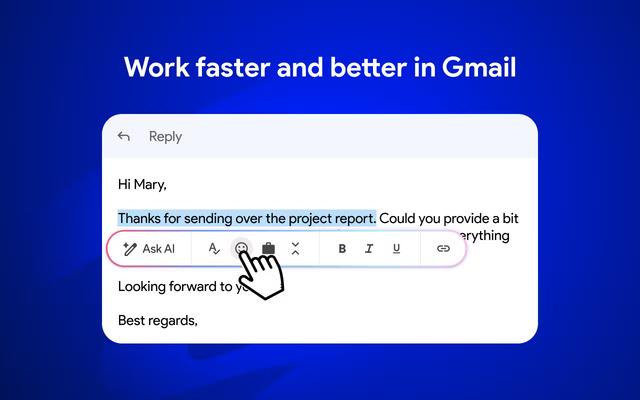
Mailmeteor AI for Gmail
Mailmeteor, Gmail içinde verimliliği ve e-posta yönetimini artırmak için AI e-posta yazma, e-posta birleştirme, otomatik takipler ve e-posta dışa aktarma yeteneklerini birleştiren güçlü bir Gmail uzantısıdır.
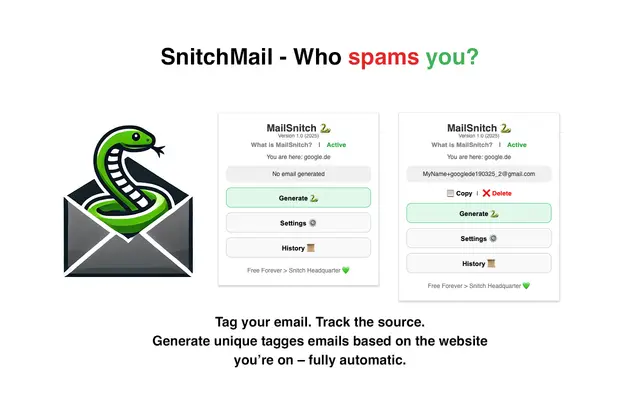
MailSnitch
MailSnitch, kullanıcıların otomatik e-posta etiketleme ve izleme sistemi aracılığıyla spam kaynaklarını belirlemelerine yardımcı olan ücretsiz bir e-posta izleme ve anti-spam Chrome uzantısıdır.

MailMood - AI Email Rewriter
MailMood, Gmail mesajlarını tek bir tıklamayla kurumsal, gündelik veya iddialı olmak üzere üç farklı ton seçeneğiyle anında profesyonel, temiz ve kendinden emin iş diline dönüştüren bir Chrome uzantısıdır.

Apparent for Gmail
Gmail için Apparent, konuşmaları yeniden düzenleyerek, düzenleri basitleştirerek ve gizliliği ve güvenliği korurken iş akışlarını kolaylaştırarak Gmail'in okunabilirliğini ve kullanılabilirliğini artıran bir Chrome uzantısıdır.