
Hopper
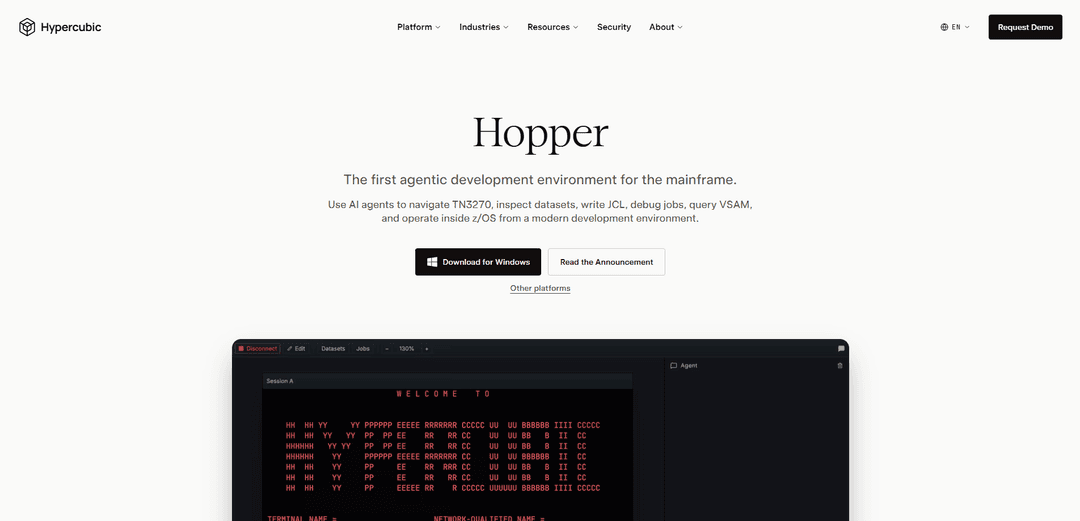
Hopper is an agentic development environment for z/OS that uses AI agents to operate mainframes end-to-end—navigating TN3270, inspecting datasets, writing JCL, debugging jobs, and safely shipping changes with approval gates.
https://www.hypercubic.ai/hopper?ref=producthunt
Product Information
Updated:May 15, 2026
What is Hopper
Hopper (by Hypercubic) is a modern, AI-powered workspace built specifically for mainframe operations and development. It brings “agentic” automation to z/OS workflows—letting engineers and operators interact with classic mainframe surfaces (like TN3270/ISPF, datasets, JCL, JES/SDSF outputs, VSAM, and CICS) from a contemporary environment. Hopper is positioned as a practical tool for day-to-day mainframe work: investigating jobs, making changes, and executing operational tasks while keeping humans in control of critical actions.
Key Features of Hopper
Hopper by Hypercubic is an agentic development environment for z/OS mainframes that combines AI agents with a modern UI and an optional real TN3270 terminal. It can navigate 3270 screens, inspect datasets, write and run JCL, debug failed jobs by interpreting JES spool outputs, query VSAM, and assist with operational workflows—often turning multi-step mainframe tasks (compile/test/deploy) into guided, approval-based prompt flows. It’s available as a free “Hobby” tier for individuals and a customizable Enterprise offering with security, governance, and deployment controls.
Agentic mainframe workflow automation: AI agents can operate inside z/OS to perform tasks like navigating TN3270, inspecting datasets, querying VSAM, writing JCL, and executing operational steps from a single environment.
One-prompt compile/test/ship with approvals: Automates end-to-end changes by driving JCL, parsing JES return codes, performing actions like NEWCOPY into CICS, and pausing for user approval before each change is applied.
Automated failed-job triage from JES spools: Reduces SDSF investigation time by decoding JESMSGLG, JESYSMSG, and SYSUDUMP into the likely abend code, failing step, and relevant source line context.
Integrated real TN3270 terminal mode: Provides a traditional TN3270 experience (PF/PA/attention-key support) when manual control is needed, alongside the agent panel for assisted work.
Cross-platform client and flexible connectivity: Runs on macOS, Windows, and Linux, and supports connecting to your own mainframe; also offers free trial access to a hosted mainframe via provided credentials.
Enterprise governance, privacy, and deployment options: Enterprise tier adds SAML SSO, admin/model controls, org-wide privacy controls, “no model training” commitments, priority support, and on-prem/VPC deployment options (plus SOC 2 and pen test reports).
Use Cases of Hopper
Mainframe DevOps acceleration (banks/insurance): Automate JCL-driven build/test/deploy steps (including CICS NEWCOPY) with approval gates to speed up releases while keeping tight control over changes in regulated environments.
Operations triage for mission-critical batch workloads (government/large enterprises): Diagnose nightly batch failures faster by having the agent interpret JES logs and dumps, pinpoint failing steps, and summarize abends without manual SDSF spelunking.
Legacy application maintenance and modernization support: Help engineers navigate datasets, job outputs, and terminal workflows more efficiently—reducing time spent on procedural mainframe tasks while maintaining existing systems.
Onboarding and productivity for new mainframe engineers: Provide a modern interface plus guided agent assistance to reduce the learning curve of TN3270/ISPF-centric workflows and common operational patterns.
Secure enterprise mainframe assistance (healthcare, critical infrastructure): Use SSO, privacy controls, and on-prem/VPC deployment to apply agentic automation in environments that require strict data handling and governance.
Pros
Purpose-built for z/OS workflows (JCL, JES spools, VSAM, TN3270) rather than generic coding assistance
Can significantly reduce manual terminal/SDSF effort via automated job triage and guided end-to-end change flows
Enterprise options support governance needs (SSO, admin/model controls, privacy controls, on-prem/VPC deployment)
Cons
Value depends on access to a mainframe environment and fit with existing operational controls/processes
Some workflows may still require manual TN3270 operation, limiting full automation in certain situations
Enterprise-grade capabilities (governance/deployment) are gated behind custom pricing
How to Use Hopper
1) Get access to a mainframe (or use your own): If you don’t already have a z/OS environment, request free credentials from Hypercubic’s Hopper page (“Need access to a mainframe?”). Otherwise, plan to connect Hopper to your own mainframe.
2) Install Hopper on your computer: Install Hopper on your preferred OS (macOS, Windows, or Linux). The Hobby tier is free and does not require a credit card.
3) Connect Hopper to z/OS: Launch Hopper and connect it to your target mainframe (either the provided trial credentials or your own mainframe).
4) Use the agentic environment to explore and operate: Use Hopper’s AI agents from the modern UI to navigate TN3270 workflows and operate in z/OS: inspect datasets, write JCL, debug jobs, query VSAM, and perform operational tasks.
5) Open the TN3270 terminal when you need manual control: Switch to the built-in “real TN3270 terminal” mode for traditional workflows. It behaves like a standard TN3270 terminal with full PF/PA and attention-key support.
6) Compile, test, and ship changes via a single prompt (with approvals): Ask the agent to execute an end-to-end change workflow: drive JCL, parse JES return codes, and (when applicable) NEWCOPY into CICS. Hopper pauses for your approval before every change.
7) Debug failed jobs using @-tag triage instead of manual SDSF hunting: When a batch job fails, @-tag the job (example shown: “@JOB01945”). Hopper analyzes JESMSGLG, JESYSMSG, and SYSUDUMP to summarize the abend code, failing step, and likely source line.
8) Iterate: inspect artifacts, adjust, and rerun: Use the agent to inspect relevant datasets/spool outputs, refine JCL or program changes, rerun jobs, and confirm results—switching between agent actions and the TN3270 terminal as needed.
9) (Optional) Upgrade to Enterprise for org controls and deployment options: If you need SAML SSO, MCP Server access, admin/model controls, org-wide privacy controls, no model training, priority support, on-prem/VPC deployment, or SOC 2 & pen test reports, use the Enterprise plan.
10) Join the Hopper community for updates and help: Join Hypercubic’s Discord community to connect with other builders, follow product updates, and exchange ideas with the team.
Hopper FAQs
Hopper is an agentic development environment for IBM mainframes that lets AI agents operate inside z/OS from a modern UI, including navigating TN3270, inspecting datasets, writing JCL, debugging jobs, querying VSAM, and assisting with mainframe operations.
Hopper Video
Popular Articles

Atoms: A Multi-Agent AI Platform That Transforms Ideas into Launch-Ready Products
May 22, 2026

Nano Banana SBTI: What It Is, How It Works, and How to Use It in 2026
Apr 15, 2026

Atoms Review — The AI Product Builder Redefining Digital Creation in 2026
Apr 10, 2026

Kilo Claw: How to Deploy and Use a True "Do‑It‑For‑You" AI Agent(2026 Update)
Apr 3, 2026
Latest AI Tools Similar to Hopper

Hapticlabs
Hapticlabs is a no-code toolkit that enables designers, developers and researchers to easily design, prototype and deploy immersive haptic interactions across devices without coding.

Deployo.ai
Deployo.ai is a comprehensive AI deployment platform that enables seamless model deployment, monitoring, and scaling with built-in ethical AI frameworks and cross-cloud compatibility.

CloudSoul
CloudSoul is an AI-powered SaaS platform that enables users to instantly deploy and manage cloud infrastructure through natural language conversations, making AWS resource management more accessible and efficient.

Devozy.ai
Devozy.ai is an AI-powered developer self-service platform that combines Agile project management, DevSecOps, multi-cloud infrastructure management, and IT service management into a unified solution for accelerating software delivery.
Popular AI Tools Like Hopper

A2A Protocol
A2A (Agent2Agent) Protocol is an open interoperability protocol developed by Google that enables seamless communication and collaboration between AI agents across different frameworks and vendors, regardless of their underlying architecture.

VoltOps
VoltOps is a framework-agnostic LLM observability platform that provides real-time visual monitoring, debugging, and optimization tools for AI agents across any technology stack.

Chaterm
Chaterm is an open-source AI-native terminal and SRE copilot that enables engineers to manage complex infrastructure through natural language, automating deployment, troubleshooting, and operations without memorizing commands.

Open Browser Use
Open Browser Use is an open-source, agent-runtime-neutral browser automation layer that pairs a Chrome extension with a CLI/SDK/MCP to enable DOM-aware, CDP-powered tab control, navigation, and actions across different AI agent tools.