Foglamp
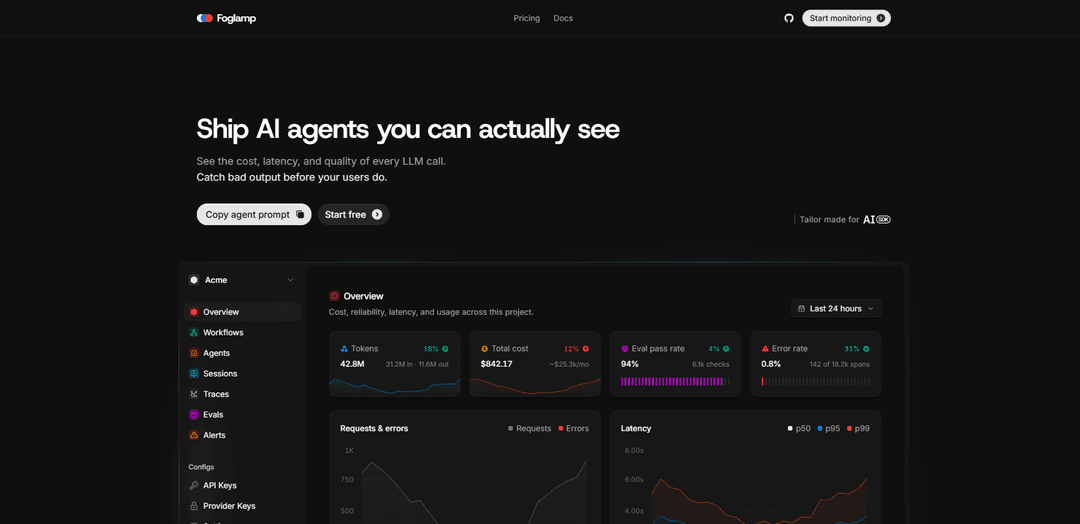
Foglamp is an observability platform for AI agents that instruments LLM calls to track cost, latency, traces, evaluations, alerts, and per-agent spend, helping teams catch regressions and bad outputs early.
https://www.foglamp.dev/?ref=producthunt
Product Information
Updated:Jul 8, 2026
What is Foglamp
Foglamp is a developer-focused observability product designed to make AI agents and LLM applications measurable and debuggable in production. It provides visibility into the cost, latency, and quality of every LLM call, and helps teams understand end-to-end agent behavior through traces and run waterfalls that include the exact prompts and responses. By instrumenting once via an SDK, Foglamp aims to centralize monitoring and analysis so teams can ship agentic systems with confidence and quickly detect issues before users do.
Key Features of Foglamp
Foglamp is an observability SDK and platform for AI agents that lets teams instrument LLM calls once and then monitor cost, latency, traces, and output quality across full multi-agent workflows. It provides per-span and per-agent visibility into prompts/responses, run waterfalls, and spend by model/customer, plus evaluation tooling (code checks and LLM judges) and alerting on thresholds like cost regressions, latency spikes, and error rates—helping catch bad outputs and runaway spend before users do.
Single-SDK instrumentation: Instrument once (e.g., generateText/streamText) and automatically capture end-to-end telemetry for LLM calls and agent runs.
Cost and spend analytics: Track what every call costs with breakdowns by model, agent, and customer to identify regressions and optimize usage.
Tracing and run waterfalls: Visualize the full call flow with per-agent spans, latency, and queued steps, including the exact prompt and response per span.
Quality evaluation on production traffic: Score outputs using deterministic code checks and LLM-judge evaluations to monitor pass rates and detect degraded responses.
Alerting and threshold rules: Set rules on cost, latency, and error rate to proactively flag incidents like sudden spend increases or slowdowns.
Privacy-oriented monitoring: Designed to support observability without capturing PII (as indicated by the product’s “No PII” positioning).
Use Cases of Foglamp
SaaS AI feature cost control: Monitor per-tenant and per-feature LLM spend to prevent margin erosion, detect 10× cost regressions, and enforce budget guardrails.
Customer support agent reliability: Trace multi-step support agents (retrieval → drafting → critique) and evaluate output quality to catch harmful or incorrect responses early.
E-commerce shopping assistants: Track latency and errors across agent workflows (search, recommendations, checkout help) and alert when performance impacts conversion.
Fintech/compliance-sensitive assistants: Use evaluations and tracing to validate response correctness and policy adherence while maintaining a no-PII observability posture.
R&D and prompt/model experimentation: Compare models and prompt versions using cost/latency/quality metrics to choose the best configuration for production.
Pros
Clear visibility into cost, latency, and quality per LLM call and per agent span.
End-to-end tracing with prompt/response context makes debugging agent workflows faster.
Built-in evaluation and alerting helps catch regressions before users notice.
Cons
Requires adding/maintaining SDK instrumentation in your codebase.
Storing prompts/responses for observability may require careful governance even with a “no PII” approach.
Best value depends on how much you rely on LLM/agent workflows; may be overkill for minimal usage.
How to Use Foglamp
1) Choose which “Foglamp” you mean (AI observability vs. FogLAMP IIoT edge platform): The sources include two different products with similar names: (A) Foglamp.dev (observability for AI agents) and (B) FogLAMP (IIoT edge gateway). Follow the tutorial below that matches your goal.
2) Foglamp.dev (AI agents): Install the SDK: Add the Foglamp SDK to your app using your JavaScript/TypeScript package manager (the site shows usage via `import { foglamp } from "foglamp"`).
3) Foglamp.dev (AI agents): Initialize Foglamp in code: Create a Foglamp client instance as shown: `import { foglamp } from "foglamp"; const fog = foglamp();`.
4) Foglamp.dev (AI agents): Instrument your LLM calls: Instrument your `generateText` / `streamText` calls (the site states “Two lines instruments every generateText / streamText call”) so Foglamp can capture traces, latency, and cost per call.
5) Foglamp.dev (AI agents): Inspect traces and waterfalls: Use Foglamp to view per-agent spans, full call flow, and a waterfall for each run including the exact prompt and response per span.
6) Foglamp.dev (AI agents): Track cost and spend breakdowns: Use Foglamp’s cost views to see spend by model, agent, and customer, and identify regressions (e.g., cost spikes).
7) Foglamp.dev (AI agents): Add quality checks and evaluations: Score production traffic using code checks and LLM judges, and monitor pass rates (the site highlights production scoring and evals).
8) Foglamp.dev (AI agents): Configure alerts: Set threshold rules on cost, latency, and error rate to catch regressions before users do.
9) FogLAMP (IIoT): Install prerequisites (Debian/Ubuntu example): Install common build/runtime dependencies mentioned in the sources (examples include: `avahi-daemon`, `curl`, `cmake`, `g++`, `make`, `build-essential`, `autoconf`, `automake`, `uuid-dev`, `libtool`, `libboost-dev`, `libpq-dev`, `libssl-dev`, `libz-dev`, `python3-dev`, `python3-pip`, `postgresql`, `sqlite3`, `libsqlite3-dev`). Use `sudo` as needed.
10) FogLAMP (IIoT): Avoid interactive Kerberos prompts (optional): If installing `krb5-user`, set `DEBIAN_FRONTEND=noninteractive` to avoid interactive KDC questions during installation, as shown in the sources.
11) FogLAMP (IIoT): Build FogLAMP from source: Clone the FogLAMP repository, then run `make` in the top-level directory to build.
12) FogLAMP (IIoT): Install FogLAMP and set FOGLAMP_ROOT: Run `make install` (or `sudo make install` if required). Then set the `FOGLAMP_ROOT` environment variable to the installation path (default noted as `/usr/local/foglamp`).
13) FogLAMP (IIoT): Run from the development tree (alternative): Instead of installing, you can run from the development tree by setting the required environment variable described in the sources (the docs indicate a single environment variable is needed, based on your clone base directory).
14) FogLAMP (IIoT): Install via package manager (developer toolkit option): Configure the Dianomic Systems package repository (if not already configured) and install packages such as `foglamp-dev` using `apt`. The sources recommend matching the toolkit version to the FogLAMP version you run.
15) FogLAMP (IIoT): Start with PostgreSQL (optional): If you want PostgreSQL storage, install the PostgreSQL package explicitly before starting FogLAMP (as noted in the sources).
16) FogLAMP (IIoT): Develop or install plugins: Use South plugins to ingest data from devices and North plugins to send data to destinations. Plugins can be written in Python or C/C++. For C/C++ plugin builds, the sources note headers/libraries are typically in `/usr/include/foglamp` and `/usr/lib/foglamp`.
17) FogLAMP GUI (optional): Run the GUI in development mode: In the `foglamp-gui` directory, run `yarn install && yarn start` (or `yarn start --host <ip_address>` to access from another machine). Then open `http://localhost:4200/` (or `http://<ip_address>:4200/`).
18) FogLAMP GUI (optional): Build and deploy the GUI: Run `./build --clean-start` to create build artifacts in `dist/`. Deploy by copying `dist/` to the target machine and serving via nginx; the sources mention using a provided `nginx.conf` and ensuring nginx (or nginx-light) is installed.
Foglamp FAQs
Foglamp is an observability tool for AI agents that lets you see the cost, latency, and quality of LLM calls, helping you catch bad outputs before users do.
Foglamp Video
Popular Articles

Vosko AI: Localize and Dub Videos for Global Audiences
Oct 15, 2026

Atoms: A Multi-Agent AI Platform That Transforms Ideas into Launch-Ready Products
Oct 13, 2026

Nano Banana SBTI: What It Is, How It Works, and How to Use It in 2026
Apr 15, 2026

Atoms Review — The AI Product Builder Redefining Digital Creation in 2026
Apr 10, 2026
Latest AI Tools Similar to Foglamp

Hapticlabs
Hapticlabs is a no-code toolkit that enables designers, developers and researchers to easily design, prototype and deploy immersive haptic interactions across devices without coding.

Deployo.ai
Deployo.ai is a comprehensive AI deployment platform that enables seamless model deployment, monitoring, and scaling with built-in ethical AI frameworks and cross-cloud compatibility.

CloudSoul
CloudSoul is an AI-powered SaaS platform that enables users to instantly deploy and manage cloud infrastructure through natural language conversations, making AWS resource management more accessible and efficient.

Devozy.ai
Devozy.ai is an AI-powered developer self-service platform that combines Agile project management, DevSecOps, multi-cloud infrastructure management, and IT service management into a unified solution for accelerating software delivery.
Popular AI Tools Like Foglamp

A2A Protocol
A2A (Agent2Agent) Protocol is an open interoperability protocol developed by Google that enables seamless communication and collaboration between AI agents across different frameworks and vendors, regardless of their underlying architecture.

VoltOps
VoltOps is a framework-agnostic LLM observability platform that provides real-time visual monitoring, debugging, and optimization tools for AI agents across any technology stack.

Chaterm
Chaterm is an open-source AI-native terminal and SRE copilot that enables engineers to manage complex infrastructure through natural language, automating deployment, troubleshooting, and operations without memorizing commands.

Open Browser Use
Open Browser Use is an open-source, agent-runtime-neutral browser automation layer that pairs a Chrome extension with a CLI/SDK/MCP to enable DOM-aware, CDP-powered tab control, navigation, and actions across different AI agent tools.