
Expect
Expect is a powerful automation tool that allows users to script and control interactive applications by simulating user interactions and responses through programmed dialogue.
https://www.expect.dev/?ref=producthunt
Product Information
Updated:Apr 8, 2026
What is Expect
Expect is an extension to the Tcl scripting language that automates interactions with programs that expose a text terminal interface. Originally written in 1990 for Unix platforms and now available for Windows and other systems, Expect is designed to control and automate interactive applications such as Telnet, FTP, SSH, passwd, fsck, rlogin and others that typically require human input through command-line interfaces.
Key Features of Expect
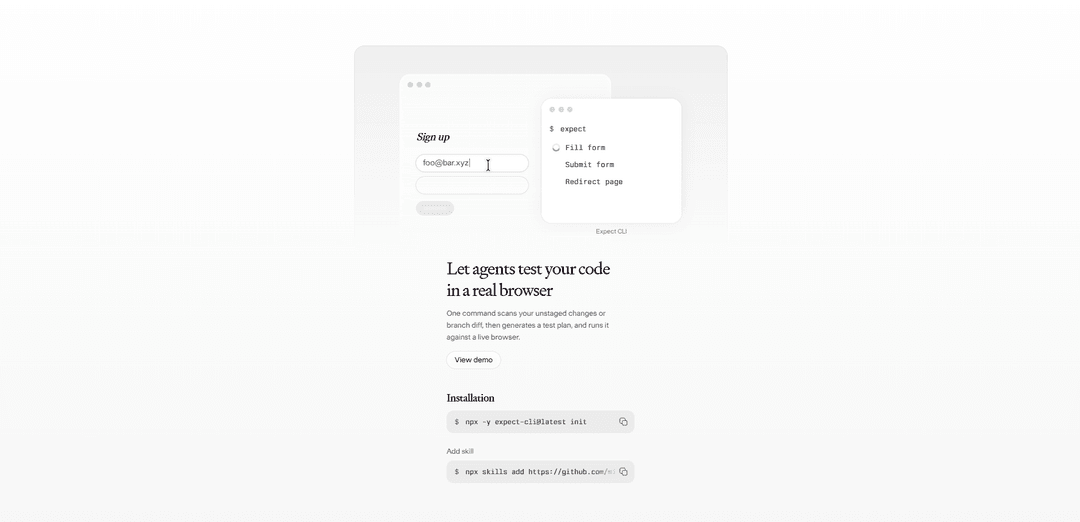
Expect is a powerful automation and testing tool that allows developers to automate interactive applications and write test assertions. It can generate step-by-step test plans from code changes, execute tests in real browsers, and automate interactions with command-line programs that require user input. The tool combines testing frameworks like Chai and Jest with its own assertion system to provide comprehensive testing capabilities.
Automated Test Plan Generation: Scans code changes and automatically generates detailed test plans that can be reviewed and executed against live browsers
Interactive Application Automation: Automates interactions with programs like telnet, SSH, FTP and other applications that require user input through a terminal interface
Assertion Framework: Provides a robust assertion system combining Chai and Jest matchers for writing clear, readable test expectations
Browser Testing: Executes tests in real browsers using existing login sessions without requiring manual authentication setup
Use Cases of Expect
Web Application Testing: Automate testing of web applications by generating and running test plans against real browsers
System Administration: Automate repetitive system administration tasks that require interaction with command-line tools
Continuous Integration: Integrate automated testing into CI/CD pipelines to validate code changes before deployment
API Testing: Write and execute tests to validate API functionality and responses
Pros
Reduces manual testing effort through automation
Supports multiple testing frameworks and approaches
Works with real browsers and existing authentication
Cons
May require additional setup and configuration
Generated test plans may need manual review and adjustment
How to Use Expect
Install Expect: Use your system's package manager to install Expect and any required dependencies. On most Linux systems, Expect is available in the default repositories.
Create an Expect script: Create a new script file starting with the shebang line '#!/usr/bin/expect -f'. This tells the system to use Expect to interpret the script.
Set up variables: Define variables at the start of your script for things like timeouts, usernames, passwords, and commands using the 'set' command. For example: 'set timeout 20'
Use spawn command: Use the 'spawn' command to start the interactive program you want to automate. For example: 'spawn ssh username@hostname'
Add expect/send pairs: Add 'expect' commands to watch for specific output patterns, followed by 'send' commands to provide input. For example: 'expect "password:" { send "mypassword\r" }'
Handle timeouts and errors: Add timeout and error handling using expect's timeout and error conditions. For example: 'timeout { send_user "Connection timed out\n"; exit }'
Make script executable: Make your Expect script executable using: 'chmod +x scriptname.exp'
Run the script: Execute your Expect script by running: './scriptname.exp' or '/usr/bin/expect scriptname.exp'
Debug if needed: Use the '-d' flag when running your script to enable debug mode and see detailed information about what Expect is doing: 'expect -d scriptname.exp'
Expect FAQs
Expect is a tool/toolkit for automating interactive applications. It provides commands to automate interactions with processes, particularly useful for testing and automation purposes.
Popular Articles

Vosko AI: Localize and Dub Videos for Global Audiences
Oct 15, 2026

Atoms: A Multi-Agent AI Platform That Transforms Ideas into Launch-Ready Products
Oct 13, 2026

Nano Banana SBTI: What It Is, How It Works, and How to Use It in 2026
Apr 15, 2026

Atoms Review — The AI Product Builder Redefining Digital Creation in 2026
Apr 10, 2026
Latest AI Tools Similar to Expect

Callaia
Callaia is an AI-powered script analysis tool that provides comprehensive script coverage, including logline, synopsis, character summaries, and actionable recommendations in under a minute for $79 per script.

Narrai
Narrai is an AI-powered mobile app that instantly creates voice narration and background music for short videos by automatically generating relevant scripts and offering multiple narrator personas.

THE FABLE STUDIO
THE FABLE STUDIO is an AI-powered platform that enables users to create, direct, and interact with animated stories using generative AI technology.

Wedding Speech Genie
Wedding Speech Genie is an AI-powered platform that crafts personalized wedding speeches in minutes by generating 3 custom versions based on your input, helping speakers deliver memorable toasts for any wedding role.
Popular AI Tools Like Expect

AI Dungeon
AI Dungeon is an AI-powered text adventure game that allows players to create and experience infinite interactive stories across any genre.

HitPaw Edimakor
HitPaw Edimakor is a powerful AI-powered video editor that combines advanced features like AI script generation, speech-to-text, and background removal with an intuitive interface for easy and creative video editing.

Fliki
Fliki is an AI-powered text-to-video and text-to-speech platform that transforms written content into engaging audio and video materials using lifelike voices in over 80 languages.

Creatify
Creatify is an AI-powered platform that generates high-quality marketing videos from product URLs or descriptions, enabling effortless creation of engaging video ads.